NovaStar MG Series distributed processors are AV-over-IP encoders, decoders and all-in-one decoders that transport 1080p and 4K video, audio, USB and control signals over a standard Gigabit Ethernet network. The family is split into two tiers: the 2K MG Series (MG200 encoder, MG201 decoder, MGT600 all-in-one decoder) and the 4K MG Series (MG420 encoder, MG421 decoder, MGT1000 and MGT2000 all-in-one decoders).
This guide compares every model in the NovaStar MG Series side by side, explains what really separates the 2K and 4K tiers, and shows how to match a processor to your pixel count, room count and budget. The tables and selection steps below are written to answer one question directly: which NovaStar MG Series model should you specify?
Key takeaways
- Two tiers, one platform: the NovaStar MG Series scales from a single meeting room to a multi-building command centre using the same web-based management interface.
- Sub-60 ms latency: both tiers target end-to-end latency under 60 ms with H.264/H.265 compression, so live operation and KVM control stay responsive.
- Pixel capacity picks the model: the MGT600 drives up to 3.9 million pixels, the MGT1000 up to 6.5 million and the MGT2000 up to 13 million pixels.
- 4K adds more than resolution: the 4K tier adds HDMI 2.0 and DisplayPort 1.2 inputs, PoE, optical backup, nanosecond NovaSync synchronization and USB 3.0 data tunnelling.
- Deployment is network-first: one node becomes the primary management node and every other device is discovered and configured from one browser session.
1. What Are NovaStar MG Series Distributed Processors?
NovaStar MG Series distributed processors are AV-over-IP encoders, decoders and all-in-one decoders that carry video, audio, USB and control signals across a standard Gigabit Ethernet network. Instead of routing every source through one centralized chassis, the NovaStar MG Series assigns an encoder to each signal source and a decoder to each display or operator station, so any source can be shown on any screen in the system.
The platform is organized into two tiers. The 2K MG Series handles Full HD distribution with the MG200 encoder, MG201 decoder and MGT600 all-in-one decoder at up to 1920×1080@60Hz. The 4K MG Series handles 4Kx2K@60Hz with the MG420 encoder, MG421 decoder and MGT1000 and MGT2000 all-in-one decoders, adding nanosecond-level synchronization, optical backup and USB 3.0 data tunnelling.
01. Key Features of the NovaStar MG Series
- High image quality and low latency: H.264/H.265 encoding delivers crisp, synchronized video with end-to-end latency below 60 ms, 4K@60Hz support and 10-bit color depth on the 4K tier.
- Decentralized, scalable architecture: devices can be spread across floors or buildings and expanded one node at a time over IP, rather than being limited by the input slots of a single processor.
- KVM operator system: one keyboard and mouse can roam across Windows, Linux and macOS workstations, with remote PC power control and USB data tunnelling on 4K models.
- Signal pushing and collaboration: operators can push a live signal to another workstation or straight onto an LED wall for coordinated decision-making.
- Web-based management: a single browser interface controls devices, users, permissions, screen layouts, EDID settings and firmware updates.
- Flexible audio routing: embedded HDMI/DP audio and independent analog audio are both supported, with volume control and per-node output routing.
02. How an AV-over-IP Distributed System Works
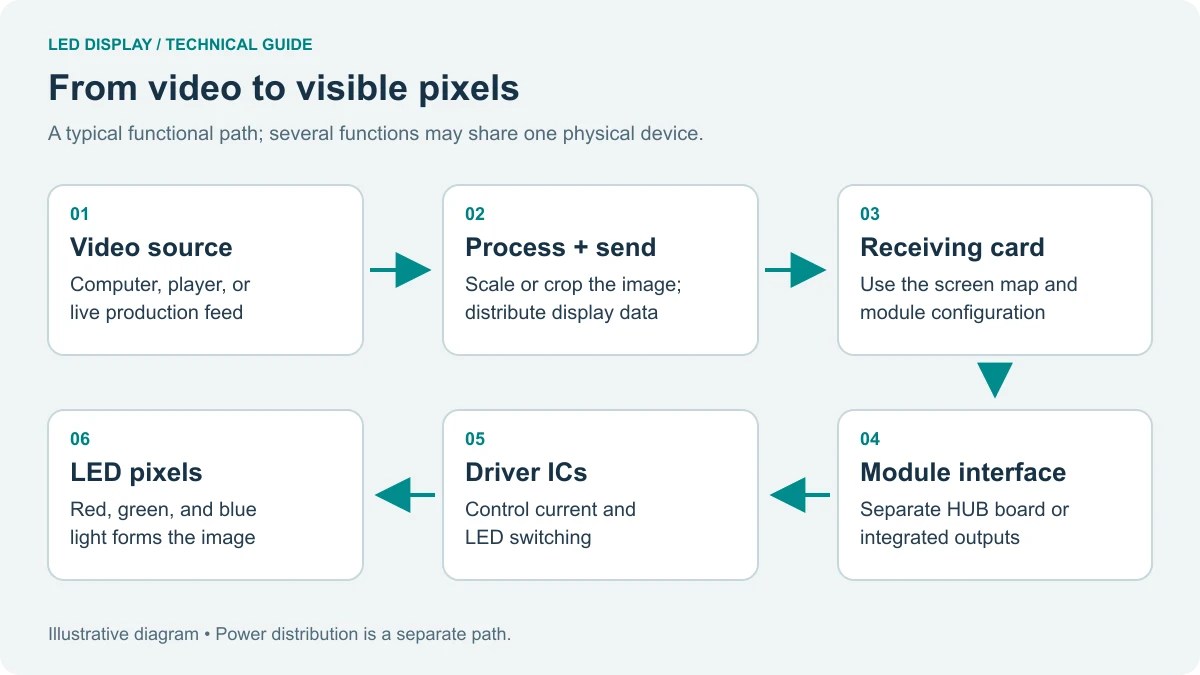
Every source computer, camera or media player connects to a NovaStar MG Series encoder, which compresses the signal and publishes it as a standard network stream. Decoders subscribe to the stream they need and output it to an HDMI display, an LCD video wall, or – with the MGT600, MGT1000 and MGT2000 – directly to LED cabinets.
One device is promoted to primary management node. It discovers every encoder and decoder on the subnet, stores video wall layouts and user permissions, and serves the web control interface. Because switching logic lives on the network rather than in a fixed matrix, adding a room, a screen or an operator station means adding a node, not replacing the processor.
2. NovaStar MG Series 2K Models: MG200, MG201 and MGT600
The 2K tier of the NovaStar MG Series is built for reliable Full HD distribution inside a single building. It targets meeting rooms, monitoring stations and mid-scale control centres where 1080p content, KVM access and simple video wall layouts matter more than 4K pixel budgets.
01. MG200 Encoder
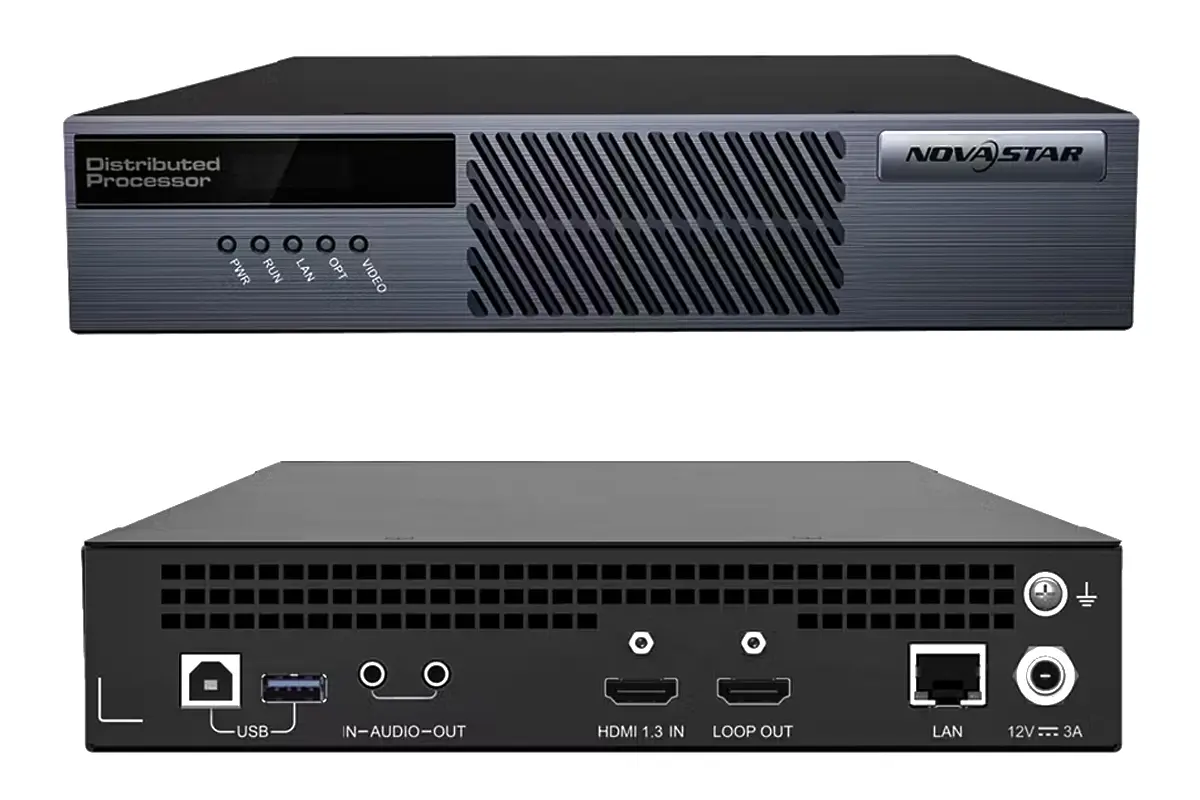
The MG200 captures and transcodes HDMI audio and video into IP streams for transmission over standard network infrastructure. It supports resolutions up to 1920×1080@60Hz and provides an audio input/output connector, a USB control interface and a loop-through HDMI output so a local monitor keeps working while the signal is encoded.
02. MG201 Decoder
The MG201 receives and decodes those IP streams and outputs video to a display or LED sending system. It offers HDMI and analog audio output and can be configured as a decoder-screen node for video walls or a decoder-KVM node for operator desks – the setting that makes mouse roaming possible.
03. MGT600 All-in-One Decoder
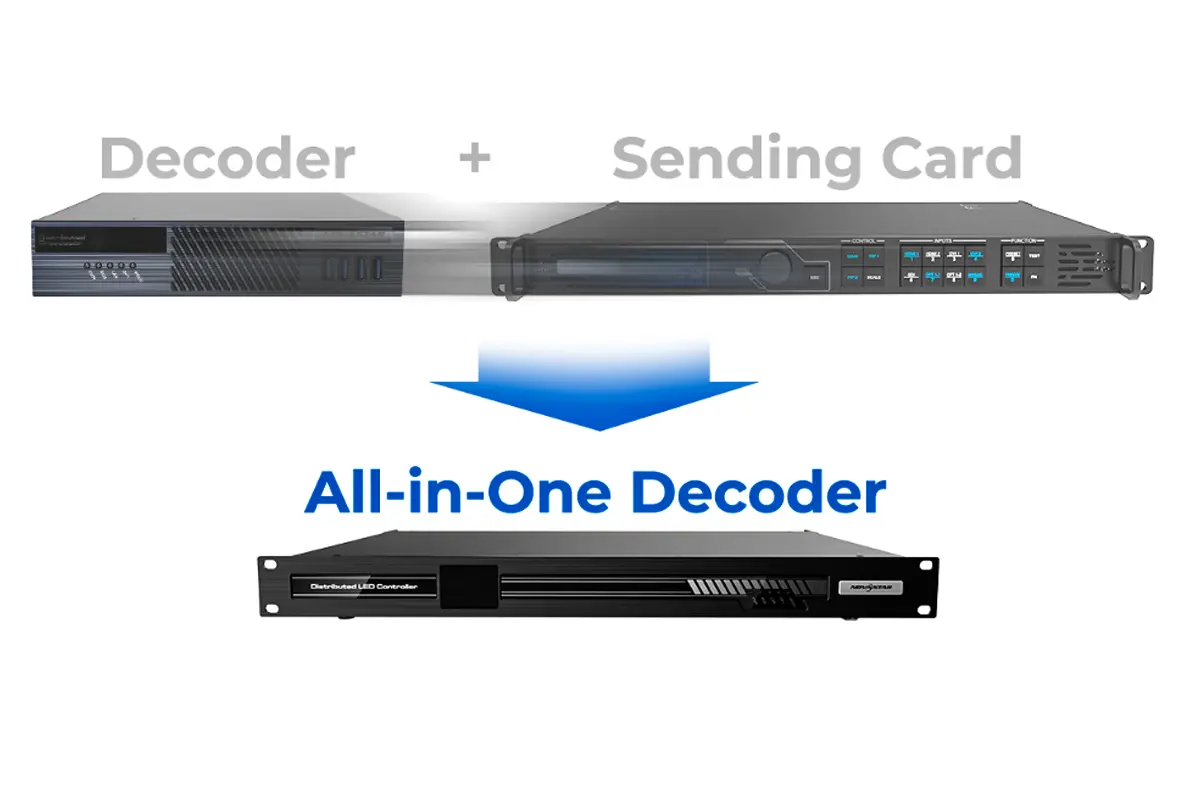
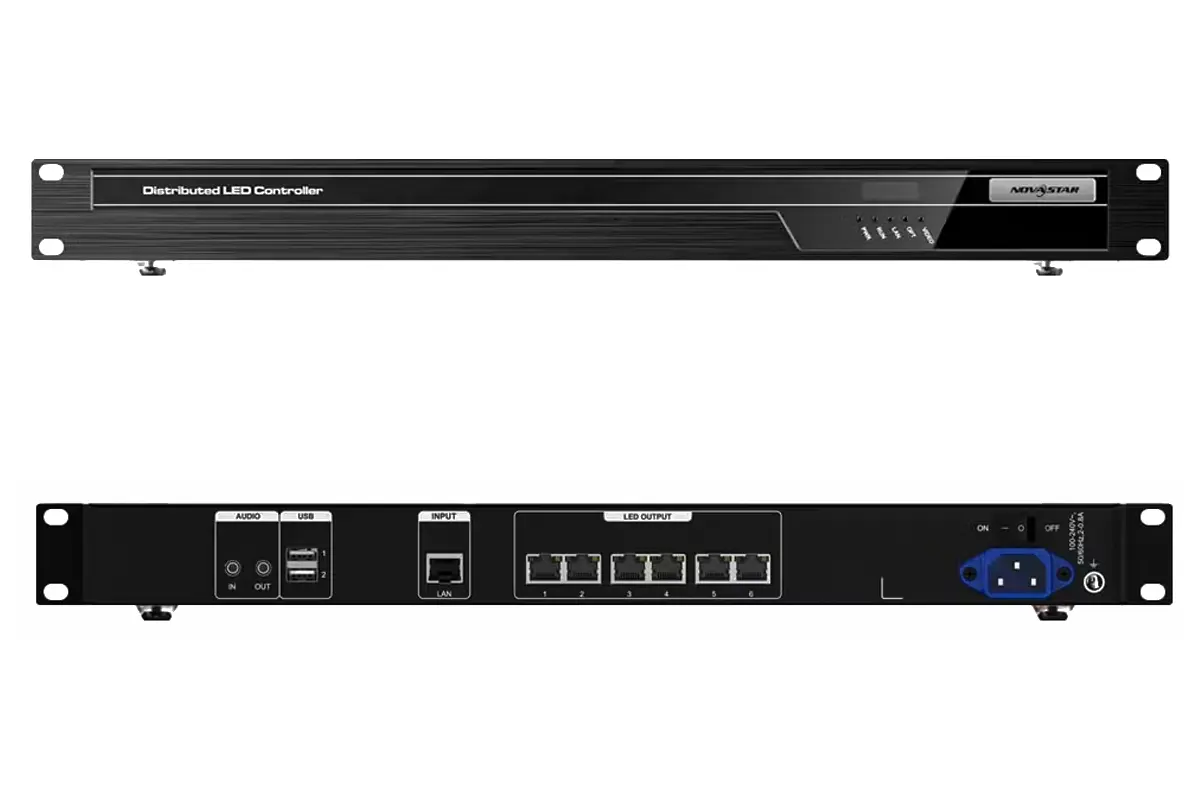
The MGT600 combines decoding with LED screen driving in one box. It drives up to 3.9 million pixels on a 10240×8192 canvas, so a medium LED wall can be fed directly from the network without a separate sending card – fewer boxes and one less failure point in the rack.
04. MG 2K Series Specifications at a Glance
Table 1: NovaStar MG Series 2K model comparison
| Model | Role | Max Resolution | Key Interfaces | LED Pixel Capacity | Typical Use |
|---|---|---|---|---|---|
| MG200 | Encoder | 1920×1080@60Hz | HDMI in with loop out, audio in/out, USB control | Not applicable (no LED output) | Full HD source capture from computers, cameras and media players |
| MG201 | Decoder | 1920×1080@60Hz | HDMI out, analog audio out, USB for KVM | Not applicable (no LED output) | Displays and KVM operator desks in the same AV-over-IP system |
| MGT600 | All-in-one decoder | 1920×1080@60Hz | HDMI out, audio, Gigabit Ethernet, LED output ports | Up to 3.9 million pixels (10240×8192 canvas) | Mid-size LED walls driven directly from the network without a sending card |
3. NovaStar MG Series 4K Models: MG420, MG421, MGT1000 and MGT2000
The 4K tier of the NovaStar MG Series is engineered for ultra-high-definition video, high node counts and continuous operation. It supports 4Kx2K@60Hz at 10-bit color depth and adds the redundancy features command environments expect: PoE or DC power, dual network or optical links and configuration backup.
01. MG420 Encoder
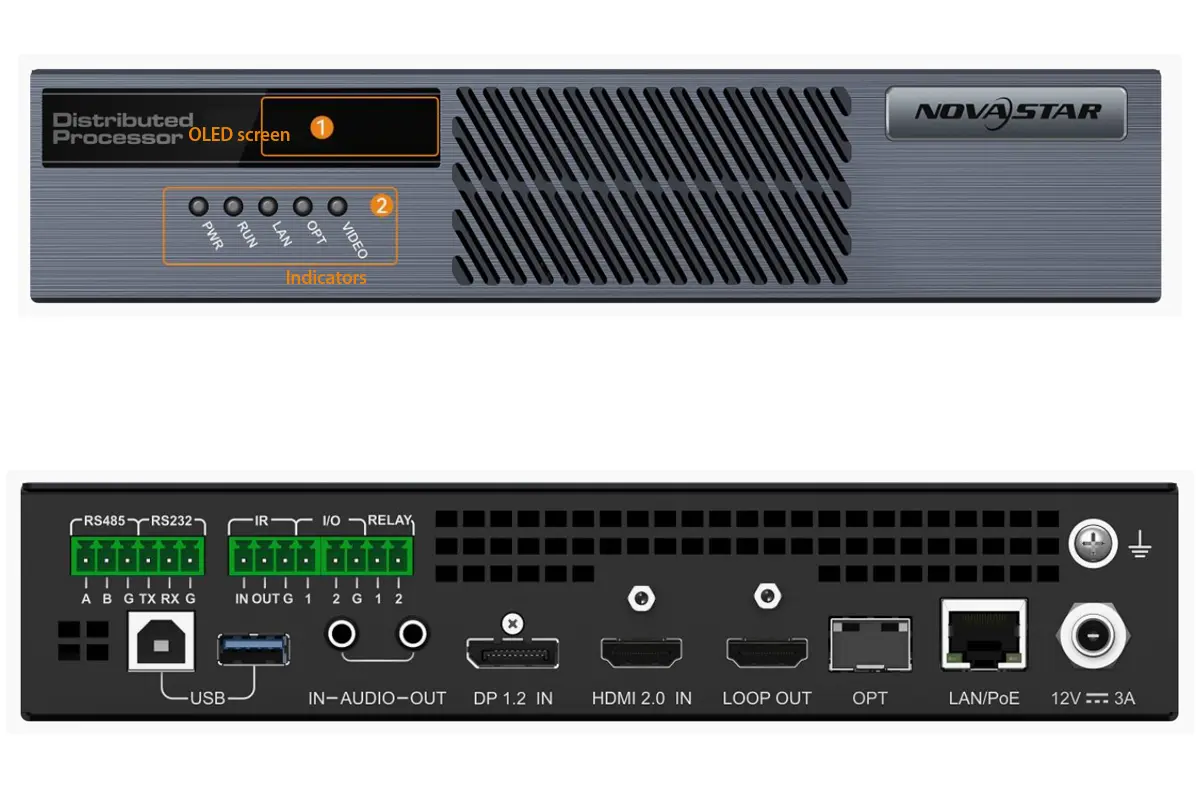
The MG420 is designed for 4K signal capture. It accepts HDMI 2.0 and DisplayPort 1.2 inputs and transcodes video, audio and USB control signals into IP streams in real time. Its network ports support PoE and an optical (OPT) backup link, so a single cable fault does not take the source offline.
02. MG421 Decoder
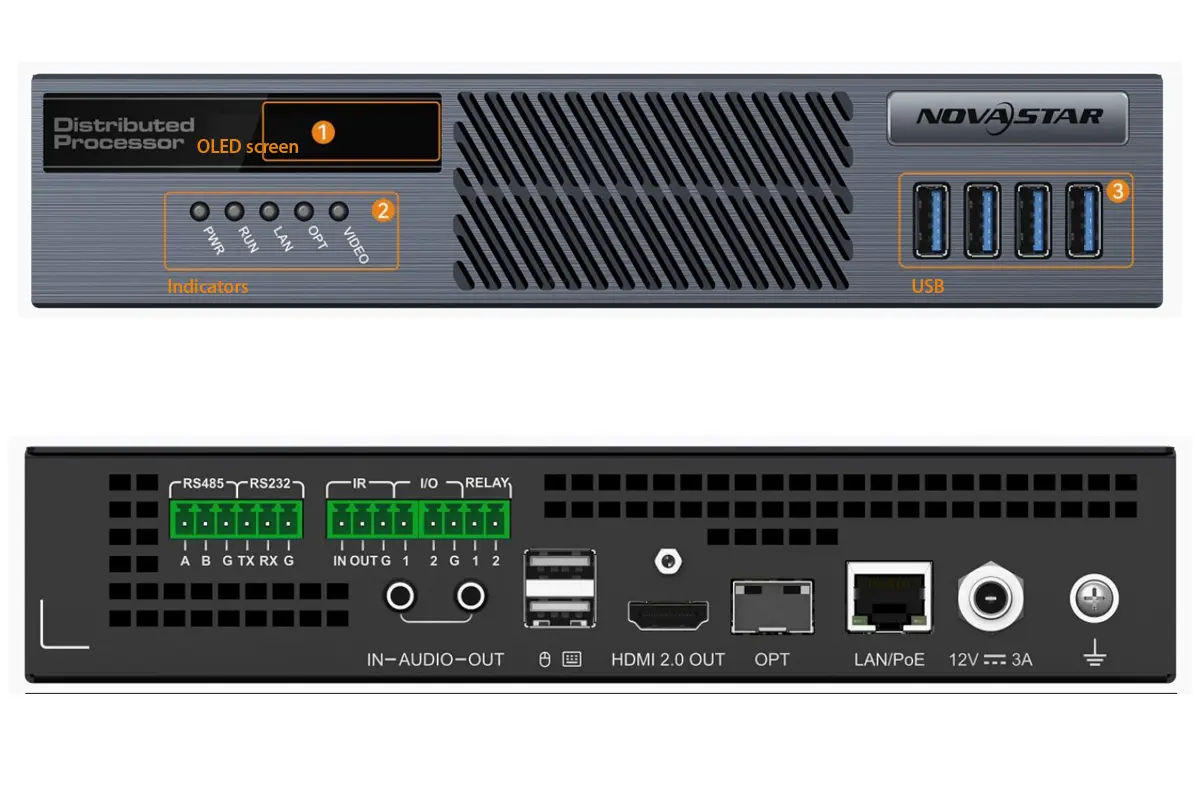
The MG421 outputs 4K@60Hz and uses full-link nanosecond synchronization (NovaSync), which keeps multi-decoder video walls aligned without tearing. Four USB 3.0 ports serve KVM peripherals and USB drives, and IR, RS-232/485 and relay interfaces tie the decoder into third-party control systems.
03. MGT1000 All-in-One Decoder
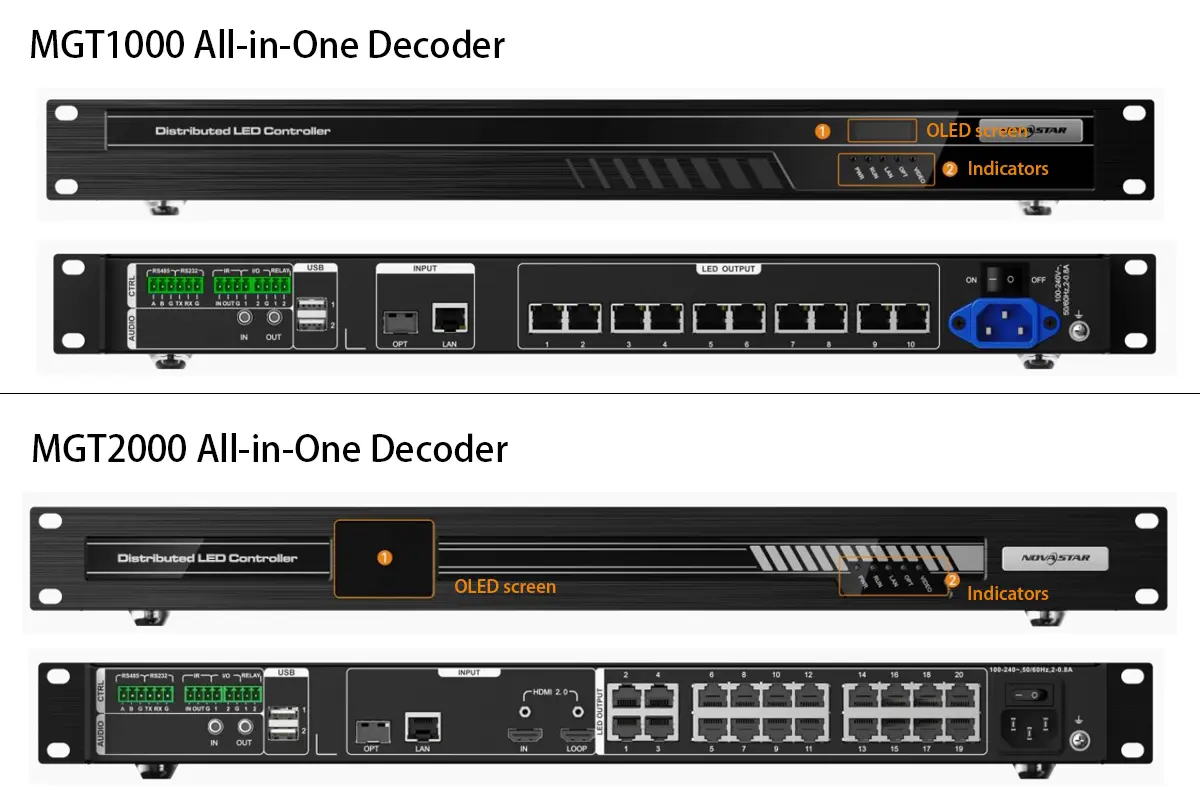
The MGT1000 is a decoder and LED driver in one chassis. Ten Gigabit Ethernet LED output ports drive up to 6.5 million pixels on a 10240×8192 canvas, and screens are configured directly from NovaLCT software, removing the sending card stage for large LED walls.
04. MGT2000 All-in-One Decoder
The MGT2000 is the highest-capacity model in the NovaStar MG Series. Twenty LED output ports support displays of up to 13 million pixels on a 16384×8192 canvas, and an extra HDMI 2.0 input with loop-out lets a local source be injected at the decoder.
05. MG 4K Series Specifications at a Glance
Table 2: NovaStar MG Series 4K model comparison
| Model | Role | Max Resolution | Key Interfaces | LED Pixel Capacity | Typical Use |
|---|---|---|---|---|---|
| MG420 | Encoder | 4Kx2K@60Hz | HDMI 2.0 + DisplayPort 1.2 inputs, PoE, optical (OPT) backup | Not applicable (no LED output) | 4K source capture with dual-link and power redundancy |
| MG421 | Decoder | 4Kx2K@60Hz | HDMI out, 4 x USB 3.0, IR, RS-232/485, relay | Not applicable (no LED output) | 4K video walls and KVM operator stations with NovaSync alignment |
| MGT1000 | All-in-one decoder | 4Kx2K@60Hz | 10 Gigabit Ethernet LED output ports, HDMI out | Up to 6.5 million pixels (10240×8192 canvas) | Large LED walls configured directly with NovaLCT software |
| MGT2000 | All-in-one decoder | 4Kx2K@60Hz | 20 LED output ports, HDMI 2.0 in with loop out | Up to 13 million pixels (16384×8192 canvas) | Ultra-large LED installations and complex signal routing |
4. NovaStar MG Series 2K vs 4K: Full Comparison Table
The table below places the two NovaStar MG Series tiers side by side across the specifications that change a project: resolution, pixel budget, synchronization, resilience, KVM capability and scale.
Table 3: NovaStar MG Series 2K vs 4K capability comparison
| Feature | MG 2K Series | MG 4K Series |
|---|---|---|
| Maximum input resolution | 1920×1080@60Hz | 4Kx2K@60Hz |
| Maximum output resolution | 1920×1080@60Hz | 4Kx2K@60Hz |
| Color depth and sampling | 8-bit | 10-bit, 4:2:2 |
| Video codecs | H.264, H.265 | H.264, H.265 |
| End-to-end latency | Under 60 ms | Under 60 ms |
| Synchronization | Frame-accurate synchronization across decoders | Full-link nanosecond synchronization (NovaSync) |
| Encoder inputs | HDMI (fixed) | HDMI 2.0 or DisplayPort 1.2, selectable in the web interface |
| Network and power | Standard Ethernet, external power supply | PoE or DC power, optical (OPT) backup link |
| KVM and USB | Keyboard and mouse roaming, Decoder-KVM mode | Keyboard and mouse roaming, USB 3.0 data tunnelling, remote PC power control |
| LED pixel capacity | Up to 3.9 million pixels with the MGT600 | Up to 6.5 million pixels (MGT1000) or 13 million pixels (MGT2000) |
| Redundancy features | Signal and configuration backup | Dual network and optical links, redundant power, signal and configuration backup |
| Typical deployment scale | Single building, small to medium video walls | Multi-room or multi-building, large and mission-critical walls |
01. What the Differences Mean in Practice
Three differences decide most projects. Pixel budget: 3.9 million pixels on the MGT600 covers a mid-size LED wall, while 6.5 million on the MGT1000 and 13 million on the MGT2000 make single-processor large-format walls realistic. Synchronization: the 4K tier uses nanosecond-level alignment, which removes the tearing that appears when many decoders build one canvas. Resilience: PoE, dual network and optical links keep a 4K NovaStar MG Series system running through a cable or switch failure.
02. Where the 2K Tier Still Wins
The 2K tier remains the sensible choice when content is 1080p, the canvas is modest and the room count is small. It delivers the same KVM workflow, web management and low-latency distribution as the 4K models at a lower cost per node.
5. MG Series Selection Matrix: Match a Processor to Your Project
Use the matrix below as a first filter, then confirm pixel counts with your LED supplier. The figures show the driving capacity of each all-in-one decoder.
Table 4: NovaStar MG Series selection matrix by project profile
| Project profile | Typical resolution | Approximate LED pixels | Recommended NovaStar MG Series models |
|---|---|---|---|
| Huddle room or small meeting room | 1080p | Under 2 million | MG200 + MG201 (or MGT600 for a small in-room LED wall) |
| Mid-size control or monitoring room | 1080p | 2 to 3.9 million | MG200 + MG201, with MGT600 where the wall is driven directly |
| Boardroom, lobby or auditorium wall | 1080p or 4K | 3.9 to 6.5 million | MG420 + MG421 + MGT1000 |
| Large control room or command centre | 4K | 6.5 to 13 million | MG420 + MG421 + MGT1000 or MGT2000 |
| Landmark LED installation | 4K | Over 13 million | Multiple MGT2000 units split by canvas area |
| Multi-site or campus distribution | 1080p or 4K | Varies per room | Mixed 2K and 4K NovaStar MG Series nodes on one network |
01. How to Estimate Your Pixel Count Before Choosing
Multiply the horizontal resolution of the wall by its vertical resolution. A 6 m x 3.375 m wall built from P2.5 cabinets runs at roughly 2400 x 1350 pixels, about 3.24 million – within reach of the MGT600 in the NovaStar MG Series. The same wall at P1.5 rises to 4000 x 2250 pixels, or 9 million, which requires the MGT2000.
6. How to Choose Between NovaStar MG 2K and MG 4K Processors
Choosing between the MG 2K and MG 4K tiers comes down to four practical questions: what resolution your content uses, how many pixels the wall consumes, what the project can spend, and how the system will grow.

01. Resolution and Image Quality
Choose the 2K tier of the NovaStar MG Series if your content is primarily Full HD (up to 1920×1080@60Hz) from standard HDMI sources. Choose the 4K tier if you need Ultra HD (4Kx2K@60Hz) with 10-bit color depth and 4:2:2 sampling, or display photographic and broadcast content where smooth gradients matter.
02. Project Scale and Pixel Drive Capacity
The MGT600 handles up to 3.9 million pixels and suits medium LED walls in corporate and education environments. The MGT1000 raises that to 6.5 million pixels, and the MGT2000 to 13 million pixels on a 16384×8192 canvas – enough for large-format walls in command centres and venues without external sending hardware.
03. Budget and Total Cost of Ownership
The 2K tier is the cost-effective entry point into professional AV over IP, covering KVM control, web management and synchronized video walls at a lower price per node. The 4K tier costs more but buys nanosecond synchronization, dual-link backup, remote power control and USB data tunnelling – features that reduce downtime in rooms that never switch off.
04. Operational Complexity and Future Expansion
If the requirement is reliable signal distribution and simple video wall layouts, the 2K platform is usually sufficient. If the project involves multi-layer layouts, frame-accurate synchronization across vast canvases, several operators sharing sources, or external control integration, specify the 4K tier – the NovaStar MG Series lets you start small and add 4K nodes later on the same network.
7. Typical Application Scenarios for the NovaStar MG Series
Because the platform is network-based, the NovaStar MG Series fits any environment where signals originate in one place and need to be seen in several. The following scenarios cover the majority of deployments.
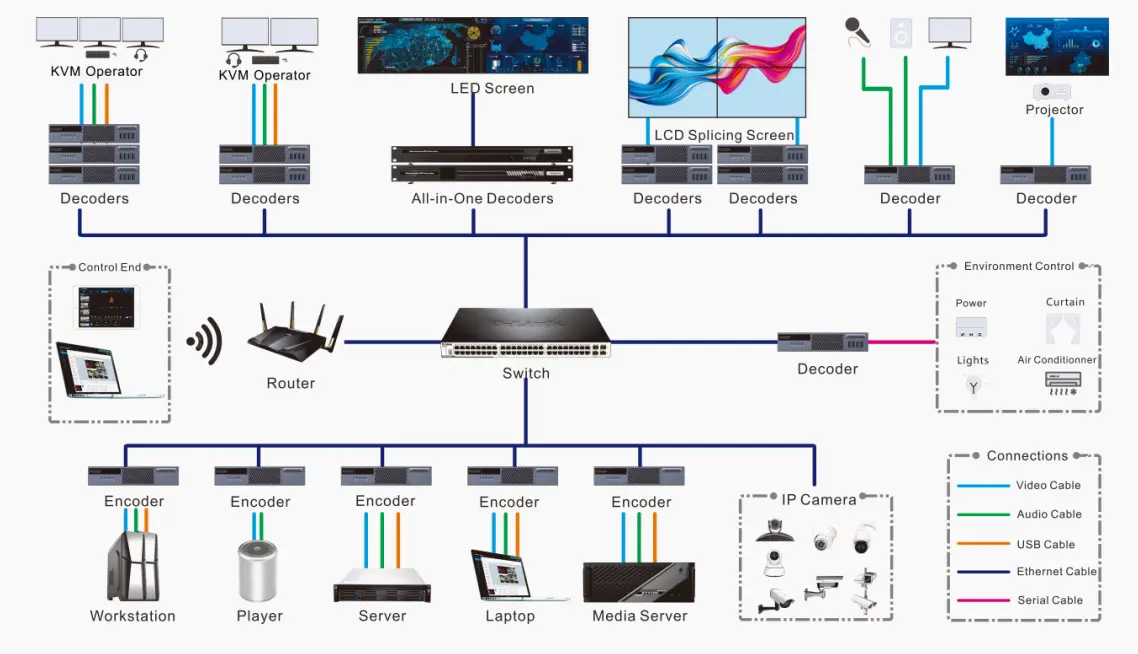
Table 5: Application scenarios and the recommended NovaStar MG Series tier
| Application | Recommended tier | Why it fits |
|---|---|---|
| Control rooms and command centres | 4K | Nanosecond synchronization, redundant links, KVM roaming and signal pushing for multiple operators |
| Conference and collaboration centres | 2K (4K for UHD content) | Simple switching of laptops, cameras and players to any display, plus direct LED driving with the MGT600 |
| Monitoring and surveillance hubs | 4K | Low-latency IP camera integration and clear, real-time visual intelligence for operators |
| Data centre and IT operations | 4K | USB 3.0 data tunnelling and remote power control let one operator manage many servers and workstations |
| Broadcast and production studios | 4K | 4K capture, frame-accurate synchronization and multi-layer layouts for live production and master control |
| Education, signage and corporate displays | 2K | Reliable network-based content distribution and scheduling across lecture halls, lobbies and information walls |
01. Control Rooms and Command Centres
Control rooms need synchronized, low-latency walls fed from many sources at once. The 4K NovaStar MG Series models provide nanosecond synchronization, redundant links and KVM roaming for security, transportation, energy and utility operations, while signal pushing lets one operator send a feed to a colleague or the main wall instantly.
02. Conference and Collaboration Spaces
In meeting rooms and collaboration centres, encoders sit behind AV sources and decoders behind each display, so a laptop, camera or media player can be switched to any screen without replugging cables. 2K models of the NovaStar MG Series are usually enough here, and the MGT600 can drive an in-room LED wall from the same network.
03. Broadcast, Education and Digital Signage
Broadcast and production studios use 4K capture and frame-accurate synchronization for master control, while campuses and signage networks distribute scheduled content to lecture halls, lobbies and information walls.
8. System Setup: Deploying MG Series Distributed Processors
Setting up a NovaStar MG Series system follows one universal pattern: connect every device to the network, promote one node to primary management node, and configure everything else from a single web interface.
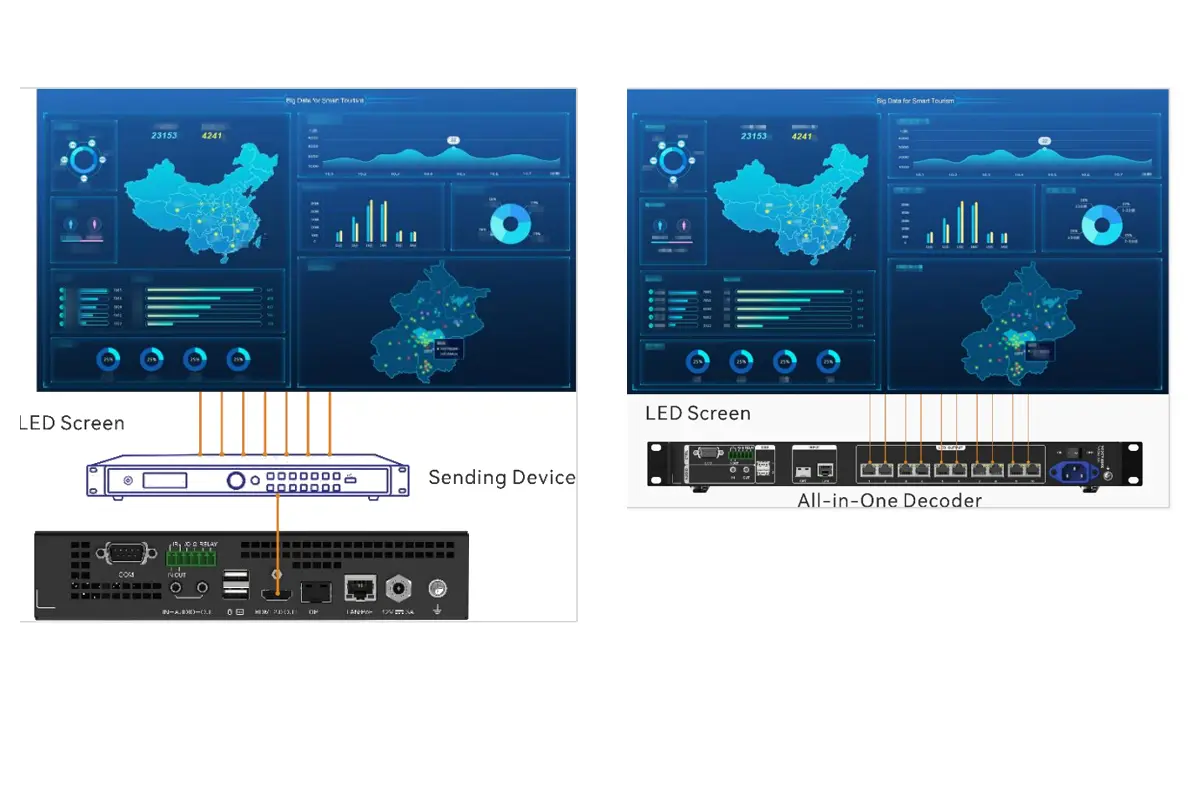
01. Network and Hardware Connection
Connect all encoders and decoders to a standard Gigabit Ethernet switch. Attach source devices to encoder inputs and connect monitors, LED sending systems or MGT-series decoders to the network. Keep management and video traffic on the same VLAN only if the switch provides adequate QoS; otherwise separate them.
02. Designating the Primary Management Node
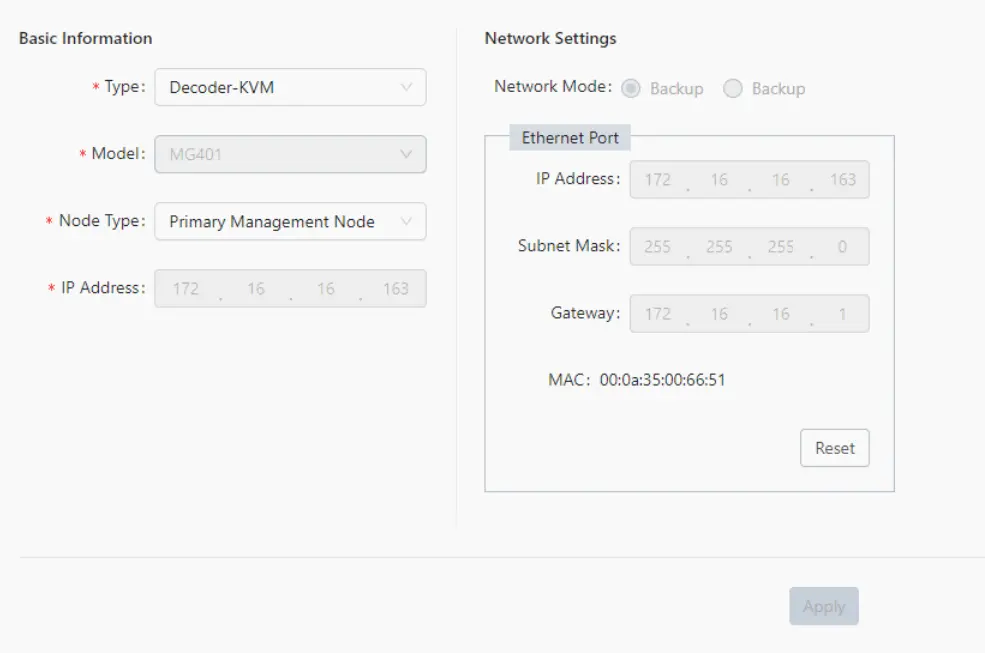
Using a browser, open the IP address of the node you want to promote and set its management type to Primary Management Node. Every other NovaStar MG Series device then registers under that node, which becomes the single controller for video walls, sources and users.
03. Web-Based Configuration and Device Discovery
Once the primary node is active, its web interface discovers online devices automatically, so you can rename nodes, assign sources, build video walls, set permissions and push firmware updates from one screen.
9. Basic Configuration Workflow (Official Manual Steps)
The steps below follow the official NovaStar MG Series user manual and apply to both the 2K and 4K tiers.
01. Configure the Primary Management Node
- Open a browser and enter the IP address of the intended management device followed by port 8081 (for example http://192.168.x.x:8081).
- In the Primary Management Node Settings page, select Primary Management Node from the Node Management Type dropdown.
- Click Apply. All nodes in the system restart and register under this primary node.
02. Log Into the Web Control System
Navigate to the primary node IP address on the default HTTP port 80 and sign in with the factory credentials (username admin, password password123). Change the password immediately after commissioning.
03. Add and Configure Devices
Open Configuration > Device to view every detected encoder and decoder and rename them for clarity. On 4K encoders such as the MG420, specify the active input connector (HDMI or DP) and set encoding mode, codec and resolution. On decoders, set the type to Decoder-Screen for video walls or Decoder-KVM for operator stations.
04. Create a Video Wall
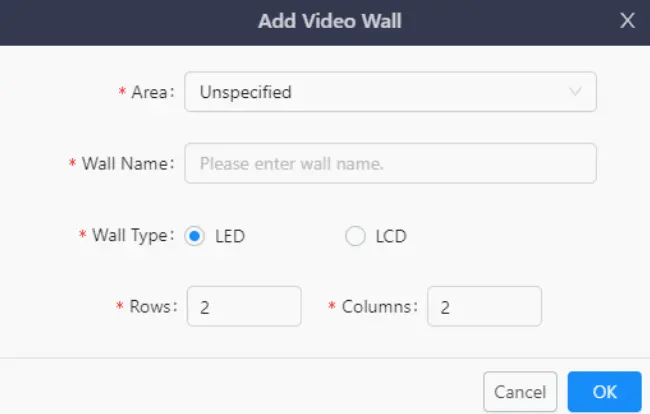
Go to Configuration > Video Wall and click Add. Name the wall, choose LED or LCD, define rows and columns, then drag Decoder-Screen nodes into the layout grid to match the physical arrangement. For LCD walls, enable bezel compensation and enter the horizontal and vertical spacing values so the image stays continuous across the frames.
05. Manage Signal Sources
Sources connected to encoders appear automatically under Configuration > Signal. Rename each one, and add IP cameras by selecting Network Source and entering the RTSP or ONVIF parameters. Once sources and walls are defined, operators can switch, push and share signals without touching the rack.
10. MG Series vs Other NovaStar Processor Families
NovaStar sells several processor families that solve different problems. The table below shows where the NovaStar MG Series fits alongside them.
Table 6: NovaStar MG Series compared with other NovaStar processor families
| NovaStar family | Architecture | Best suited to | Example models |
|---|---|---|---|
| MG Series | Distributed AV over IP with encoders and decoders | Signals travelling between rooms, buildings or operators on a scalable network | MG200, MG201, MGT600, MG420, MG421, MGT1000, MGT2000 |
| VX Series | All-in-one video processor with local inputs | Single-room LED video walls fed from nearby sources | VX1000 Pro, VX600 Pro, VX400 Pro, VX2000 Pro |
| H Series | Card-based video wall splicer | Large LCD and LED video walls with many simultaneous inputs | H2, H5, H9, H15, H20 |
| TU Series | 4K LED display processor | 4K LED processing in a single rack unit | TU4K Pro, TU20 Pro, TU15 Pro |
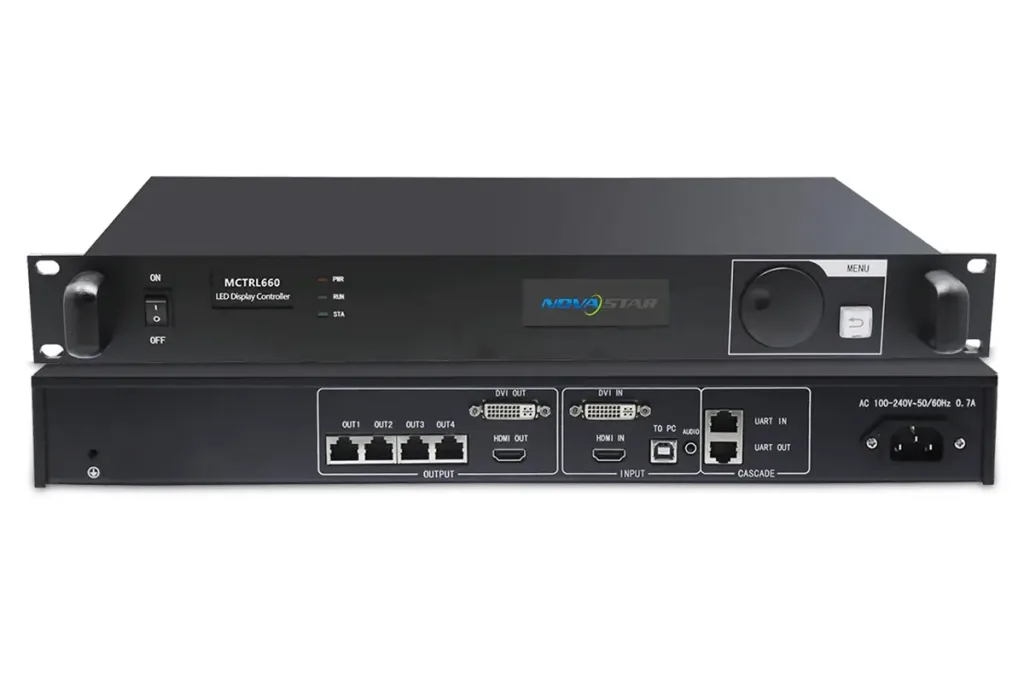
| MCTRL Series | LED display controller and sending card | Driving LED cabinets where the processor has no built-in LED ports | MCTRL4K, MCTRL660 Pro, MCTRL R5 |
01. When the MG Series Is the Right Choice
Pick the NovaStar MG Series when signals must travel between rooms, floors or buildings; when more than one operator controls the same sources; or when inputs and outputs will grow over time. If everything lives in a single rack, a conventional all-in-one processor usually costs less.
02. Related NovaStar Hardware Worth Considering
Software completes the platform: NovaLCT configures the LED screens driven by MGT-series decoders, and ViPlex Express publishes content to players. For single-room video walls, compare the NovaStar VX1000 Pro and VX600 Pro; for card-based walls, see the H Series splicers such as the H9 and H2; for 4K LED processing, the TU4K Pro; and for long cable runs, a CVT10 fiber optic converter. See also our video wall processor vs controller guide.
11. Buying Advice: Price, Compatibility and Total Cost of Ownership
01. What Drives the Price of a NovaStar MG Series Processor
Four factors set the price of any NovaStar MG Series node: the tier, the role (encoder, decoder or all-in-one decoder with LED ports), the port count and the redundancy features. All-in-one decoders cost more than a plain decoder but remove sending cards, power supplies and rack space from the bill of materials.
02. Pre-Purchase Compatibility Checklist
- Pixel count: total the pixels of every wall one decoder will drive, then compare against 3.9M, 6.5M and 13M.
- Source resolution: confirm whether sources are 1080p (2K tier) or 4K and DisplayPort (4K tier).
- Network: verify switch capacity, VLAN plan and whether PoE or optical links are required.
- Control system: check IR, RS-232/485 and relay requirements against the decoder spec.
- Software: plan NovaLCT for screens and ViPlex Express for content, and confirm firmware versions before mixing tiers.
- Growth: size the switch and management node for the node count you expect in three years, not today.
12. Frequently Asked Questions (FAQ)
13. Final Thoughts
The NovaStar MG Series gives integrators one AV-over-IP platform that spans a meeting room and a national control centre. The 2K models – MG200, MG201 and MGT600 – cover Full HD distribution, KVM and mid-size LED walls at an accessible price, while the 4K models – MG420, MG421, MGT1000 and MGT2000 – add 4K@60Hz capture and up to 13 million pixels of direct LED driving. Match the tier to your resolution and the model to your pixel count.
 NovaStar MCTRL660 Series LED Display Controllers: MCTRL660 vs MCTRL660 PRO Complete Guide
 NovaStar MSD300 Sending Card Technical Guide For LED Display Systems