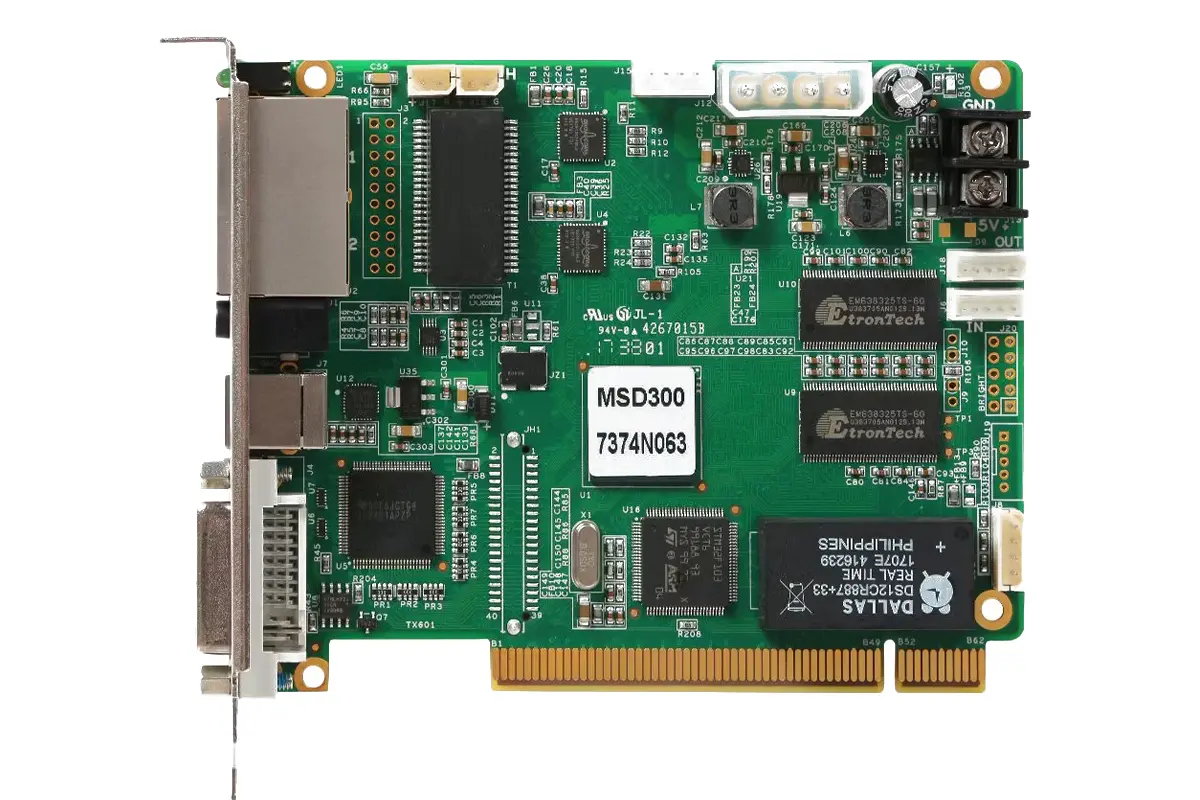
The NovaStar MSD300 sending card is a compact, single-source video sender built for professional LED displays. It accepts one DVI signal from a computer or media player, converts it into LED display data, and distributes it through two Gigabit Ethernet outputs at up to 650,000 pixels each. When a project needs one reliable source, a tight budget, and rock-solid stability, the NovaStar sending card is usually the right answer.
This guide explains exactly what the NovaStar MSD300 sending card does, its full specifications, its input and output limits, how it fits into a NovaStar control system alongside NovaLCT and standard NovaStar receiving cards, how to cascade several units, where the sending card is used in real projects, and how to buy the right unit for your screen.
Key takeaways
- The NovaStar MSD300 sending card accepts up to 1920×1200@60Hz over SL-DVI, plus custom resolutions up to 3840 px wide or tall (interlaced signals are not supported).
- Two Gigabit Ethernet ports carry up to 650,000 pixels each, with built-in failover redundancy for mission-critical screens.
- Up to 20 NovaStar MSD300 sending cards can be cascaded over UART for multi-zone control from a single PC.
- It is a single-source sender: the NovaStar MSD300 sending card does not switch between inputs or stitch one seamless image across screens.
- It is configured with NovaLCT and works with standard NovaStar receiving cards such as the M3, MRV331, and A8 series.
Table of Contents
1. What Is the NovaStar MSD300 Sending Card?
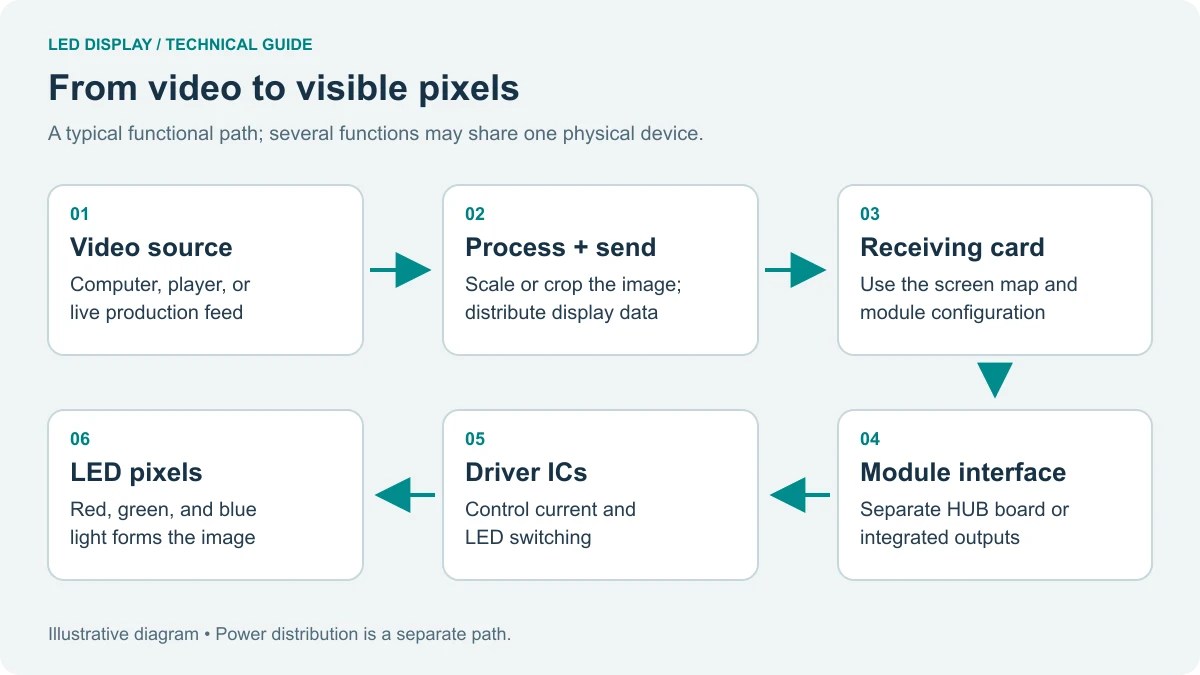
The NovaStar MSD300 sending card is a compact, cost-efficient sender designed for professional LED video applications. It sits between your video source and the LED display backend: the source sends a DVI signal in, the MSD300 sending card processes it, and the card forwards display data to downstream receiving cards over Ethernet. In other words, the NovaStar sending card is a dedicated signal gateway rather than a central controller.
Because it handles a single input and a fixed amount of pixel capacity, the NovaStar MSD300 sending card is not the flagship of the NovaStar range. That is exactly the point. It does one job — moving one clean video feed onto a screen — and it does that job at a price and form factor most rental and fixed installations can justify.
01. Core Functions of the NovaStar MSD300 Sending Card
- Signal conversion: the NovaStar MSD300 sending card converts a DVI video source into LED display data that receiving cards can drive.
- Signal distribution: two Gigabit Ethernet ports push that data to the LED modules, with the second port acting as a redundant or extended output.
- Calibration support: pixel-level brightness and chroma correction can be applied through NovaStar software while the NovaStar MSD300 sending card is in the signal chain.
- Cascading: multiple NovaStar MSD300 sending cards can be chained over UART so one PC controls several display zones.
- Monitoring: a light sensor port lets the NovaStar MSD300 sending card adjust screen brightness automatically as ambient light changes.
02. Key Advantages of the NovaStar MSD300 Sending Card
Four advantages explain why the NovaStar MSD300 sending card remains a common choice years after launch:
- High-resolution input support — up to 1920×1200@60Hz, with custom resolutions up to 3840 px on one axis, so unusual screen shapes are still possible.
- Pixel-level calibration — brightness and color uniformity can be corrected across the whole screen, which matters most on large-pitch outdoor displays driven by the NovaStar MSD300 sending card.
- Dual Gigabit Ethernet outputs — redundancy, or simply more room to split a large canvas across two data paths.
- Compact and efficient — a small board footprint, a wide operating temperature range, and modest power draw make the NovaStar MSD300 sending card easy to house in a control cabinet.
The table below summarizes what each advantage of the NovaStar MSD300 sending card means in practice on a real installation.
| Advantage | What the NovaStar MSD300 sending card offers | Why it matters on site |
|---|---|---|
| Input flexibility | 1920×1200@60Hz via SL-DVI, custom resolutions up to 3840 px | Handles standard Full HD sources and unusual screen shapes |
| Calibration | Pixel-level brightness and chroma correction | Even color and brightness across large, multi-cabinet screens |
| Dual Ethernet outputs | 2 × Gigabit ports, 650,000 pixels each | Redundancy plus flexibility when splitting a wide canvas |
| Cascading | Up to 20 units chained over UART | Multi-zone control without buying a high-end controller |
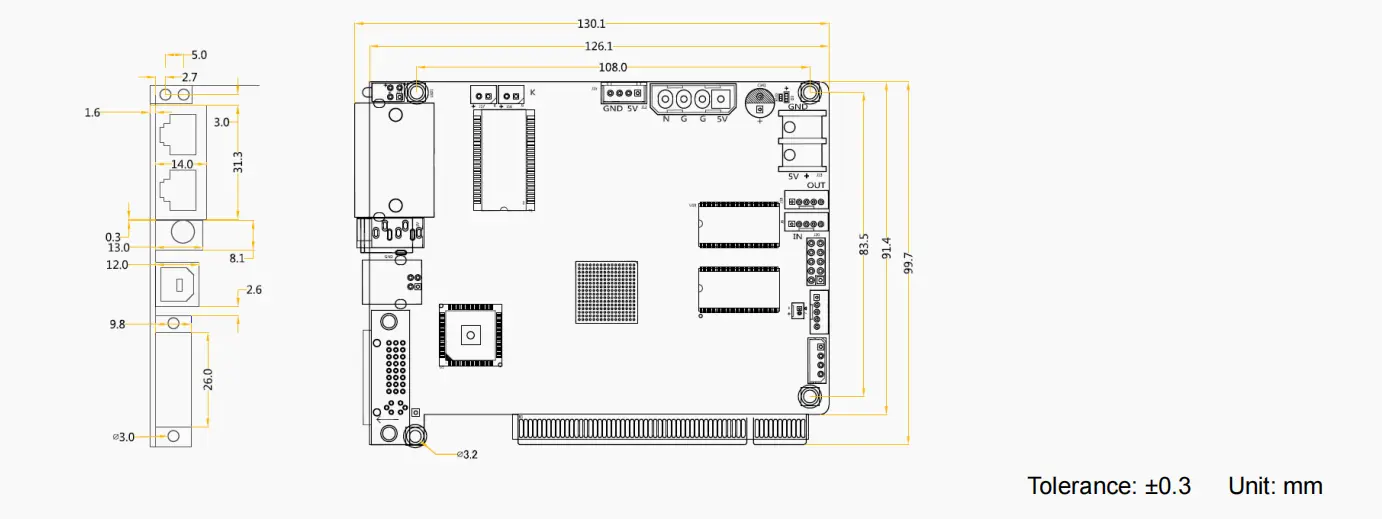
| Form factor | 130.1 × 99.7 × 14.0 mm board | Fits inside standard control cabinets and rental road cases |
| Efficiency | 3 W rated power, –20°C to +75°C operation | Low running cost and reliable operation in harsh environments |
2. Key Specifications of the NovaStar MSD300 Sending Card
Before you specify a NovaStar MSD300 sending card for a project, confirm that its input resolution, pixel capacity, and physical size match your screen. The specification table below is the reference most integrators keep open when they plan a build around the sending card.
| Parameter | Specification of the NovaStar MSD300 sending card |
|---|---|
| Input resolution | Up to 1920×1200@60Hz (custom resolutions supported up to 3840 px on one axis, for example 3840×600) |
| Video input | 1 × SL-DVI (interlaced signals not supported) |
| Audio input | 1 × audio input for synchronized sound |
| Output capacity | 650,000 pixels per Ethernet port |
| Ethernet outputs | 2 × Gigabit Ethernet with failover redundancy |
| Cascading | Up to 20 units via UART |
| Control and configuration | Type-B USB to PC; setup and firmware via NovaStar software |
| Brightness control | Light sensor port for automatic ambient-light adjustment |
| Power consumption | 3 W rated; input voltage range DC 3.3 V to 5.5 V |
| Operating temperature | –20°C to +75°C |
| Dimensions | 130.1 mm × 99.7 mm × 14.0 mm |
| Certifications | EMC, RoHS, PFoS, FCC |
3. Input and Output Capabilities of the NovaStar MSD300 Sending Card
The card delivers the connectivity a single-source LED screen needs, without the cost of ports you will never use. Understanding the input and output limits of the unit is the difference between a clean installation and a screen that flickers, drops frames, or runs out of capacity.
01. Input Interfaces on the NovaStar MSD300 Sending Card
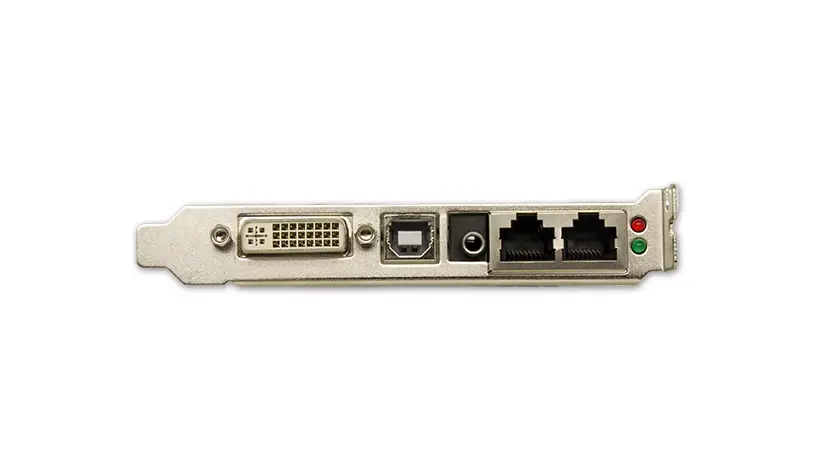
- 1 × SL-DVI: accepts video up to 1920×1200@60Hz, plus custom resolutions with a maximum width or height of 3840 px. Interlaced formats are not supported, so feed the NovaStar MSD300 sending card from a progressive-scan source.
- 1 × audio input: carries synchronized audio alongside the video signal so sound and picture stay in step.
02. Output Interfaces and Pixel Capacity
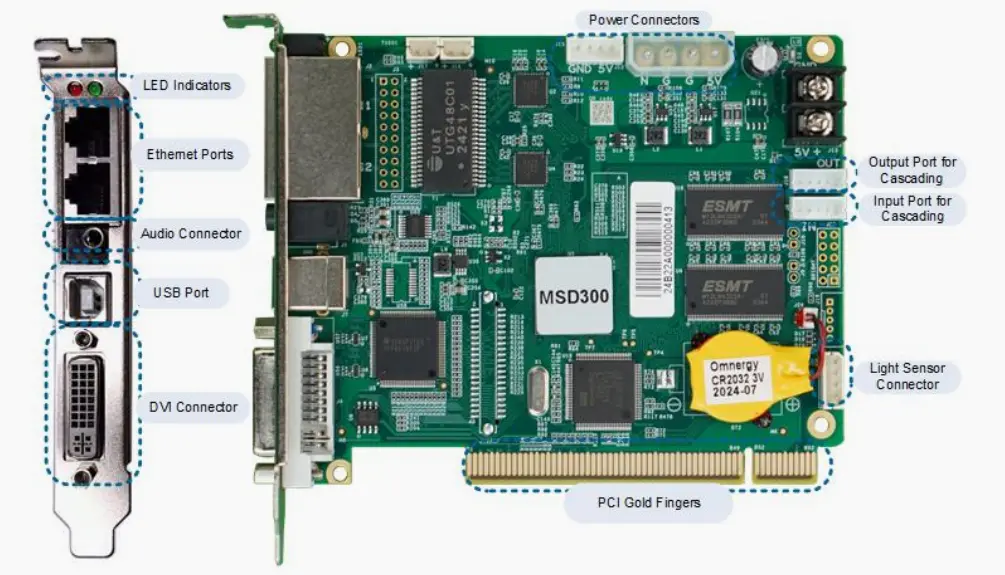
- 2 × Gigabit Ethernet ports: each port drives up to 650,000 pixels, which is enough for most P2.5 to P10 screens within a single data path from the NovaStar MSD300 sending card.
- Built-in redundancy: the dual outputs support failover, so if one data path is interrupted the NovaStar MSD300 sending card can keep the screen running — a decisive advantage for control rooms and live events.
03. Additional Connectivity and Control
- Light sensor port: connects an ambient light sensor so the NovaStar MSD300 sending card can dim or brighten the screen automatically, saving energy and protecting viewers’ eyes.
- Type-B USB port: used for direct PC connection during setup, firmware updates, and real-time control of the NovaStar MSD300 sending card.
- UART ports: let you cascade up to 20 MSD300 sending cards, which removes the need for extra control hardware on large builds.
| Interface | Quantity | Function and limit on the NovaStar MSD300 sending card |
|---|---|---|
| SL-DVI input | 1 | Video up to 1920×1200@60Hz; custom resolutions up to 3840 px; no interlaced input |
| Audio input | 1 | Synchronized audio with the video source |
| Gigabit Ethernet output | 2 | 650,000 pixels per port; second port for redundancy or extra capacity |
| Light sensor port | 1 | Automatic brightness adjustment from ambient light |
| Type-B USB | 1 | PC connection for configuration and firmware updates |
| UART | 2 | Cascade up to 20 sending cards |
4. How the NovaStar MSD300 Sending Card Fits Into a NovaStar LED Control System
In a typical NovaStar LED control architecture the card is the signal gateway. It is not the brain of the system; it is the dedicated sender that bridges the source computer and the display backend. The sender works together with receiving cards, such as the M3 or A-series, and NovaStar control software to form a complete, scalable video delivery chain.
01. The Signal Chain, Step by Step
- A PC or media player sends a video signal over SL-DVI to the MSD300 sending card.
- The sender processes the input in real time, applying pixel-level brightness and chroma calibration when it is enabled through NovaLCT.
- The processed data travels over one or both Gigabit Ethernet ports to downstream NovaStar receiving cards, which drive the LED modules.
- On large installations, several MSD300 sending cards are managed from one controller PC, or cascaded over UART so zones stay in sync.
Because a single NovaStar sending card handles one source, it is best suited to cost-sensitive, single-source applications. When a project needs multi-input switching or seamless canvas stitching, a higher-end NovaStar processor such as the VX4S, VX6S, or A10 takes over.
02. Software and Receiving Card Compatibility
The sending card is configured with NovaLCT, the standard NovaStar configuration tool, and it works with mainstream NovaStar receiving cards. The compatibility table below shows what a typical NovaStar sending card deployment includes.
| Component | Compatible with the NovaStar MSD300 sending card | Notes |
|---|---|---|
| Receiving cards | M3, MRV331, A8 series and other standard NovaStar cards | Keep the total under 650,000 pixels per Ethernet port |
| Configuration software | NovaLCT | Screen configuration, calibration, brightness and firmware control |
| Signal source | Any device with a DVI output | PC, media player, or playback server |
| Cascaded senders | Up to 20 units | Chained over UART from one control PC |
| Brightness sensor | Standard ambient light sensor | Automatic day and night brightness on the sender |
5. Cascading Multiple NovaStar MSD300 Sending Cards for Large LED Displays
The MSD300 sending card supports cascading up to 20 units over its UART interface, which allows centralized control of many sending cards in one installation. This is exactly what a venue with several independent screens needs: each zone keeps its own DVI feed, while one PC manages every sending card in the chain.
01. How UART Cascading Works
Cascading links NovaStar sending cards in a chain rather than feeding them all from separate control PCs. One card acts as the first link, and the remaining cards follow it over UART. NovaLCT then addresses the whole chain, so configuration, brightness changes, and firmware updates apply consistently to every unit in the line.
02. Key Benefits of Cascading NovaStar MSD300 Sending Cards
- Simplified control: one PC configures and monitors every cascaded sending card through NovaLCT.
- Cost-efficient scaling: multiple cards cover distributed displays for less than a single high-end multi-output sender.
- Consistent management: firmware, brightness, and calibration settings can be pushed uniformly down the chain of units.
One limitation is worth repeating: cascading does not merge video inputs. Each sender still processes its own DVI source, so the setup suits multi-screen installations with separate content — not one ultra-wide stitched image.
| Scenario | MSD300 sending cards | How content is managed |
|---|---|---|
| Two independent stage screens | 2, cascaded over UART | One PC, two DVI sources, separate content per screen |
| Four-zone venue | 4, cascaded over UART | Central NovaLCT control, one feed per zone |
| Control-room video wall | 2–6, cascaded over UART | Redundant Ethernet outputs keep critical screens live |
| Large multi-wall complex | Up to 20, cascaded over UART | Single control PC for the whole chain of NovaStar sending cards |
6. NovaStar MSD300 Sending Card vs Other NovaStar Senders
Choosing the sending card is a deliberate trade-off: you give up multi-input switching and seamless stitching in exchange for a low price, a small footprint, and dependable single-source performance. Use the selection guide below to decide whether a sender matches your project or whether you need a processor from the VX or A series.
| Project requirement | NovaStar MSD300 sending card | Multi-input NovaStar processor (VX4S / VX6S / A10) |
|---|---|---|
| Budget | Best value per output on a single source | Higher cost, justified by extra features |
| Number of video sources | One DVI source only | Several sources with switching |
| Seamless multi-screen stitching | Not supported | Supported |
| Multi-window and PIP layouts | Not supported | Supported |
| Multi-zone cascading | Up to 20 units over UART | Handled inside one processor |
| Best-fit projects | Rental side screens, signage, auxiliary displays, video walls with fixed content | Broadcast, control rooms, complex live shows |
7. Typical Application Scenarios for the NovaStar MSD300 Sending Card
The sender is widely deployed wherever a single, reliable feed has to reach a screen on a controlled budget. As a compact NovaStar sending card it pairs well with many LED display types, from rental LED screens and sports venue displays to retail digital signage.
| Application | Typical pixel pitch | How the NovaStar MSD300 sending card is used |
|---|---|---|
| Indoor rental screens | P2.5–P4 | Modular rental cabinets at concerts, awards shows, and corporate events, fed from a dedicated media server |
| Control-room video walls | P1.8–P2.5 | Fixed monitoring walls running 24/7, with redundant Ethernet outputs from the NovaStar sending card |
| Sports venue auxiliary displays | P4–P6 | Tunnel screens, bench-side ribbons, and secondary scoreboards driven by a local playback PC |
| Outdoor advertising | P5–P8 | Full-screen promotional content on fixtures fed by a single industrial PC through a sending card |
| Retail digital signage | P2–P3 | Posters, countertop displays, and storefront screens with plug-and-play content |
Whatever the application, the NovaStar MSD300 sending card sits just as comfortably behind outdoor LED billboards, mobile LED screens, and flexible LED screens, as long as a single source feeds each screen.
8. Installation, Configuration, and Troubleshooting
A card is quick to install, but a few setup rules prevent the most common faults.
01. Step-by-Step Setup
- Install the unit in the control cabinet or sending box and connect the power source within the DC 3.3–5.5 V range.
- Connect the video source to the SL-DVI input of the sender and confirm the source resolution stays at or below 1920×1200@60Hz.
- Link the Gigabit Ethernet outputs of the MSD300 sending card to the receiving cards, respecting the 650,000-pixel limit per port.
- Connect the Type-B USB port to the control PC, open NovaLCT, and detect the NovaStar sending card.
- Configure the screen, run calibration if needed, then save the settings to the sending card.
02. Common Issues and Fixes
- No image on the screen: confirm the DVI source is active, the resolution is within the limits of the card, and the receiving cards are detected in NovaLCT.
- Flickering or dropped frames: the pixel load on a single Ethernet port of the unit has probably exceeded 650,000 pixels — move part of the screen to the second output.
- Screen not detected: check the USB connection, confirm the correct serial port in NovaLCT, and re-scan for the sender.
- Color mismatch between cabinets: re-run pixel-level calibration on the MSD300 sending card and apply the file to all receiving cards.
- Cascade not responding: verify the UART chain order and make sure no more than 20 NovaStar sending cards sit on one chain.
9. How to Choose and Buy a NovaStar MSD300 Sending Card
Buying the right NovaStar MSD300 sending card comes down to three things: the pixel budget per Ethernet port, the resolution your source can deliver, and the receiving cards you already own. The checklist below covers the points behind the most expensive mistakes, followed by a short note on sourcing, support, and spare units.
01. Compatibility Checklist Before You Buy
- Total pixels per Ethernet port stay within 650,000.
- Your source outputs progressive DVI at 1920×1200@60Hz or lower — the sending card does not accept interlaced signals.
- Your receiving cards are standard NovaStar models such as the M3, MRV331, or A8 series.
- You need one video source only; if you need switching or stitching, choose a VX or A series processor instead of the card.
- You plan a UART cascade of no more than 20 units.
02. Sourcing, Support, and Spare Units
The sender is a mature product with a wide supply base, so availability is rarely a problem. For rental companies and integrators, the practical advice is to standardize on the MSD300 sending card across your fleet, keep one spare unit per project, and buy from a supplier who can provide NovaLCT configuration support and genuine NovaStar receiving cards at the same time. Sourcing the NovaStar sending card together with matching receiving cards reduces compatibility risk and simplifies warranty handling.
10. FAQs About the NovaStar MSD300 Sending Card
Still deciding whether the sending card fits your project? Talk to our LED control specialists and we will confirm the pixel budget, receiving cards, and cascade layout for your screen.
11. Conclusion
The card does one thing extremely well: it takes a single DVI source and delivers it to an LED screen reliably and affordably. With 1920×1200@60Hz input, dual Gigabit Ethernet outputs at 650,000 pixels each, pixel-level calibration, and UART cascading for up to 20 units, the unit covers a large share of rental, signage, and control-room projects without the cost of a multi-input processor.
If your screen runs one source and you want proven, low-maintenance hardware, the sender is the practical choice. If you need seamless switching or stitched multi-screen canvases, step up to a VX or A series processor and keep the sender for the zones that need a simple, dependable feed.
 NovaStar MG Series Distributed Processors: 2K vs 4K Complete Guide
 NovaLCT Guide: Novastar Software Download, Setup & Basic Operation