NovaStar CVT10 converts a compatible LED control signal between Ethernet and optical links; it does not scale video or increase controller pixel capacity. Choose the single-mode or multimode version to match both optical ends, the installed fibre and the required route. This guide covers model selection, installation checks and the information needed for a complete link quotation.
- Sender model and firmware, receiving system and active Ethernet-port map.
- Matching optical modules, fibre type, connector and route length.
- Protected installation or the appropriate weather-rated model and connection conditions.
- Primary and backup paths, included accessories and acceptance tests.
On this page
Novastar CVT10 Fiber Optical Converter overview
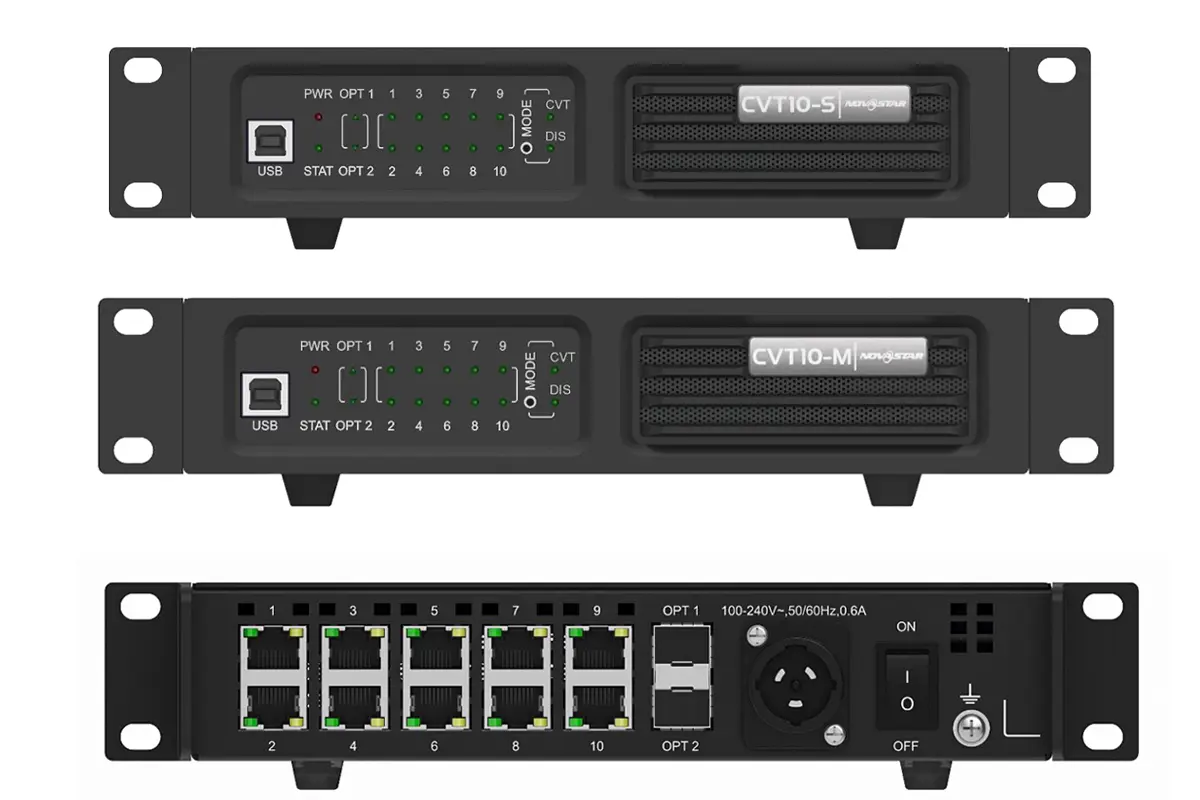
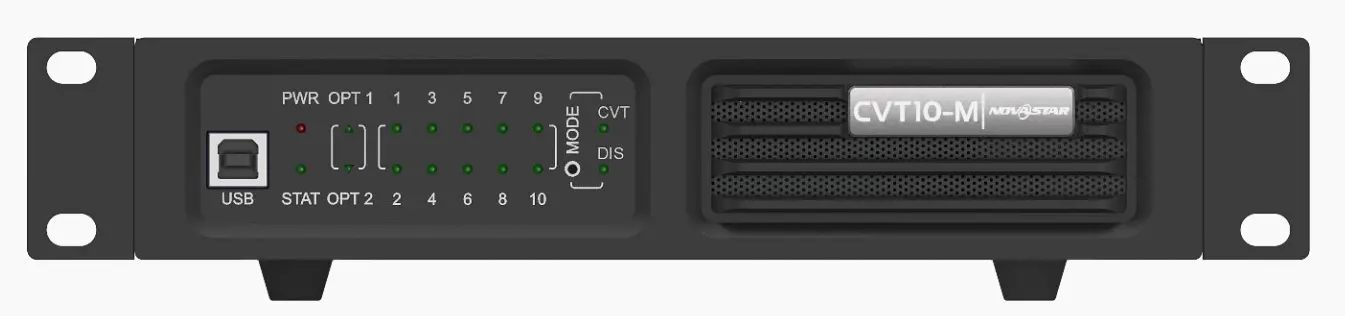
Novastar CVT10 is a high-performance, cost-effective fiber optical converter engineered to seamlessly bridge sending cards and LED displays over long distances. By converting electrical signals to optical—and vice versa—it enables stable, full-duplex data transmission with exceptional immunity to electromagnetic interference. Available in two variants—CVT10-S (single-mode) for extended reach and CVT10-M (multi-mode) for shorter-range applications—the CVT10 adapts to a wide range of installation scenarios without compromising signal integrity.
Novastar CVT10 fiber converter Key Features:
- CVT10-S uses single-mode optics; CVT10-M uses multimode optics. Match the optics and cable at both ends.
- Ten physical Ethernet connectors do not guarantee ten active outputs in every sender configuration. Check the documented port mapping.
- Optical transmission extends a compatible signal path; the sending controller and receiving system still determine the display load.
- Confirm mounting hardware, power connection and installation conditions for the exact model and revision.
Why Use a Fiber Converter in LED Display Systems?
Unlike traditional copper-based solutions, fiber converters solve three critical challenges that directly impact performance, scalability, and image quality.
Choose the appropriate optical route
Use fibre when the route exceeds the supported copper link or requires an appropriate isolated optical path. The CVT10-S specification lists up to 10 km; CVT10-M lists up to 300 m. These are model-specific limits, not an acceptance guarantee for any installed cable. Connector condition, optical loss, patch panels and the selected modules must be checked.
Verify the complete transmission path
Transmission reliability must be verified with the real equipment and cable route. A converter does not repair a missing source, incorrect cabinet mapping, insufficient controller capacity or a damaged fibre. Test normal content and the planned backup behaviour before handover.
Plan capacity and port assignments
Plan each Ethernet output against the actual cabinet chain. Adding a converter does not create additional sending capacity, and an optical backup port is not automatically a second independent screen output. Keep a labelled signal diagram with the accepted controller configuration.
Novastar CVT10 vs CVT10 Pro: Key Differences in Performance and Design
While both the Novastar CVT10 and CVT10 Pro are high-performance fiber optical converters designed for seamless signal transmission in LED display systems, they serve distinctly different application needs. The choice between them depends on your environment, installation requirements, and operational demands.
Below is a detailed Novastar CVT10 vs CVT10 Pro comparison:
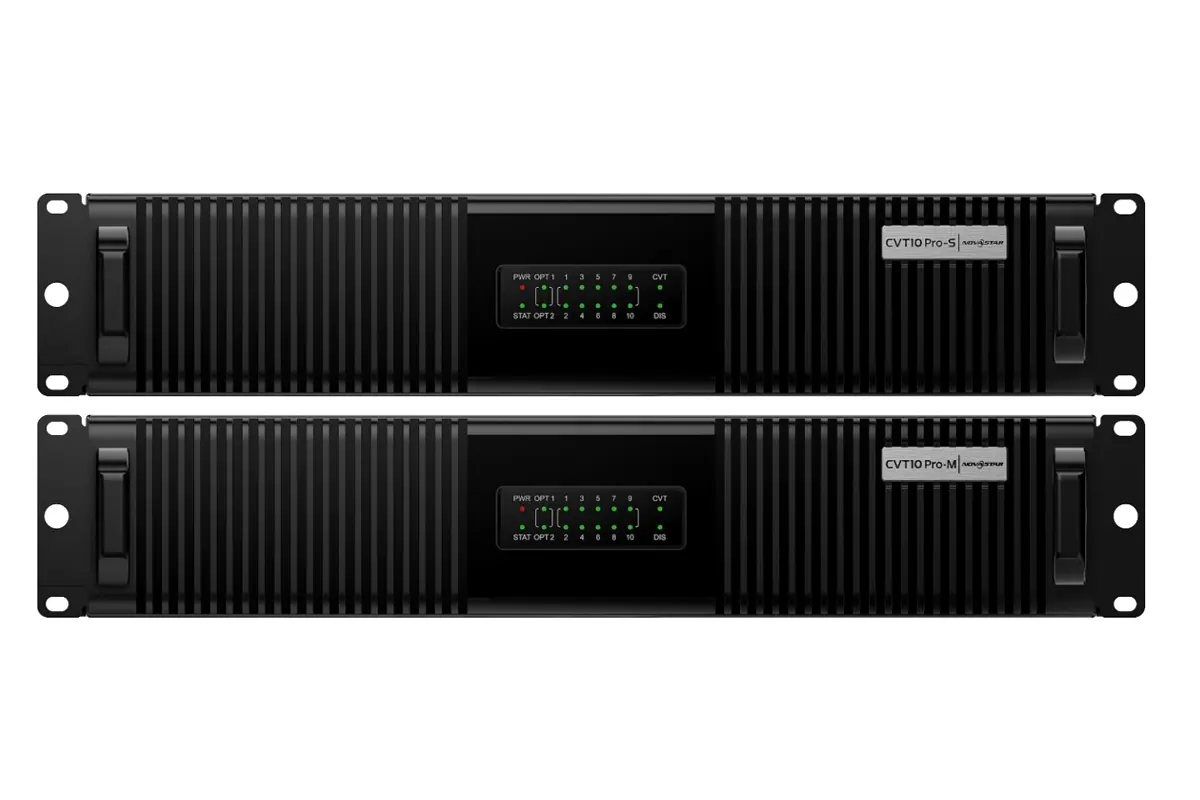
| Feature | CVT10 | CVT10 Pro |
|---|---|---|
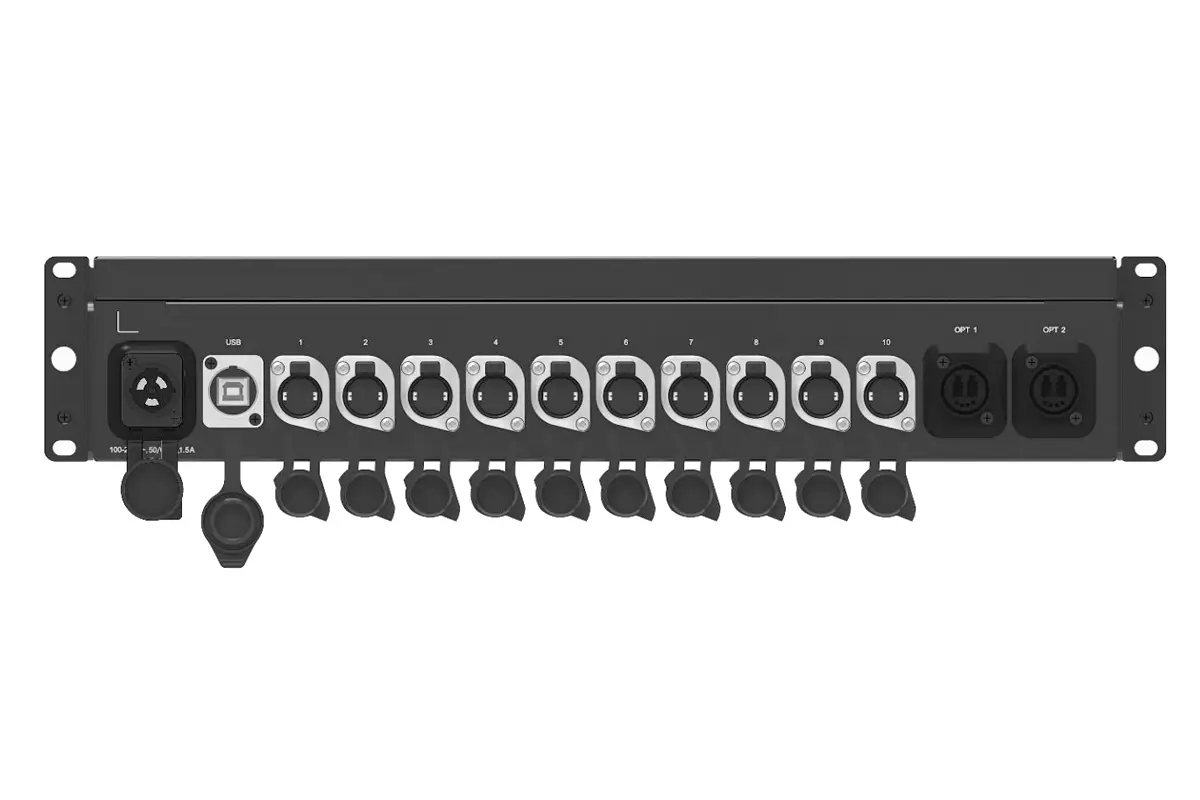
| Ports | 10x RJ45 | 10x Neutrik (EtherCon) |
| Power Input | Check the connector on the supplied revision | PowerCON Socket |
| Water Resistance | N/A | IP65 under the documented connection and protective-cover conditions |
| Installation | Horizontal, suspended or rack mounting as specified | Rack-mounted or truss-mounted |
| Weight | 2.1 kg | 5.9 kg |
| Size | 1U (254.3 x 50.5 x 290.0 mm) | 2U (482.6 x 88 x 280.0 mm) |
Choose the CVT10 if:
- You’re deploying in controlled indoor environments like studios, conference centers, or fixed installations.
- Your priority is compact size, lightweight design, and cost-efficiency.
- You’re using standard network cables and don’t require ruggedized connectors.
Choose the CVT10 Pro if:
- Your setup involves outdoor or harsh conditions—such as stage rentals, touring events, or weather-exposed venues.
- You need IP65 protection against dust, water, and accidental spills.
- You want truss-mounting capability for flexible rigging and industrial-grade durability.
- Your system uses Neutrik EtherCon connectors for enhanced reliability and anti-vibration performance.
How to Install and Configure the Novastar CVT10 Fiber Converter
Proper installation and configuration are critical to maximizing the CVT10’s performance. Follow these steps:
Step 1: Choose the Right Mounting Method
The Novastar CVT10 fiber converter supports three flexible mounting options to suit different environments:
- Horizontal Mounting: Place the unit on a flat, stable surface using the included brackets—ideal for temporary setups or control rooms.
- Rack Mounting: Combine two CVT10 units (or one CVT10 with a dedicated connecting piece) to form a standard 1U rack assembly, saving space in permanent installations.
- Suspended Mounting: Use truss hooks or clamps to hang the device securely—common in stage or rental applications where floor space is limited.
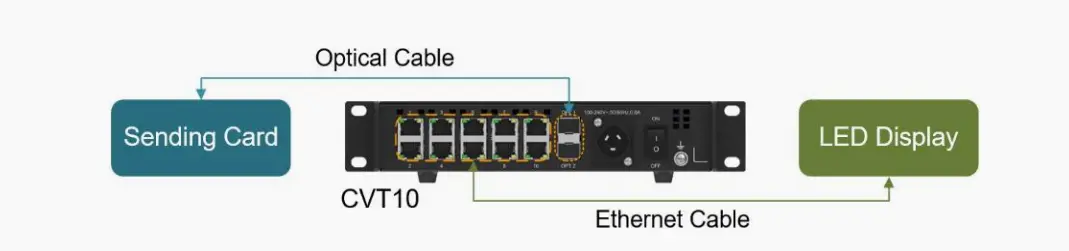
Step 2: Connect Cables Properly
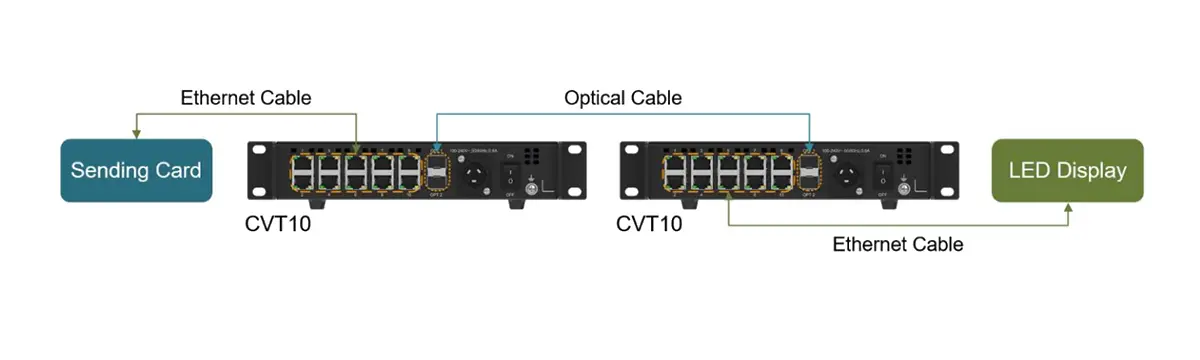
- Optical link: match single-mode or multimode modules and fibre, connector type and polarity at both ends.
- Ethernet link: connect the documented LED sending outputs and cabinet chains. Do not assume these ports behave as an ordinary LAN switch.
- Power: use the connector and supply specified on the actual unit. Follow the manufacturer connection procedure.
Step 3: Basic Configuration
- The Novastar CVT10 operates in CVT mode by default (the only supported mode at this time).
- To update firmware or verify settings, connect the USB Type-B port to a PC running NovaLCT V5.4.0 or later.
- Use the MODE button to confirm operational status (LED indicators provide real-time feedback).
Cooling & Environmental Best Practices
Keep the airflow and ambient conditions within the exact model instructions. Consider the temperature inside an assembled rack, secure the equipment and cables, and keep optical connectors clean and protected. Do not use a generic clearance figure or an IP claim from another model as the installation specification.
Common Applications of the CVT10 fiber optical converter
Thanks to its robust design, high-bandwidth capability, and immunity to electromagnetic interference, the Novastar CVT10 fiber optical converter is widely deployed across industries where signal reliability and visual fidelity are non-negotiable. Here’s how it powers real-world LED display solutions:
Live Events & Entertainment
In fast-paced environments like concerts, festivals, and award shows, signal stability can make or break a production. The CVT10 enables long-distance, low-latency transmission between control booths and stage displays—even over hundreds of meters—when the complete route and equipment are correctly specified and tested. Its compact form factor also simplifies integration into mobile racks and flyable truss systems.
Broadcast Studios & XR Stages
For broadcast or an XR stage, check the complete source-to-screen path, including source timing, processor mode, receiving cards and camera settings. Fibre is a transmission choice; it does not establish camera synchronisation, tracking compatibility or zero end-to-end latency. Include representative camera and content tests in acceptance.
Outdoor Advertising & Digital Billboards
From city-center mega-displays to highway signage, outdoor LED screens face extreme temperatures, electrical noise, and long cable runs. An optical route can separate the conductive signal path between equipment locations. Cabinet protection, power design, calibration and image quality remain separate project requirements.
Corporate & Institutional Spaces
In boardrooms, university auditoriums, and command centers, clarity and uptime are critical. Use a supported optical link when the equipment-room location or cable route requires it. For critical information displays, agree the service response, spare equipment and recovery test as part of the system design.
Compatibility Guide: Which LED Controllers Work with Novastar CVT10?
Compatibility is a system question. Record the exact sending controller, optical mode, firmware and receiving-card chain. A matching connector alone does not prove that two products use the same control signal. Obtain the applicable manufacturer application diagram for the proposed combination.
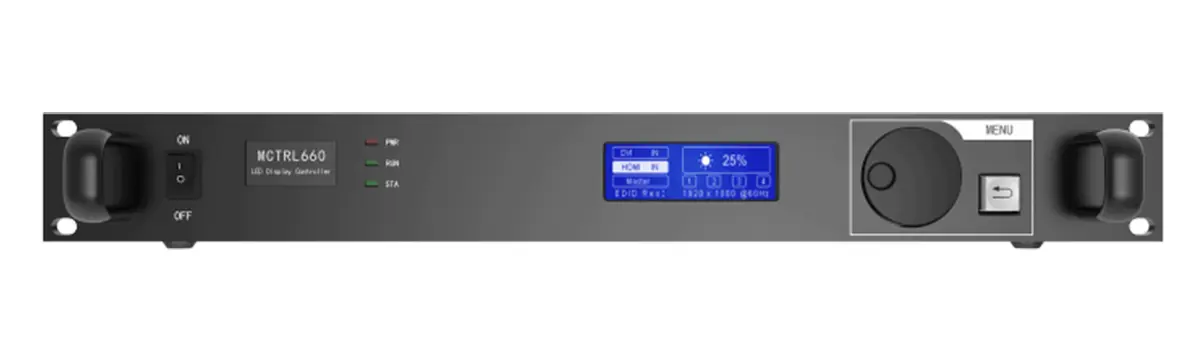
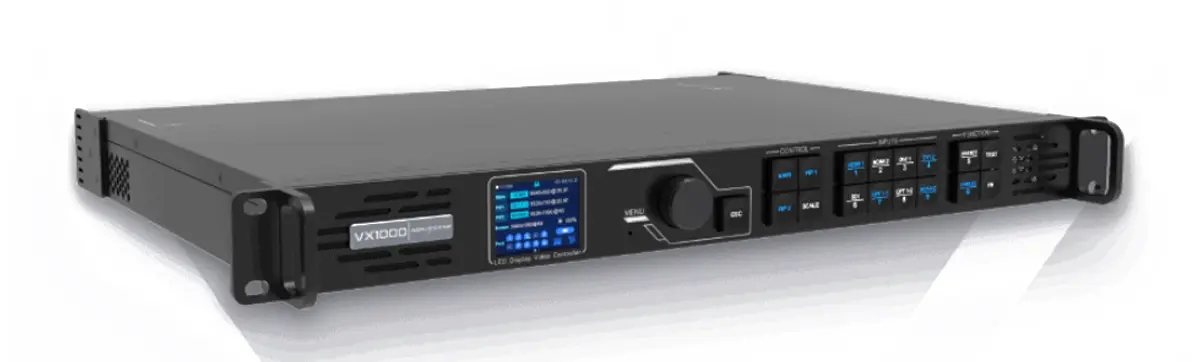
If the sender has a supported optical output, the display-side converter may connect directly to that output. If the sender only provides the required Ethernet outputs, the route may need conversion at both ends. Ask the supplier to identify both endpoint devices, module types and active port assignments in a labelled drawing before ordering.
How CVT10 Handles 4K and High Frame Rates
When a project uses a 4K source or a high frame rate, verify the controller input format and the final display loading separately. The CVT10 transports the compatible control data; it does not turn the source resolution into an additional output-capacity allowance.
Optical channels and Ethernet-port loading
Confirm which Ethernet channels are carried by the optical connection and how the sender assigns them. The published CVT10 document distinguishes sender configurations with different available port counts. Do not plan a ten-port cabinet map solely from the number of connectors on the converter front or rear panel.
Check latency across the complete system
Define the required latency for the complete system, then test it in the intended controller mode. The cited CVT10 specification does not establish a sub-millisecond project guarantee based on a particular line-coding scheme. Keep source processing, camera settings and screen scanning in the test plan.
Link validation and backup acceptance
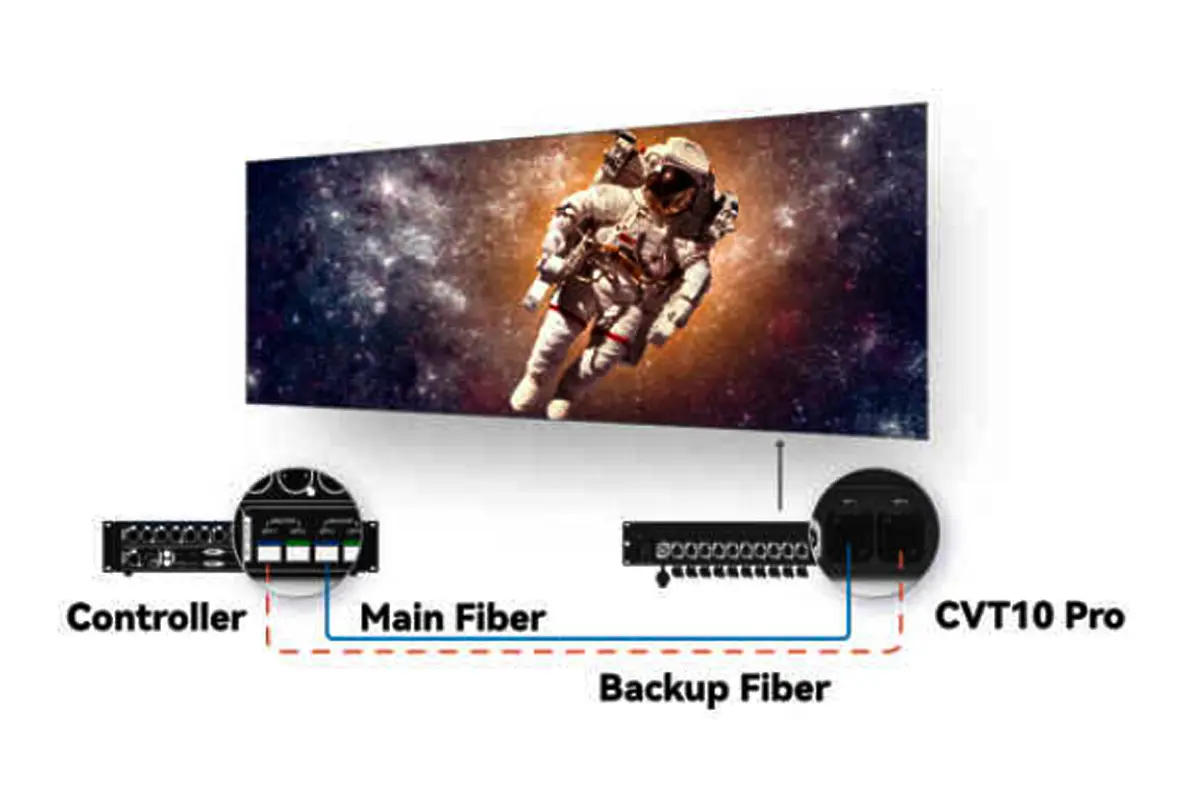
At commissioning, inspect connector cleanliness and fibre routing, confirm optical and Ethernet status, then run representative content. For a redundant design, test the agreed primary-path failure and recovery. Record results and retain a labelled diagram; do not infer flawless playback or undocumented error-correction behaviour from a link light.
Information for a complete optical-link quotation
Send the controller and receiving-card models, cabinet port map, existing fibre type, connector and route length, mounting location and backup requirement. Ask the supplier to list every endpoint converter, optical module, cable, patch lead and mounting accessory, and state which parts are already included.
Compare the same link design and commissioning scope. Retain the accepted port map, firmware record and test results with the site files so a replacement unit can be fitted without guessing.
FAQs
 A Deep Dive Into The Novastar HDR Master 4K Video Processor
 NovaStar MCTRL660 Series LED Display Controllers: MCTRL660 vs MCTRL660 PRO Complete Guide