A 16:9 aspect ratio is the width-to-height relationship used by almost every camera, screen and streaming platform in service today. It means that for every 16 units of width there are 9 units of height, which is 1.78:1 in decimal form. A 1280 x 720 HD display, a 1920 x 1080 Full HD display and a 3840 x 2160 4K display all share the same 16:9 aspect ratio.
For anyone planning an LED display wall, a digital signage screen installation or a broadcast studio, this is not a cosmetic detail. It decides whether content fills the screen edge to edge, whether cabinets tile without an awkward strip, and how much budget is later spent re-editing material that does not fit. This guide covers what the 16:9 aspect ratio means, how to calculate it, and how to plan a display around it from wall size down to pixel pitch.
Key takeaways
- A 16:9 aspect ratio is a proportion of 1.78:1, not a size, a resolution or a pixel pitch.
- Every mainstream HD, QHD, 4K and 8K video resolution is built on the same shape.
- With 500 mm square cabinets, a true 16:9 shape needs a grid such as 16 x 9 or 32 x 18.
catalogue
1. What Does the 16:9 Aspect Ratio Mean?
01. The Width-to-Height Formula
The 16:9 aspect ratio describes the shape of a rectangle rather than its size. Two numbers express the relationship: width first, height second. Every 16 units across the screen are matched by 9 units down the screen, so the shape stays wide and rectangular however large the display becomes.
Divide 16 by 9 and the result is 1.78, which is why this ratio is also written as 1.78:1. The number is not tied to centimetres, inches or pixels. A 6-inch phone screen and a 16-metre LED wall can both use a 16:9 aspect ratio and will accept the same video file, whatever the screen size of the installation.
02. Standard Resolutions That Use the 16:9 Aspect Ratio
Every mainstream HD and UHD resolution is built on this shape, which is why footage shot for one screen usually fits the next one without black bars.
| Resolution | Pixel dimensions | Total pixels | Typical use |
|---|---|---|---|
| 720p HD | 1280 x 720 | 921,600 | Small indoor displays and entry-level signage |
| 1080p Full HD | 1920 x 1080 | 2,073,600 | The most common target for indoor LED walls |
| 1440p QHD | 2560 x 1440 | 3,686,400 | Control rooms, design work and mid-size walls |
| 4K UHD | 3840 x 2160 | 8,294,400 | Premium indoor walls, boardrooms and studios |
| 8K UHD | 7680 x 4320 | 33,177,600 | Large command centres and flagship installations |
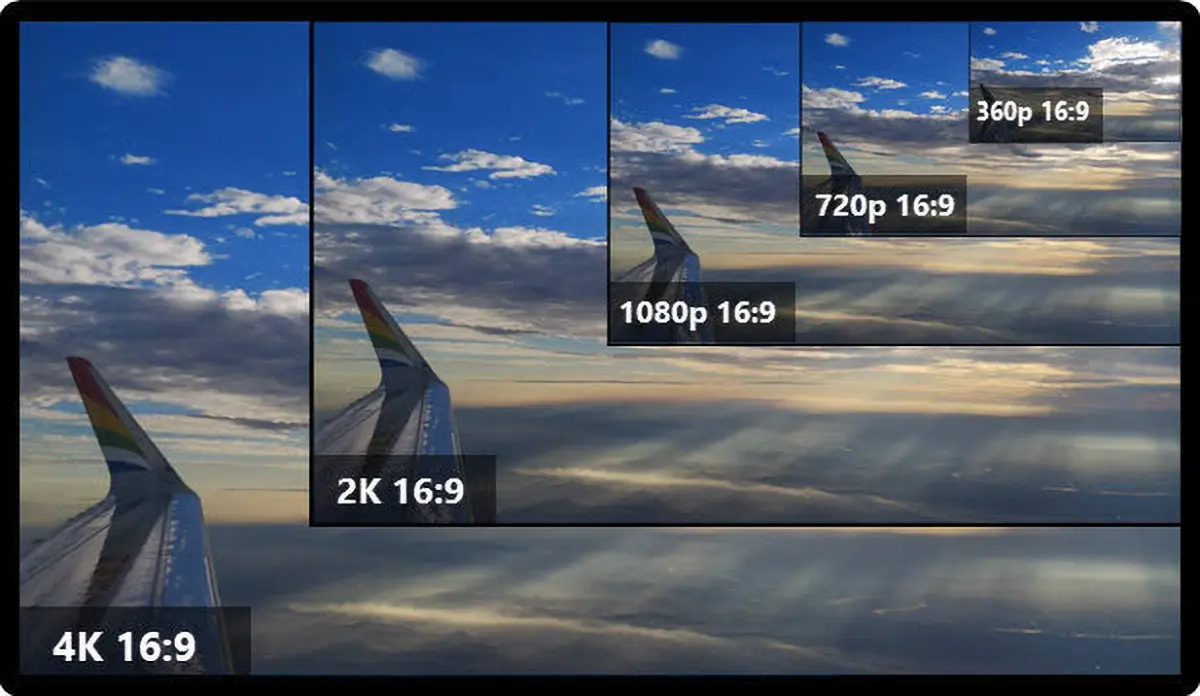
Notice how the pixel count multiplies while the outline stays fixed. Moving from 1080p to 4K UHD quadruples the number of pixels without changing the shape, so a 16:9 aspect ratio wall can be upgraded in resolution later without redesigning content or rebuilding the cabinet layout.
03. What This Ratio Is Not
- It is not a screen size. A 55-inch television and a 16-metre LED wall can both be 16:9.
- It is not a resolution. The shape is fixed while 1920 x 1080 defines the pixel grid inside it.
- It is not a pixel pitch. Pixel pitch is the physical distance between LED pixels and is chosen independently of the shape.
Keeping these three ideas separate makes comparison easier: two walls can share an identical resolution and outline yet offer completely different viewing distances because their pixel pitch differs.
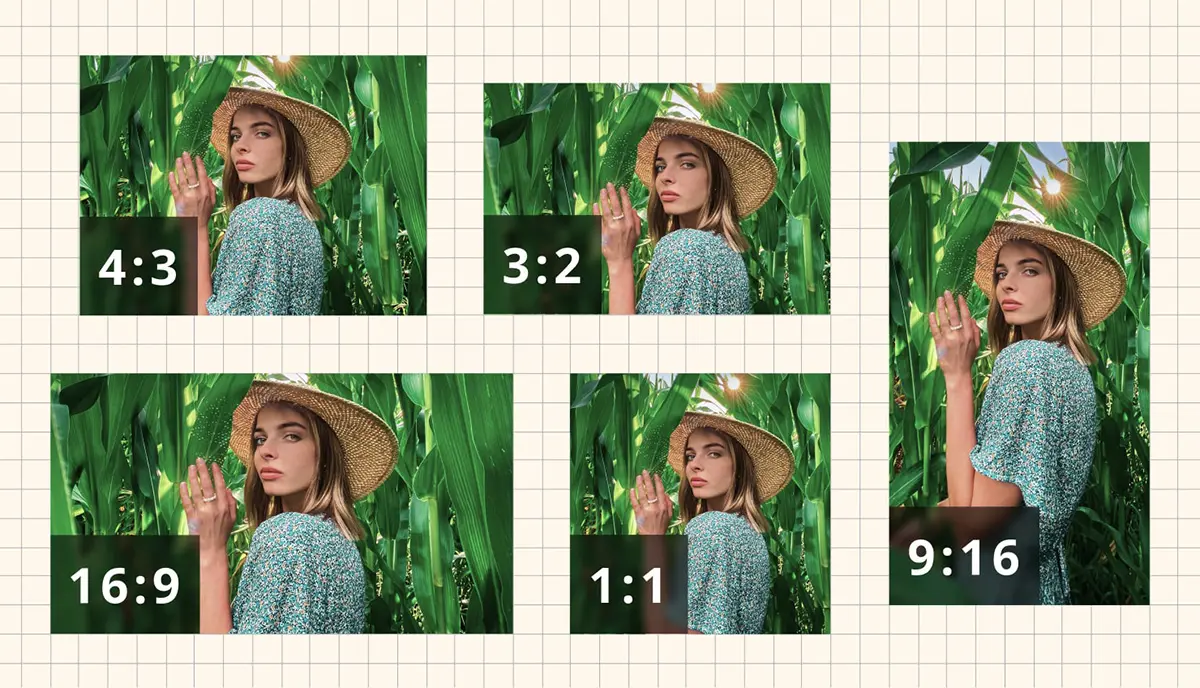
2. 16:9 Aspect Ratio Compared With 4:3, 21:9, 16:10, 3:2 and 1:1
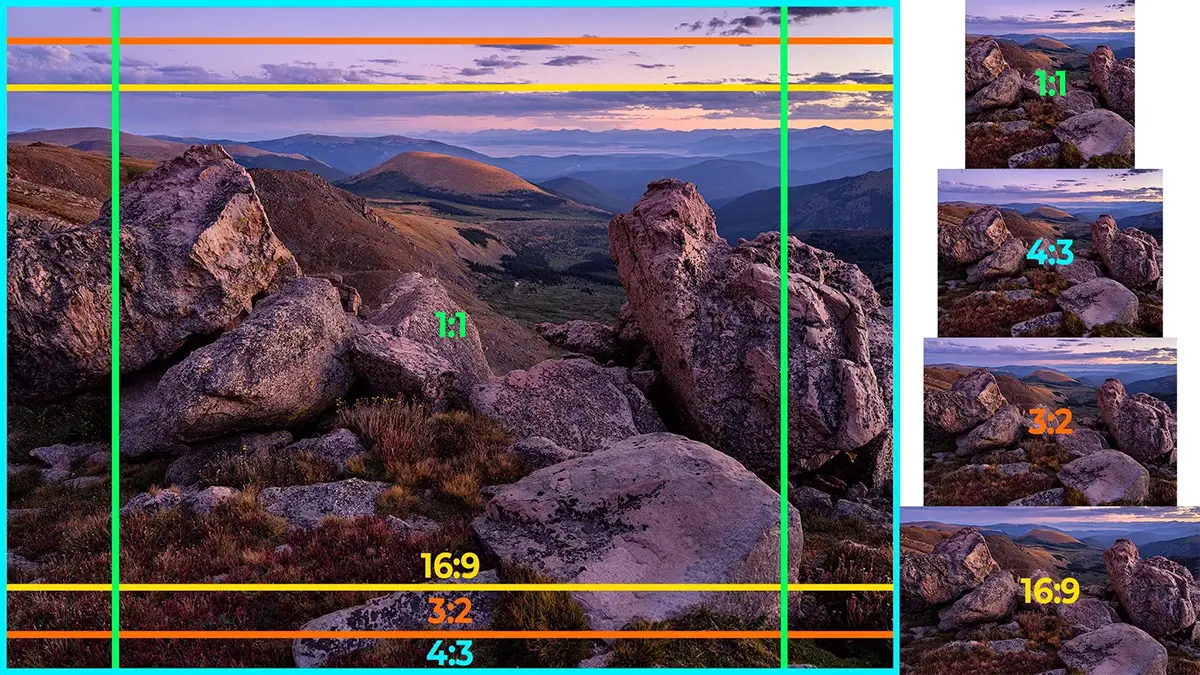
No format is universally better; each suits a particular job. The 16:9 aspect ratio sits in the middle of the range, wide enough for immersive video and practical enough for laptops, phones and conference screens.
| Ratio | Decimal value | Typical use | Fit for 16:9 content |
|---|---|---|---|
| 16:9 | 1.78 | TV, monitors, streaming and LED video walls | Native fit, with no bars and no cropping |
| 16:10 | 1.60 | Some laptops and desktop monitors | Very close, with thin bars or a slight crop |
| 3:2 | 1.50 | Photography and print workflows | Moderate bars on a widescreen display |
| 4:3 | 1.33 | Legacy broadcast and older projectors | Wide bars or heavy cropping |
| 1:1 | 1.00 | Social feeds and square retail signage | Full-width content must be redesigned |
| 21:9 | 2.33 | Cinema-style walls and ultra-wide gaming | Cropped or pillarboxed video |
| 9:16 | 0.56 | Vertical signage and mobile campaigns | Requires a separate portrait edit |
01. Why 4:3 Content Still Appears on Modern Screens
The 4:3 ratio predates widescreen broadcasting and survives in archive footage, older presentations and some control-room equipment. Legacy material shown on a modern screen either loses the top and bottom of the image to cropping or gains vertical bars at the sides, so decide in advance which outcome is acceptable for the project.
02. Where Ultra-Wide and Vertical Formats Still Win
Ultra-wide ratios such as 21:9 and 32:9 create a panoramic feel for film and simulation but place black bars around ordinary broadcast material. Square 1:1 layouts suit social feeds, while 9:16 vertical formats dominate mobile advertising. Each is chosen for a specific medium. For general-purpose corporate, retail and event work the 16:9 aspect ratio accepts the widest range of material without adjustment.
3. Why the 16:9 Aspect Ratio Became the Global Standard
Its dominance was not a matter of design taste. It emerged from a practical compromise, then three forces locked it in place.
01. Broadcast and Streaming Compatibility
When television moved from analogue to digital, this shape was adopted because it carried both legacy 4:3 material and cinema-style widescreen content with the least visible loss. Broadcast standards and later streaming platforms standardised on the same proportions, so one 16:9 aspect ratio master file can be published to broadcast, to streaming and to a massive LED screen without re-framing.
02. Panel and Cabinet Economics
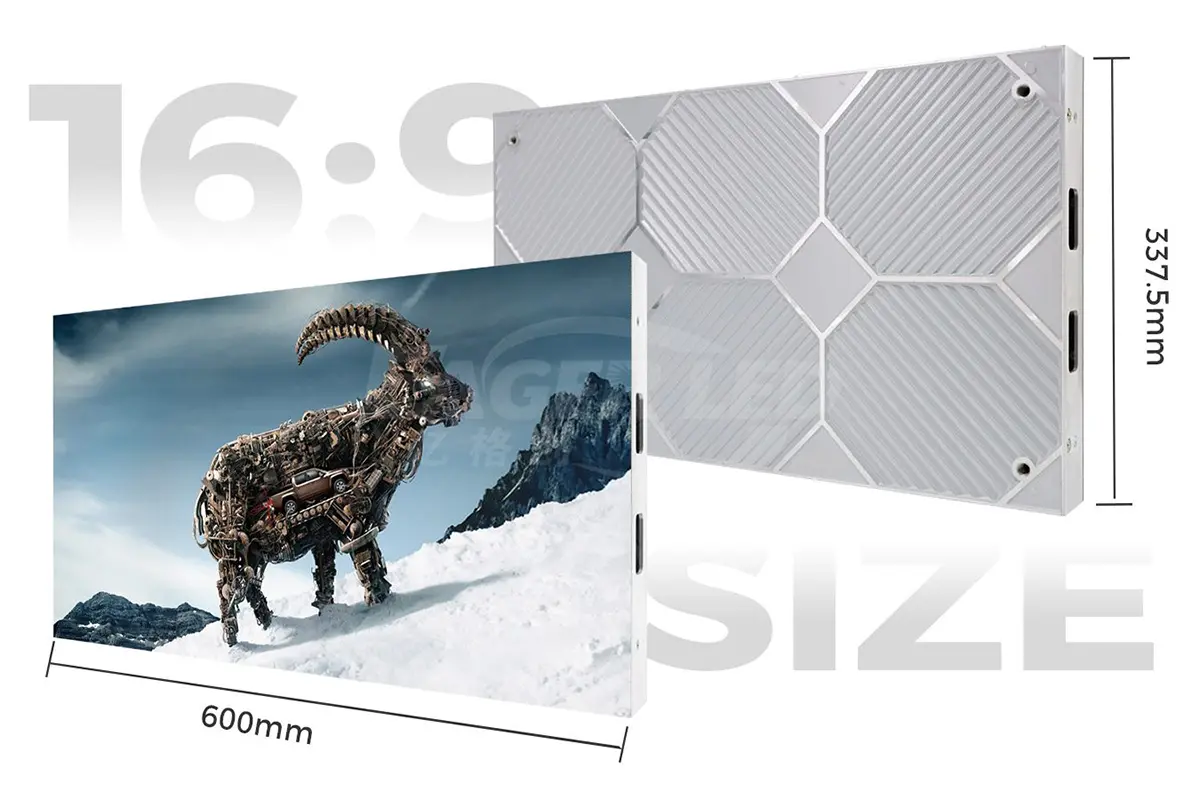
Once panels, camera sensors and encoder chips were tooled for this proportion, its cost fell below every alternative. LED cabinets follow the same logic: a cabinet designed around a 16:9 aspect ratio suits both a small meeting-room display and a large outdoor wall, so suppliers stock fewer variants.
03. Software and Platform Defaults
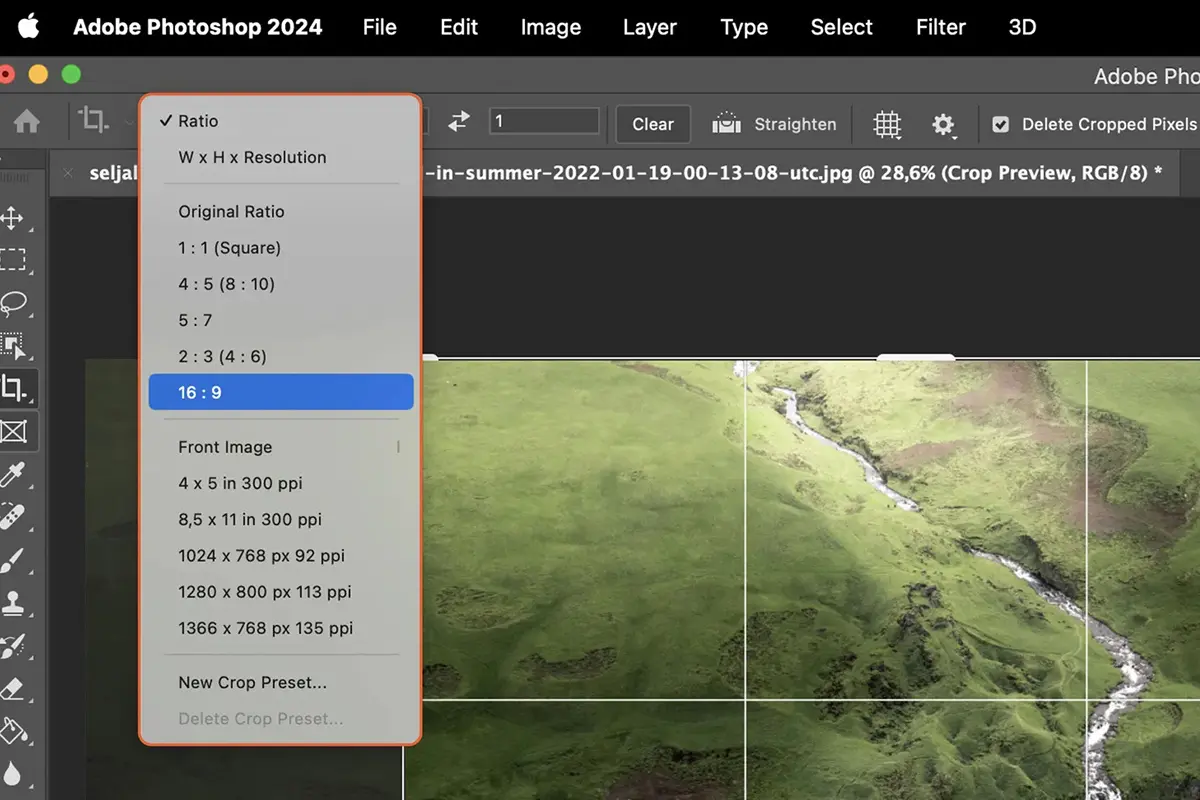
New documents in Photoshop, new sequences in Premiere Pro and new timelines in DaVinci Resolve all begin at 1920 x 1080 or 3840 x 2160. Because the default on nearly every platform is a 16:9 aspect ratio, most content is created in that format before anyone considers the final screen.
4. Why the 16:9 Aspect Ratio Matters in LED Display Design
On a television the shape is fixed by the manufacturer. On an LED display it is a project decision, because walls are assembled from modular cabinets and can be built to almost any outline.
01. Content Matching and Scaling
When the wall matches the content, the processor passes the signal through with no letterboxing, cropping or rescaling. When the two do not match, something has to give: scaling stretches pixels unevenly and softens fine detail on LED screens, where every pixel is a visible light source.
02. Cabinet Tiling and Wall Geometry
If the wall outline does not divide neatly into the cabinet grid, the installer must hide a partial row or column, leaving an uneven border that is obvious on camera. Designing to a 16:9 aspect ratio keeps the grid regular, which simplifies steelwork, power distribution and calibration. On large-scale LED walls and modular displays, that regularity makes a wall read as one surface instead of a grid of tiles.
03. Viewing Comfort and Immersion
Human vision is wider than it is tall, so a shape near 1.78:1 feels natural to a seated audience. It is wide enough for immersion in an auditorium, yet not so wide that head movement becomes tiring in a boardroom.
5. How to Calculate a 16:9 Aspect Ratio LED Wall
The calculation takes two short steps, and doing them before steelwork is ordered prevents most layout problems later.
01. Finding Width or Height From the Ratio
If the available width is known, divide it by 16 and multiply by 9. A room that allows an 8-metre wall therefore needs 8 / 16 x 9 = 4.5 metres of height to hold a true 16:9 aspect ratio. If only the height is fixed, divide the height by 9 and multiply by 16: a 3-metre high wall needs 3 / 9 x 16 = 5.33 metres of width. Both directions produce the same 1.78:1 outline. Once the outer size is known, divide each dimension by the cabinet size: whole numbers in both directions are the practical test of whether a wall can be built at this ratio without filler panels.
02. Planning Cabinets and Resolution
The table below works through the calculation using 500 mm x 500 mm cabinets, the size most commonly used indoors. Cabinet counts of 16 x 9 and its multiples produce the cleanest geometry.
| Wall width | Wall height | Cabinets | Total cabinets | Pixel pitch | Screen resolution |
|---|---|---|---|---|---|
| 8.0 m | 4.5 m | 16 x 9 | 144 | P2.5 | 3200 x 1800 |
| 8.0 m | 4.5 m | 16 x 9 | 144 | P4 | 2000 x 1125 |
| 8.0 m | 4.5 m | 16 x 9 | 144 | P5 | 1600 x 900 |
| 16.0 m | 9.0 m | 32 x 18 | 576 | P5 | 3200 x 1800 |
| 16.0 m | 9.0 m | 32 x 18 | 576 | P10 | 1600 x 900 |
| 24.0 m | 13.5 m | 48 x 27 | 1296 | P10 | 2400 x 1350 |
A 16 x 9 grid is the smallest practical layout for square cabinets. Wider walls simply repeat the pattern, and 32 x 18 and 48 x 27 keep the 16:9 aspect ratio intact while the physical size grows. Resolution then follows from the pixel pitch, so the same wall can be delivered at P2.5 for close viewing or at P10 for a motorway-facing billboard.
03. Worked Example: An 8 m x 4.5 m Wall
Sixteen cabinets across and nine cabinets high give 144 cabinets and a perfect 16:9 aspect ratio. At P2.5 the wall resolves 3200 x 1800 pixels, comfortably above 1080p content. At P5 the same wall resolves 1600 x 900 pixels, which suits a viewing distance of six metres or more. The outline is identical in both cases; only the pixel density changes.
6. Key Benefits of Designing Around a 16:9 Aspect Ratio
The advantages show up in daily operation rather than on the specification sheet, which is why experienced buyers treat this shape as a default rather than an option.
01. No Letterboxing and No Cropped Edges
When display and content share the same proportions, the image fills the screen completely. No black bands appear at the top or bottom, and no part of the frame is cut away at the sides. For advertising that matters commercially: every pixel you paid for carries the message.
02. Lower Content Production Cost
Material produced in a 16:9 aspect ratio can be reused on televisions, laptops, conference displays, streaming platforms and LED walls. Campaigns avoid a dedicated re-edit for every screen, and templates stay usable for years.
03. Consistent Branding Across Every Screen
Logos, lower-thirds, price panels and call-to-action bars sit in the same relative position when every screen uses a 16:9 aspect ratio, so a campaign approved on a desktop monitor looks the same on an outdoor wall bar brightness and scale.
04. Creative Freedom Without Distortion
This frame gives editors room for wide shots, multi-panel layouts and split-screen graphics, and it does so without the distortion that appears when content is forced into a mismatched shape.
7. Applications of the 16:9 Aspect Ratio
01. LED Video Walls and Control Rooms
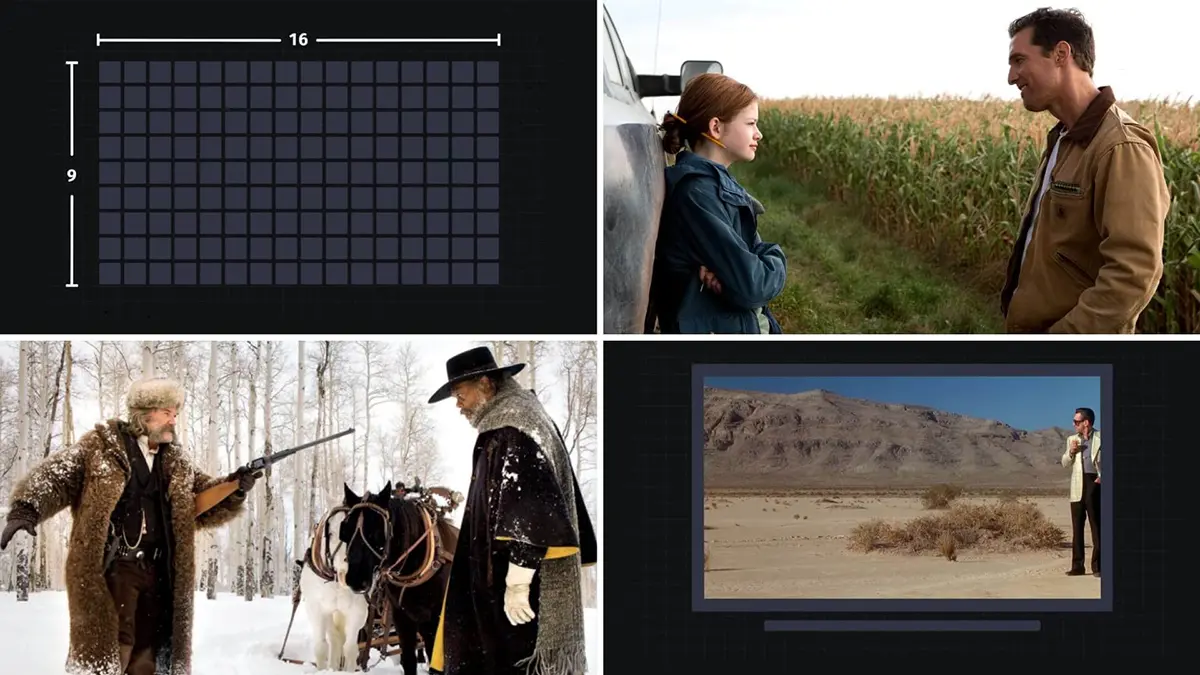
Control rooms show video feeds, dashboards and maps side by side. A 16:9 aspect ratio wall lets each window keep its native proportions, so operators read data without scaling artefacts, and the shape divides neatly into quarter-screen and half-screen tiles.
02. Digital Signage and Retail
Retail and hospitality screens usually show content supplied by brands and streaming platforms, and that material is almost always produced in this format. Retailers who match their digital signage to it can rotate campaigns quickly, while LED posters and feature walls benefit from the same template reuse.
03. Corporate Meeting Rooms and Auditoriums
Presentations, video calls and training material all arrive in a 16:9 aspect ratio. A meeting-room display built to the same shape shows a shared screen without borders, which keeps text legible on the back row of an auditorium.
04. Broadcast, Virtual Production and Live Events
Broadcast and streaming pipelines standardise on this shape, so an LED volume or studio wall built to match avoids repeated conversion. On tour, a 16:9 aspect ratio stage screen accepts sponsor reels, live camera feeds and pre-rendered content from a single playback file.
05. Sports and Stadium Displays
A stadium screen is often long and narrow for sightline reasons, but the video section inside it is usually framed in a 16:9 aspect ratio so replays and sponsor clips sit inside a familiar window and broadcast material can be reused without re-framing.
06. Gaming and Home Theatre
Consoles, streaming sticks and disc players all output this format by default. A home cinema or esports display built to match shows every title as intended, with no bars and no stretched geometry.
8. How to Set and Maintain a 16:9 Aspect Ratio
Setting it takes seconds in modern software, but the option lives in a different place in each tool, and that is where mistakes creep in.
01. Canvas and Sequence Settings by Tool
| Tool | Where the setting lives | Values to enter | Common pitfall |
|---|---|---|---|
| Adobe Photoshop | Image > Canvas Size, or File > New | 1920 x 1080 or 3840 x 2160 px | Leaving Resample on while changing the canvas |
| Adobe Premiere Pro | New Sequence > Sequence Settings | 1920 x 1080 or 3840 x 2160 | Legacy clips with a non-square pixel aspect ratio |
| Adobe After Effects | Composition > New Composition | 1920 x 1080 or 3840 x 2160 | Nesting a composition built at another ratio |
| DaVinci Resolve | Project Settings > Master Settings | 1920 x 1080 or 3840 x 2160 | Mixing timeline and clip resolutions |
| Final Cut Pro | Modify > Project | 1920 x 1080 or 3840 x 2160 | Letting the first clip set the project ratio |
| Canva | Create a design > Custom size | 1920 x 1080 px | Choosing a preset that is not 16:9 |
| OBS Studio | Settings > Video | 1920 x 1080 base and output | Stretching a source instead of fitting it |
02. Cropping Versus Scaling
When content and screen shapes differ there are only two honest options. Cropping keeps pixels square and removes part of the frame, so faces stay in proportion; it suits footage where the subject sits near the centre. Scaling keeps the whole frame but changes the shape of everything inside it, so circles become ovals and text stretches. Most tools include a lock aspect ratio or constrain proportions switch, and leaving it enabled is the simplest way to protect the 16:9 aspect ratio while resizing.
03. Checking and Fixing an Incorrect Ratio
Stretched faces, thick bands or a picture that looks slightly wrong are the usual symptoms. Divide width by height to confirm it: 1.78 means the design is a 16:9 aspect ratio, 1.33 points to 4:3 and 0.56 points to a vertical format. In Photoshop the Image Size dialog shows both dimensions together. In Premiere Pro, Sequence Settings reveals the frame size and the pixel aspect ratio, and a clip set to Fit is resized rather than stretched. For a wider comparison of shapes, see our LED screen aspect ratio guide.
04. Aspect Ratio Settings in Video Processors
On site, the processor is the last place the shape can be protected. Set the output canvas to the wall resolution, keep the output format in step with the cabinet grid, and use the processor to fit rather than stretch incoming sources.
9. Pixel Pitch and the 16:9 Aspect Ratio
Shape and pixel density are separate decisions that meet when a wall is planned. The 16:9 aspect ratio fixes the outline; pixel pitch decides how much detail that outline can hold.
01. What Pixel Pitch Means
Choosing the right pixel pitch matters as much as the shape of the wall. Pixel pitch is the centre-to-centre distance between two LED pixels, measured in millimetres. A small pitch such as P1.5 or P2.5 packs more pixels into the same area, so viewers can stand close without seeing individual lamps, which suits boardrooms and retail interiors. A larger pitch such as P5 or P10 stays sharp from a distance, which is why it suits outdoor advertising and sports boards.
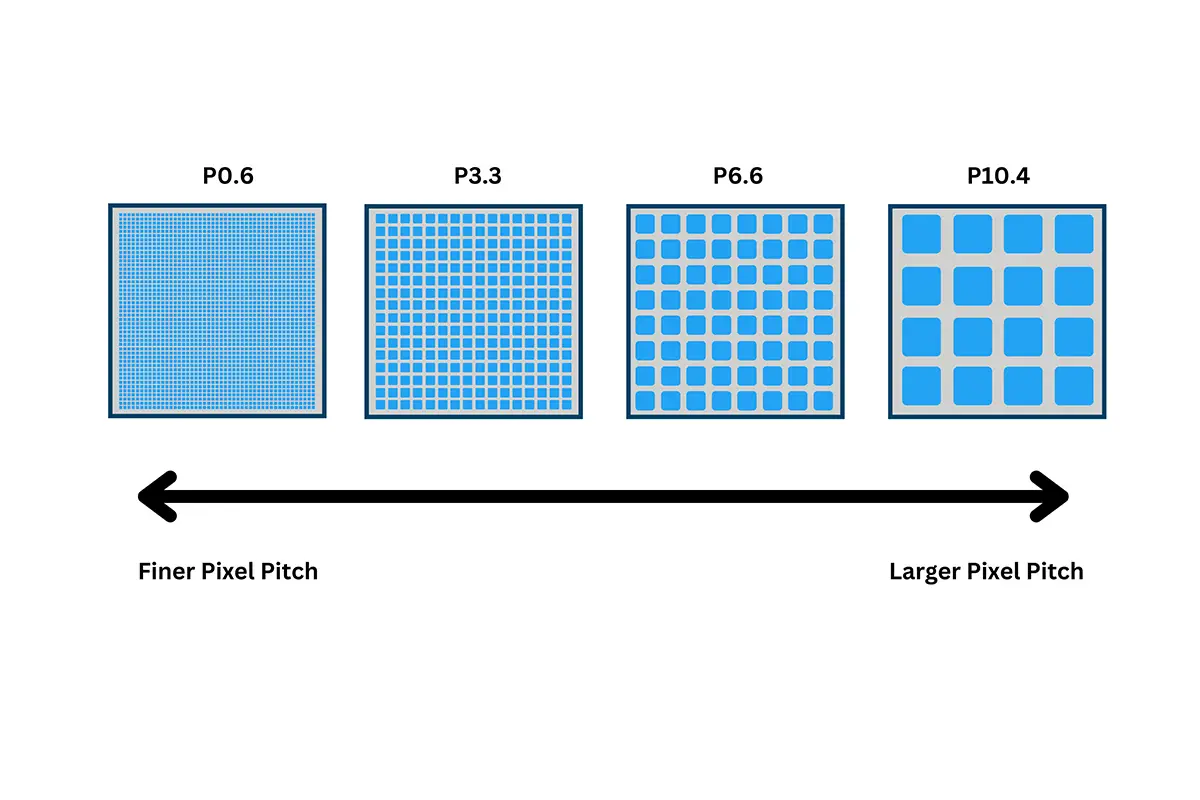
02. Matching Pixel Pitch to Viewing Distance
| Environment | Viewing distance | Pixel pitch | Example wall | Resolution at that pitch |
|---|---|---|---|---|
| Boardroom or control room | 2 to 5 m | P1.5 to P2.5 | 8.0 x 4.5 m | 3200 x 1800 at P2.5 |
| Indoor lobby or retail | 4 to 8 m | P3 to P4 | 8.0 x 4.5 m | 2000 x 1125 at P4 |
| Auditorium or hall | 6 to 12 m | P5 to P6.67 | 8.0 x 4.5 m | 1600 x 900 at P5 |
| Outdoor advertising | 15 to 40 m | P8 to P10 | 16.0 x 9.0 m | 1600 x 900 at P10 |
| Stadium and large format | 40 m and above | P10 to P16 | 24.0 x 13.5 m | 2400 x 1350 at P10 |
Read the table as a starting point rather than a rule: the further the audience sits, the larger the pitch can be without any loss of perceived sharpness. To translate these figures into a target pixel count, see the LED screen resolution guide.
03. Why the Shape Simplifies Cabinet Standardisation
When every wall in a portfolio follows the 16:9 aspect ratio, cabinet layouts become reusable. The same 16 x 9 arrangement can serve as a 2.5-metre meeting-room display or scale up to a 16-metre auditorium wall using the same drawings, spare parts and calibration workflow.
10. Common Mistakes That Break the Format
01. Stretching Content to Fill the Screen
Stretching changes the shape of every element, so circular logos become ovals and on-screen text looks compressed or elongated. If a source does not match the wall, fit it and accept the bars, crop it deliberately, or rebuild the layout.
02. Mixing Cabinet Sizes in One Wall
Combining differently proportioned cabinets without planning the grid produces a wall that is close to a 16:9 aspect ratio but not exact, and the error is obvious once the wall is powered on because one edge steps in or out by the width of a module.
03. Ignoring the Processor Output Format
A processor left on the wrong output canvas will letterbox a signal that already matches the screen or rescale it to an odd size. Confirm that the canvas matches the physical wall resolution and that input scaling preserves the shape of incoming sources.
04. Finalising the Shape After the Structure Is Built
Aspect ratio is cheapest to change on paper. Once steelwork, power runs and brackets are installed, adjusting the wall usually means adding or removing cabinets and repeating the calibration.
11. Choosing a Display: A Buyer Checklist
01. Questions to Ask Before You Order
- What wall width and height does the room allow, and what ratio do those dimensions produce?
- Does the proposed cabinet grid divide into whole cabinets in both directions?
- Which resolution will the wall deliver at the chosen pixel pitch?
- How far will the audience sit, and does the pixel pitch suit that distance?
- How does the video processor handle a 4:3 or 21:9 source, and can it fit rather than stretch?
- Are spare cabinets, receiving cards and power supplies available in the same size?
02. How EagerLED Supports These Projects
EagerLED builds LED displays in a range of pitches for indoor and outdoor use, including cabinets suited to a 16:9 aspect ratio as well as custom wall shapes. Projects usually begin with a site drawing and a content brief, which allows the LED solutions to be matched to the intended viewing distance before manufacturing starts.
12. Frequently Asked Questions About the 16:9 Aspect Ratio
13. Conclusion
The 16:9 aspect ratio has shaped digital media for four decades and remains the safest choice for any display that must accept content from the wider world. It matches every mainstream HD, QHD, 4K and 8K resolution, so material arrives ready to play, and with a grid such as 16 x 9 it converts into a clean, buildable LED wall.
Getting the shape right early separates a display that simply works from one that needs constant adjustment. Decide the ratio, derive the dimensions, confirm the cabinet count, then choose the pixel pitch that suits the audience. If you would like the numbers checked, the contact team can review your 16:9 aspect ratio plan against the space, the content and the viewing distance before anything is ordered.
 A Complete Guide To LED Receiving Cards: How To Choose The Right One
 Novastar Processors H Series Comparison: H2, H5, H9, H15, H20