LED screen resolution does not increase simply because an LED wall is physically large. Native resolution comes from the number of real pixels built into the display, while its screen aspect ratio comes from the relationship between width and height. Buyers who confuse those two specifications often end up scaling every video, shrinking text, or paying for pixels their audience cannot see.
The right LED screen resolution starts with the installation, not a fashionable resolution label. Define the closest viewer, the content that must remain legible, the available wall dimensions, and the desired canvas shape. Pixel pitch and cabinet geometry can then turn those requirements into a buildable pixel matrix.
This LED screen resolution guide gives display buyers a practical way to make that decision. It explains common formats, calculation methods, viewing-distance trade-offs, processor considerations, and the questions that belong in a supplier quotation.
Choose LED screen resolution from the closest viewing position, critical content, available dimensions, cabinet geometry, and processor path. Match the screen aspect ratio to the content workflow; do not buy a resolution label in isolation.
Table of Contents
1. What Is LED Screen Resolution?
LED screen resolution is the display's fixed horizontal and vertical pixel count, written as width x height. A native resolution of 1,920 x 1,080 means that the physical LED canvas contains 1,920 pixel columns and 1,080 pixel rows, for 2,073,600 pixels in total.
In a direct-view LED display, those pixels are physical light-emitting elements arranged across modules and cabinets. Software can accept a different input signal, but it cannot create additional physical pixels. If a processor sends a 4K source to a 1,920 x 1,080 wall, the image must be downscaled to the wall's native matrix.
That distinction is central to LED screen resolution planning: the input format can change, but the installed pixel matrix remains fixed.
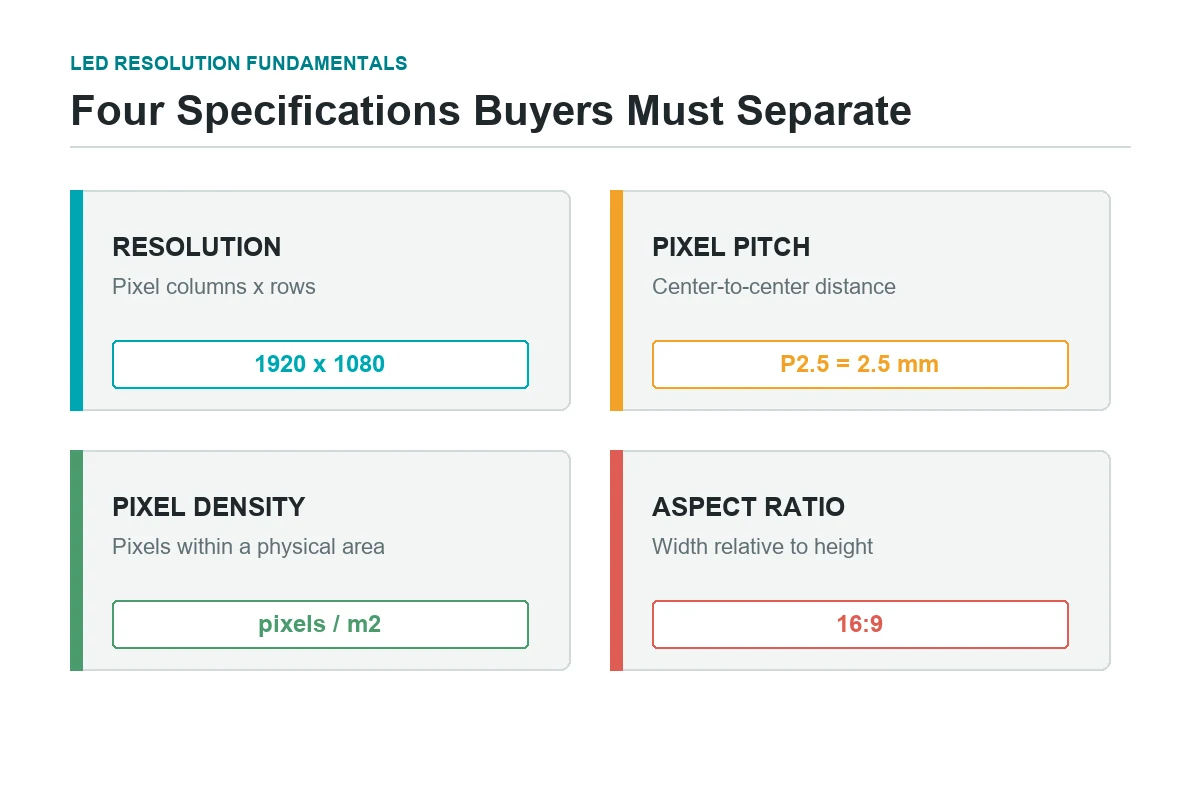
Resolution is related to, but different from, four other specifications:
| Term | What it describes | Unit or notation | Buyer's question |
|---|---|---|---|
| Native resolution | Physical pixel columns and rows | 1,920 x 1,080 px | How many real pixels will the finished wall contain? |
| Total pixel count | All addressable pixels | 2.07 million pixels | What processing and content workload will the wall create? |
| Pixel pitch | Center-to-center spacing between adjacent pixels | P1.5, P2.6, P6 | How tightly are pixels packed? |
| Pixel density | Pixels within a physical area | pixels/m2 or PPI | How much detail fits into the wall area? |
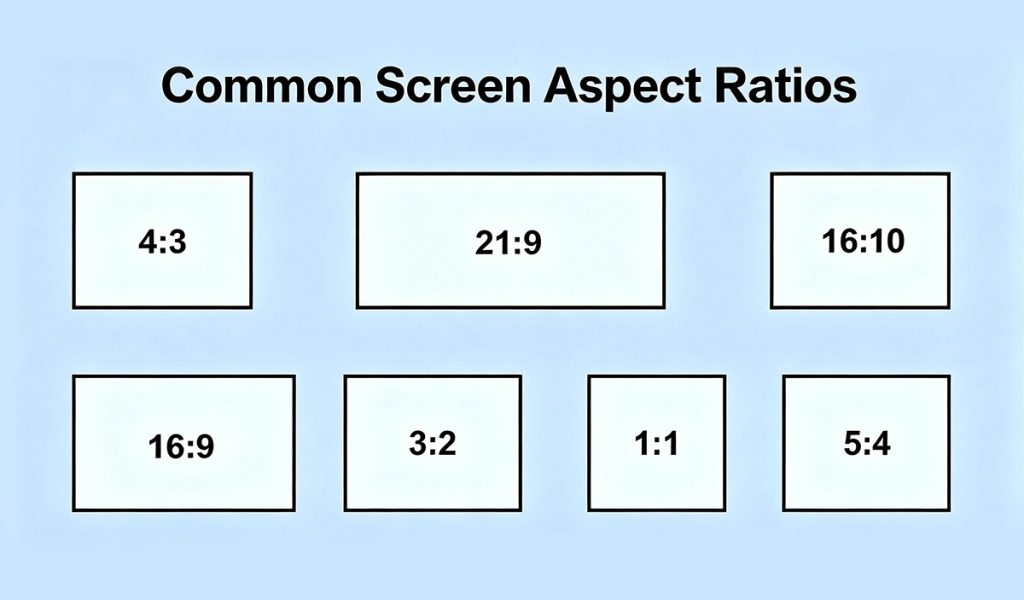
| Screen aspect ratio | Width relative to height | 16:9, 21:9, 4:3 | Does the canvas shape match the content? |
For a rectangular pixel matrix, the native screen aspect ratio is horizontal pixels / vertical pixels, simplified where useful. A 1,920 x 1,080 display is 16:9. A custom 2,400 x 900 ribbon is 8:3. Physical dimensions and pixel dimensions normally produce the same ratio when the same pixel pitch is used in both directions.
This is why LED screen resolution and screen aspect ratio must be checked together, even though they describe different properties.
2. Why Does LED Screen Resolution Matter?
LED screen resolution determines how much spatial detail the wall can reproduce. Fine type, thin chart lines, small interface elements, and close-up product textures need more pixels than a bold logo viewed across a stadium. But higher resolution alone does not guarantee a better installation.
The native matrix affects five procurement decisions:
- Content fidelity: A canvas that matches the production format can show content without unnecessary scaling, cropping, or letterboxing.
- Text legibility: More pixels allow type and line graphics to be rendered with cleaner edges at the same physical size.
- Viewing experience: Adequate pixel density reduces visible pixel structure at the planned viewing positions.
- System design: More pixels require suitable sending devices, receiving cards, video processors, cabling, source outputs, and content playback capacity.
- Project economics: A finer pitch usually increases the number of LED packages, modules, power supplies, receiving hardware, and calibration work within a given area.
Resolution does not directly determine brightness, contrast, color accuracy, refresh rate, grayscale performance, or motion quality. Those are separate specifications. A well-calibrated 1080p wall can be more convincing than a poorly processed 4K wall, especially when viewers are far enough away that they cannot resolve the extra pixels.
For buyers, the useful LED screen resolution target is therefore not "the highest resolution available." It is the lowest native resolution that fully satisfies the content and viewing requirements, with sensible headroom for the planned workflow.
3. Common LED Screen Resolutions
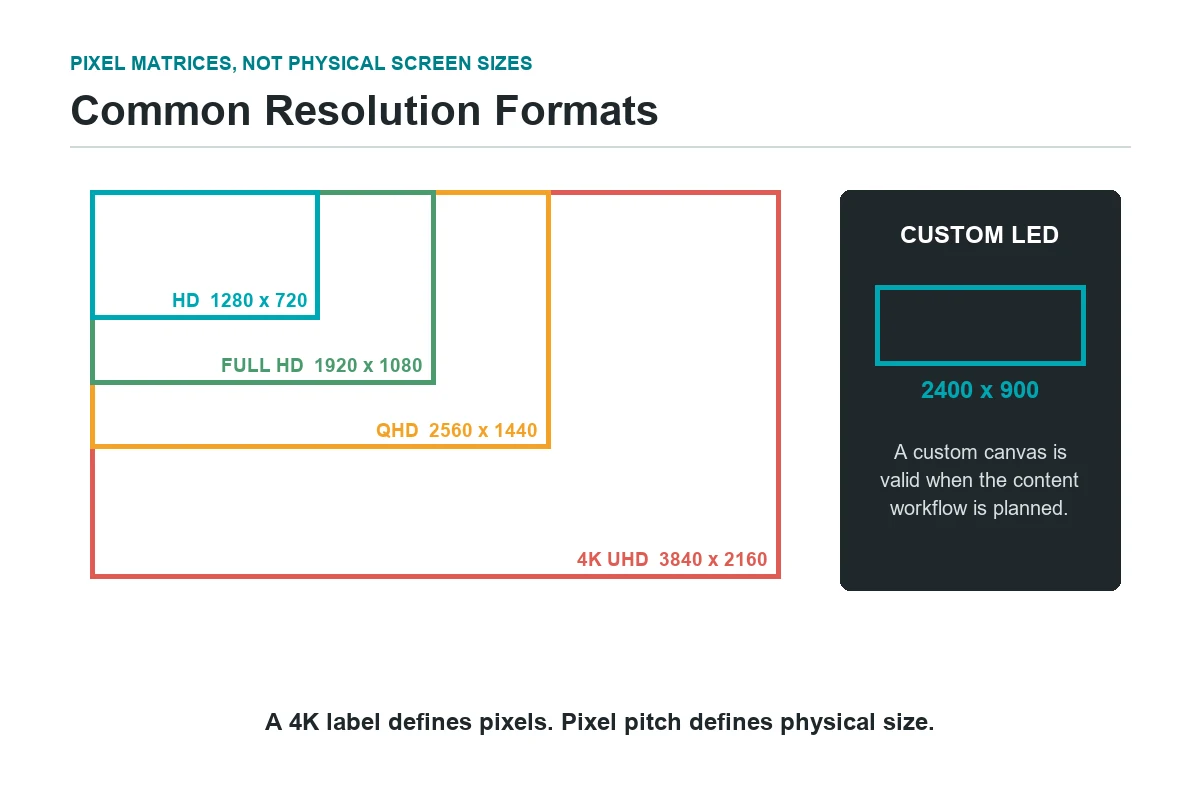
Common LED screen resolution labels such as HD, Full HD, QHD, 4K, and 8K describe pixel formats, not physical screen sizes. A 4K LED wall may be 4 meters wide or 20 meters wide; pixel pitch determines how much physical area that matrix occupies.
| Common name | Pixel dimensions | Screen aspect ratio | Total pixels | Practical LED-display context |
|---|---|---|---|---|
| HD / 720p | 1,280 x 720 | 16:9 | 921,600 | Simple video or signage where distance and budget limit the value of more pixels |
| Full HD / 1080p | 1,920 x 1,080 | 16:9 | 2,073,600 | Corporate presentation, broadcast-friendly stages, and general indoor video walls |
| QHD / 1440p | 2,560 x 1,440 | 16:9 | 3,686,400 | Data-rich or close-view installations needing more workspace than FHD |
| 4K UHD | 3,840 x 2,160 | 16:9 | 8,294,400 | Premium close-view walls, production, control, and large canvases with detailed content |
| DCI 4K | 4,096 x 2,160 | Approx. 1.90:1 | 8,847,360 | Cinema-production workflows; not interchangeable with 4K UHD without mapping |
| 8K UHD | 7,680 x 4,320 | 16:9 | 33,177,600 | Specialized very large or very close-view canvases with an end-to-end 8K workflow |
The hd display resolution of 1,280 x 720 is still valid when content is simple and viewing distance is long. The fhd screen resolution of 1,920 x 1,080 remains a practical target because it maps cleanly to common 1080p sources. A qhd screen resolution of 2,560 x 1,440 offers 77.8% more pixels than Full HD, but it should be chosen because the content benefits from the additional workspace, not because "QHD" sounds more premium.
The International Telecommunication Union's Recommendation BT.2020 covers ultra-high-definition television system parameters. In commercial AV, "4K" commonly refers to 3,840 x 2,160 UHD, while digital cinema uses a different 4,096-pixel-wide format. Confirm which raster the content team means before procurement.
When comparing these formats, treat LED screen resolution as one part of the signal, processing, and content workflow rather than a standalone quality grade.
Custom resolutions are normal in LED
Direct-view LED is modular, so many useful displays are not standard 16:9 canvases. Retail columns, panoramic command walls, stage backdrops, scoreboards, and architectural ribbons may have custom native matrices. A nonstandard LED display resolution is not inherently a problem; an undefined content workflow is.
| Canvas format | Advantage | Content risk | Best planning response |
|---|---|---|---|
| 16:9 | Direct fit for most presentation and video sources | Unused wall area if the architecture is wider or taller | Build close to an exact standard raster when possible |
| Ultra-wide | Strong for dashboards, timelines, and scenic content | Standard video may pillarbox or occupy only part of the wall | Produce a native ultra-wide canvas or define multiple zones |
| Portrait | High impact for retail and wayfinding | Landscape assets require redesign, not simple rotation | Create portrait masters and safe areas from the start |
| Irregular or curved | Integrates with architecture | Content edges and focal points can land on seams or absent pixels | Use a pixel map and content preview template |
4. Pixel Pitch vs. Screen Resolution
Pixel pitch is a physical distance; LED screen resolution is a pixel count. They are connected through screen size:
horizontal pixels = active width in millimeters / pixel pitch in millimeters
vertical pixels = active height in millimeters / pixel pitch in millimeters
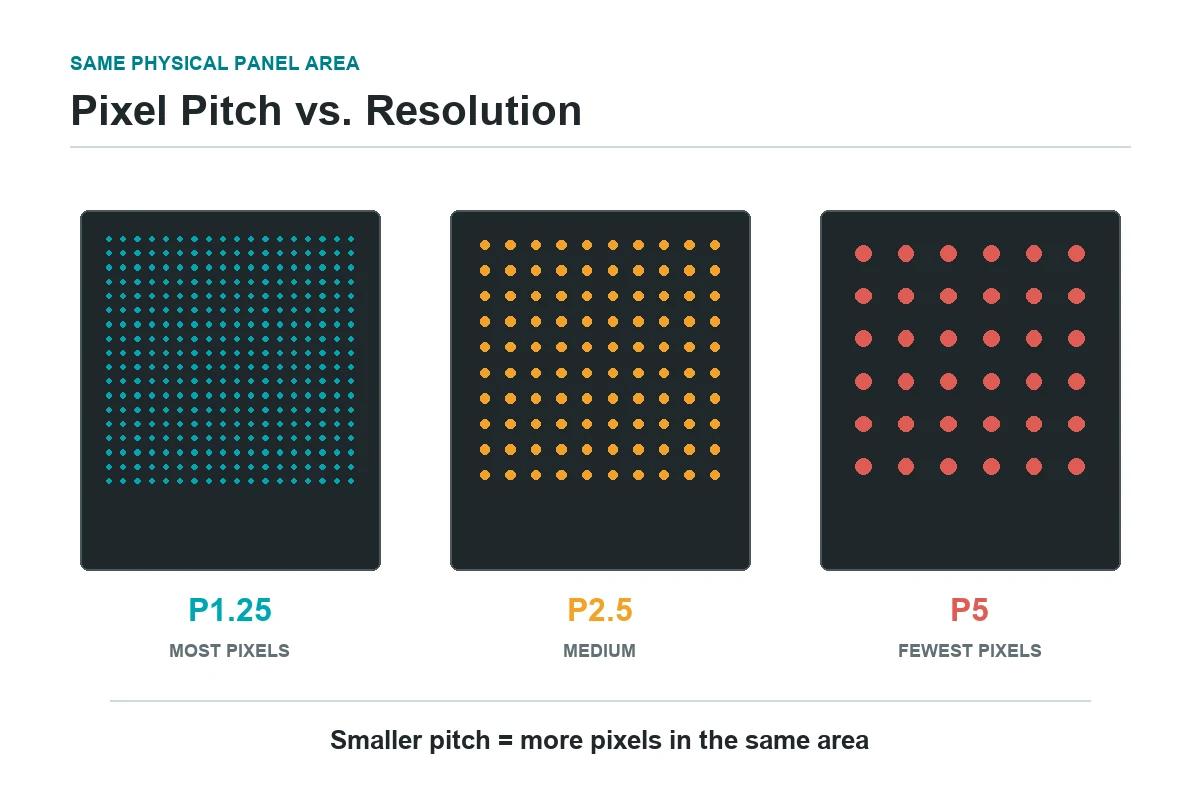
If two walls have the same physical dimensions, the wall with the smaller pitch has more pixels. If two walls have the same native resolution, the wall with the larger pitch is physically larger.
Consider an idealized 4.8 m x 2.7 m, 16:9 active area. The calculations below assume the dimensions are exactly buildable at each pitch; a real quotation must use the supplier's module and cabinet increments.
| Pixel pitch | Approx. horizontal pixels | Approx. vertical pixels | Approx. native format | What changes |
|---|---|---|---|---|
| P1.25 | 3,840 | 2,160 | 4K UHD | Highest density in this comparison |
| P2.5 | 1,920 | 1,080 | Full HD | Half the pixels on each axis vs. P1.25 |
| P5 | 960 | 540 | Quarter-FHD dimensions | Suitable only where content and distance tolerate fewer pixels |
This LED screen resolution relationship prevents a common specification error: asking for "P2.5 4K" without stating the required physical size. A native 3,840-pixel width at P2.5 requires an active width of 3,840 x 2.5 mm = 9,600 mm, before cabinet constraints are considered.
Smaller pitch also brings engineering trade-offs. Within the same area, it raises pixel count and can increase system complexity, processing load, power density, heat-management demands, calibration scope, and cost. Ask suppliers to quote the complete system, not only the LED panel square-meter price.
5. How to Calculate LED Screen Resolution
To calculate LED screen resolution, use millimeters throughout so physical dimensions and pixel pitch share the same unit.
Method 1: Calculate from finished active dimensions
For a planned screen 6,000 mm wide and 3,375 mm high at P2.5:
- Horizontal pixels:
6,000 / 2.5 = 2,400 - Vertical pixels:
3,375 / 2.5 = 1,350 - Native resolution:
2,400 x 1,350 - Total pixels:
2,400 x 1,350 = 3,240,000 - Screen aspect ratio:
2,400 / 1,350 = 16 / 9
The calculated LED screen resolution is exact, but the build may not be. If available modules do not combine into a 3,375 mm height, the supplier must adjust the active dimensions, select a different module/cabinet platform, or revise the target matrix.
Method 2: Calculate from modules or cabinets
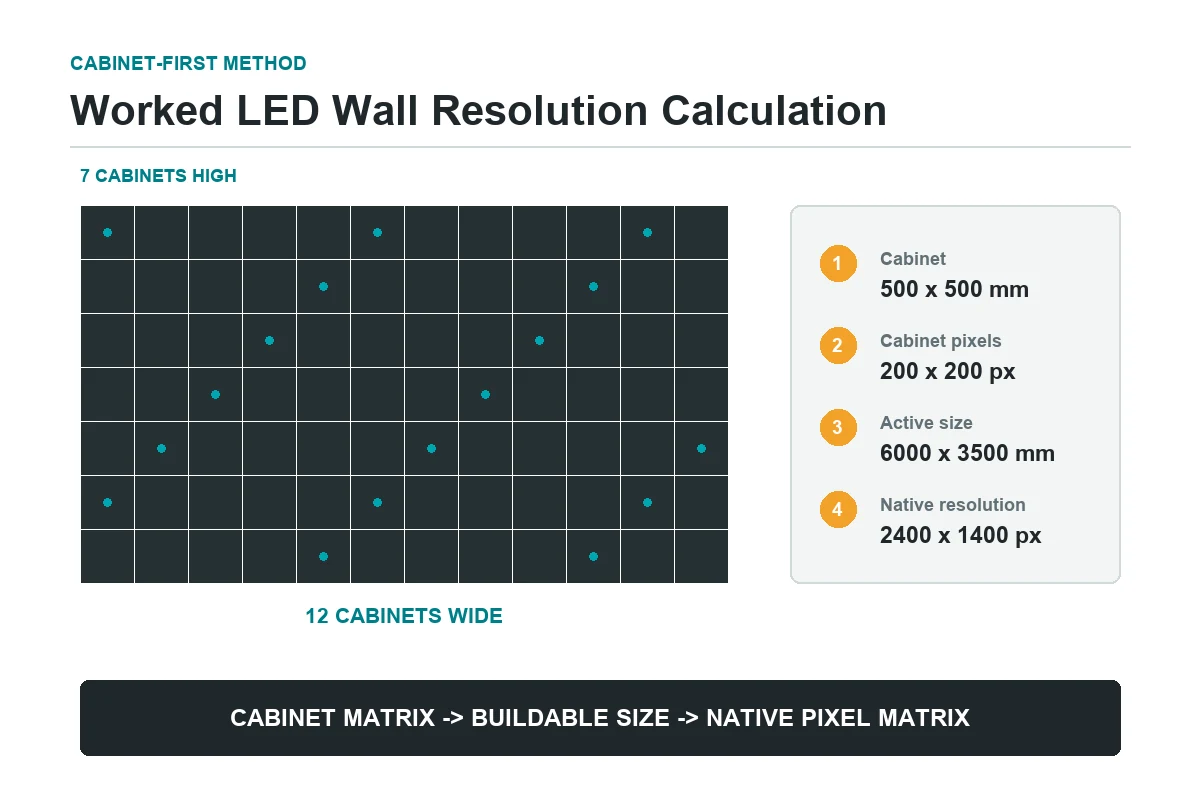
This is the safer procurement method because LED panels cannot be cut like drywall. Suppose one cabinet is 500 x 500 mm and contains 200 x 200 pixels. An array of 12 cabinets wide by 7 cabinets high produces:
| Calculation | Width | Height |
|---|---|---|
| Cabinet count | 12 | 7 |
| Active physical dimension | 12 x 500 = 6,000 mm | 7 x 500 = 3,500 mm |
| Native pixel dimension | 12 x 200 = 2,400 px | 7 x 200 = 1,400 px |
The finished wall is therefore 2,400 x 1,400 pixels, with a 12:7 screen aspect ratio, not 16:9. A content team can use the full native canvas, create a centered 16:9 area with reserved side or top/bottom zones, or revise the cabinet array.
This cabinet-derived LED screen resolution is the value the processor and content team must use.
Method 3: Calculate the physical size for a target raster
When the native target is fixed, reverse the formula:
active width = horizontal pixels x pixel pitch
active height = vertical pixels x pixel pitch
For Full HD at P1.875:
- Width:
1,920 x 1.875 mm = 3,600 mm - Height:
1,080 x 1.875 mm = 2,025 mm
Before treating that as the final size, verify that the selected product's module and cabinet dimensions can assemble a 3,600 x 2,025 mm active area.
Your supplier's resolution schedule should show module resolution, cabinet resolution, cabinet array, total active dimensions, total native resolution, total pixel count, and final aspect ratio. These values should reconcile mathematically.
6. What Factors Affect LED Screen Resolution?
Native resolution is created by physical geometry, but the right LED screen resolution target is governed by the complete use case.
| Factor | Effect on the decision | What to give the supplier |
|---|---|---|
| Closest viewing distance | Closer viewers can detect coarser pixel structure and need more pixel density | Minimum planned distance, not average distance |
| Active display size | Larger dimensions contain more pixels at the same pitch | Maximum and preferred active width/height |
| Content type | Small text, data, UI, and product detail need more pixels than bold scenic video | Representative native files and smallest critical text |
| Screen aspect ratio | Determines whether content fits, crops, scales, or leaves unused pixels | Master canvas ratio and zoning plan |
| Cabinet/module geometry | Constrains buildable dimensions and exact pixel matrix | Approved product family and orientation |
| Processor and signal path | Limits accepted inputs, output canvas, layer handling, and mapping | Source formats, frame rates, redundancy, HDR needs, and number of feeds |
| Camera use | Pixel pitch, refresh behavior, scan design, shutter settings, and moire risk interact | Camera positions, lenses, frame rates, and shutter ranges |
| Budget and lifecycle | Finer pitch changes both capital cost and service complexity | Budget range, warranty expectations, spare-parts plan |
Content resolution is not wall resolution
A media server may output 3,840 x 2,160 while the physical LED screen resolution is 2,400 x 1,350. The processor maps and scales that source to the physical pixels. Conversely, sending a 1,920 x 1,080 image to a 4K wall does not reveal genuine 4K detail; it enlarges the existing information.
Processing must be checked by exact pixel load
Before selecting a video processor, do not approve it merely because its brochure says "supports 4K." Confirm the required input formats, maximum input and output dimensions, total load, layer limits, scaling behavior, color depth, frame rate, redundancy, and port mapping against the proposed wall. Product capabilities differ and should be verified on the current manufacturer data sheet.
Serviceability can outweigh a marginal resolution gain
A technically denser product is not automatically the better procurement choice. Module availability, front or rear access, cabinet compatibility, spare parts, calibration after replacement, power distribution, environmental protection, and supplier support all affect the wall's useful life.
7. Resolution and Viewing Distance
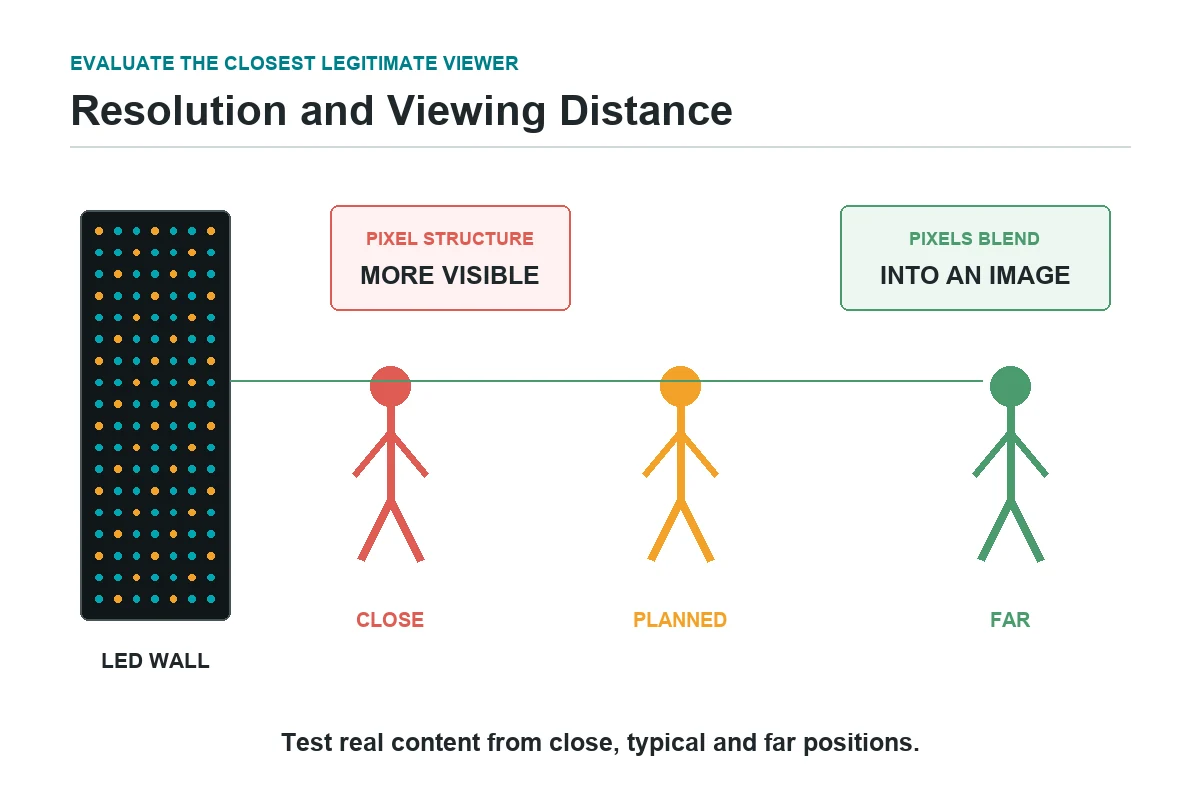
Viewing distance determines whether additional LED screen resolution produces a visible benefit. A close viewer sees the gaps and structure between pixels more readily; from farther away, neighboring pixels blend into a continuous image.
There is no universal distance multiplier that guarantees the right pitch for every project. Visual acuity varies, and text, contrast, motion, camera capture, ambient light, and acceptable image quality change the result. Manufacturer rules such as "minimum distance in meters roughly equals pitch in millimeters" can be useful for early budgeting, but they are not acceptance criteria.
| Viewing situation | Resolution priority | Evaluation method |
|---|---|---|
| Executive boardroom or control room | Very high; viewers inspect text and data at close range | Test the smallest real text and thinnest chart line at the closest seat |
| Retail product wall | High where shoppers approach the display | Preview product imagery and typography from the closest aisle position |
| Stage or house of worship | Balanced; first rows and camera positions both matter | Check first-row sightline and camera tests, not only audience average |
| Outdoor billboard | Moderate pixel density may be sufficient at long range | Evaluate legal viewing zones, dwell time, message size, brightness, and distance |
| Broadcast or virtual production | Native resolution is only one constraint | Conduct camera, moire, refresh, scan, color, and genlock tests |
For a defensible specification, conduct a sample-panel test with representative content. Observe it from the minimum, typical, and maximum viewing positions. If cameras are involved, record the panel using the planned camera bodies, lenses, frame rates, shutters, and angles. A photograph from a phone is not a substitute for the production-camera test.
Use that test to confirm whether the proposed LED screen resolution is useful at each planned position.
8. How to Choose the Right LED Screen Resolution
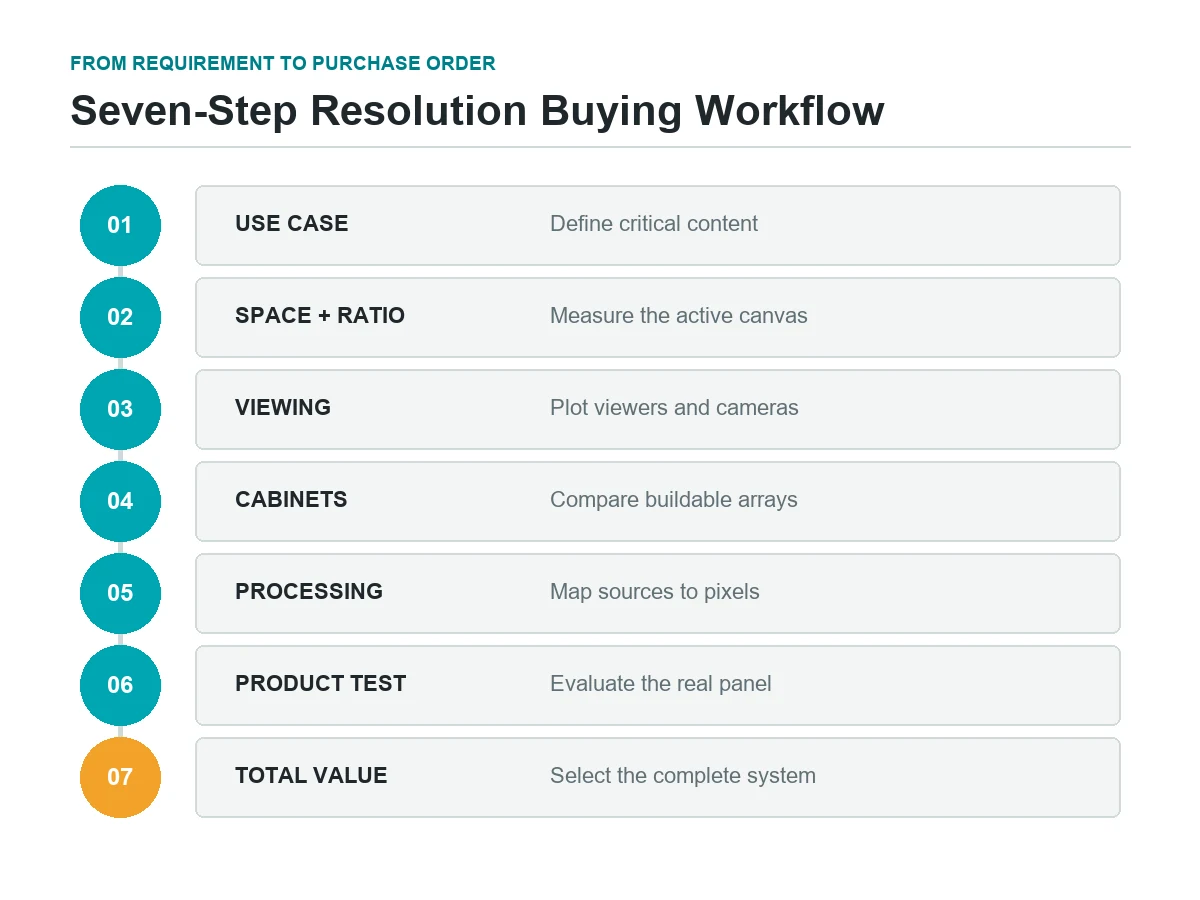
Use this sequence to select LED screen resolution before requesting final quotations.
1. Lock the use case and acceptance content
State what the wall must display: presentation slides, dashboards, advertising video, IMAG, virtual-production plates, or a mix. Collect representative files, including the smallest text and most detailed visuals. "Plays 4K video" is not an acceptance requirement; "shows this dashboard legibly from the closest operator seat" is.
2. Measure the space and define the canvas
Use a disciplined LED screen size planning process to record the available wall area, structural limits, service access, and desired active display dimensions. Choose a screen aspect ratio based on both the architecture and the content workflow. If the space forces a custom ratio, decide how standard assets will be zoned or reformatted.
3. Establish closest viewing and camera positions
Use the nearest legitimate viewer, not the average audience location. Plot fixed cameras and likely handheld positions. This defines the range of pixel pitches worth testing.
4. Compare buildable cabinet arrays
Ask each supplier for at least two technically suitable configurations. Require exact cabinet count, physical dimensions, pixel pitch, native matrix, total pixels, power estimates, weight, access method, and processor mapping. Reject proposals that show only diagonal size, pitch, and a marketing resolution name.
5. Match the native matrix to content and processing
An exact 16:9 raster is helpful when most sources are standard video, but exact FHD or 4K is not mandatory for every LED wall. Scaling can work well when it is planned. Confirm whether the production team will create content at the wall's native resolution or feed a standard canvas through a processor.
6. Test the actual product
Use a representative panel, current firmware, intended processor, and real content. Inspect text edges, gradients, dark scenes, motion, off-axis viewing, seams, reflections, and camera behavior. Record agreed settings so the factory acceptance test and site acceptance test use the same baseline.
7. Select on total value, not pixel count alone
Score the compliant options across image quality, system reliability, serviceability, product continuity, warranty, spare modules, power and cooling implications, installation method, and price.
| Buyer priority | Favor this direction | Do not assume |
|---|---|---|
| Close-view text and dashboards | Smaller pitch, more native pixels, tested font sizes | 4K input automatically means 4K visible detail |
| Standard corporate video | A build near 16:9 and a clean FHD or UHD workflow | Every custom cabinet array will land on exact 16:9 |
| Long-distance outdoor advertising | Pitch justified by distance, message design, and brightness needs | Finer pitch always improves campaign performance |
| Camera-critical production | Tested panel/processor/camera combination | Resolution alone prevents moire or scan artifacts |
| Architectural canvas | Buildable geometry plus a native content template | Standard landscape video will fill an unusual shape gracefully |
Before issuing a purchase order, ask for a signed resolution schedule and pixel map. That single document aligns the LED manufacturer, integrator, processor programmer, content studio, structural team, and end user around the same physical and digital canvas.
The approved LED screen resolution should appear on both the signed schedule and the pixel map.
9. FAQs
What is the best LED screen resolution?
There is no single best LED screen resolution. The correct native matrix is the one that makes critical content legible at the closest viewing position, fits the available structure, maps cleanly through the processor, and stays within the lifecycle budget. For standard video, exact Full HD or 4K can simplify production, but a custom matrix can be equally effective with a planned content workflow.
Is a 4K LED screen always better than a 1080p LED screen?
No. A 4K wall contains four times as many pixels as a 1,920 x 1,080 wall, but viewers may not perceive the difference at a long distance. The 4K system also needs an end-to-end workflow capable of supplying and processing that detail. Compare the two using real content at the actual viewing positions.
How do I calculate LED screen resolution from pixel pitch?
Divide the active width and height in millimeters by the pixel pitch in millimeters. A 5,000 x 3,000 mm P2.5 active area yields 2,000 x 1,200 pixels in principle. Then verify the result against the product's module and cabinet increments, because the theoretical dimensions may not be buildable.
Does a smaller pixel pitch mean higher resolution?
For two screens with the same active dimensions, yes: the smaller-pitch screen contains more pixels. Across screens of different sizes, pitch alone cannot tell you the resolution. You need pitch plus active width and height, or the cabinet pixel matrix and array count.
What screen aspect ratio should an LED wall use?
Use 16:9 when most content is standard presentation or video and the space permits it. Choose an ultra-wide, portrait, or architectural ratio when the use case benefits from that shape, but provide a native content template and rules for placing standard assets. The most important requirement is agreement between physical canvas and content canvas.
Can a custom-resolution LED wall display 1080p or 4K content?
Yes. A suitable video processor can scale, crop, or map standard content onto a custom native matrix. Decide whether to preserve the full source with bars, crop it to fill, stretch it, or place it within designed zones. Stretching is rarely appropriate because it distorts geometry.
What is the difference between QHD and 4K for LED displays?
QHD is 2,560 x 1,440, while 4K UHD is 3,840 x 2,160. Both usually use a 16:9 ratio, but 4K UHD has 2.25 times the pixels of QHD. That difference affects detail, processor load, source requirements, and cost; it does not change the canvas shape.
Does higher LED screen resolution increase processing requirements?
Yes. More pixels increase the amount of image data the system must receive, map, process, and transmit. Exact limits depend on the processor, frame rate, color depth, layer count, and redundancy design. Verify the complete proposed configuration against current manufacturer specifications rather than relying on a generic "4K-compatible" label.
What resolution information should an LED supplier include in a quotation?
Request module and cabinet pixel dimensions, cabinet quantity and arrangement, finished active dimensions, pixel pitch, native horizontal and vertical resolution, total pixel count, final aspect ratio, processor and port mapping, source format assumptions, and any scaling or unused-pixel strategy. The numbers should reconcile across drawings, bills of materials, and technical proposals.
10. Conclusion: Choosing the Right LED Screen Resolution
Choosing LED screen resolution is a geometry and workflow decision before it is a marketing-label decision. Native pixels come from active dimensions divided by pixel pitch, then constrained by the modules and cabinets that can actually be assembled. The screen aspect ratio determines how the finished canvas relates to the content.
Start with the closest viewer, critical content, available space, and camera requirements. Compare buildable configurations, verify the processor path, and test a representative panel. The right LED screen resolution is not the largest number on a proposal; it is the configuration that meets the visual requirement without adding pixels, complexity, and cost that the audience cannot use.
For procurement, issue a content sample and viewing-position plan with the request for quotation, then require every bidder to return the same resolution schedule. That makes technical and commercial comparisons far more reliable.
 LED Screen Aspect Ratio: A Complete Guide to 16:9, 4:3 and More
 4K UHD vs QLED: Which Is Better for LED Display Buyers?