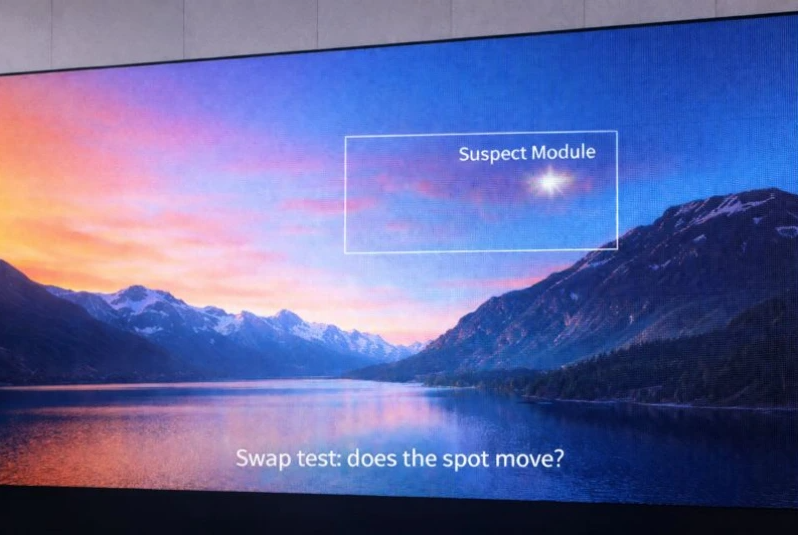
White spots on LED display equipment usually point to one of four faults: an overdriven or failed LED package, a driver IC or control-path problem, moisture at the module or PCB, or an aging or physically damaged module. On a modular LED screen, a powered-down module-swap test is the fastest way to separate a bad module from a cable, receiving card, or power fault.
If the bright area moves with the module, replace or repair that module. If it stays in the same cabinet position, inspect the ribbon cable, receiving card, hub board, and power path for that slot. This distinction prevents unnecessary full-screen replacement and turns white spots on LED display systems into a controlled diagnosis.
Table of Contents
1. What White Spots on LED Display Mean
White spots on LED display surfaces are pixels or areas that appear brighter, paler, or cloudier than the surrounding image. A single sharp dot usually belongs to one pixel or LED package. A small rectangular cluster often follows a driver channel or circuit group. A soft patch near a cabinet edge is more consistent with moisture, surface contamination, optical aging, or physical stress.
01. LED display white spots vs LCD white spots
Google Search Console shows that people also use phrases such as LCD white spot, white spot on screen, and monitor white spots. Those searches are related, but the hardware is different. A modular direct-view LED display produces the image with individual red, green, and blue LED packages mounted on replaceable modules. An LCD monitor or LED-backlit TV uses a liquid-crystal panel, optical films, and a separate backlight.
Therefore, a module-swap test is suitable for white spots on LED display cabinets but not for an LCD monitor or television. If your device is a thin consumer monitor or TV rather than a cabinet-based LED video wall, follow its service manual and do not open the panel. This guide uses screen white spot and white spot on display only to explain the difference, not to suggest that all display technologies use the same repair.
02. White spots vs dead pixels, black spots, and flicker
| Visible symptom | Typical appearance | Likely LED-display area | First check |
|---|---|---|---|
| White spot | Bright dot or pale patch | LED package, driver IC, module surface, power path | Display a solid test pattern and mark the module |
| Dead pixel | Tiny dark point on every image | LED package or solder connection | Compare red, green, blue, white, and black patterns |
| Black spot | Dark dot, line, or block | LED, driver channel, data cable, or module | Use the black spots on display guide |
| Flicker | Brightness changes over time | Signal, refresh configuration, cable, or unstable power | Check whether the fault changes with content or temperature |
03. Why the shape and location matter
- One bright pixel: suspect an LED package, solder joint, or one driver output.
- A row, column, or repeated cluster: suspect a driver IC, hub path, ribbon cable, or configuration issue.
- A cloudy patch: inspect the module surface, mask, encapsulation, moisture path, and cabinet seal.
- The same area on several modules: inspect shared power, receiving-card output, and cabinet wiring.
- An edge or corner patch after rain: treat it as possible ingress until inspection proves otherwise.
Mapping the shape before touching hardware is the first reliable step when diagnosing white spots on LED display installations.
In practice, white spots on LED display screens become easier to classify when the same test pattern, camera position, and cabinet map are used at every inspection.
2. Quick Diagnosis for White Spots on LED Display
Start with observation, not replacement. Photograph the screen from the normal viewing distance and again close enough to identify the affected cabinet and module. Record the content being shown, ambient conditions, and whether the symptom appeared after rain, cleaning, transport, maintenance, or a power event.
| What you see | Most likely area | Safe first action | Urgency |
|---|---|---|---|
| One stable bright dot | LED package or driver output | Run solid-color test patterns and locate the module | Plan repair |
| Bright group of pixels | Driver IC, hub path, or module circuit | Compare the same position on adjacent modules | Prompt inspection |
| Cloudy patch after rain or washing | Seal, mask, PCB, or moisture path | Power down and arrange an ingress inspection | Urgent |
| White spots across multiple cabinets | Power, receiving card, calibration, or signal | Check whether affected cabinets share a source | System diagnosis |
| Spot disappears after controller restart | Temporary signal or control state | Save logs and monitor for recurrence | Monitor |
01. The module-swap decision test
The module-swap test is the most useful isolation method for white spots on LED display systems that support front or rear module service. It should be performed only by trained personnel, with the display de-energized and the manufacturer’s maintenance procedure available.
A consistent swap method also prevents white spots on LED display equipment from being confused with a temporary content, mapping, or calibration issue.
- Show a solid white, red, green, blue, and black pattern. Confirm that the fault stays in the same physical location.
- Identify the exact cabinet, module, and connector position. Photograph the cable routing before removal.
- Shut down the display, isolate power, and verify that stored or hazardous energy is controlled.
- Swap the suspected module with a known-good matching module from another position.
- Reconnect the screen exactly as documented, restore power, and repeat the same test patterns.
The safety reason for the powered-down step is not cosmetic. The U.S. Occupational Safety and Health Administration explains that unexpected startup or stored-energy release during servicing can cause serious injury, and it describes lockout/tagout as the control method for hazardous energy. Follow the applicable local rules and your manufacturer’s procedure; see the OSHA hazardous-energy overview for the underlying principle.
| Swap result | Meaning | Next action |
|---|---|---|
| The white spot moves with the module | The fault is on that module | Repair or replace the matching module, then calibrate if required |
| The white spot stays in the original position | The module is not the only suspect | Inspect the ribbon cable, hub board, receiving-card output, and power branch |
| The fault changes shape or becomes intermittent | A connection or control fault is likely | Stop repeated swaps and inspect connectors, logs, and configuration |
02. What not to do during diagnosis
- Do not press the LED surface, scrape the mask, or apply cleaning fluid to a powered screen.
- Do not use a hair dryer or high-temperature heater on a wet module.
- Do not hot-swap modules unless the manufacturer explicitly supports that procedure.
- Do not mix pixel pitch, scan mode, LED batch, connector layout, or calibration data.
- Do not keep energizing a screen when a wet patch is spreading or an electrical smell is present.
3. 7 Causes of White Spots on LED Display
01. Failed or over-bright LED package
An LED package can fail dark, but it can also remain partly or fully on when the surrounding pixels dim. On a test pattern, a package-level problem usually stays confined to one pixel or one color channel. White spots on LED display modules may look white only because multiple color channels are being driven together or because the point is much brighter than the image around it.
02. Driver IC or pixel-control fault
Constant-current driver ICs regulate LED output. A failed output, control signal, or nearby component can create an over-bright pixel group, row, or repeated pattern. Fault detection is a real driver-design function, not a guess: Analog Devices describes the MAX6979 as a constant-current LED driver with a watchdog and open-circuit LED fault reporting. Its MAX6979 technical overview illustrates why driver and interface checks belong in the diagnosis of white spots on LED display systems.
03. Moisture or liquid ingress
Water can reach the module face, connectors, PCB, power supply, or receiving-card area through a damaged seal, blocked drain, loose fastener, cable entry, or improper cleaning. The resulting symptom may be a cloudy patch, corrosion, unstable brightness, or a fault that expands after humid weather.
Ingress protection should be read as a tested enclosure rating, not as a promise that every installation remains waterproof forever. The International Electrotechnical Commission states that IEC 60529 IP ratings grade an enclosure’s resistance to dust and liquids. Installation details, aging seals, opened cabinets, and maintenance quality still matter when preventing white spots on LED display installations.
04. Power-supply, grounding, or connector problem
A loose DC connection, damaged cable, poor grounding path, unstable output, or overloaded branch can alter brightness or cause several modules to behave abnormally. If white spots on LED display cabinets share one power supply or appear together after a power event, measure the branch under load and compare it with the manufacturer’s limits. This work belongs to qualified personnel.
05. Module aging and optical mismatch
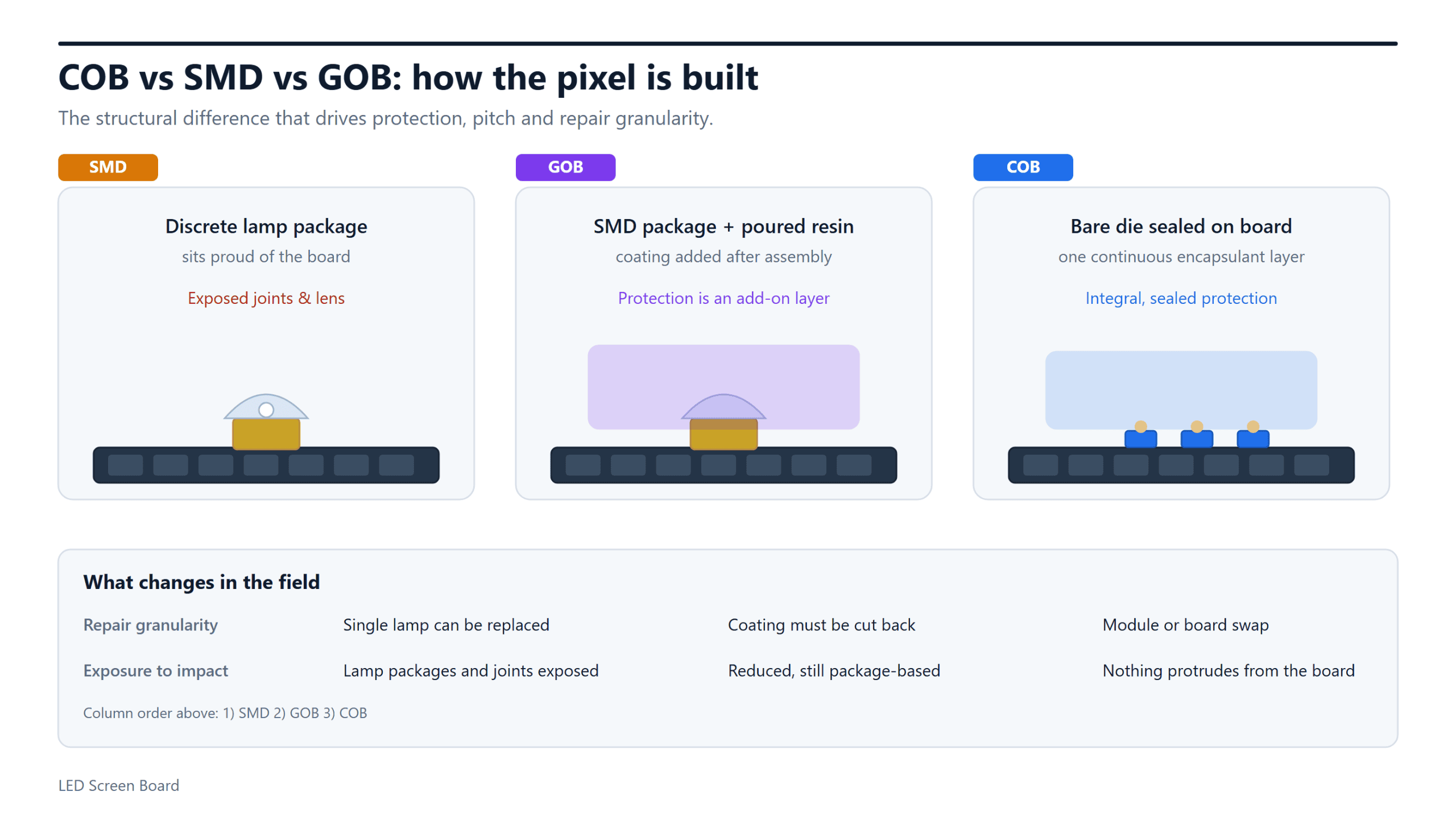
LED output, encapsulation, mask condition, and color uniformity change with operating time, temperature, and environment. A replacement from a different production batch may also look like a pale rectangle even when it is electrically healthy. Match the module specification and calibration data; the site’s LED module overview explains the replaceable unit, while the SMD vs COB module comparison shows why package construction matters.
06. Physical impact, pressure, or handling damage
Rental handling, a dropped tool, incorrect suction force, or contact with the LED face can damage packages and solder joints. The failure may appear immediately or become intermittent as the module heats. Inspect the mask, LEDs, and connector area around the impact point before blaming the controller.
07. Configuration, signal, or calibration error
Not every bright region is a hardware failure. Incorrect receiving-card parameters, wrong mapping, corrupted calibration coefficients, a loose data cable, or a controller state can create brightness blocks or repeated patterns. If the symptom changes with a restart, source, or configuration file, preserve the working configuration before changing settings.
That is why white spots on LED display systems should be diagnosed across both the physical module path and the saved control configuration.
4. How to Troubleshoot White Spots on LED Display
01. Capture a repeatable baseline
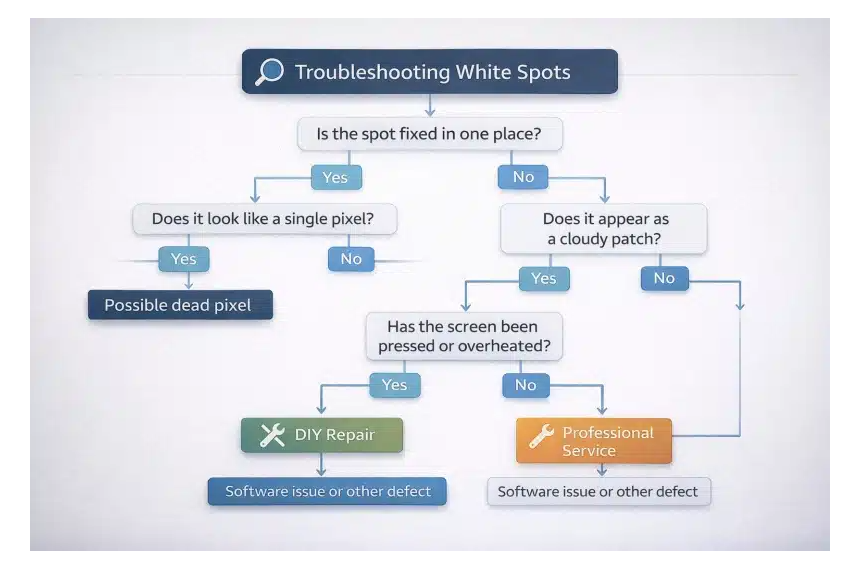
Photograph white spots on LED display screens with the same content, brightness, camera position, and ambient light. Use full-screen red, green, blue, white, gray, and black patterns. A point that is visible on every pattern is more likely to be physical or electrical; a region that appears only on certain content may be signal, processing, or calibration related.
02. Map the fault to the LED-display architecture
Mark the cabinet, module row and column, ribbon-cable path, hub port, receiving-card output, and power branch. This map is more useful than a close-up photo alone. The LED screen resolution guide also helps technicians relate pixel pitch, module resolution, and total screen mapping.
03. Separate module, signal, and power causes
| Test | Module fault signal | Signal/control fault signal | Power/environment signal |
|---|---|---|---|
| Solid-color patterns | Same pixel or cluster remains abnormal | Pattern follows mapping or data group | Several modules vary together |
| Controller restart | No change | Fault clears or changes | May return under load |
| Module swap | Spot moves | Spot stays in slot | Multiple slots on one branch remain abnormal |
| Weather history | No clear link | No clear link | Starts or spreads after rain, condensation, or cleaning |
04. Escalate when the evidence points beyond one module
Stop module replacement if the white spot stays in place, several cabinets share the symptom, connectors show heat damage, or moisture is visible inside the cabinet. At that point, a technician should inspect voltages under load, grounding, data paths, receiving-card logs, connectors, and enclosure integrity. Repeated trial-and-error swaps can create new faults and erase useful evidence.

5. How to Fix White Spots on LED Display
01. Replace or repair the affected module
If white spots on LED display modules move during the swap test, repair or replace the identified module. Match pixel pitch, cabinet model, scan method, connector layout, LED package, electrical specification, and production batch when possible. After installation, load the correct calibration data and compare brightness at normal viewing distance.
02. Repair the fixed cabinet path
If the fault remains in the original position, inspect the ribbon cable, hub board, receiving-card output, connectors, and power feed for that slot. Replace only the part confirmed by measurement or substitution. A new module will not solve white spots on LED display systems when the upstream path continues to send incorrect data or power.
03. Address moisture before cosmetic symptoms
For moisture-related white spots on LED display cabinets, de-energize the affected area and have a qualified technician inspect the ingress path. The repair may require cleaning corrosion, replacing connectors or modules, restoring seals, correcting drainage, and testing the enclosure. Drying the visible face without fixing the entry path only hides the cause.
04. Restore configuration and calibration carefully
When the issue is configuration-related, restore a verified receiving-card file and the correct mapping rather than experimenting on the live screen. Back up the current working data before any change. Recalibration can correct a healthy replacement module that looks like a pale block, but it cannot repair a failed LED package or corroded circuit.
05. Know when professional service is required
Professional service is appropriate when white spots on LED display equipment spread, follow a rain or power event, affect several cabinets, return after restart, or involve burned connectors, odor, heat, visible corrosion, or exposed mains wiring. OSHA’s hazardous-energy guidance is especially relevant here: trained personnel and an energy-control procedure are required for safe service, not simply a software shutdown.
6. How to Prevent White Spots on LED Display
01. Inspect seals, drains, and cable entries
For outdoor installations, add cabinet seals, gaskets, doors, vents, drains, and cable glands to the maintenance checklist. Inspect after severe weather and after any cabinet has been opened. EagerLED’s LED display module waterproof test provides related first-party context, while IEC 60529 explains what the enclosure IP code measures.
02. Keep power and grounding within specification
Use the specified supplies, cable sizes, connectors, protection devices, and grounding design. Log recurring undervoltage, overvoltage, temperature, and overload events where monitoring is available. Stable electrical conditions reduce stress that can contribute to white spots on LED display modules and driver circuits.
03. Control cleaning and storage
Use only manufacturer-approved cleaning methods. Do not spray liquid directly into seams, use aggressive solvents on masks or encapsulation, or store damp rental modules in closed cases. Let transported equipment acclimate before energizing when temperature change could create condensation.
04. Keep matched spare modules and records
Store labeled spare modules from the same batch when possible, along with calibration data, cabinet maps, configuration backups, maintenance dates, and fault photos. These records make white spots on LED display systems faster to isolate and reduce the risk of installing an electrically compatible but visibly mismatched module.
05. Use a practical inspection schedule
| Interval or event | Inspection | Record |
|---|---|---|
| Before each rental deployment | Test patterns, connectors, module locks, impact damage | Cabinet and module fault map |
| Routine site inspection | Brightness uniformity, seals, drains, fans, abnormal heat | Photos under the same test pattern |
| After severe weather or washing | Ingress paths, door seals, cable glands, moisture indicators | Affected cabinet and weather event |
| After repair or module replacement | Calibration, color uniformity, fasteners, cable routing | Part number, batch, position, and technician notes |
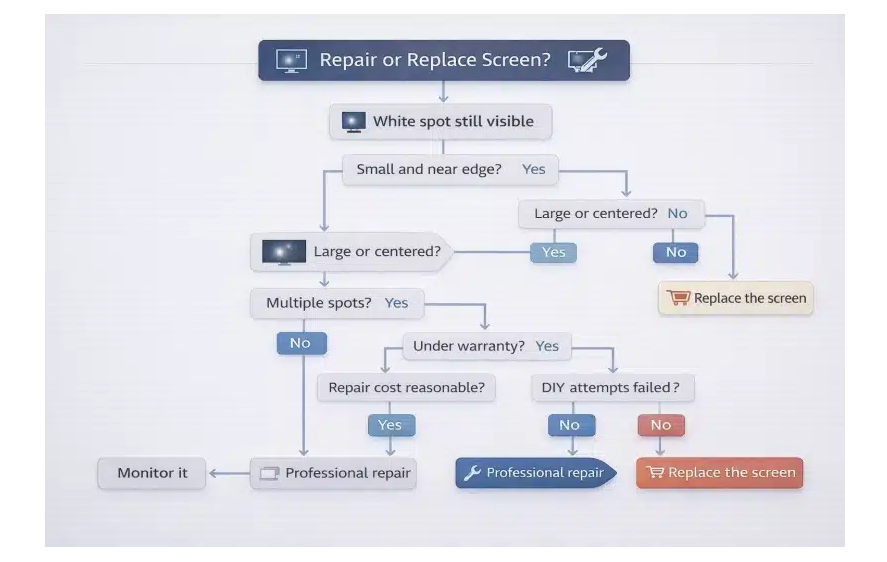
7. Repair or Replace an LED Display With White Spots?
Most isolated white spots on LED display screens do not justify replacing the whole display. Modular construction exists so that a module, receiving card, cable, hub board, or power supply can be serviced independently. Replacement becomes reasonable when failures are widespread, matching parts are unavailable, structural or moisture damage crosses many cabinets, or repeated repairs exceed the operational value of the screen.
| Situation | Recommended path | Why |
|---|---|---|
| One stable spot on one module | Repair or replace the module | Fault is localized and parts are serviceable |
| Spot stays in one cabinet slot | Repair cable, hub, receiving card, or power path | Replacing the module alone will not remove the cause |
| Several wet or corroded modules | Repair ingress and replace affected parts | Both source and damage must be corrected |
| Many mismatched or aging modules | Compare batch replacement with a new display | Uniformity and parts availability may dominate cost |
| Recurring multi-cabinet electrical faults | Complete system assessment | The root cause may be infrastructure, not modules |
01. What determines repair cost
The cost of fixing white spots on LED display equipment depends on pixel pitch, module and LED batch, spare-part availability, access method, cabinet location, labor, calibration, shipping, and whether water or electrical damage extends beyond the visible spot. Ask for a diagnosis by component, not only a single total price.
02. Information to send your supplier
- Full-screen and close-up photos using solid test patterns.
- Screen model, pixel pitch, cabinet and module dimensions, and serial details.
- The exact cabinet and module position.
- Whether the spot moves during a powered-down module swap.
- When the fault started and whether rain, cleaning, transport, repair, or a power event preceded it.
- Whether the area is stable, intermittent, growing, warm, wet, or accompanied by odor.
8. FAQs About White Spots on LED Display
01. Why does my LED display have white spots?
The usual causes are a failed or over-bright LED package, a driver IC or control-path fault, moisture, unstable power, physical damage, module aging, or incorrect configuration. Start with solid-color patterns and a powered-down module-swap test to separate a module fault from a fixed cabinet-path fault.
02. Can white spots on LED display screens disappear by themselves?
A temporary signal state may clear after a controller restart, but a failed LED, damaged driver circuit, corroded connector, or aging module normally does not repair itself. If a patch changes after rain or condensation, power down the affected area and arrange an inspection instead of waiting for it to dry while energized.
03. Can I replace only one LED module?
Yes, when the module-swap test confirms a module-level fault and a matching replacement is available. Match pixel pitch, electrical specification, connector layout, scan method, LED batch, and calibration data. A mismatched but working module can still appear as a bright or pale rectangle.
04. How much does it cost to fix white spots on LED display equipment?
Cost depends on the failed component, pixel pitch, module batch, spare-part availability, screen access, labor, calibration, shipping, and the extent of moisture or electrical damage. One confirmed module replacement is generally a smaller job than multi-cabinet ingress or power-system repair.
05. Can moisture cause white spots on LED display cabinets?
Yes. Moisture can affect the module surface, PCB, connectors, hub board, receiving card, or power area and may create cloudy patches, corrosion, or unstable brightness. Treat a patch that appears or spreads after rain, washing, or condensation as urgent until the enclosure and affected electronics are inspected.
06. Is an LCD white spot the same as a white spot on a modular LED display?
No. A modular direct-view LED screen uses replaceable LED modules, while an LCD monitor or LED-backlit TV uses a liquid-crystal panel, optical layers, and a separate backlight. The module-swap procedure in this guide does not apply to consumer LCD panels; use the device manufacturer’s service guidance.
For related purchasing, operation, and maintenance questions, see the EagerLED LED screen FAQs.
9. Final White-Spot Action Checklist
- Confirm that the equipment is a modular direct-view LED display, not an LCD monitor or TV.
- Run repeatable solid-color patterns and photograph the fault.
- Map the exact cabinet, module, signal path, and power branch.
- Power down and follow the approved hazardous-energy control procedure.
- Use a matching known-good module for the swap test only if trained and authorized.
- If the spot moves, repair or replace the module; if it stays, inspect the fixed cabinet path.
- Escalate immediately for spreading moisture, heat, odor, corrosion, or multi-cabinet faults.
- Record the repair, replacement batch, calibration, and final test result.
White spots on LED display installations are usually repairable once the fault is isolated correctly. The key is to identify whether the symptom follows the module, stays with the cabinet path, or appears across a shared power or signal group. If you need help interpreting the test results, send clear photos and the screen details to the EagerLED technical team before replacing parts.
Documenting the final cause of white spots on LED display equipment gives the next inspection a verified baseline and helps prevent the same fault from returning.
 Black Spots on LED Display: 5-Step Diagnosis and Fixes
 Jumbotron Price Guide 2026: Costs by Size and Venue