The NovaStar MCTRL660 Pro is an independent LED display controller with HDMI 1.4a, single-link DVI and 3G-SDI inputs, six Gigabit Ethernet outputs and two 10G optical ports. NovaStar lists a 1920 × 1200 at 60 Hz loading capacity, while its 10-bit/12-bit 4:4:4 input specification is up to 1920 × 1080 at 60 Hz. Check the intended signal format before ordering.
For rental teams and LED integrators, the NovaStar MCTRL660 Pro is worth considering when fiber transmission, flexible mapping and configuration recovery matter. It is a sending controller, so plan the source, any required scaling, receiving cards and screen cabling as a complete system. This guide separates manufacturer specifications from practical purchasing and commissioning checks.
Key takeaways: Confirm the PRO model on the quotation; calculate screen pixels before allocating ports; match optical equipment at both ends; and test the actual content, receiving cards and backup route before handover.
Technical references: NovaStar official MCTRL660 PRO specifications. Calculations below are planning examples, not measured installation results or performance guarantees.
1. Why the NovaStar MCTRL660 Pro Stands Out
The NovaStar MCTRL660 Pro combines several professional signal interfaces in one sending controller. A computer or media server supplies the video; the controller distributes the mapped image to compatible receiving cards inside the LED cabinets. Understanding these roles prevents a common buying mistake: expecting the controller alone to create, schedule or resize every type of content.
Searches such as “MCTRL660 Pro”, “NovaStar 660 Pro” and “NovaStar MCTRL 660 Pro” generally refer to this product. A quotation that says only “MCTRL660” needs clarification. Similar names do not establish matching connectors, firmware or feature support. Require a photograph of the model label and rear panel when comparing offers.
For the NovaStar MCTRL660 Pro, the useful purchasing question is whether its input formats and output layout match your project. Six network ports can simplify cabinet grouping, but the port count is not permission to ignore the published total capacity. Optical ports change the transmission route; they do not automatically create additional independent image capacity.
Start with a screen drawing and the LED control system architecture. List the source resolution, cabinet pixel dimensions, receiving-card model, cable distances and recovery requirements. This gives a supplier enough information to propose a verifiable system instead of recommending equipment from screen width alone.
2. Key features of NovaStar MCTRL660 Pro
01. Six Gigabit Ethernet Outputs
The NovaStar MCTRL660 Pro provides six Gigabit Ethernet outputs for cabinet data distribution. Allocate cabinets by pixel load and physical cable sequence. An equal cabinet count is useful only when cabinet resolutions are equal. Label every output and document the first cabinet on each chain so that the connection drawing can be checked during installation.
02. Dual 10G Fiber Outputs
The two 10G optical ports on the NovaStar MCTRL660 Pro support optical transmission workflows. Specify compatible optical modules, fiber type, connectors and equipment at the receiving end. A port marked 10G does not mean an arbitrary network transceiver or switch will work. Ask the supplier to confirm the complete link, including its supported distance and optical budget.
03. Flexible Working Modes
The NovaStar MCTRL660 Pro supports sending-card and fiber-converter operation. In the first role it receives video and sends LED display data; in the second it serves the electrical/optical transmission path. Mark the intended mode on the system drawing. A correct cable connection can still produce no image if the equipment is operating in the wrong mode.
04. Image Mirroring and Rotation
NovaStar describes mirroring and rotation for single or dual ports. For a portrait wall or creative stage, verify the exact transformation, software workflow and receiving-card compatibility before designing the content canvas. The NovaStar MCTRL660 Pro should be tested with a numbered grid and directional arrows, because symmetric artwork can conceal a reversed cabinet or incorrect orientation.
05. Independent RGB Gamma Adjustment
Independent RGB gamma adjustment is specified for 10-bit or 12-bit sources. Gamma controls the relationship between incoming values and displayed brightness; it does not replace cabinet calibration. On a NovaStar MCTRL660 Pro installation, first verify the receiving-card configuration and calibration data, then assess dark gradients, neutral grays and white balance using representative content.
06. High Bit Depth Input
The NovaStar MCTRL660 Pro supports 10-bit/12-bit RGB 4:4:4 and YCbCr 4:4:4 input up to 1920 × 1080 at 60 Hz, according to NovaStar official MCTRL660 PRO specifications. Keep this condition separate from the 1920 × 1200 at 60 Hz loading figure. A source, converter or receiver that reduces precision can limit the benefit of a higher-bit-depth workflow.
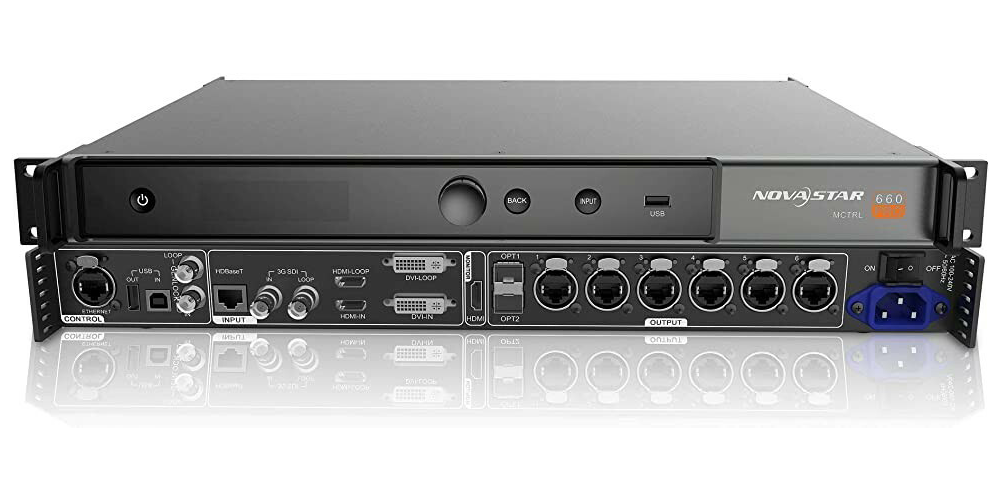
3. Best Use Cases for the NovaStar MCTRL660 Pro
Choose the NovaStar MCTRL660 Pro by the signal workflow and acceptance criteria. Venue size alone does not determine controller suitability. A small, fine-pitch screen can contain more pixels than a much larger coarse-pitch display. Compare actual pixel dimensions and the requirements of the people operating the system.
| Application | Why it may fit | Confirm before purchase |
|---|---|---|
| Rental and live events | Reusable mapping and configuration recovery | Cabinet inventory, setup time and tested recovery plan |
| Advertising and signage | Continuous video distribution from a connected source | Separate playback scheduling and remote service arrangements |
| Broadcast and studios | 3G-SDI input and high-bit-depth options | Camera test, source format and total system delay |
| Monitoring and control rooms | Mapped cabinet layout and input monitoring | Upstream window processing and maintenance access |
01. Rental and Live Events
For repeated deployments, save a configuration package for each cabinet layout. The NovaStar MCTRL660 Pro can be part of an efficient rental workflow when the spare equipment, cable labels and receiving-card settings are standardized. Include a rehearsal with the show media server, not only the controller test pattern.
02. Advertising and Digital Signage
A NovaStar MCTRL660 Pro installation still needs a suitable source for scheduled advertising. Confirm who manages playlists, restores playback after a power interruption and responds to a failed signal. For an advertising LED board, include enclosure conditions and service access in the project review.
03. Broadcast and Studio Applications
NovaStar states controller latency below 1 ms when the image start position is 0. This is a conditional device specification, not a camera-to-screen measurement. Test the NovaStar MCTRL660 Pro with the actual camera shutter, screen brightness and content to assess banding, flicker and synchronization across the complete chain.
04. Monitoring and Control Rooms
When several applications must appear simultaneously, confirm which upstream processor creates the combined canvas. The NovaStar MCTRL660 Pro distributes that prepared image. Define readable text size, alarm visibility and the recovery sequence so the system remains usable during normal operations and planned maintenance.
4. NovaStar MCTRL660 Pro Price and Value
There is no single verified universal NovaStar MCTRL660 Pro price in this guide. Obtain a dated quotation for the exact model, condition and delivery destination. A low advertised unit price may exclude optical equipment, shipping, taxes or commissioning. Comparing complete bills of materials is more useful than comparing isolated controller prices.
| Cost item | What the quote should state | Why it changes value |
|---|---|---|
| Controller | MCTRL660 PRO, quantity, new or used, included accessories | Prevents substitution or incomplete delivery |
| Optical link | Modules, fiber, connectors and compatible far-end equipment | Defines whether long-distance transmission is included |
| Video processing | Required scaling, switching or canvas creation | Avoids buying a sender for an upstream processing task |
| Configuration | Receiving-card setup, mapping and acceptance tests | Defines responsibility for an operational screen |
| Support and logistics | Warranty terms, return process, freight and applicable taxes | Makes delivered cost and service obligations comparable |
When evaluating a NovaStar MCTRL660 Pro quotation, request the warranty provider, coverage period and process for a failed unit. Confirm whether technical support includes the complete LED wall or only the controller. These are contractual details to obtain from the seller; do not infer them from a manufacturer logo or a product photograph.
For existing equipment, ask for a functional demonstration of the relevant inputs, output ports and configuration recovery. For new systems, send the cabinet drawing and source specification with your inquiry. The NovaStar MCTRL660 Pro offers value when its verified features remove a real installation requirement, not simply because a quotation lists more ports.
A useful purchasing comparison has three columns: required function, included equipment and acceptance evidence. If a supplier proposes a replacement model, have them revise all three. Keep the original specification with the purchase order so that compatibility discussions remain anchored to the delivered system.
5. NovaStar MCTRL660 Pro Technical Specifications Overview
Use this NovaStar MCTRL660 Pro specification table as a starting point for supplier confirmation. The figures are drawn from NovaStar official MCTRL660 PRO specifications. Manufacturer descriptions distinguish loading capacity, input format and operating conditions; combining them into a single “maximum resolution” claim can produce an unsuitable design.
| Item | Manufacturer information | Design implication |
|---|---|---|
| Listed loading format | 1920 × 1200 at 60 Hz | 2,304,000 pixels at this listed format |
| Video inputs | 1 × HDMI 1.4a; 1 × single-link DVI; 1 × 3G-SDI | Match the intended source and signal timing |
| Video loop outputs | HDMI 1.4a LOOP, DVI LOOP and 3G-SDI LOOP | Loop connections are separate from LED data outputs |
| LED data outputs | 6 × Gigabit Ethernet; 2 × 10G optical | Check routing and compatible optical equipment |
| High-bit-depth input | 10-bit/12-bit RGB or YCbCr 4:4:4; up to 1920 × 1080 at 60 Hz | Do not assume all formats share the same limit |
| RGB gamma adjustment | For 10-bit or 12-bit input sources | Confirm the complete signal chain |
| Low latency | Less than 1 ms when image start position is 0 | Total system latency requires separate testing |
| Operating functions | Sending card, fiber converter, Web control, input monitoring | Select and document the required workflow |
01. Calculate Pixels Before Assigning Ports
For a NovaStar MCTRL660 Pro project, multiply cabinet pixel width by cabinet pixel height, then multiply by the number of cabinets. Calculate the complete canvas width and height as well. Total pixels are only one condition: source timing, per-port load and mapping constraints also need approval.
| Example canvas | Calculation | Planning conclusion |
|---|---|---|
| 1920 × 1080 | 2,073,600 pixels | Matches the listed high-bit-depth input dimensions; verify the full configuration |
| 1920 × 1200 | 2,304,000 pixels | Matches the listed loading format; confirm selected bit depth |
| 20 × 10 cabinets, each 128 × 128 pixels | 2560 × 1280 = 3,276,800 pixels | Exceeds the listed 1920 × 1200 pixel total; requires a different system design |
| 3840 × 2160 | 8,294,400 pixels | Do not treat a single controller as a full 4K wall solution |
For the 20-by-10 example, each cabinet contains 16,384 pixels. The total remains 3,276,800 pixels regardless of how cabinets are divided between ports. Adding an optical cable cannot remove that load. Review the LED screen resolution guide before finalizing cabinet quantities.
6. Applications
The NovaStar MCTRL660 Pro should be specified as part of a complete signal path. Draw the video path separately from the control connection, then mark each electrical and optical link. This makes troubleshooting easier because an accessible control interface does not prove that valid video is reaching the receiving cards.
01. Sending Card Mode
In sending-card mode, the NovaStar MCTRL660 Pro accepts an external video signal and distributes mapped LED data. The player or computer remains the content source. Connect the chosen video input, confirm the detected format, and assign the output chains to the physical cabinet layout. Keep the source canvas consistent with the agreed screen mapping.
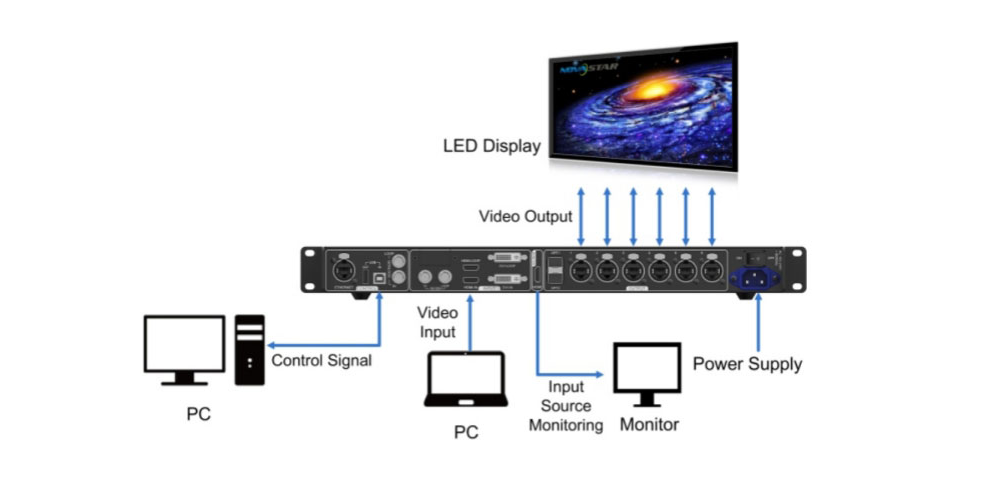
For a standard rectangular indoor LED screen, document the cabinet coordinates and the direction of every cable chain. Where the screen is divided across multiple controllers, the upstream source arrangement and image offsets also need a coordinated design.
02. Fiber Converter Mode
In fiber-converter mode, the NovaStar MCTRL660 Pro serves the electrical/optical conversion workflow. Confirm the equipment at both ends and follow the matching manual diagram. The presence of fiber ports does not make a controller a general-purpose Ethernet switch or a universal HDMI-over-fiber extender.
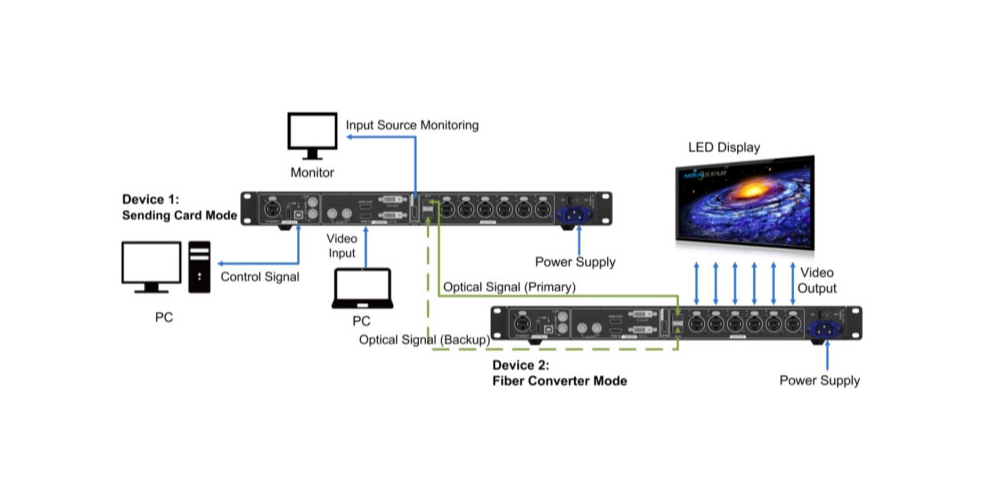
For the optical path, record module model, fiber type, connector and link length in the handover document. Protect connector ends during installation, inspect the link when faults occur, and keep compatible spares. Request a supported distance for the actual optical combination rather than treating all fiber as interchangeable.
03. Dual Output Mode
A NovaStar MCTRL660 Pro dual-output arrangement needs an explicit routing plan. Identify which outputs carry the intended image and which connections, if any, form a configured backup path. Two connected cables do not by themselves prove automatic failover or two separately scalable video canvases.
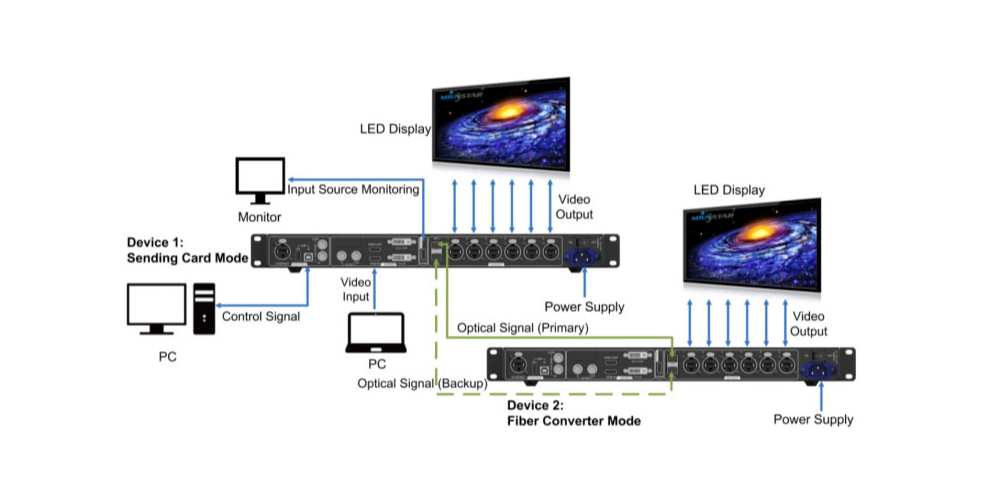
Test the agreed recovery behavior during commissioning. Disconnect the designated primary path under controlled conditions, observe the displayed result and restore the link. Record the recovery procedure and any interruption. This provides practical evidence for the installed system instead of relying on a generic redundancy description.
7. NovaStar MCTRL660 Pro Quick Screen Configuration
Before configuring the NovaStar MCTRL660 Pro, obtain the cabinet supplier’s correct receiving-card settings and a physical connection drawing. Keep a copy of the existing working configuration before changing an installed screen. Start with a stable test source so that mapping problems can be distinguished from source-format problems.
01. Basic Setup Steps
- Connect the intended video source and verify that the controller detects the expected input and resolution.
- Check cabinet power, receiving-card status and the numbered cable route for each output.
- Open the front-panel menu and locate Screen Settings and Quick Config for the installed firmware.
- For a supported regular layout, enter the cabinet rows and columns and the cabinet quantity assigned to Port 1.
- Select the data-flow direction that matches the actual cabling; do not copy a diagram with a different starting corner.
- Display a numbered grid, solid colors and gradients. Check every cabinet position, edge and transition.
- Save the confirmed configuration according to the manual, then verify that the settings survive the planned restart procedure.
- Export a backup and label it with the screen layout, controller model and receiving-card configuration.
Quick configuration on the NovaStar MCTRL660 Pro is intended for supported regular cabinet arrangements. Check the manual’s requirements for the cabinet quantities on each port and the last port before proceeding. For irregular shapes or unequal layouts, use a compatible NovaStar software workflow and verify every cabinet coordinate.
02. Troubleshooting by Symptom
| Symptom | First checks | Verification |
|---|---|---|
| Entire screen is black | Input selection, source format, operating mode and cabinet power | Confirm a valid input and a known test pattern |
| Cabinets appear in the wrong order | Starting cabinet, cable direction and mapping coordinates | Use a numbered grid to trace every chain |
| One chain is missing | Output connection, first receiving card and cable condition | Test the suspected link with a known-good compatible cable |
| Dark tones look tinted | Source bit depth, gamma and cabinet calibration | Compare neutral gray ramps at operating brightness |
| Fiber path has no image | Module compatibility, fiber route and far-end mode | Verify both endpoints against the approved diagram |
| Settings disappear after restart | Save procedure and configuration version | Restart during commissioning and confirm the same mapping |
Do not overwrite receiving-card parameters repeatedly to diagnose a simple cable fault. Work from the source toward the cabinets and change one variable at a time. For the NovaStar MCTRL660 Pro, retain the last working configuration so a troubleshooting attempt can be reversed without rebuilding the screen map.
Acceptance should include the actual operating content and the intended brightness, not just a bright white test screen. Check fine text, motion, dark gradients and cabinet boundaries. For camera-facing screens, record the camera settings used during the test so that later changes can be compared fairly.
8. NovaStar MCTRL660 Pro Manual and Software
Use the exact NovaStar MCTRL660 Pro manual when confirming menu names, connection diagrams and firmware-dependent options. A document for MCTRL660 or another controller is not an interchangeable setup reference. Begin with the official MCTRL660 PRO product page and the NovaStar downloads center.
01. Manual, Specifications and Quick Start Guide
Use the specification sheet to confirm input formats and operating limits; use the user manual for modes and configuration rules; use the quick start guide for the initial connection sequence. Read the version number and model on the document itself. Archived links may remain useful, but check them against the manufacturer’s current documentation before making a purchasing commitment.
Keep a local commissioning package containing the approved connection drawing, source format, cabinet pixel dimensions, receiving-card files and configuration backup. For each NovaStar MCTRL660 Pro in a multi-controller system, include a unique equipment label and its assigned screen region. This makes replacement and remote support substantially clearer.
02. Software and Firmware Compatibility
Confirm which NovaLCT or SmartLCT version supports the intended NovaStar MCTRL660 Pro workflow and receiving cards. The site’s SmartLCT configuration guide provides related background, while the manufacturer’s compatibility documentation should govern the installed combination.
Do not assume that the newest firmware is necessary for every working installation. Check the release notes, model compatibility and supplier guidance, back up settings, and test planned changes during a maintenance window. Keep the previously approved configuration available for recovery. Web control also requires a documented management connection; it does not establish a cloud signage service by itself.
9. FAQs About NovaStar MCTRL660 Pro
These answers address model selection, capacity and setup questions that should be resolved before a purchase order or installation. Each answer separates the published product capability from checks required for the complete LED system.
01. What resolution does the NovaStar MCTRL660 Pro support?
NovaStar lists 1920 × 1200 at 60 Hz loading capacity. Its detailed high-bit-depth specification states 10-bit/12-bit RGB or YCbCr 4:4:4 input up to 1920 × 1080 at 60 Hz. Confirm the selected input format, output mapping and receiving-card configuration together rather than treating every operating mode as identical.
02. Is MCTRL660 Pro the same as MCTRL660?
Do not treat the names as interchangeable. Specify NovaStar MCTRL660 Pro on the quotation and verify the rear panel and model label. For this PRO model, the official page lists six Gigabit Ethernet outputs, two 10G optical ports and HDMI, DVI and 3G-SDI inputs. Check the other model’s own documentation before comparing features.
03. Can it drive a full 4K LED wall by itself?
A 3840 × 2160 wall contains 8,294,400 pixels, above the pixel total of the listed 1920 × 1200 format. Do not specify one NovaStar MCTRL660 Pro as a full 4K wall solution. Request an appropriately sized controller system and confirm how the source canvas will be distributed.
04. Does it support long-distance fiber transmission?
Yes, the NovaStar MCTRL660 Pro includes two 10G optical ports and supports optical workflows. The supported distance depends on the approved modules, fiber and far-end equipment. Obtain a complete optical-link specification and test the installed route; the presence of an optical socket alone is insufficient.
05. Can it rotate a portrait or irregular screen?
NovaStar describes mirroring and rotation for single or dual ports. For the NovaStar MCTRL660 Pro, confirm the requested transformation and the software and receiving-card requirements. Irregular geometry also requires accurate mapping. Use numbered test content to verify orientation and cabinet position before accepting the layout.
06. What should a price quotation include?
Request the exact model and condition, accessories, optical equipment, required upstream processing, configuration work, warranty terms and delivery costs. A NovaStar MCTRL660 Pro unit price is not necessarily the total installed cost. Provide the source format, screen pixel dimensions and cable distance to receive a comparable project quotation.
07. Does low latency guarantee a camera-ready result?
No. NovaStar specifies less than 1 ms when the image start position is 0, but sources, processing, receiving cards and the LED panel also influence the result. Test total delay, flicker and banding with the intended camera and operating settings. Treat the published figure as a conditional controller specification.
10. Conclusion
The NovaStar MCTRL660 Pro is a practical option for projects that need its combination of video inputs, six network outputs, optical transmission and configuration tools. Its suitability depends on the actual canvas, source format, receiving cards and cable route. Use the published conditions to evaluate those requirements before committing to hardware.
A sound buying decision has four pieces of evidence: an approved pixel-load calculation, a complete connection diagram, an itemized quotation and a documented acceptance test. For a NovaStar MCTRL660 Pro system, those checks establish what will be delivered and how the screen will be verified after installation.
For an EagerLED project quotation, send your screen requirements with cabinet quantity, cabinet pixel resolution, source connection, desired bit depth and control-to-screen distance. Include any portrait layout or backup requirement. These details allow the proposed controller and accessories to be reviewed against your actual installation.
 Top 10 LED Display Suppliers in Hungary: Buyer Guide
 LED Screen Supplier UK: 15 Companies Reviewed (2026)