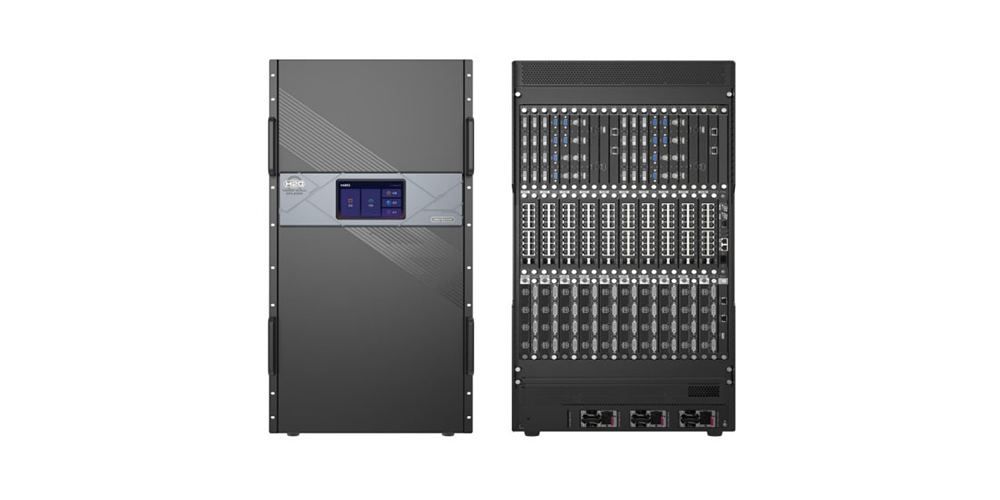
Novastar MCTRL4K is a NovaStar 4K LED display controller documented at 4096×2160@60Hz with 16 Neutrik Gigabit Ethernet ports, 4 optical ports and custom resolutions up to 7680 pixels wide or tall. It is the controller integrators reach for when a screen is larger than a standard 1080p canvas, and this guide collects the verified Novastar MCTRL4K specifications, pixel-budget tables, HDR10 and HLG settings, 3D and low-latency limits, software requirements, firmware steps, manual downloads and price guidance.
1. Novastar MCTRL4K Overview and Key Specifications
01. What the Novastar MCTRL4K LED Display Controller Does
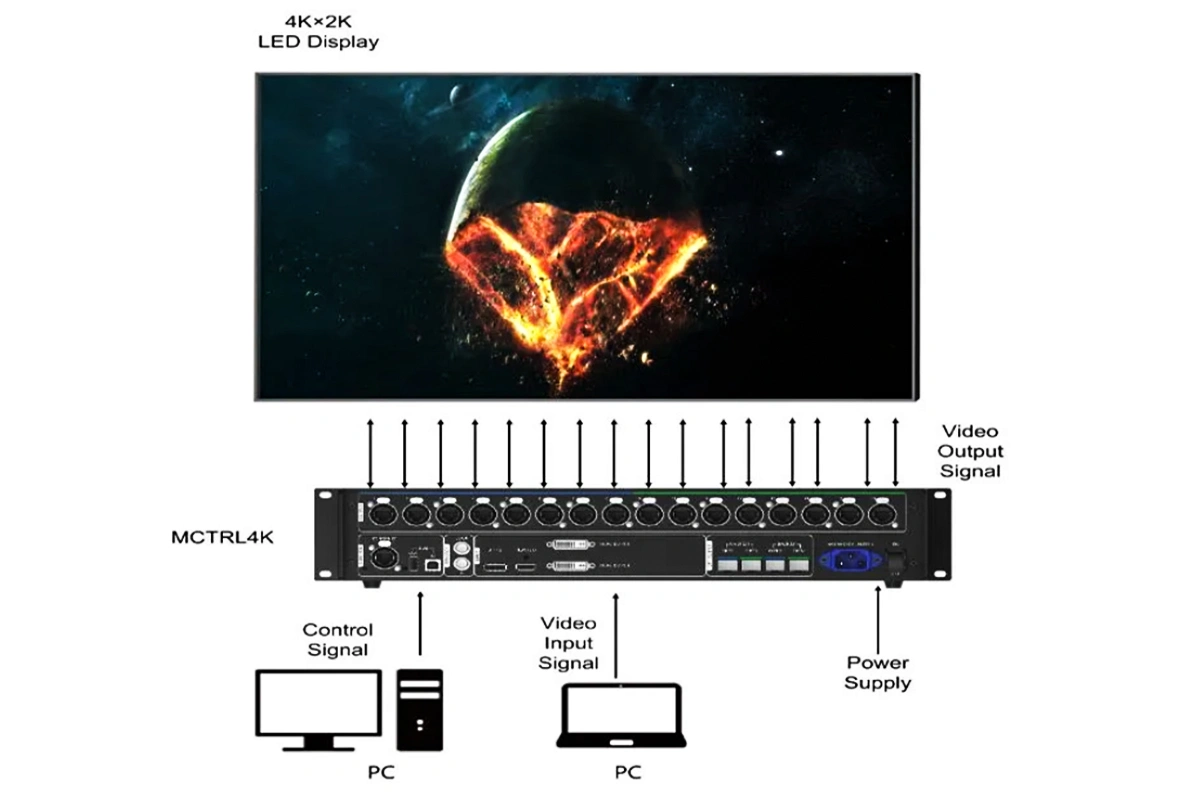
NovaStar documents one MCTRL4K driving 4096×2160@60Hz plus any custom resolution whose width or height reaches 7680 pixels, which is why it is usually specified when a screen is far wider or taller than 16:9. A single unit adds a 16-port Ethernet output stage for ultra-long and ultra-wide displays, from a stadium fascia to advertising LED board work.
Pixel capacity is only part of the story. The MCTRL4K also brings HDR10 and HLG, individual RGB gamma, low latency, 3D and pixel-level brightness and chroma calibration, and the 4.6 kg chassis with its carrying case is built to travel.
02. Novastar MCTRL4K Specifications at a Glance
Figures below are from the official NovaStar MCTRL4K specification sheet, version V1.2.0.
| Specification | Novastar MCTRL4K |
|---|---|
| Input connectors | 1x DP 1.2, 1x HDMI 2.0, 2x dual-link DVI |
| Output connectors | 16x Neutrik NE8FBH Gigabit Ethernet ports, 4x optical ports |
| Control and sync | Ethernet, USB IN and OUT, GENLOCK IN and LOOP |
| Maximum input resolution | 4096×2160@60Hz, minimum 640×480@24Hz on DP and 800×600@30Hz on HDMI and DVI |
| Maximum custom resolution | 7680×1080@60Hz or 1080×7680@60Hz |
| Loading capacity | 8,800,000 pixels from DP or HDMI, 8,300,000 from DVI |
| Pixels per Ethernet port | 650,000 at 8-bit, 320,000 at 10-bit or 12-bit |
| Picture features | HDR10 and HLG, 3D, RGB gamma, low latency under 1 ms, pixel-level calibration |
| Power | AC 100 V to 240 V, 50/60 Hz, 30 W rated consumption |
| Dimensions and weight | 482.6 x 372.0 x 88.1 mm, 4.6 kg, carrying case 530 x 420 x 193 mm |
| Environment and certifications | -20 to +60 C operating, -20 to +70 C storage, FCC, CE, UL/CUL, EAC, CB, IC, KC, RCM |
03. Front Panel, Rear Panel and Cascade Design
The front panel is deliberately simple: a power button, a USB port, an LCD screen, a knob and a BACK button. Rotate the knob to move through the menus and press it to confirm. Hold the knob and BACK together for five seconds to lock the panel.
- Rear inputs: DP 1.2, HDMI 2.0 and two dual-link DVI connectors, each with its own custom resolution
- Rear outputs: 16 Gigabit Ethernet ports with redundancy support plus OPT1 to OPT4 optical ports
- Cascade: USB IN and OUT for configuration, GENLOCK IN and LOOP for synchronised output
- Placement: horizontal only, never mounted vertically or upside down
2. Novastar MCTRL4K Ports, Resolutions and Loading Capacity
01. Input Ports: DP 1.2, HDMI 2.0 and Dual-Link DVI
Three input families feed the Novastar MCTRL4K and each has its own ceiling.
| Input connector | Maximum resolution | Custom resolution limit | Other limits |
|---|---|---|---|
| DP 1.2 | 4096×2160@60Hz, min 640×480@24Hz | 7680 pixels wide or tall | HDCP 1.3, no interlaced input, more than 5 s between unplugging and re-plugging |
| HDMI 2.0 | 4096×2160@60Hz, min 800×600@30Hz | 7680 pixels wide or tall | HDCP 1.4 and 2.2, no interlaced input, the only HDR-capable input |
| Dual-link DVI (DVI-D1 and DVI-D2) | 3840×1080@60Hz each, min 800×600@30Hz | 3840 pixels wide or tall | No interlaced input, and the pair acts as one mosaic source, two multi-card sources or the two 3D eyes |
Two details are easy to miss. No MCTRL4K input accepts interlaced video, so a 1080i feed must be de-interlaced upstream. DP detection is also strict: allow more than five seconds between unplugging and re-plugging, or the input is not detected.
02. 16 Gigabit Ethernet Ports and 4 Optical Ports
All 16 outputs use Neutrik NE8FBH connectors, and NovaStar supports redundancy between ports, so a primary and a backup port can feed the same cabinet group with automatic failover. Each port carries 650,000 pixels from an 8-bit source and 320,000 from a 10-bit or 12-bit source.
The four optical ports are not extra screen outputs. OPT1 transmits the data of Ethernet ports 1 to 8, OPT2 transmits ports 9 to 16, and OPT3 and OPT4 duplicate them, mirroring the copper ports for long-distance runs and hot-backup cabling.
03. How to Budget Pixels on a Novastar MCTRL4K
Two numbers decide whether a screen fits on one Novastar MCTRL4K. The controller total is 8,800,000 pixels from DP or HDMI and 8,300,000 from DVI, while each Ethernet port is limited to 650,000 pixels from an 8-bit source, so the controller total binds first.
| Input bit depth or active function | Pixels per Ethernet port | Effect on loading capacity |
|---|---|---|
| 8-bit input, no HDR and no 3D | 650,000 | No reduction, up to 8,800,000 pixels from DP or HDMI |
| 10-bit input | 320,000 | Halved, the source uses double the bandwidth |
| 12-bit input | 320,000 | Halved, for the same reason as 10-bit |
| HDR10 or HLG enabled | Runs on 10-bit input only | Halved, so plan the cabinet layout before the show |
| 3D in side-by-side or top-and-bottom format | Halved, the Ethernet frame rate doubles | Halved, a 60 Hz input becomes 120 Hz |
A standard 3840×2160 screen is 8,294,400 pixels, which from DP or HDMI fits on one MCTRL4K with about six percent of headroom. Switch it to HDR10, which needs a 10-bit input, and the capacity halves, so the same screen no longer fits on a single unit.
3. Novastar MCTRL4K Image Quality: HDR10, HLG and Calibration
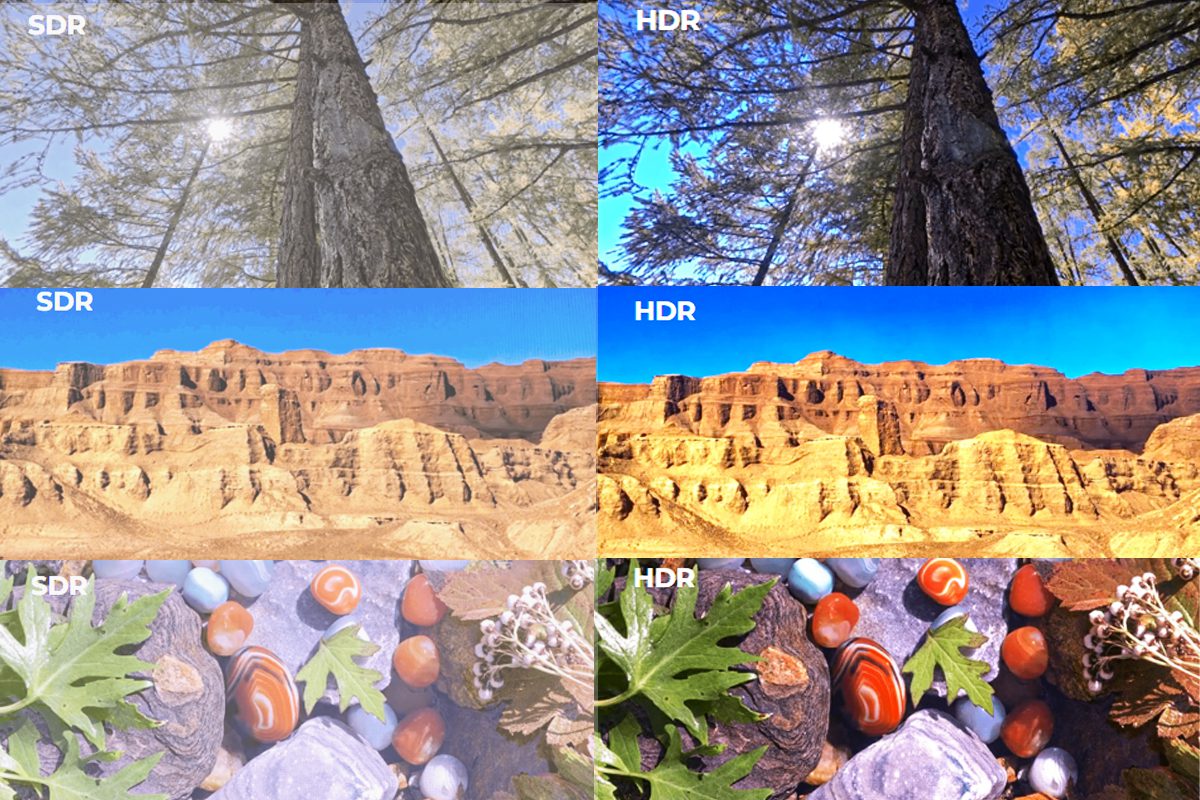
Picture processing is where Novastar MCTRL4K separates itself from a plain sending box. Beyond pixel capacity it adds HDR10 and HLG processing, separate red, green and blue gamma curves, a contrast, saturation and hue stage, and pixel-level brightness and chroma calibration. Each feature carries a documented condition.
01. HDR10 and HLG Support on the Novastar MCTRL4K
The controller supports HDR10 and HLG with three hard rules attached. HDR works only on the HDMI input, it needs a 10-bit source, and it halves the loading capacity because a 10-bit source consumes double the bandwidth. NovaStar also specifies A8s or A10s Plus receiving cards, and HDR is enabled from Advanced Settings > HDR.
If the source falls out of specification the MCTRL4K disables HDR automatically, and re-enables it when a compliant 10-bit signal returns, so keep the cabinet layout inside the halved ceiling.
| HDR standard | Setting | Range and step | What it controls |
|---|---|---|---|
| HDR10 | Screen Peak Luma | 100 to 10,000 nits, step 10 | Screen brightness during normal operation |
| HDR10 | Ambient Light | 0 to 30, step 10 | Ambient light measured at the screen |
| HDR10 | Low Grayscale Mode | 0 to 50, step 1 | Shadow detail; a larger value clarifies dark areas |
| HLG | HLG Mode | 7 modes, HLG1 at 300 nits to HLG7 at 1,700 nits | Brightness the display can deliver |
02. Individual RGB Gamma Adjustment
Novastar MCTRL4K corrects the gamma curve of the red, green and blue channels independently, which is how you even out a screen where one colour channel reads hotter or flatter than the others. In NovaLCT the route is Brightness > Manually Adjustment, then Advanced Settings > Gamma > Custom Gamma Adjustment; adjust the three channels, click Send and finish with Save to HW. With an 8-bit input, RGB gamma needs AXs V2.0 series receiving cards.
03. Contrast, Saturation and Hue in Image Settings
Image Settings adjusts the contrast, saturation and hue of the output image. Contrast and saturation run from 0% to 100% in steps of 1%, and hue from -180 to +180 in steps of 1. The same area holds eight test patterns built from pure colours and line patterns. One restriction is documented clearly: image settings are unavailable while calibration is enabled.
04. Pixel-Level Brightness and Chroma Calibration
Calibration is the stage that lifts a screen above the rest of a rental fleet. Because Novastar MCTRL4K calibrates brightness and chroma at pixel level, it removes the seam differences that become obvious on a large advertising LED board or a broadcast wall. The trade-off is exclusivity: image settings cannot be used once calibration is on, no calibration can run while HDR or 3D is active, and advanced screen configuration removes 3D.
4. Novastar MCTRL4K 3D, Low Latency and Genlock Performance
Three features turn Novastar MCTRL4K from a large-canvas driver into a live production controller: 3D, latency below one millisecond, and Genlock across several units. Each rules out at least one other function.
01. 3D Display with the EMT200 Emitter and Shutter Glasses
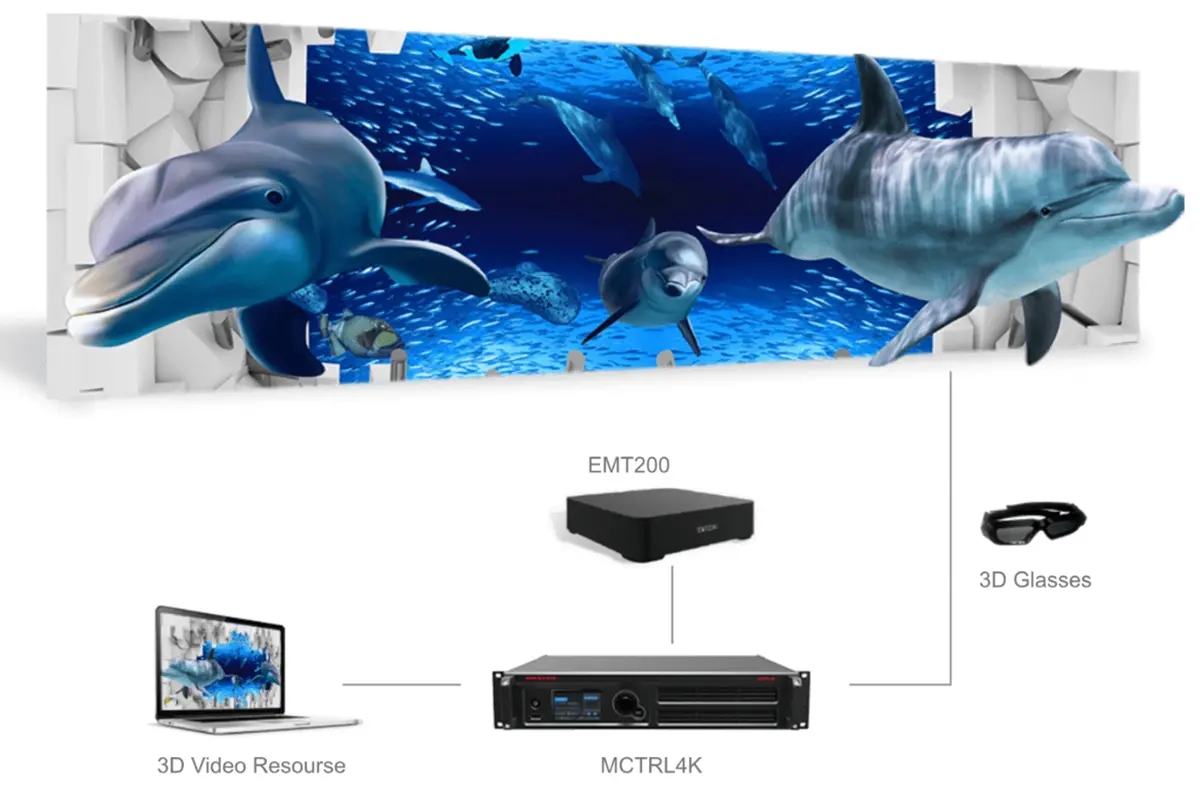
3D on the MCTRL4K is built around the NovaStar EMT200 3D emitter and active shutter glasses. The controller accepts side-by-side, top-and-bottom and frame sequential formats and keeps the glasses in sync with the display. With a DVI source, DVI1 carries the left eye and DVI2 the right eye. Side-by-side and top-and-bottom double the Ethernet output frame rate, so a 60 Hz input drives the ports at 120 Hz and port capacity is halved. This is the mode behind 3D billboard and immersive event work.
02. Low Latency Below 1 Millisecond
NovaStar rates the low latency function of the MCTRL4K at less than 1 ms when the start position of the image is 0, the figure that matters for broadcast, camera work and virtual production. Low latency needs a DP or HDMI source, and each Ethernet port must load its cabinets vertically. NovaStar also states that the image offset cannot exceed the size of the input source, and that low latency and Genlock cannot be enabled together.
03. Genlock and Cascading Up to 10 Units
Genlock locks several controllers to one reference so that a wall assembled from multiple Novastar MCTRL4K units behaves as a single canvas. Cascade over the GENLOCK IN and GENLOCK LOOP connectors and up to 10 controllers output images simultaneously, and the phase offset setting moves the time of the sync source backwards to align the screen with the rest of the signal chain.
04. Feature Conflicts to Plan Around
The table below collects the incompatibilities NovaStar documents for the Novastar MCTRL4K. If two of these items appear in the same design, one of them has to change.
| Feature in use | Cannot be combined with | Practical consequence |
|---|---|---|
| 3D | Low latency, calibration, advanced screen configuration, multi-card input mode | 3D and the sub-1 ms path are mutually exclusive on the MCTRL4K |
| Low latency | Genlock, 3D | A Genlocked multi-unit build cannot also run the low latency path |
| HDR10 or HLG | Calibration operations, and any input other than HDMI at 10-bit | Calibrate first, enable HDR afterwards, and budget half the capacity |
| Calibration | Image settings, 3D, HDR | Image settings become unavailable once calibration is enabled |
| Advanced screen configuration and multi-card mode | 3D | Complex mapping removes 3D from the menu, and 3D needs Mosaic input mode |
5. Novastar MCTRL4K Mosaic Mode and Multi-Card Mode Explained
01. Mosaic Mode for Ultra-Wide and Ultra-Tall Screens
Mosaic mode is the default way to use Novastar MCTRL4K. The controller treats its inputs as one canvas and stitches them into a single image. The input source can be Auto, DP, HDMI or DVI x 2, and in Auto the device detects inputs in the order DP, then HDMI, then DVI. When the two dual-link DVI connectors are paired you also choose the DVI mosaic direction: Top and Bottom, or Side by Side.
That direction is what makes the MCTRL4K unusual. Side by Side lets two 3840×1080 feeds form a 7680×1080 canvas for a long stadium fascia, while Top and Bottom turns the same pair into an ultra-tall banner. Enable Limited to Full for an RGB Limited source only, because on an RGB Full source it causes grayscale loss.
02. Multi-Card Mode for Two Independent Sources
Multi-card mode splits Novastar MCTRL4K into two independent sending cards. The only available inputs are DVI1 and DVI2, and each card loads up to 3840×1080@60Hz. Both DVI images can be shown at the same time but cannot be configured simultaneously, so the screen behaves as two displays driven from one chassis. Multi-card mode suits a stage with a main screen and a side screen, and it is unavailable whenever 3D is enabled.
| Design question | Mosaic mode | Multi-card mode |
|---|---|---|
| Inputs accepted | Auto, DP, HDMI or DVI x 2 | DVI1 and DVI2 only |
| How the controller behaves | One canvas stitched from the selected input | Two independent sending cards in one chassis |
| Capacity ceiling | 8,800,000 pixels from DP or HDMI, 8,300,000 from DVI | Up to 3840×1080@60Hz per card |
| DVI direction setting | Top and Bottom or Side by Side | Not applicable |
| Best suited to | Ultra-wide, ultra-tall and single-canvas shows | Two separate screens from one controller |
| 3D compatibility | Required for 3D | Not available while 3D is active |
03. Applications Where Novastar MCTRL4K Performs Best
Rental houses use Novastar MCTRL4K for LED screens for events and touring stages where a 4K canvas travels in one flight case. Stadium projects use it for fascia displays far wider than 16:9. Broadcast and LED display for sports venues use it because Genlock and low latency carry equal weight, and fixed installations use it wherever a wall has to run for years.
6. Novastar MCTRL4K Quick Setup: Three Steps to Light Up a Screen
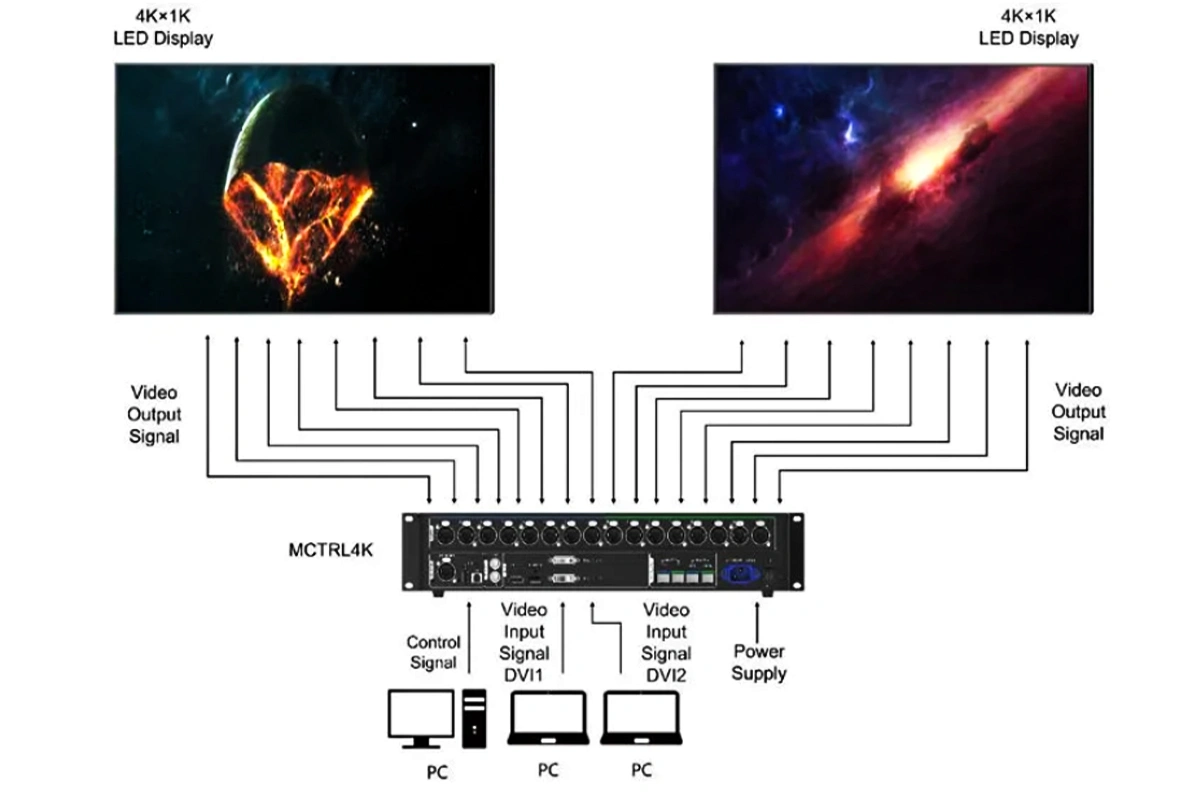
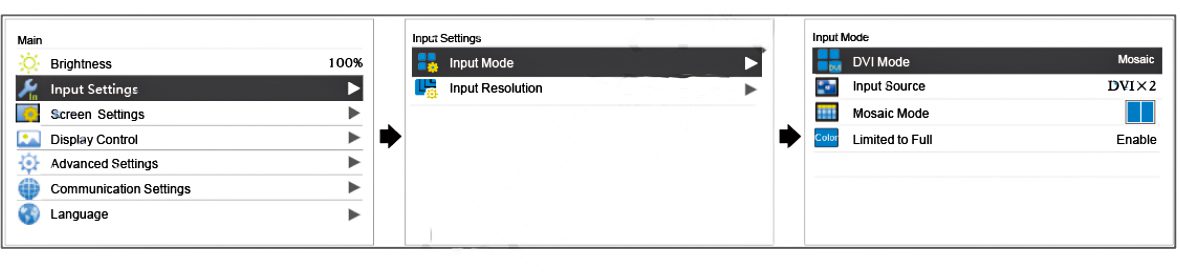
NovaStar designed Novastar MCTRL4K so that a technician can light a screen from the front panel without opening a laptop. The documented sequence is Set Input Mode, then Set Input Resolution, then Quickly Configure the Screen.
01. Step 1 – Set the Input Mode
Begin with the DVI mode and choose Mosaic or Multi-card. In Mosaic mode the source can be Auto, DP, HDMI or DVI x 2; in Multi-card mode the inputs are DVI1 and DVI2 only. If you are in Mosaic mode and using the DVI pair, set the DVI mosaic direction to Top and Bottom or Side by Side, then enable Limited to Full for an RGB Limited source.
02. Step 2 – Set the Input Resolution
Either select a standard preset or enter a custom resolution. The preset lists follow the capability of each connector, with the dual-link DVI and HDMI lists running to 3840×2160 and adding steps such as 1280×1024, 1440×900, 1600×1200 and 1920×1080. Custom resolutions can reach 7680 pixels of width or 7680 pixels of height, but the source device has to be set to output them first.
03. Step 3 – Quickly Configure the Screen
Quick configuration is the fast path for a regular screen. Press the knob, choose Screen Settings > Quick Config, then set Cabinet Row QTY, Cabinet Col QTY, Port1 Cabinet QTY and the Data Flow (Front View) pattern. NovaStar applies one arithmetic rule: if n ports load the screen, each of the first (n-1) ports must load the same number of cabinets, that number must be an integral multiple of the cabinet rows or columns, and it must be at least the number loaded by the last port. With all 16 Ethernet ports in use, ports 1 to 15 must be identical and port 16 must not exceed them. Irregular screens cannot use quick configuration and need NovaLCT instead.
Two further constraints shape the workflow: quick and advanced configuration cannot be enabled at the same time, and once a screen has been configured in NovaLCT you should not map it again from the controller front panel.
04. Novastar MCTRL4K Setup Troubleshooting
| Symptom | Documented cause | What to do |
|---|---|---|
| No picture after a DP cable is replugged | DP detection needs more than 5 s between unplugging and plugging | Wait five seconds or more before reconnecting |
| A broadcast feed will not lock | No MCTRL4K input accepts interlaced video | De-interlace or convert to a progressive format upstream |
| Half the cabinets go dark once HDR is on | HDR halves the loading capacity of the controller | Reduce the canvas, drop to 8-bit or add a second MCTRL4K |
| Image settings cannot be changed | The calibration function is enabled | Finish calibration first, then re-enable image settings |
| Low latency will not enable | It needs a DP or HDMI source and vertical cabinet loading per port | Reconfigure the screen and change the input |
7. Novastar MCTRL4K Software, Web Control and Firmware Updates
A Novastar MCTRL4K can be configured from its front panel or from a computer. For anything beyond a rectangular screen the computer wins, because NovaLCT and SmartLCT expose the calibration, gamma, hot backup and monitoring pages the LCD menu does not.
01. NovaLCT V5.2.0, SmartLCT V3.4.0 and Which Tool to Use
| Software | Minimum version for the MCTRL4K | Connection | Main tasks |
|---|---|---|---|
| NovaLCT | V5.2.0 or later | USB or Ethernet | Screen configuration, brightness adjustment, calibration, display control and monitoring |
| SmartLCT | V3.4.0 or later | USB | Building-block screen configuration, seam brightness, real-time monitoring and hot backup |
| Web control page | Google Chrome 50 or later recommended | Ethernet or router on the same LAN | Menu operations for screen configuration on a PC or mobile device |
| Firmware update | Performed from NovaLCT or SmartLCT | USB | Loads a program package onto the controller after a privileged login |
02. Web Control Through the Device IP Address
The controller also serves a web control page. Connect Novastar MCTRL4K to a PC, phone or tablet over an Ethernet cable or a router, read the device IP address from the top-right corner of the home screen, then type that address into the browser. NovaStar recommends Google Chrome 50 or later for LED screen configuration this way, and both devices must be on the same LAN. The page mirrors the front panel, with connection status and loading capacities on one side and menu operations on the other.
03. How to Update Novastar MCTRL4K Firmware
Firmware is updated from either tool, and the NovaLCT route is protected by a code. In NovaLCT open User > Advanced Synchronous System User Login and log in, then type the secret code admin to reach the program loading page, click Browse to select the program package and click Update. In SmartLCT, open the V-Sender page, click into Firmware Upgrade in the properties area, select the update program path and click Update. Check the hardware version from the front panel first, and keep the controller powered for the whole update.
Both tools are listed on our Novastar LED control software download page, with a walkthrough on the dedicated Novastar SmartLCT page.
8. Novastar MCTRL4K Manual and Specifications PDF Download
Both official NovaStar documents for this controller are available below as PDFs. The specification sheet is the file to quote from, and the user manual is the one to keep during commissioning.
- NovaStar MCTRL4K LED Display Controller Specifications V1.2.0 (PDF) – loading capacity, port count, HDR and 3D limits, power, dimensions and certifications
- NovaStar MCTRL4K LED Display Controller User Manual V1.2.0 (PDF) – home screen, menu operations, quick configuration, gamma and HDR settings, Genlock, software and firmware steps
V1.2.0 is the revision NovaStar publishes for this hardware, and the figures in this guide are taken from it. Where a specification here disagrees with the PDF, follow the PDF.
9. Novastar MCTRL4K Price and Buying Advice
Most people searching for Novastar MCTRL4K arrive with two questions: what does it cost, and is it the right controller for my screen. The MCTRL4K is priced as a premium 4K controller and earns that premium when a project needs an ultra-large canvas, HDR or 3D.
01. What a Novastar MCTRL4K Costs
Prices vary with supplier, region and order volume. The range we observed across dealers was roughly $2,000 to $5,000 USD, and our own listed price is $2,999. Freight, duty and lead time move the landed cost more than the sticker price does. You can check the current Novastar MCTRL4K price on our product page.
02. When the Novastar MCTRL4K Is the Right Buy
The MCTRL4K is the right controller when at least two of the following are true: the screen needs a 4K single-unit feed, the aspect ratio is far from 16:9, the content is HDR, the show needs genuine 3D, or several controllers must be Genlocked into one canvas. If none apply, a smaller LED display controller costs less and does the same job.
03. Add-Ons and Alternatives to Budget For
- HDR10 or HLG needs A8s or A10s Plus receiving cards as well as a 10-bit HDMI source
- 8-bit individual RGB gamma adjustment needs AXs V2.0 series receiving cards
- 3D needs the NovaStar EMT200 emitter and active shutter glasses for every viewer
- Resolutions above 4092 pixels need a graphics card with a pixel clock of 595.0 MHz or less, such as the GTX 970, GTX 1060 or GTX 750 Ti
- A second Novastar MCTRL4K is the practical answer whenever the HDR or 3D pixel budget is exceeded
10. Novastar MCTRL4K Frequently Asked Questions
These are the questions buyers and technicians ask most often about Novastar MCTRL4K. Every answer is taken from the official NovaStar specification sheet and user manual, both version V1.2.0.
11. Conclusion: Specifying the Novastar MCTRL4K
Novastar MCTRL4K answers both halves of a modern brief. It drives 8,800,000 pixels from DP or HDMI, delivers 4096×2160@60Hz from a single unit, reaches custom canvases of 7680 pixels wide or tall, and offers HDR10 and HLG, pixel-level calibration, 3D and latency under one millisecond. Because most of those features are mutually exclusive, specifying an MCTRL4K means deciding which two or three matter most.
Use this guide as a checklist. Confirm the pixel budget against the bit depth you will actually run, confirm the ports and cabinets against the quick configuration rule, and settle the choice between HDR, 3D, low latency and Genlock before anything is ordered. If you want help matching a Novastar MCTRL4K to a screen size and pixel pitch, contact us.
 NovaStar VX2000 Pro Review: Specs, Setup, Software & Price
 A Complete Guide To LED Receiving Cards: How To Choose The Right One