The Vunit 3000 is commonly introduced into LED display control systems to address system-level control requirements such as multi-source signal routing, device coordination, and automated operation workflows. This Guide focuses on practical LED display applications, explaining how the Vunit 3000 is used for signal management, centralized control, and automation within typical LED display control architectures and real-world project deployments.
catalogue
1.What Is the Vunit 3000 Control Processor?
The Vunit 3000 Control Processor is a professional-grade central control system designed for intelligent video conferencing, multimedia presentations, and LED display management. Key features include:
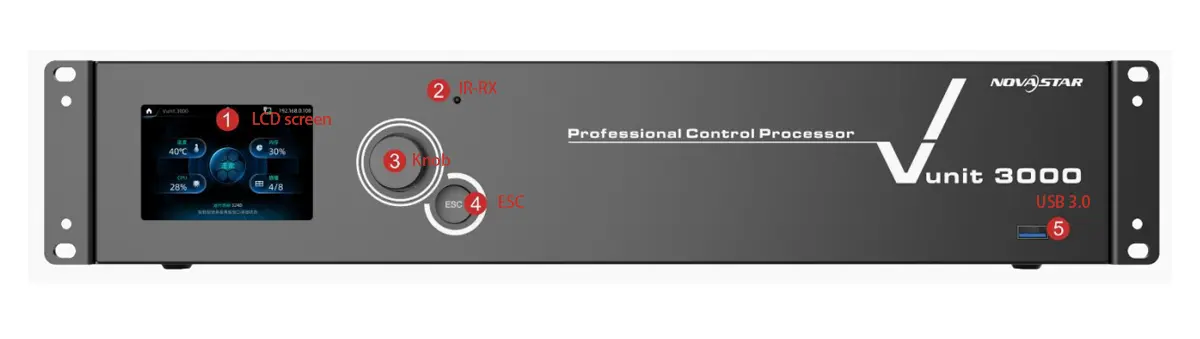
- 32-bit ARM Cortex industrial-grade CPU: Ensures high performance and stability.
- Plug-in design: Allows flexible expansion through various functional cards.
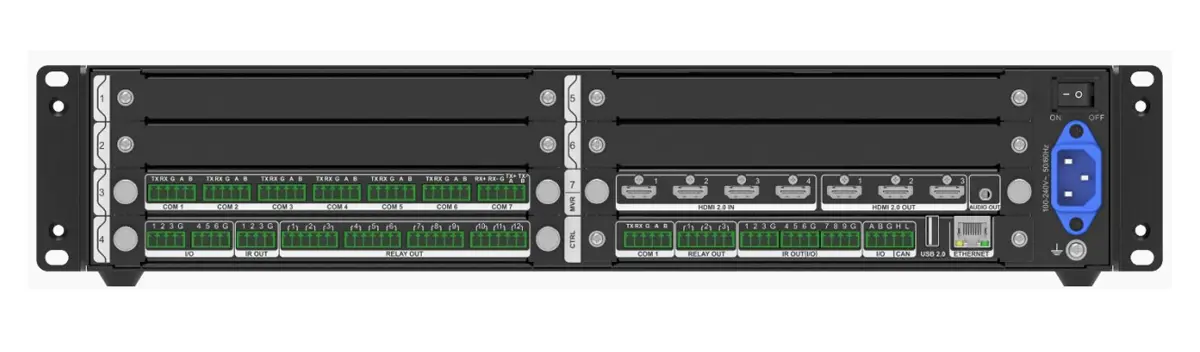
- Programmable connectors: Supports RS232, RS485, RS422, Modbus, and IR learning for versatile device control.
- Video matrix switching: Functions as a small matrix with 4 HDMI inputs and 3 outputs.
- Independent audio output: Enhances multimedia experiences.
Key Specifications Table
| Feature | Specification |
|---|---|
| Model | Vunit 3000 Professional Control Processor |
| Input Voltage | 100-240V~, 50/60Hz |
| Max Power Consumption | 60W |
| Operating Temperature | 0°C to 45°C |
| Dimensions (W×D×H) | 482.6 mm × 360 mm × 94.6 mm |
| Video I/O | 4x HDMI 2.0 Inputs, 3x HDMI 2.0 Outputs |
| Supported Resolutions | Up to 3840×2160@60Hz (4K UHD) |
| Audio Output | 3.5mm independent audio jack |
| Core CPU | 32-bit ARM Cortex® Industrial-Grade |
2.How Vunit 3000 Integrates with LED Display Control Systems
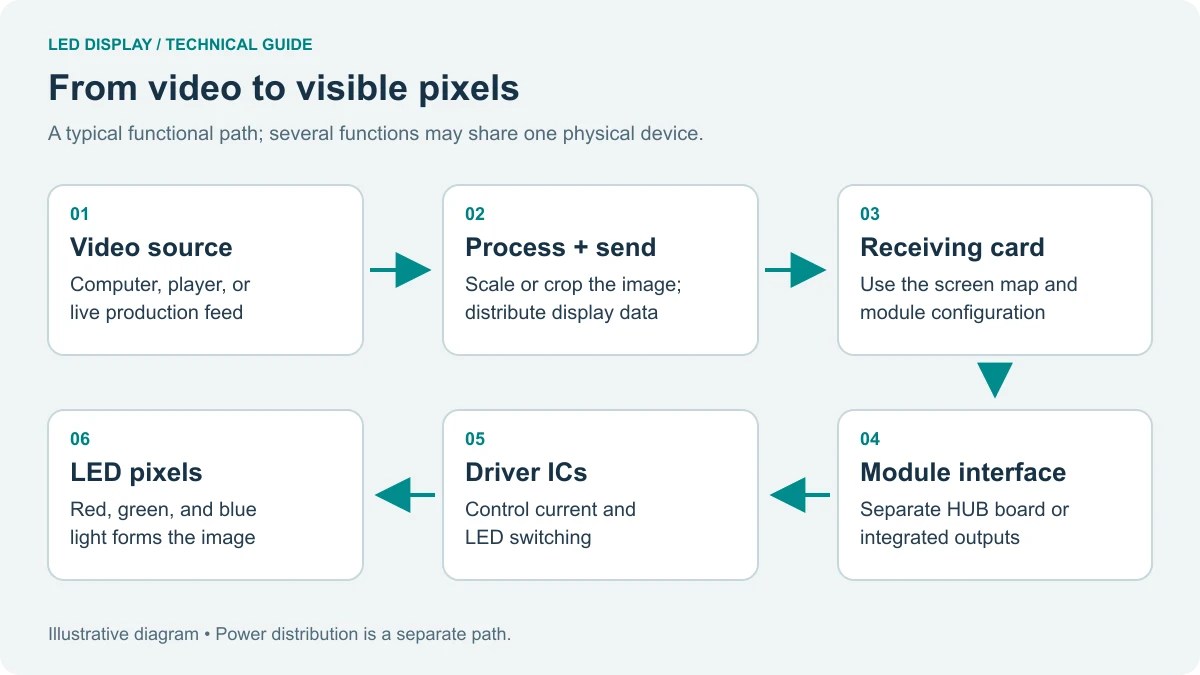
In LED screen systems, the Vunit 3000 control processor serves as the central control unit, coordinating multiple components such as video processors, audio systems, and peripheral devices. Its modular design allows it to seamlessly integrate into existing setups, providing centralized management through various interfaces.
Integration Workflow:
- Signal Routing: The control processor accepts video inputs from various sources—such as computers, media players, and cameras—and directs them to the corresponding LED displays or projectors. This ensures the correct content is delivered to the right screen with stable signal management.
- Peripheral Device Control: Using programmable I/O ports and relay modules, the system can operate connected room devices—including lighting, motorized screens, HVAC, and audio equipment—in sync with the display, enabling cohesive environmental control.
- Automation: With configurable timelines and event-based triggers, the processor automates routine operations—such as scheduled power‑on/off, content switching, and scene recalls—minimizing the need for manual intervention and ensuring consistent performance.
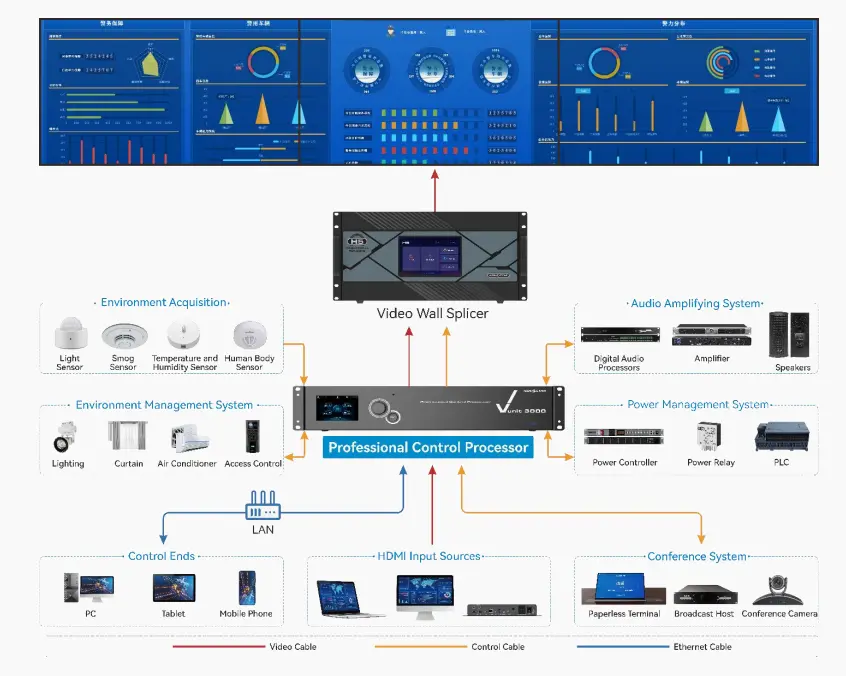
Example Use Case:In a press conference room, the Vunit 3000 LED video processor can switch between live camera feeds and presentation slides while controlling room lighting and audio levels.
3.4K HDMI Input, Output, and Matrix Switching on Vunit 3000
As a high-performance Novastar processor, the Vunit 3000 Professional Control Processor delivers professional-grade 4K video routing capabilities—making it a versatile backbone in modern AV and LED display control systems. Unlike basic switchers, its integrated 4×3 HDMI 2.0 video matrix is engineered for seamless integration with advanced LED video processors, including Novastar’s Control Processor 170 series, ensuring end-to-end signal integrity from source to screen.
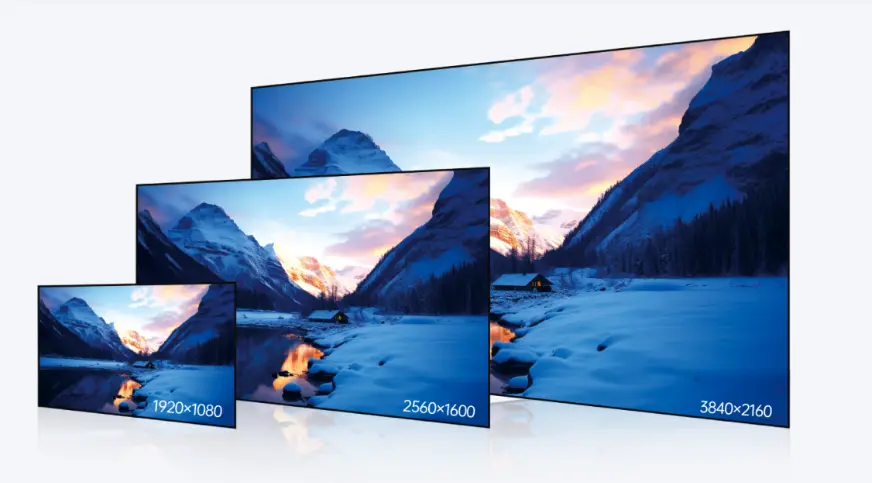
The Vunit 3000 supports full-bandwidth HDMI 2.0 on all ports, enabling lossless transmission of Ultra HD content at 3840×2160@60Hz with 4:4:4 chroma sampling—critical for crisp text, vibrant graphics, and smooth motion in corporate lobbies, broadcast studios, and command centers.
Flexible Input/Output Configuration
- 4× HDMI 2.0 Inputs: Accept signals from laptops, cameras, media players, wireless transmitters, or other HDMI sources.
- 3× HDMI 2.0 Outputs: Drive LED walls, projectors, monitors, or distribution amplifiers simultaneously.
- Resolution Transparency: Output resolution automatically matches the selected input (up to 4K@60Hz), ensuring pixel-perfect fidelity.
Intelligent EDID Management
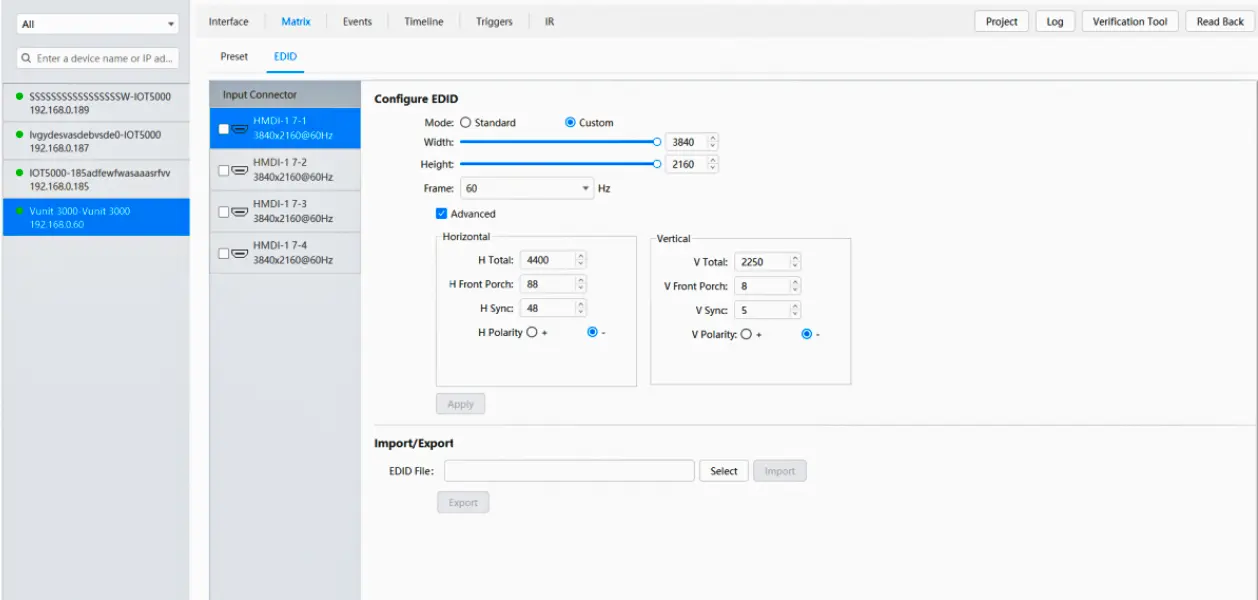
The system features customizable EDID emulation, allowing integrators to force specific resolutions or refresh rates for compatibility with legacy or non-standard devices—eliminating handshake issues common in complex AV environments.
Dynamic Signal Routing Modes
Users can configure:
- One-to-One: Route HDMI 1 → Output A (e.g., main presentation)
- One-to-Many: Broadcast HDMI 2 → Outputs A, B, and C (e.g., live camera to multiple displays)
- Crosspoint Switching: Any input to any output combination via software or touch panel
4.How Vunit Novastar processor 3000 Simplifies LED Display System Operation
The Vunit 3000 is a professional-grade central control system designed to streamline the operation of LED display systems, particularly in environments such as intelligent video conferencing rooms and multimedia presentation spaces. By integrating multiple control functions into a single platform, it significantly reduces operational complexity and enhances efficiency for end users.
Centralized Control
The Novastar processor Vunit 3000 allows operators to manage all connected devices—including video sources, displays, and peripheral equipment—through a unified interface, eliminating the need for multiple remote controls or standalone controllers.
Customizable User Interface
While the original documentation does not detail UI customization tools, its programmable nature implies that control logic and interface behavior can be tailored to specific operational workflows or user requirements.
Self-Learning IR Functionality
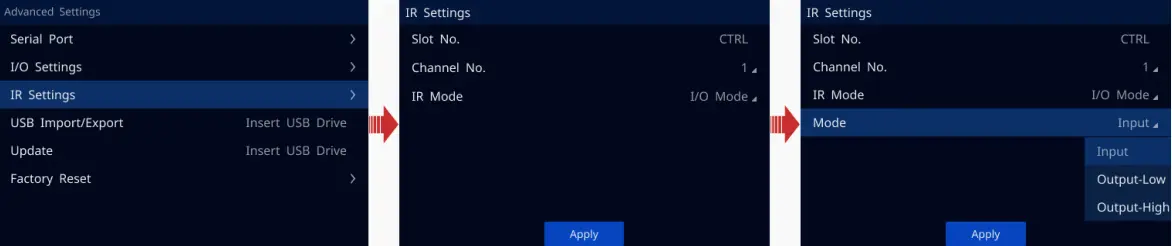
As specified in the source material, the Vunit 3000 supports IR learning, enabling it to capture and replicate infrared commands from existing remotes. This allows seamless integration with a wide range of IR-controlled devices without requiring proprietary protocols.
High Stability and Reliability
Built around a 32-bit ARM Cortex industrial-grade CPU and featuring a robust hardware design, the Vunit 3000 LED video processor ensures stable performance in demanding operating conditions. Its industrial-grade components contribute to long-term reliability with minimal maintenance.
Practical Example: Firefighting Command Center
As noted in your provided content, in a firefighting command center, the Vunit 3000 control processor can automate critical response workflows—such as switching to surveillance video feeds and activating alarms—with minimal manual input. This automation capability stems directly from its programmable connectors (supporting RS232, RS485, RS422, Modbus) and IR control functions, allowing it to trigger actions across diverse subsystems reliably and quickly.
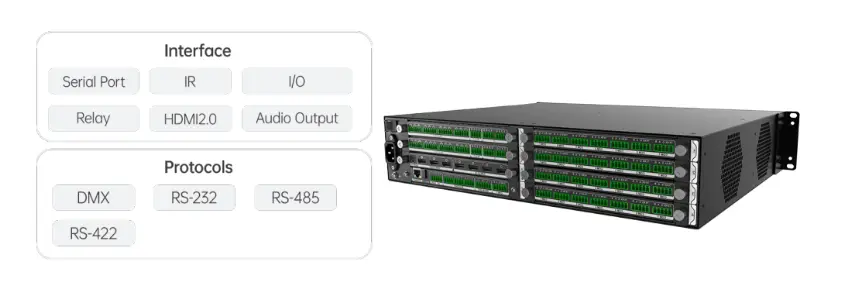
By consolidating signal routing, device control, and automation into one system, the Vunit 3000 delivers a simplified, efficient, and dependable operational experience for LED display environments.
5.Novastar processor Vunit 3000 Configuration and Network Setup
The following step-by-step guide is based on the official setup procedure outlined in the product documentation.
Connect Devices
- Use an Ethernet cable to connect the Vunit 3000 to the control PC.
- Ensure both the Vunit 3000 and the control PC are assigned IP addresses within the same network segment to enable communication.
Change IP Information
- Open BCTools on the control PC.
- Access the device list and locate the Vunit 3000 control processor .
- Configure its network settings, including IP address, subnet mask, and gateway, as required by the local network environment.
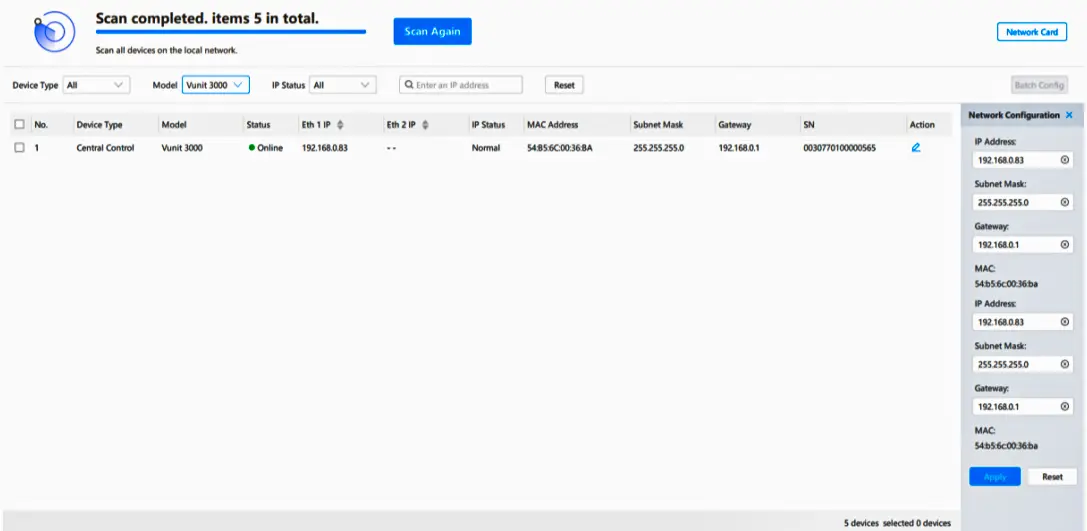
Update Firmware (If Needed)
- If a firmware update is required, copy the firmware file to a USB drive.
- Insert the USB drive into the Novastar processor Vunit 3000 and follow the on-screen or BCTools instructions to complete the update.
Configure Events and Triggers
- Navigate to the Central Control Configuration page in BCTools.
- Define automation logic by setting up events and triggers for:
Serial ports (RS232/RS485/RS422/Modbus)
Digital I/O
IR commands (including learned codes)
Ethernet-based actions
These configurations enable the Vunit 3000 control processor to respond to user inputs or system conditions automatically.
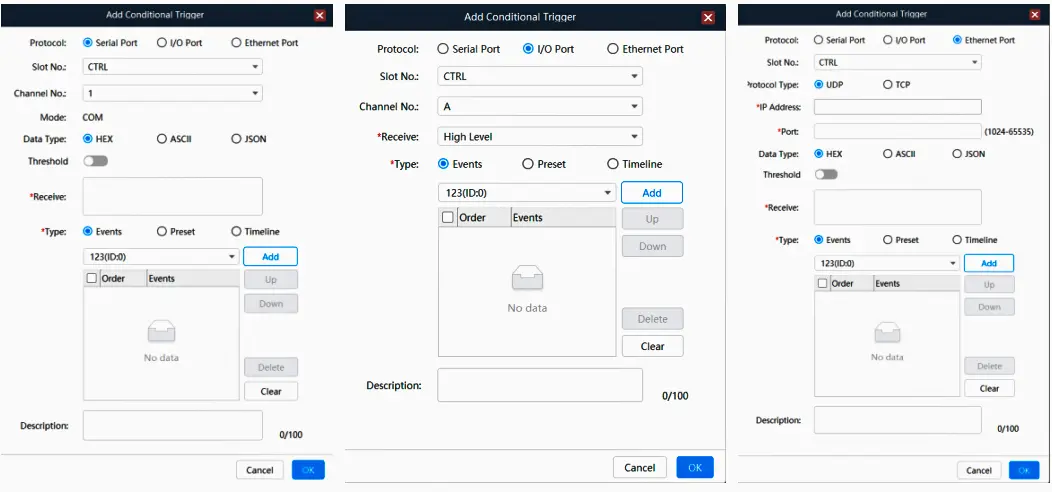
Save Presets
- Once a configuration is complete, save it as a preset.
- Presets allow operators to quickly recall frequently used setups—such as “Presentation Mode” or “Emergency Feed”—without reconfiguring the system each time.
Network Configuration Table
| Parameter | Default Value | Recommended Setting |
|---|---|---|
| IP Address | 192.168.0.10 | Match local network segment |
| Subnet Mask | 255.255.255.0 | Standard subnet mask |
| Gateway | 192.168.0.1 | Router IP address |
6.Typical LED Display Application Scenarios Using Vunit 3000
The Novastar processor Vunit 3000 is designed as a professional-grade central control system for intelligent video conferencing, multimedia presentations, and LED display management. Its flexible architecture and programmable interfaces enable reliable performance across a range of real-world environments. Below are typical application scenarios as defined in the official documentation.
Exhibition Centers
In exhibition halls and trade show venues, the Vunit 3000 automates video playback schedules and enables centralized management of multiple LED displays simultaneously. This ensures consistent content delivery without manual intervention during operating hours.
Command Centers
In command and monitoring centers, the Vunit 3000 LED video processor supports real-time monitoring and provides integrated control of surveillance systems and communication devices. Its industrial-grade stability and programmable connectors (including RS232, RS485, and IR) allow seamless interaction with critical operational equipment.
Multimedia Conference Rooms
In corporate or government multimedia conference rooms, the Vunit 3000 facilitates seamless transitions between presentation modes and interactive sessions. Whether switching from a laptop feed to a video call or adjusting audio output, the system ensures smooth, uninterrupted user experiences.
7.FAQs
8. Vunit 3000 Design Checklist for LED Display Control Systems
Use this checklist before commissioning a Vunit 3000. Start with the signal map: list every source, required resolution, destination, cable length, and fallback source. Then confirm the LED display receiving card, sending device, and processor agree on timing. A short written signal map prevents last-minute crosspoint errors and gives operators a repeatable recovery path.
01. Signal and bandwidth planning
HDMI 2.0 ports can carry 4K at 60 Hz when the source, cable, and display all support the same timing. For long runs, validate cable quality and add an approved extender rather than assuming a passive lead will work. Keep one spare input available for emergency content and label every connector at both ends.
| Planning item | What to record | Acceptance check |
|---|---|---|
| Source list | Laptop, camera, media player, signage server | Every source tested at show resolution |
| Output map | LED wall, confidence monitor, projector | Correct destination on each crosspoint |
| Fallback | Backup laptop or media player | Operator can recall within 30 seconds |
| Labels | Port ID and cable ID | Matches drawing and rack labels |
02. Control and safety planning
Document which actions use RS232, RS485, RS422, Modbus, digital I/O, IR, or Ethernet. Give each event a clear name, an owner, and a test result. For public venues, lock the rack, protect the control PC, and keep the latest configuration export on two separate storage devices.
9. Vunit 3000 Commissioning and Troubleshooting
A commissioning pass should verify the complete path from source to LED module. Test normal operation, source loss, power cycling, and recovery from an incorrect EDID. Record the firmware version, IP address, subnet, gateway, and preset names so another technician can reproduce the result.
| Test | Method | Pass condition |
|---|---|---|
| Input lock | Connect each HDMI source | Stable picture without flicker |
| 4K timing | Send 3840×2160 at 60 Hz | Image remains sharp and synchronized |
| EDID recovery | Switch to a known-safe EDID | Source reconnects without reboot |
| Preset recall | Load presentation and emergency scenes | All outputs and peripherals follow |
| Power cycle | Restart processor and display chain | System returns to defined default |
01. No signal or intermittent picture
Check the source output mode first, then the HDMI cable, EDID profile, and destination input. Reduce variables by connecting one source to one output. If the picture returns after an EDID change, document that profile and apply it consistently across the source and display chain.
02. Control command does not trigger
Confirm the port type, baud settings, device address, and command syntax. Test the endpoint independently, then test the Vunit 3000 event. For IR, relearn the command from the original remote and verify line of sight or emitter placement.
10. Vunit 3000 Comparison for System Designers
The Vunit 3000 fits projects that need central control, a compact 4×3 HDMI matrix, and programmable device integration. A simple HDMI switch may cost less, but it will not provide the same event logic or serial and IR control. A large video wall processor may offer more canvas capacity, yet can add cost and configuration overhead when the project mainly needs routing and room automation.
| Approach | Best fit | Trade-off | Where Vunit 3000 helps |
|---|---|---|---|
| Basic HDMI switch | Small single-room display | Little automation | Adds programmable control |
| AV matrix only | Many sources and zones | Separate room control required | Combines routing and control |
| Large video wall processor | Complex canvases | Higher cost and setup time | Efficient for focused 4K routing |
| Vunit 3000 | LED, conference, command, exhibit systems | Needs documented programming | Central presets, EDID, serial, IR |
01. Procurement questions
Ask whether the installer will supply a signal-flow drawing, a tested preset file, firmware notes, and operator training. Confirm the LED receiving system and the Vunit 3000 are compatible at the required frame rate. Request a spare cable set and a recovery preset before handover.
11. Vunit 3000 Maintenance Schedule
Preventive maintenance protects uptime. Review logs monthly, inspect connectors quarterly, and retest every critical preset after firmware or source changes. Keep the rack ventilated within the documented 0°C to 45°C operating range and avoid blocking airflow around the 60 W power design.
| Frequency | Action | Evidence to keep |
|---|---|---|
| Weekly | Check display status and preset recall | Operator checklist |
| Monthly | Review events, temperatures, and cabling | Maintenance log |
| Quarterly | Test every source, output, and trigger | Commissioning report |
| After changes | Export configuration and retest recovery | Versioned backup |
When these steps are followed, the Vunit 3000 remains understandable to operators and service teams. The strongest result is a documented control path: every Vunit 3000 input, output, event, and preset has a purpose, an owner, and a recovery method.
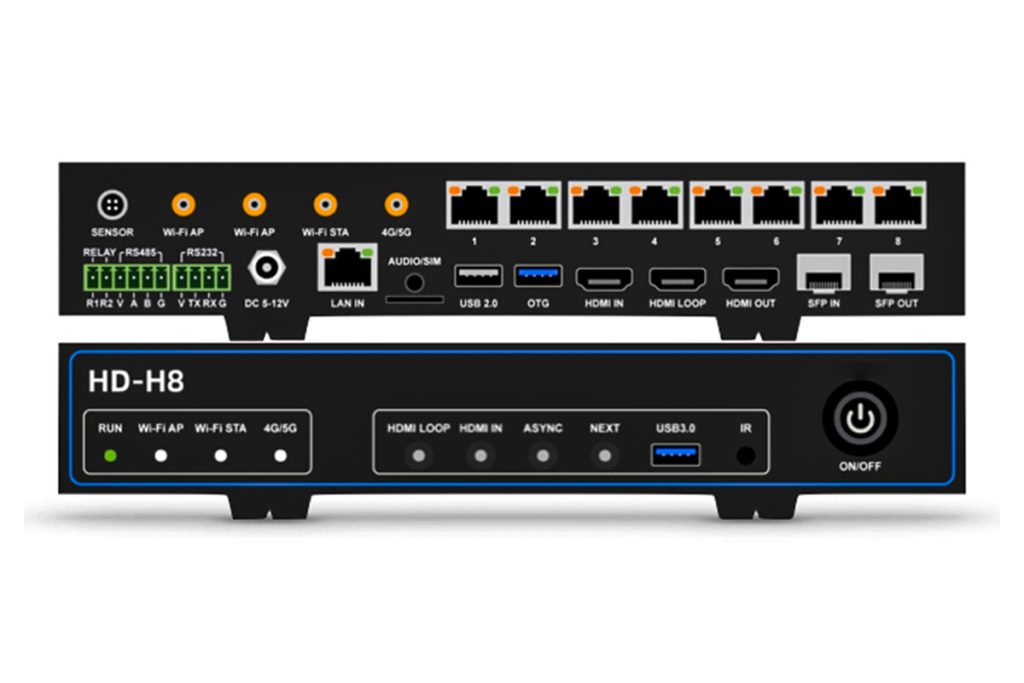 Huidu HD-H8 vs HD-H6 LED Multimedia Players: Complete 4K Guide
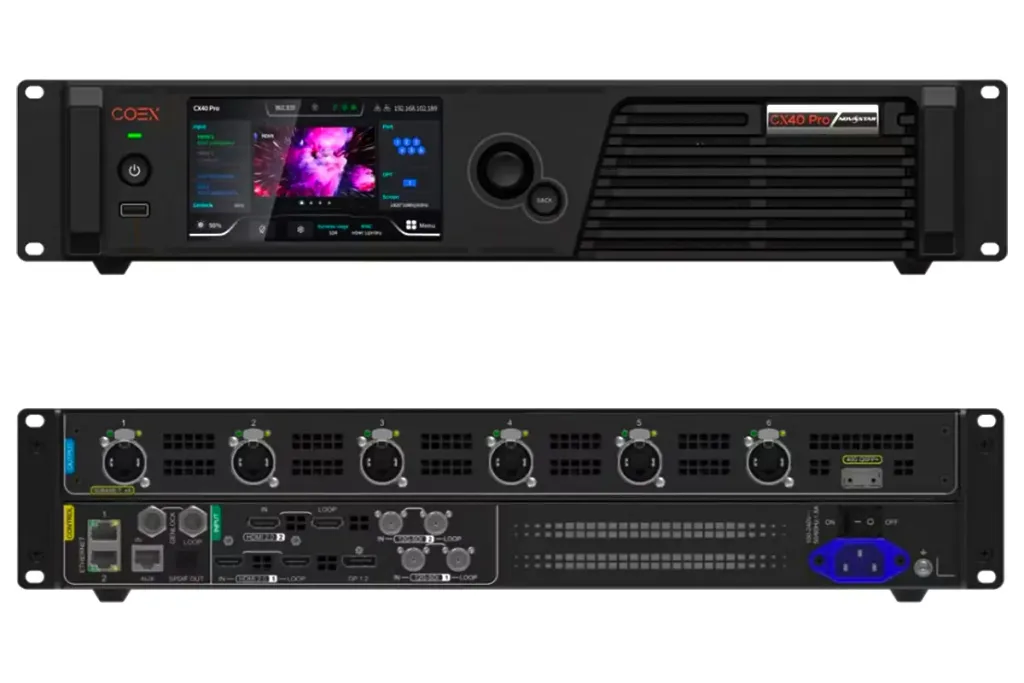 NovaStar CX40 Pro LED Controller: Specifications and Setup Guide