The Colorlight Z8t is a high-capacity LED video controller built for XR stages, broadcast facilities, touring systems, and unusually wide or tall LED canvases. Its verified headline specifications are a 23.59-million-pixel output capacity, canvas dimensions up to 16,384 pixels wide or 8,192 pixels high, input frame rates from 23.98Hz to 240Hz, four-layer splicing, HDR10/HLG processing, 3D LUT support, and a choice of 5G Ethernet or 10G fiber output boards. The Colorlight Z8t is worth considering when color accuracy, camera synchronization, modular I/O, and simplified high-bandwidth cabling matter more than low purchase cost. For a conventional conference room or modest advertising wall, it is likely more controller than the project needs.
- Best fit: XR virtual production, broadcast, premium live events, and very large LED walls.
- Verified capacity: up to 23.59 million pixels, not 23.69 million.
- Color tools: Color Magic, Color Curve, 3D LUT, gamut, temperature, shadow, and highlight adjustment.
- Camera tools: Genlock, frame multiplexing, frame multiplication, ShutterLock, and AdaptiveSync, subject to receiving-card and driver compatibility.
- Main caution: the Colorlight Z8t is a modular platform, so the installed input and output boards must match the project specification.
1. Colorlight Z8t Review Verdict: Who Should Buy It?
The Colorlight Z8t makes the strongest case for itself when a single controller must combine large-canvas processing, high-bandwidth distribution, detailed color management, and on-camera synchronization. Colorlight positions the product for high-end applications, and the feature set supports that claim: the Colorlight Z8t can scale, crop, and splice sources, drive four visual layers, manage HDR content, and output through either 5G Ethernet or 10G optical fiber.
| Decision factor | Colorlight Z8t verdict | What it means on a project |
|---|---|---|
| Very large canvas | Strong fit | Up to 23.59 million pixels, 16,384px wide, or 8,192px high. |
| XR or broadcast camera work | Strong fit | Genlock, ShutterLock, frame multiplexing, and high-frame-rate input address common camera-capture problems. |
| Color-critical production | Strong fit | Color Magic, Color Curve, 3D LUT, gamut, temperature, shadow, and highlight controls provide several correction layers. |
| Long cable runs | Strong fit with fiber board | 10G optical fiber reduces copper cabling and supports long-distance signal transport. |
| Small standard LED wall | Usually excessive | A simpler processor may meet the pixel, layer, and synchronization requirements at lower cost and complexity. |
| Mixed legacy receiving cards | Verify before purchase | Colorlight recommends i10/K10; some functions can be unavailable with i9+, K9+, or i9 cards. |
2. Verified Colorlight Z8t Specifications
The table below is based on Colorlight’s official Z8t Specification V2.1 and the manufacturer’s Colorlight Z8t feature page. This matters because older reseller pages and even earlier articles may show conflicting capacity or latency figures. The current V2.1 document states 23.59 million pixels and describes latency as low to 0 frames, depending on the signal path and configuration.
| Specification | Verified value | Planning note |
|---|---|---|
| Maximum output load | 23.59 million pixels | Maximum canvas width 16,384px or height 8,192px. |
| Input frame rate | 23.98Hz to 240Hz | The source, board, processing mode, receiving card, and LED driver still determine the usable end-to-end result. |
| Input depth | 8-bit, 10-bit, or 12-bit | Higher bit depth increases bandwidth and can reduce per-board loading capacity. |
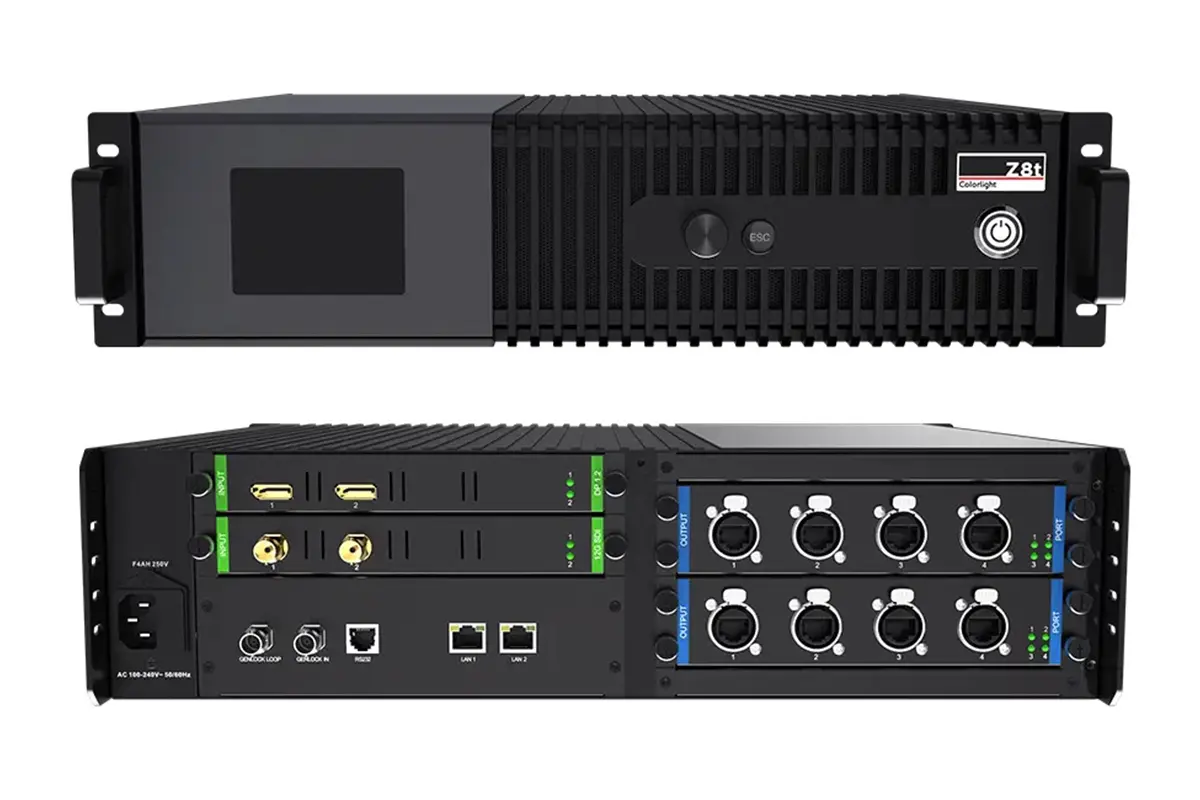
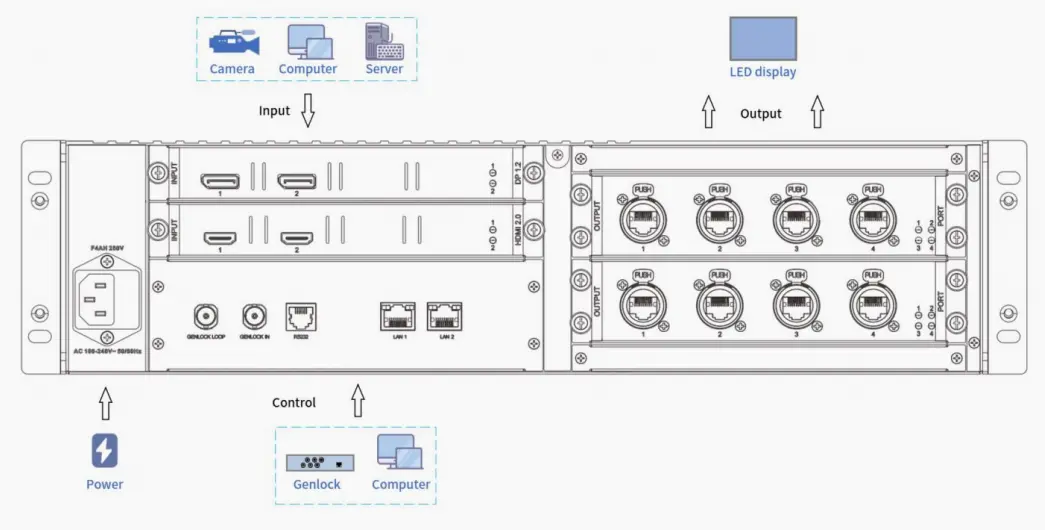
| Input boards | Dual HDMI 2.0; dual DP 1.2; dual 12G-SDI; HDMI 2.1 + DP 1.4 + 12G-SDI; or ST 2110 | Five swappable input-board types are listed. Order the correct board rather than assuming every connector is installed. |
| Output boards | 4 × 5G Ethernet; 2 × 10G fiber; or 4 × 10G fiber | On the four-fiber board, Fiber 3 and 4 back up Fiber 1 and 2. |
| Layers | Four-layer splicing display | Useful for picture-in-picture, overlays, and multi-source presentation. |
| Control and sync | 2 × Gigabit LAN, RS232, Genlock IN/LOOP, optional 3D VESA | Genlock accepts bi-level and tri-level sync. |
| Power and chassis | 130W rated; 2.5U; 12.70kg net | Device size is 482.6 × 112.0 × 480.0mm and horizontal placement is required. |
| Operating environment | -10°C to 45°C; 0% to 80% RH, non-condensing | Published ambient noise is 33dB. |
| Certifications | CE, FCC, IC, CB, cTUVus | Confirm the exact certification required in the destination market. |
3. Color Magic, 3D LUT, and Color Curve Explained
The most useful way to understand Colorlight Z8t color processing is to separate three jobs. Color Magic targets selected hues in an HSV model. A 3D LUT remaps colors throughout a three-dimensional color space. Color Curve adjusts red, green, blue, and overall brightness response at different gray levels. These tools overlap, but they should not be applied as interchangeable “make it look better” controls.
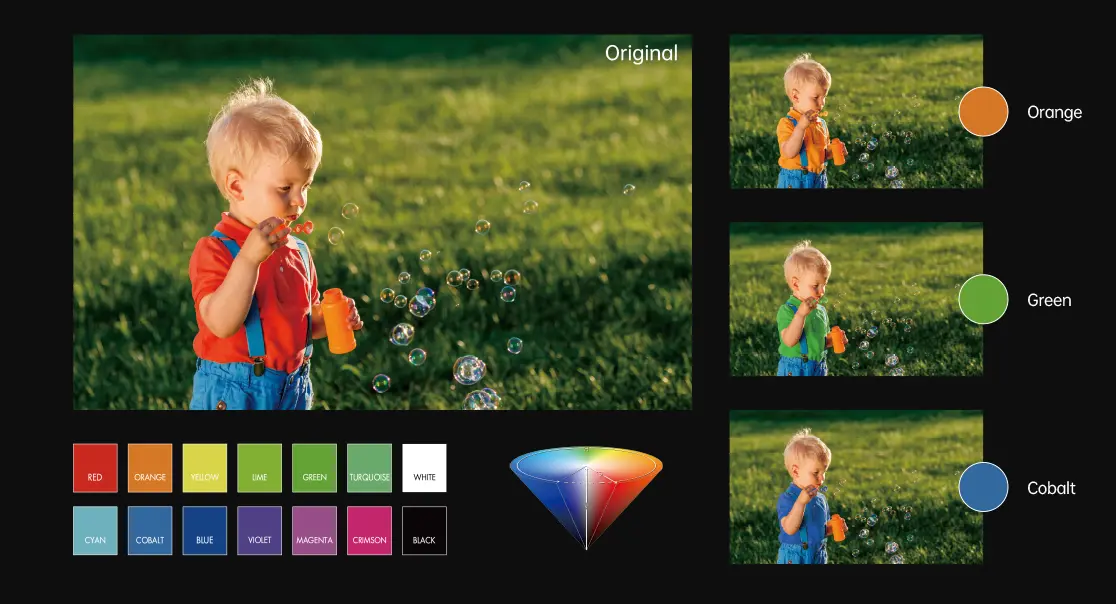
| Tool | Use it for | Do not use it for | Recommended verification |
|---|---|---|---|
| Color Magic | Adjusting the hue, saturation, or value of a selected color without moving every other color equally. | Replacing panel calibration or compensating for a badly matched camera color space. | Check brand colors, skin tones, and neutral grays before and after the change. |
| 3D LUT | Applying a controlled transform across the full RGB color volume, including a project-specific look. | Correcting a broken signal range, wrong transfer function, or inconsistent cabinet calibration. | Use a known test chart and verify the LUT strength at low, mid, and high luminance. |
| Color Curve | Fine-tuning RGB and white response at high brightness or low grayscale. | Making large creative color shifts that belong in the content pipeline. | Inspect shadow detail, highlight clipping, grayscale neutrality, and camera waveform. |
| Gamut and temperature | Matching receiving-card groups and setting a controlled white point. | Assuming every camera will interpret the LED spectral output identically. | Measure through the intended camera and lens, not only with the naked eye. |
| Shadow/highlight | Recovering visible separation near black and controlling bright detail. | Creating detail that is absent from the source or exceeds the panel’s physical range. | Use ramps and real footage; watch for banding and raised blacks. |
01. 3D LUT for a controlled pipeline
A 3D LUT maps input RGB coordinates to new output coordinates. That makes it useful for a defined transform or creative look, but only when the source color space, transfer function, and LED target are known. ARRI explains that its own virtual-production workflow generates a calibration file from how a specific camera sensor interprets RGB values on a chosen LED panel. The lesson for the Colorlight Z8t is broader: a LUT should be part of a measured pipeline, not a substitute for one.
“We had worked on the studio’s R&D for around 12 months before we started opening up for productions, and color was the missing puzzle piece.”
Markus Helminen, Technical Director at FireFrame Studios, in ARRI’s virtual-production color management case study.
4. Colorlight Z8t HDR, High Frame Rate, and Camera Sync
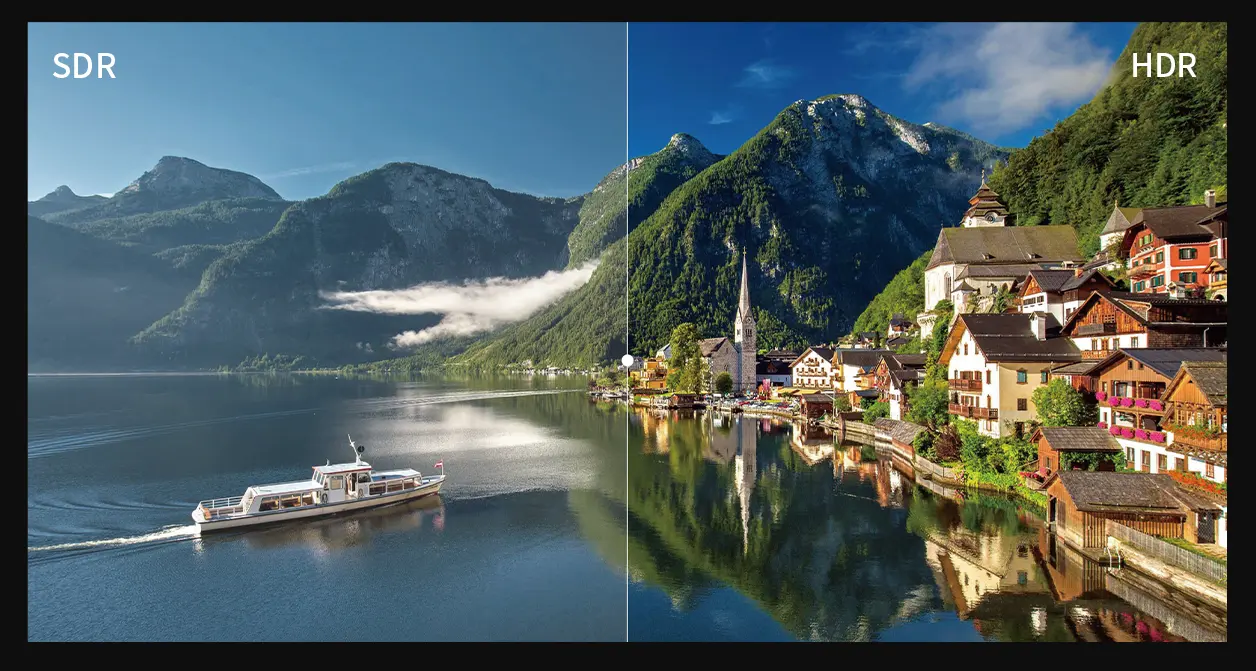
The Colorlight Z8t supports HDR10 and HLG processing, input frame rates from 23.98Hz to 240Hz, frame multiplication up to 10×, frame multiplexing, Genlock, ShutterLock, and AdaptiveSync. Those labels do not guarantee artifact-free capture by themselves. The LED driver, receiving card, scan pattern, panel refresh rate, camera sensor, shutter angle, content frame rate, and synchronization reference must work as one system.
| Feature | Problem it addresses | Critical dependency | Acceptance test |
|---|---|---|---|
| HDR10 / HLG | High-dynamic-range source handling and controlled highlight/shadow presentation. | Correct source metadata, transfer function, receiving-card setup, and panel capability. | Run HDR ramps and real material; confirm highlight detail and black stability. |
| Genlock | Aligning frame timing across the processor, camera, playback, and related devices. | A valid bi-level or tri-level reference distributed to every required device. | Record a moving test pattern and inspect for tears, discontinuities, and phase errors. |
| ShutterLock | Matching LED refresh behavior to the camera shutter to reduce bands or flicker. | Supported receiving-card/driver-chip combinations; Colorlight lists compatibility limitations. | Sweep shutter speed/angle and frame rate while filming the full wall. |
| Frame multiplexing | Showing interleaved content for multiple synchronized cameras. | Sufficient refresh headroom, phase control, rendering performance, and synchronized cameras. | Record every camera simultaneously and check for cross-frame contamination. |
| Frame multiplication | Multiplying incoming frames automatically or by a custom factor up to 10×. | Output timing, receiving cards, drivers, and panel scan behavior. | Verify motion, brightness, temperature, and camera artifacts at the chosen multiplier. |
01. Why high frame rate is not the same as panel refresh rate
The 240Hz figure in the Colorlight Z8t specification is the supported input frame-rate range, not a claim that every wall refreshes at only 240Hz. Panel refresh rate is normally much higher and is controlled farther downstream. Filmmaker Magazine reports that Frieder Hochheim and Ramiro Montes de Oca of Kino Flo explained: “an LED panel’s refresh rate determines the maximum frame rate a camera can capture.” Their practical recommendation in the same article is at least 3,840Hz for standard frame rates, with project-specific testing still required.
02. Match the whole camera chain
Rod Bogart, principal color scientist on Epic Games’ Virtual Production Tools team, is quoted in Filmmaker Magazine’s LED volume guide: “the easiest way to keep the consistency of color through the pipeline is to ensure that the color space from one thing to another matches.” Apply that principle before fine-tuning the Colorlight Z8t. Confirm camera color space, playback output, LUT placement, processor input range, receiving-card calibration, and monitoring transform in writing.
5. Colorlight Z8t Inputs, Outputs, Fiber, and ST 2110
The Colorlight Z8t supports five input-board types and three output-board types. This flexibility is a major advantage, but it changes the buying process: ports shown in one brochure image may not exist on the unit being quoted. Ask for a rear-panel drawing and bill of materials tied to the serialised configuration.
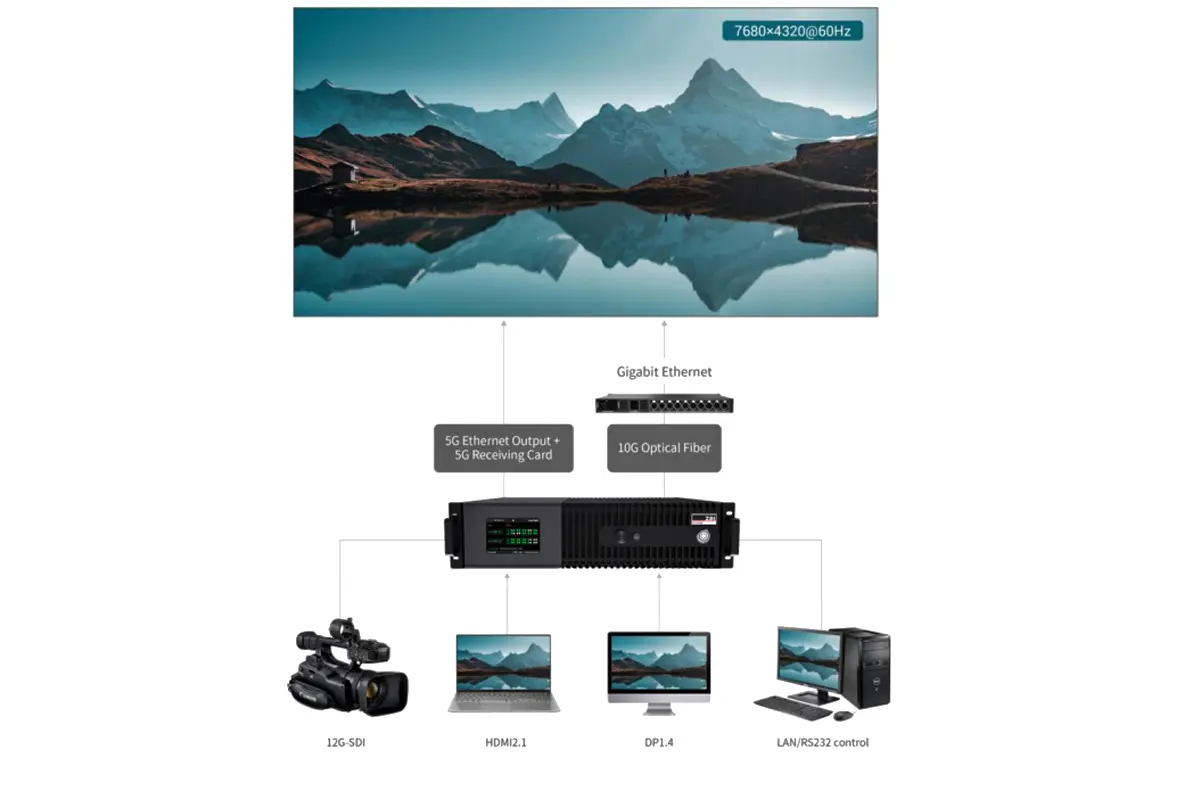
| Board option | Published ports/capability | Best suited to | Question to ask before ordering |
|---|---|---|---|
| Dual HDMI 2.0 input | 2 inputs, each up to 4096 × 2160 at 60Hz | Media servers, workstations, and general live production. | Is HDCP required, and what source depth/frame rate will be used? |
| Dual DP 1.2 input | 2 inputs, each up to 4096 × 2160 at 60Hz | Graphics workstations and multi-output render systems. | Are certified cables/adapters included in the signal test? |
| Dual 12G-SDI input | 2 inputs, each up to 4096 × 2160 at 60Hz | Broadcast cameras, routers, and production switchers. | Which SDI format, level, color sampling, and cable distance must pass? |
| Three-input board | HDMI 2.1 + DP 1.4 + 12G-SDI, with loop support | Flexible rental and mixed-source facilities. | Which connectors are primary, backup, and loop-through? |
| ST 2110 input | Uncompressed input up to 4096 × 2160 at 60Hz, 12-bit RGB/YCbCr 4:4:4 | Managed-IP broadcast and facility infrastructure. | Who owns PTP, network design, multicast, NMOS, and interoperability testing? |
| 4-port 5G Ethernet output | Four 5G Ethernet ports | Direct high-bandwidth copper distribution to compatible 5G receiving cards. | Are every receiving card and cable certified for the intended load? |
| 2-port 10G fiber output | Two 10G optical ports supporting 1G/5G Ethernet output | Long runs and reduced copper cabling. | Which single-mode fiber, connector polish, and transceiver are specified? |
| 4-port 10G fiber output | Fiber 3/4 back up Fiber 1/2 | High-availability broadcast and live-event systems. | How will redundancy be tested under load before handover? |
01. When the ST 2110 board matters
ST 2110 is not merely “video over a network cable.” The Society of Motion Picture and Television Engineers describes the suite as separate, synchronized essence streams for real-time professional media over managed IP. A Colorlight Z8t with the ST 2110 board belongs in a designed broadcast network with Precision Time Protocol, traffic engineering, multicast planning, monitoring, and interoperability tests. It is not the default choice for an unmanaged office switch.
6. How to Set Up the Colorlight Z8t
A reliable Colorlight Z8t setup begins with a signal and bandwidth plan, not with random menu adjustments. Colorlight provides the current Z8t documents and ColorAdept software downloads on its official site. Use the software and firmware versions approved for the installed hardware, and keep a rollback copy before a show or shoot.
- Document the system. Record canvas resolution, cabinet map, receiving-card model, source format, input/output boards, frame rate, bit depth, camera timing, fiber type, and redundancy goal.
- Connect control and signal paths. Connect the required source to the installed input board, connect LAN for management, then connect 5G Ethernet or 10G fiber outputs to the planned receiving-card chain.
- Load the correct cabinet data. In ColorAdept, import the approved receiving-card/cabinet package. Do not reuse a file merely because the cabinet looks similar.
- Build and verify the port map. Assign cabinets in physical order, confirm per-port load, and test orientation, color order, module geometry, and seam continuity.
- Configure timing and color. Set source format, scaling, layers, Genlock, HDR mode, Color Magic, Color Curve, 3D LUT, and any ShutterLock or AdaptiveSync function required by the workflow.
- Run acceptance tests and save presets. Test black, white, RGB, grayscale ramps, fine lines, motion, real footage, camera shutter sweeps, backup paths, and restart recovery. Save a dated preset only after every test passes.
| Preflight check | Pass condition | Failure usually points to |
|---|---|---|
| Source lock | Every expected input locks at the documented resolution, frame rate, sampling, and bit depth. | Cable, adapter, EDID/HDCP, input-board format, or source-output configuration. |
| Port loading | No output exceeds its calculated capacity; spare margin is documented. | Incorrect cabinet map, aggressive frame rate/bit depth, or wrong output-board assumption. |
| Grayscale and color | Neutral ramp, intact shadow steps, controlled highlights, and no obvious banding. | Range mismatch, calibration, LUT placement, curve settings, or panel limitation. |
| Camera capture | No visible scan bands, tearing, unexpected color shift, or cross-frame contamination. | Genlock phase, shutter, panel scan, receiving card/driver, frame multiplexing, or render timing. |
| Redundancy | Removing each defined primary path produces the documented recovery behavior. | Incomplete backup mapping, non-redundant downstream hardware, or untested failover logic. |
| Restart recovery | The Colorlight Z8t and wall return to the approved preset after a controlled power cycle. | Unsaved preset, startup order, network discovery, or receiving-card configuration. |
01. Test with the actual camera and content
ARRI’s virtual-production color guidance emphasizes calibration for the specific LED-panel and camera combination. Apply the same discipline to the Colorlight Z8t: use the intended camera body, shutter, lens, playback system, and operating brightness. A wall that looks clean to the eye can still show bands, moire, spectral color shifts, or clipped highlights on the recording.
7. Colorlight Z8t Use Cases and Limitations
The Colorlight Z8t is most valuable where large pixel load, synchronized cameras, color controls, and modular transport intersect. It can also serve conventional large displays, but its premium functions must solve a real system requirement to justify the added cost and engineering.
| Use case | Why the Colorlight Z8t fits | Limitation to plan around | Priority test |
|---|---|---|---|
| XR virtual production | Genlock, ShutterLock, frame multiplexing, 3D LUT, HDR, and high-frame-rate input. | Camera artifacts depend on the entire LED chain, not the processor alone. | Camera shutter sweep, color chart, motion, latency, and multi-camera phase. |
| Broadcast studio | 12G-SDI or ST 2110 input options, Genlock, controlled color, and fiber transport. | ST 2110 requires engineered IP infrastructure and operational expertise. | Format interoperability, reference timing, failover, and 24/7 recovery. |
| Touring and rental | Swappable boards, presets, four layers, high capacity, and redundant fiber option. | Inventory must track the exact board configuration and compatible receiving cards. | Fast setup, cable failure, dirty power recovery, and preset recall. |
| Large-format advertising | 23.59-million-pixel capacity and very wide/tall canvas support. | Advanced camera/color features may not create value for a simple playback wall. | Pixel map, playback stability, thermal operation, and remote recovery. |
| Small meeting or retail display | Technically capable. | Often oversized and unnecessarily complex for the requirement. | Compare total system cost and operator skill with a simpler processor. |
01. The practical limitations
The Colorlight Z8t is not a media server, render engine, camera tracker, receiving card, or panel-calibration instrument. It does not remove the need for good source content, correct cabinet data, tested cables, clean synchronization, or a calibrated monitoring path. ShutterLock and AdaptiveSync also have driver-chip compatibility conditions in the official specification, so they should be demonstrated on the proposed LED modules before purchase.
8. Colorlight Z8t Comparison and Buying Checklist
A traditional sending box or smaller processor is still the better choice when the wall is modest, the source is simple, and no camera or advanced color workflow exists. The Colorlight Z8t becomes defensible when it consolidates functions that would otherwise require more hardware, more cabling, or a higher-risk workflow.
| Capability | Basic sending controller | Colorlight Z8t | Buying implication |
|---|---|---|---|
| Primary role | Map a source to an LED wall. | Process, scale, splice, color-manage, synchronize, and distribute high-capacity output. | Choose the simpler class if processing features are unused. |
| Canvas scale | Model-dependent, usually lower. | Up to 23.59 million pixels; 16,384px wide or 8,192px high. | Calculate actual pixels and leave margin; do not buy by headline alone. |
| Inputs | Usually a fixed, limited set. | Five swappable board types, including HDMI, DP, 12G-SDI, and ST 2110 options. | Specify the exact board in the purchase order. |
| Color control | Basic brightness, gamma, or receiving-card adjustment. | Color Magic, Color Curve, 3D LUT, gamut, temperature, shadows, and highlights. | Valuable only with a measured color workflow. |
| Camera workflow | May provide limited sync features. | Genlock, ShutterLock, AdaptiveSync, frame multiplexing, and frame multiplication. | Demand an on-camera demonstration with the proposed panels. |
| Transport/redundancy | Conventional Ethernet, model-dependent backup. | 5G Ethernet or 10G fiber, loop redundancy, optional backup fiber ports. | Map every single point of failure, not only the controller outputs. |
01. Six questions to put in the quotation
- Which exact Colorlight Z8t input and output boards are installed?
- What is the validated pixel load per port at the intended frame rate and bit depth?
- Which receiving cards and LED driver ICs are used, and which ShutterLock/AdaptiveSync functions are confirmed?
- What firmware, ColorAdept version, cabinet file, and recovery preset will be delivered?
- How will Genlock, camera shutter, HDR, color accuracy, and redundancy be acceptance-tested?
- Who provides commissioning, operator training, spare parts, and post-installation support?
02. Alternatives to compare
If the Colorlight Z8t exceeds the requirement, compare a smaller processor and a conventional sender. Use our Colorlight Z5 controller guide and LED screen resolution guide to size the alternative around the real canvas.
Final verdict: the Colorlight Z8t is a credible high-end controller when the project needs its verified 23.59-million-pixel capacity, modular professional inputs, fiber output, four layers, camera synchronization, and advanced color tools. It is not automatically the right controller for every LED wall. Buy it against a documented signal, camera, receiving-card, and redundancy specification, then make the supplier prove the complete workflow before delivery. For a project-specific controller and LED system plan, contact EagerLED with your pixel map, source list, and camera requirements.
9. Colorlight Z8t FAQ
 20 LED Screen Suppliers in the USA (2026 Buyer Guide)
 Top 15 LED Screen Suppliers in Japan (2026 Guide)