A circular LED screen needs content prepared for its visible round boundary, rather than a rectangular video sent unchanged to the player. Confirm the active diameter, native pixel map, scaling behavior, and artwork safe area before approving the display. For a recessed installation, also agree the outer frame, opening, mounting depth, and component removal path.
This guide is for retailers designing a flat round display above a counter or within a brand-experience wall. It covers the content and installation brief to give the designer, integrator, and supplier. A sphere, a curved ribbon, and a cylindrical column use different geometry and need their own mapping plans.
The diagrams are illustrative geometry, not product photographs or construction details. Numerical examples describe hypothetical layouts; the supplied module map and approved project drawings determine what can actually be built.
1. Define the Circular LED Screen Before Designing Artwork
Start with two coordinated documents: a dimensioned outline of the visible display and a pixel map for the content team. The physical outline tells the installer where the image ends. The pixel map tells the designer where a file’s pixels will appear. One drawing cannot automatically substitute for the other.
A circular LED screen is a flat display with a round visible face. It may be assembled with shaped edge modules, another purpose-designed arrangement, or a specified masking treatment. Ask how the proposed construction creates the boundary. Do not assume that standard rectangular modules can be cut, that every point inside a mathematical circle contains an LED, or that trim is outside the quoted diameter.
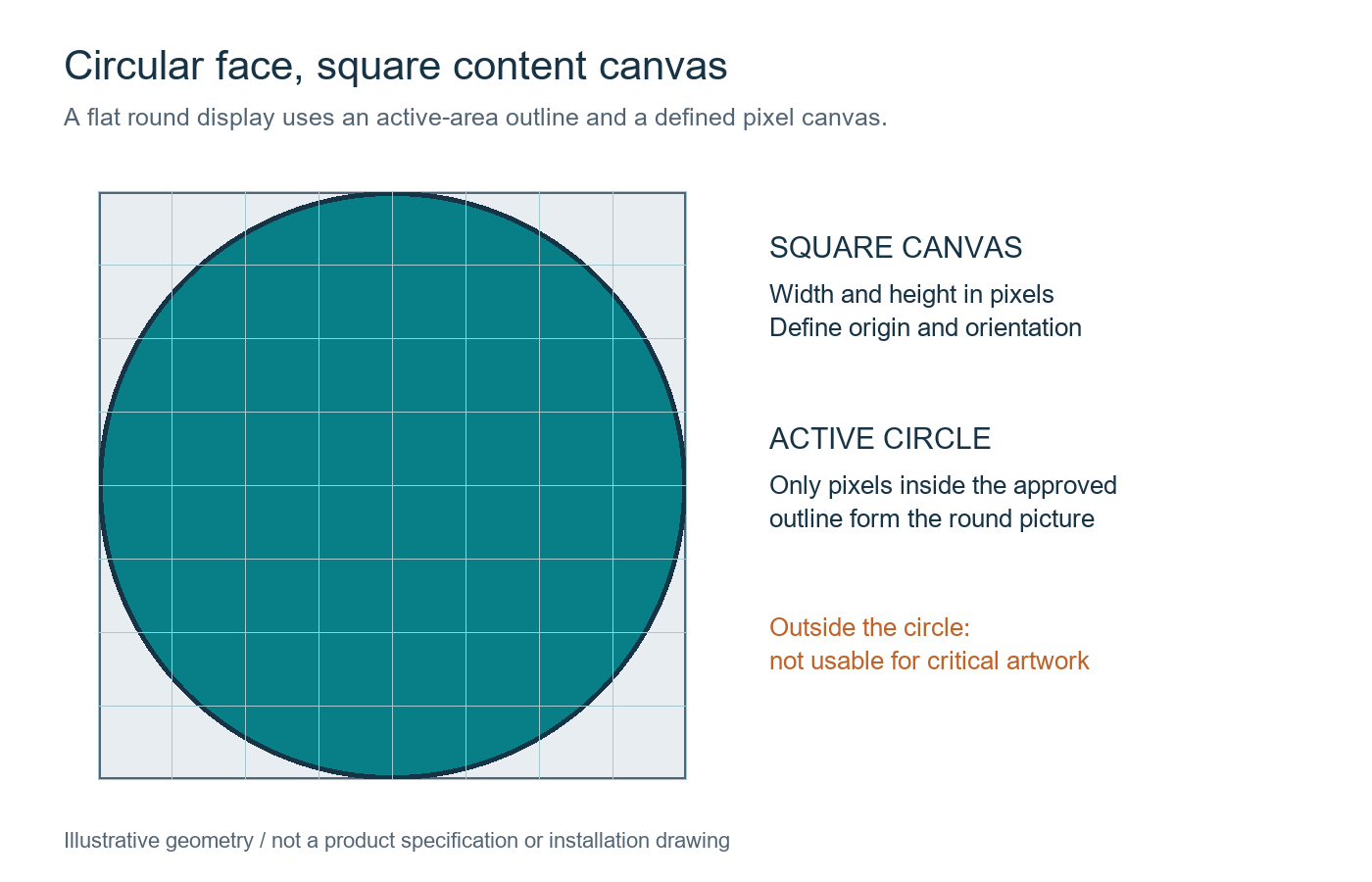
Record the active diameter separately from the overall frame diameter. Then request the content canvas width and height in pixels, its origin, display orientation, and the active-area overlay. A square file canvas can contain a circular image area, with the corner regions outside the visible display. Those corner regions are not additional space for a logo or mandatory wording.
For a circular LED screen, nominal diameter divided by nominal pitch is only a planning approximation of pixels across the face. The actual module arrangement and boundary treatment determine the final map. Use the supplier’s confirmed native canvas for production files, not a rounded estimate from a marketing dimension.
Give the same approved overlay to the creative team and integrator. Label its revision and include an orientation mark, such as a top-center reference. This prevents a correct file from being rotated or shifted during commissioning. Our LED screen resolution guide explains native pixels and input resolution; the round boundary adds a separate content constraint.
2. Decide What Happens to Rectangular Video
Rectangular video can be scaled, cropped, repositioned, or recomposed for a circular LED screen. These operations have different consequences. Ask the integrator to demonstrate the exact source file and playback preset instead of accepting an undefined promise that the video will fit.
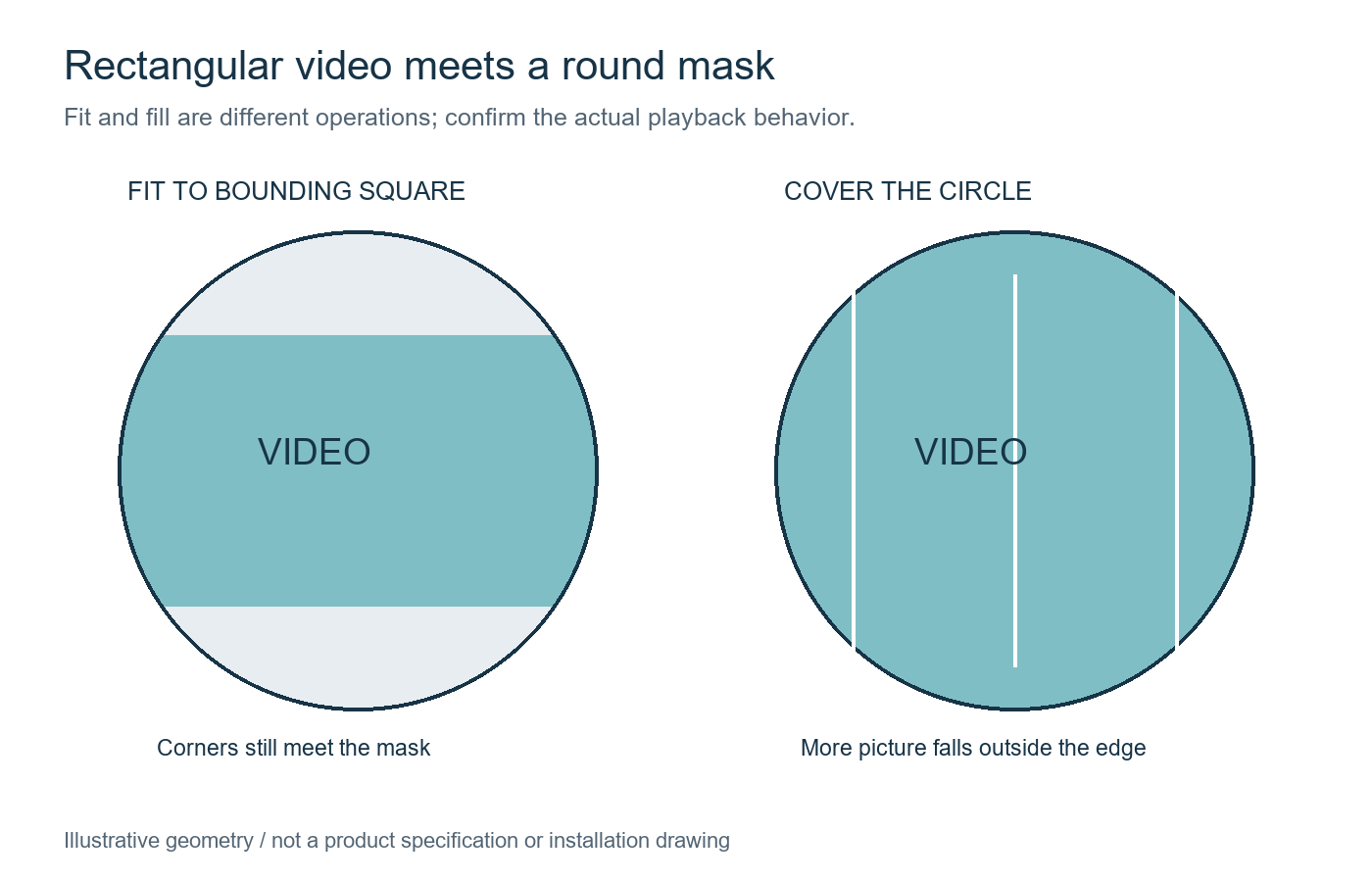
Fitting a landscape video to the width of a square canvas preserves its rectangular proportions, but the round display boundary can still remove the rectangle’s corners. Filling the square canvas generally enlarges the source and crops more of its left and right sides before the round boundary is applied. Neither operation guarantees that every price, face, or subtitle remains visible.
Stretching the source to another aspect ratio can distort shapes and brand assets. It should not be the automatic solution to missing content. For a circular LED screen, a better creative workflow is often to place the essential message within an approved central area and let decorative imagery extend toward the perimeter.
| Treatment to discuss | Likely trade-off | Review file to request |
|---|---|---|
| Fit within the bounding square | Unused bands may remain; rectangular corners can still meet the round mask | Numbered markers at all four source corners and along the edges |
| Fill the bounding square | Source sides may be cropped before the circular boundary removes more detail | A border and central reference showing the retained source region |
| Recompose for the circle | Requires a dedicated layout rather than an automatic conversion | Final logo, price, image, and text positions on the approved overlay |
| Preserve the complete rectangle inside the circle | Uses less of the available round image area | A deliberately smaller rectangular composition with all corners visible |
Include motion in the review. An object that starts safely in the center can move outside the visible boundary later in a clip. Check opening titles, lower thirds, transitions, end cards, and looping points. If the content includes required offer conditions, establish their readable position throughout the relevant part of the message.
Keep the approved scaling and position preset identifiable. A different player, replacement source, or software update may change the result. The circular LED screen content package should include the source version and the tested output settings so a future campaign does not depend on someone remembering an undocumented adjustment.
3. Establish a Safe Area for Logos, Prices, and Text
An artwork safe area is an agreed region where essential content must remain visible and readable. It is a creative and acceptance requirement, not a universal percentage built into every circular LED screen. Define it using the approved pixel map, the frame treatment, and the intended viewing positions.
Use one overlay for the active edge and another for essential content. The active edge marks where the display can show an image. The essential-content guide adds a deliberate inset for brand elements, text, and other items that should not approach that edge. Decorative backgrounds can extend farther, provided their appearance is approved.
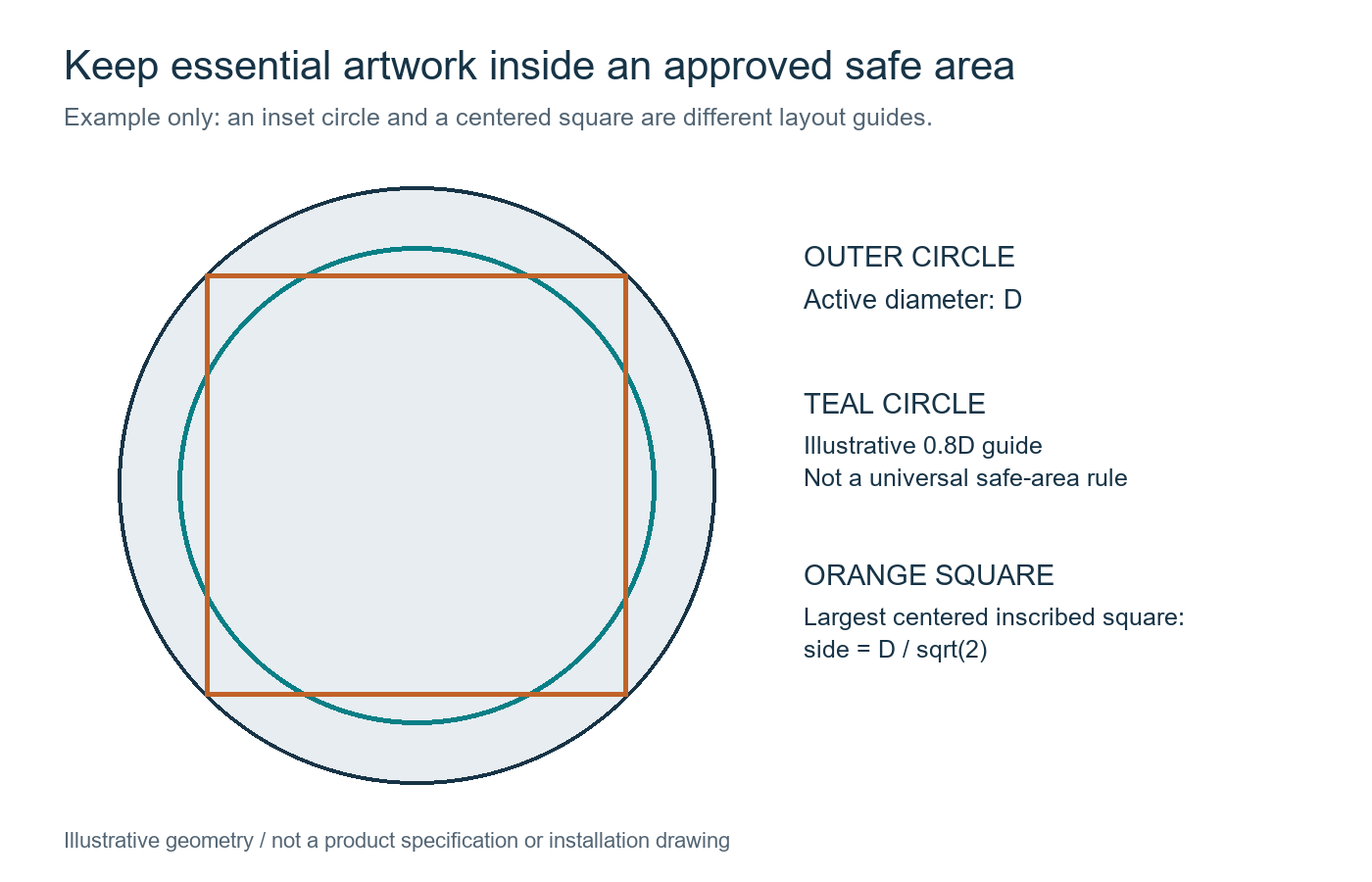
A simple geometric check helps explain why a square logo layout can lose its corners. The largest centered square inside an ideal circle has a side equal to the diameter divided by the square root of two, approximately 70.7% of the diameter. Its corners touch the circle, so it has no additional design margin. A production safe area normally needs a separately agreed inset.
For an illustrative circular LED screen with a 1,000-pixel active diameter, that inscribed square is about 707 pixels wide and high. An example inset-circle guide with an 800-pixel diameter is a different shape: a square 800 pixels wide would not fit inside the original circle. Do not confuse a circular safe-area diameter with the side length of a rectangular artwork box.
For a centered rectangular artwork box in an ideal circle, its width squared plus its height squared must not exceed the diameter squared. This is a geometric containment check, before any extra margin. It explains why a wide, shallow wordmark can use a different box from a square logo. Once the box is moved off center, use the actual overlay to check every corner instead of reusing the centered-box rule. Shadows, outlines, and attached wording count as part of the artwork boundary too.
The same geometry applies to physical dimensions, but readability needs a separate test. A mathematically visible price can still be too small or poorly contrasted for someone standing across the store. Test the actual typography and offer wording from the normal customer approach, including off-center positions, with the planned store lighting.
Ask the content team to test long names, wide logos, multiple currency characters, and the longest expected price or promotional line. Avoid approving only a short sample that leaves generous empty space. If campaigns use different languages, include representative text lengths and line breaks in the same circular LED screen template review.
Maintain a master template with editable guides that do not appear in the final export. Export a separate proof image showing those guides for approval, then deliver a clean playback file. The two versions should share a revision name so the reviewed composition can be traced to the file loaded onto the display.
4. Review Edge Pixels and Module Junctions Together
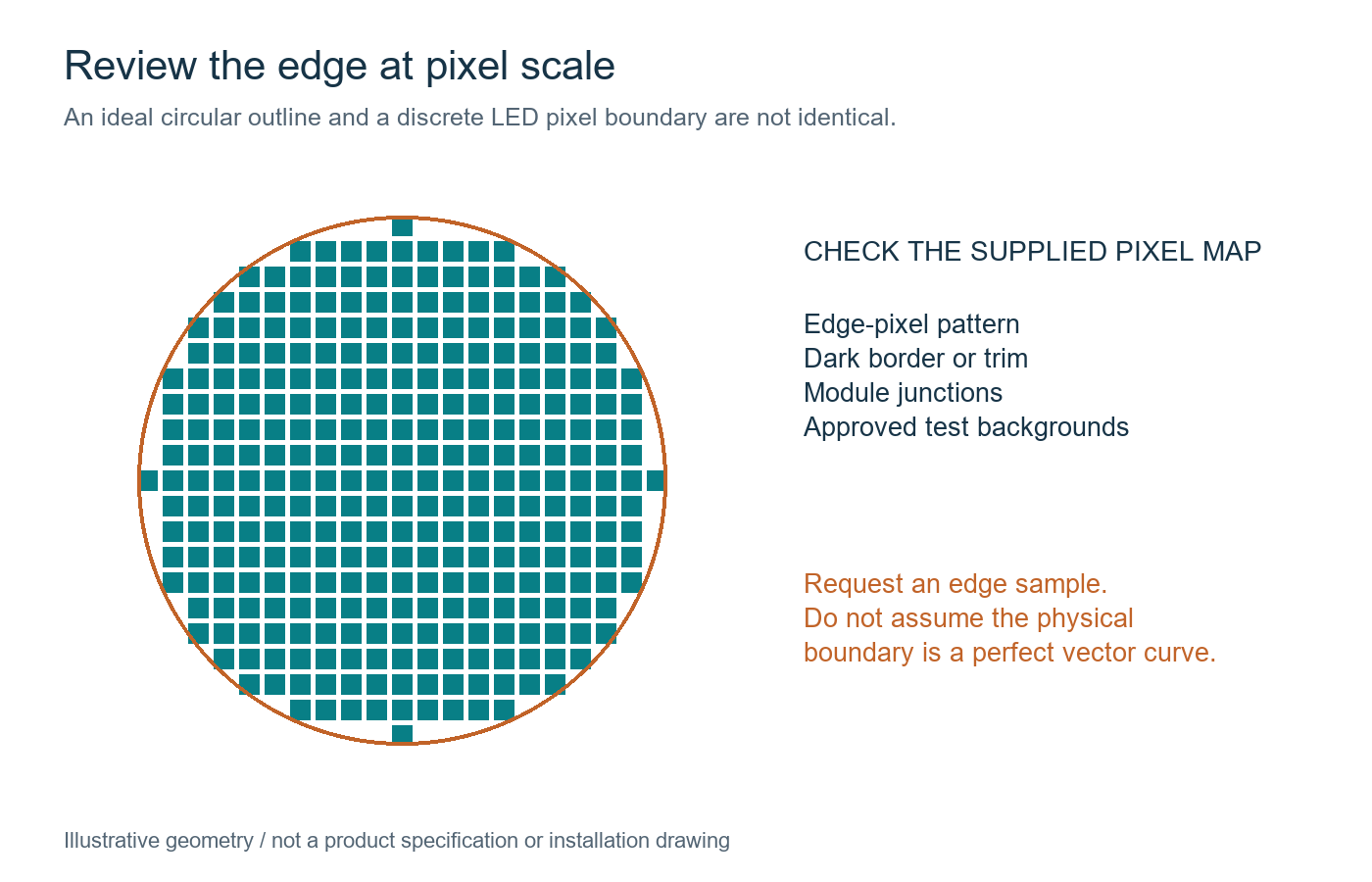
Approve a representative edge sample or an identified display demonstration before accepting the final appearance. A circular LED screen has a discrete pixel boundary, so a smooth vector outline in a drawing does not fully describe the visible edge. The module design, pixel layout, dark border, and frame all contribute to the result.
Ask the supplier to explain the perimeter construction and show how the physical edge relates to the active pixel map. Identify any non-emitting border, masked region, or visible trim. Agree whether the stated diameter measures the outer metalwork, the illuminated area, or another reference. Small differences can affect a tightly integrated retail design.
Review the circular LED screen on white, gray, dark, and single-color backgrounds as well as with the final campaign. Different patterns reveal different issues: a dark background may conceal a boundary treatment that becomes obvious on a bright image. Record the brightness setting, viewing position, and sample configuration alongside the observations.
Check module junctions and edge alignment at the intended viewing distance. Ask for agreed criteria for gaps, steps, brightness differences, and defective pixels, including how observations will be documented and resolved. This guide does not assign a universal numerical tolerance; the acceptance criteria should match the quoted construction and project requirements.
Retailers should also ask how an edge module is identified and replaced. Standard interior modules and shaped perimeter parts may have different availability or handling requirements. EagerLED’s indoor LED module range provides component context, but a standard module listing does not establish suitability for a custom circular boundary. Obtain written confirmation for the proposed assembly and its spares.
A photograph is useful for documenting a sample, but it is not a reliable substitute for every visual judgment. Camera exposure, compression, and distance can conceal or exaggerate seams. Where the finish is critical to the store design, arrange an appropriate witnessed review and retain the approved sample or documented reference.
5. Give the Installer More Than a Diameter
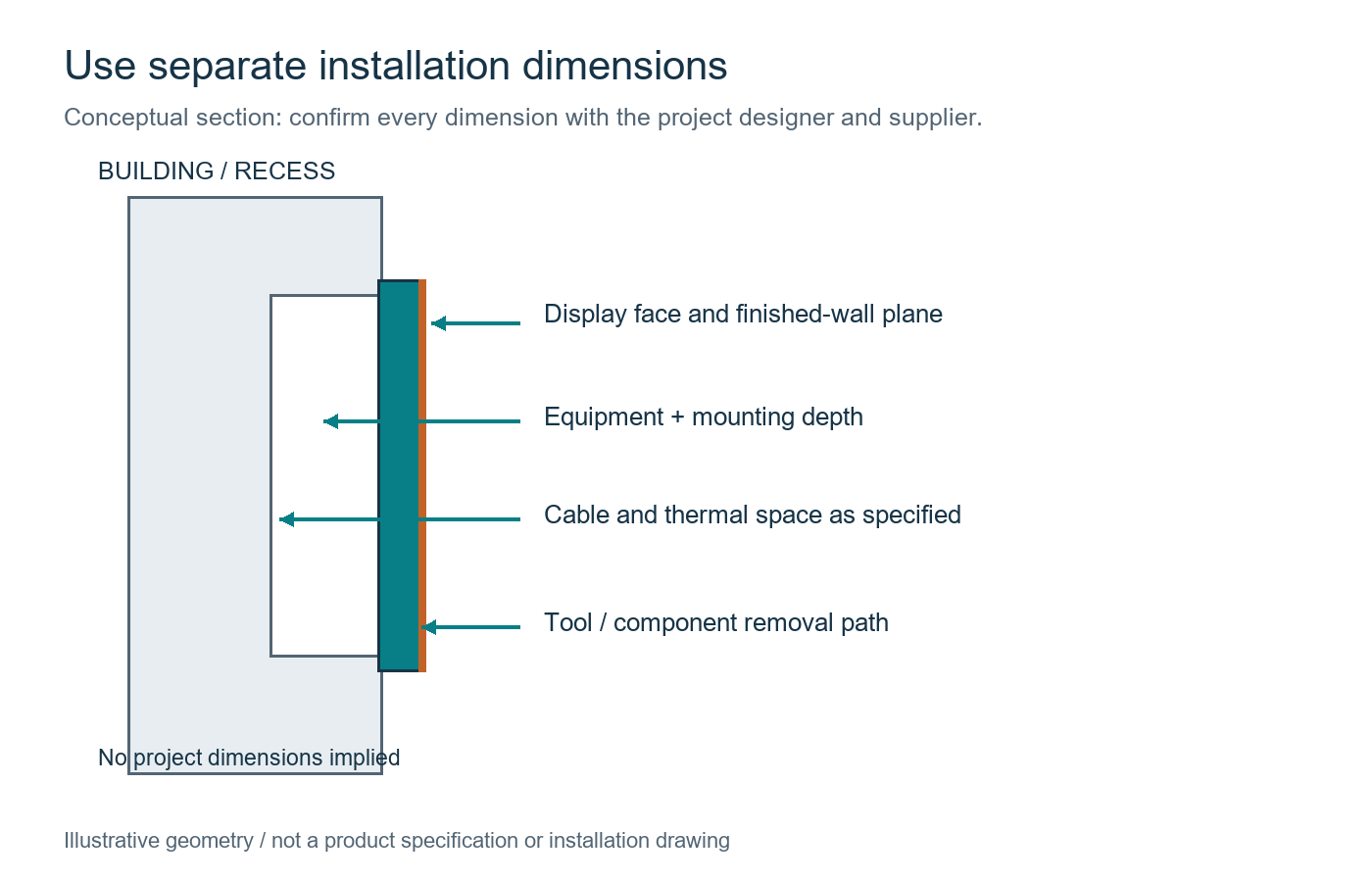
A flush-mounted circular LED screen needs a coordinated elevation and section, not simply a circle on a shopfitting plan. Identify the active diameter, outer frame diameter, opening size, finished-wall plane, mounting arrangement, and complete equipment depth. The designer and supplier should confirm how those dimensions relate before the recess is built.
Show the position relative to the retail counter, ceiling, nearby signs, and customer circulation. Check the intended sightlines and any obstruction from lighting, suspended graphics, or furniture. The center height affects the viewing experience, while the surrounding construction affects access and the appearance of the finished edge.
The section should reserve the specified space for brackets, cables, connections, heat management, and service work. Cabinet depth alone is not installed depth. A circular LED screen described as front-service still needs a usable tool approach and a removal path for each relevant component. Confirm access to power equipment and receiving electronics as well as the image surface.
Have qualified project personnel coordinate the mounting and electrical provisions. Request the equipment weights, fixing interfaces, power requirements, and environmental limits needed for that work. Do not infer support capacity or electrical design from the screen’s outline, and do not use the conceptual illustration below as a construction drawing.
Before closing the surrounding finishes, demonstrate the agreed access method within the proposed constraints. Include trim, counter projections, and any access equipment the service team will use. Record which finishes must be removable and who supplies them. This gives the circular LED screen owner a practical maintenance arrangement rather than an attractive but inaccessible recess.
6. Test the Campaign Workflow Before Handover
Test the delivered display with the approved content files, not only a supplier’s demonstration loop. A circular LED screen is ready for retail use when the content owner can publish a new campaign without losing the agreed crop, orientation, or safe area. Include that workflow in acceptance.
| Check | Evidence to retain | Person to confirm it |
|---|---|---|
| Native canvas and orientation | Approved pixel map, top reference, test-file revision | Integrator and content designer |
| Crop and safe-area behavior | Final campaign export, proof overlay, playback preset | Retail brand owner |
| Perimeter and module appearance | Sample identity, test backgrounds, observations, agreed exceptions | Buyer and supplier |
| Recess and service access | Approved drawings, access demonstration, tool and spare references | Installer and maintenance owner |
| Content replacement and restart | Steps, restored settings, final visible result, backup location | Retail operator and integrator |
Ask a retail team member to replace the campaign using the supplied instructions, then check the displayed result. Include an agreed restart test and confirm which settings return automatically and which need intervention. Do not assume that a default player preset preserves a custom round composition.
Agree a fallback campaign and a simple approval process for incorrect uploads. Keep a known-good file that can replace a stretched, cropped, or outdated promotion while the content team resolves the problem. The retailer should know who can change the playlist, who approves offer wording, and who checks the screen after an update. A successful file transfer proves delivery to the player; it does not prove the visible message is correct. Include a final storefront check in the campaign workflow.
For the circular LED screen handover, keep the clean content template, active-area overlay, export instructions, configuration backup, and approved test files in a controlled location. Record responsibilities for future software or hardware changes. If an update changes scaling behavior, repeat the relevant content checks before loading the next campaign.
Frequently Asked Questions
Does a round display need a circular video file?
A video file can use a rectangular pixel canvas while the visible display is round. Confirm the canvas dimensions and active-area overlay with the integrator. File shape, visible shape, and any masking inside the playback chain are separate matters; do not assume an alpha channel is required or supported.
Can a circular LED screen show a QR code?
It may, if the code remains complete, has sufficient contrast and clear surrounding space, and is readable at the intended phone positions. Place it inside the approved content area and test the final file on the display. The round shape alone does not establish successful scanning.
Should the logo be enlarged to touch the perimeter?
Only if that treatment is intentional and the brand owner approves the resulting crop. Keep logos that must remain complete within the agreed safe area. Check the widest brand variant and any attached wording, rather than approving only a compact symbol.
Can the same artwork be used on a sphere or cylindrical screen?
Not automatically. Those surfaces introduce different mapping and viewing conditions. A circular LED screen in this guide is a flat round face. Request the correct template and content review for a sphere, curved surface, or cylindrical wrap instead of reusing a flat-circle overlay.
What if the store changes the campaign agency later?
Give the new agency the approved canvas, active-area mask, safe-area guide, and export requirements. Include a known-good example and the current playback preset. Require a proof and a display check before the first new campaign so the design intent survives the change of supplier.
Prepare a Round-Display Design Brief
Send an elevation and section of the proposed location, desired active diameter, customer viewing positions, store-lighting conditions, and representative artwork. Mark the frame finish, opening, and service constraints separately. State which dimensions are fixed and which can change during feasibility review.
For an EagerLED circular LED screen inquiry, request confirmation of the proposed construction, native map, perimeter treatment, and maintenance arrangement alongside the equipment scope. Discuss your round-display design requirements before finalizing the recess or commissioning the campaign artwork.
 LED Receiving Card Replacement Files: Before You Buy