What happens when your controller can’t handle tomorrow’s signal format? You either rent a different unit, buy a second one, or turn down the gig. The MX6000 Pro solves that problem with swappable input cards. HDMI today. 12G-SDI tomorrow. ST 2110 next month. Same chassis, different card.
In this guide, you’ll learn what the MX6000 Pro does, which cards it supports, how it compares with other NovaStar controllers, and whether it’s worth buying.
catalogue
1.What Is NovaStar MX6000 Pro?
1.1 NovaStar MX6000 Pro Overview
The NovaStar MX6000 Pro is a high-end controller for large 8K LED displays. Unlike traditional controllers, the MX6000 Pro lets you change input and output cards to match different projects. Input cards and output cards are hot-swappable.Set it up for one event today and a different one tomorrow.
The MX6000 Pro is a professional 8K LED display controller for big, high-end projects. It supports up to 32× 4K@60Hz, 16× 8K@30Hz, or 8× 8K@60Hz inputs, with a maximum load of 141 million pixels.
It features 12-bit color depth, 480 Hz refresh, zero latency, and HDR10/HLG support. It is ideal for virtual production, xR stages, broadcast studios, e-sports venues, and large rental events.
1.2 Who Is NovaStar MX6000 Pro For?
The MX6000 Pro isn’t a general-purpose controller. It is built for professionals who need a large display area. It also provides broadcast-grade signal handling and flexible input switching.
Typical MX6000 Pro users include virtual production and xR studios using Unreal Engine. TV broadcast centers with 12G-SDI and ST 2110. E-sports venues managing multiple live feeds. Rental companies switching between concerts and corporate events. Stadiums and arenas with large fixed LED walls. If your pixel count regularly tops 10 million, the MX6000 Pro is the tier you should be looking at.
2.Key Features of the NovaStar MX6000 Pro
2.1 Massive 8K Processing Capability
The MX6000 Pro handles up to 141 million pixels across its output card configuration, with native 8K@60Hz input support via the MX_1×DP 1.4 (8K@60Hz) input card.
The NovaStar MX6000 Pro processes up to 141 million pixels. It uses an output card configuration. It supports native 8K@60Hz input via the MX_1×DP 1.4 (8K@60Hz) input card. A single unit can drive an 8K LED wall at full resolution. It can also handle multiple 4K input sources at the same time.
For rental companies, one MX6000 Pro can cover all needs. It ranges from a single 4K breakout-room display to a multi-8K concert backdrop. It does this without changing controller platforms.
2.2 True 12-Bit Color Processing
The NovaStar MX6000 Pro delivers authentic 12-bit video input and processing, supporting 12-bit, 10-bit, and 8-bit depth across its input cards.
This results in smoother grayscale transitions. It also improves gradient handling on large LED walls.What’s more,it ensures full compatibility with HDR workflows.
With HDR10 and HLG support, the NovaStar MX6000 Pro also keeps HDR content’s original color accuracy. It maintains color accuracy from source to screen.
2.3 480Hz High Frame Rate Support
It is used in applications where motion clarity is critical. Such as xR stages, virtual production, and broadcast sports.The NovaStar MX6000 Pro supports up to 480 Hz frame rates.
It also uses frame multiplication and shutter fit features. This helps remove scan-line artifacts. Lower-spec controllers often show these artifacts in multi-angle camera shooting.
The result is a clean LED wall under the most demanding camera conditions.
2.4 0-Frame Latency
The NovaStar MX6000 Pro achieves 0-frame processing latency. It is under 1 millisecond from input to output.This matters in live events. Any delay between the camera feed and LED wall breaks the illusion.
It is also critical in virtual production. Real-time camera tracking needs perfect sync. You can also dial in extra latency (zero to two frames) for scenarios where deliberate delay is needed.
2.5 HDR10 and HLG Support
The NovaStar MX6000 Pro fully supports HDR10 and HLG across its HDMI 2.0, HDMI 2.1, and DP 1.4 input cards. For 12G-SDI and DP 1.2 sources, HDR attributes can be manually overridden.
It also supports 3D LUT files (.cube). It supports 17×17×17, 33×33×33, and 65×65×65 accuracy levels.This allows precise control over the final output.
3.Modular Design Explained
3.1 Why Modular Architecture Matters on the MX6000 Pro
Traditional LED controllers ship with fixed inputs and fixed outputs. When your event needs change, you replace the entire controller. It gets expensive fast. The MX6000 Pro takes a different approach.
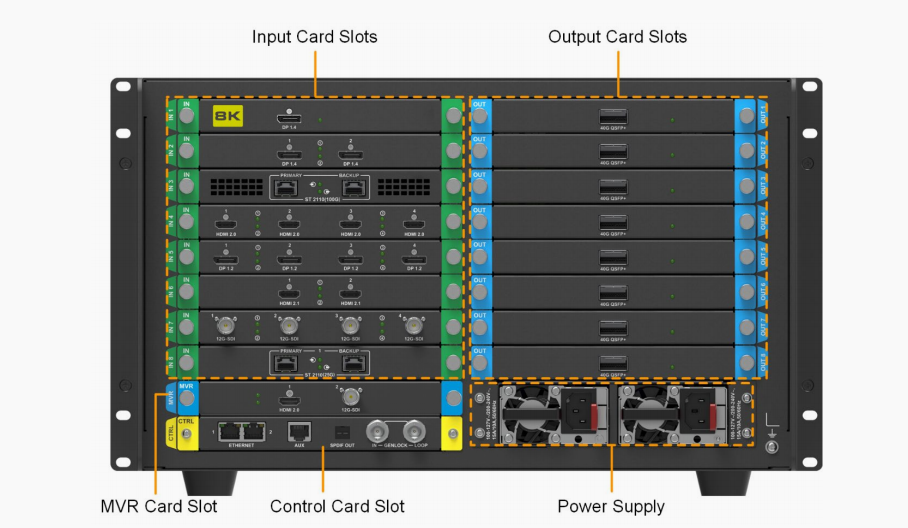
Its card-cage chassis holds up to 8 input card slots, 8 output card slots, 1 dedicated MVR slot, and 1 control card slot. Each card is hot-swappable. So configuring the MX6000 Pro for a broadcast show with 12G-SDI inputs takes minutes.
Switching to an ST 2110 IP workflow for the next production only needs a card swap. It does not require replacing the controller. This modularity is the MX6000 Pro’s biggest advantage for rental and staging operations.
3.2 NovaStar MX6000 Pro Input Cards
The NovaStar MX6000 Pro supports up to 10 different input card types across its 8 input slots:
| Input Card | Type | Max Resolution | Best For |
|---|---|---|---|
| MX_4×HDMI 2.0 | 4× HDMI 2.0 | 4096×2160@60Hz | Corporate events, standard sources |
| MX_2×HDMI 2.1 | 2× HDMI 2.1 | 8192×4320@30Hz | 8K sources, next-gen GPUs |
| MX_4×DP 1.2 | 4× DP 1.2 | 4096×2160@60Hz | Multi-source computer feeds |
| MX_2×DP 1.4 | 2× DP 1.4 | 7680×4320@30Hz | 8K playback, high-res media servers |
| MX_1×DP 1.4 (8K@60Hz) | 1× DP 1.4 (8K) | 7680×4320@60Hz | Full 8K@60Hz single-source |
| MX_4×12G-SDI | 4× 12G-SDI | 4096×2160@60Hz | Broadcast trucks, live sports |
| MX_1×DP 1.4 + 1×HDMI 2.1 | 1× DP 1.4 + 1× HDMI 2.1 | 7680×4320@30Hz (DP)
/ 8192×4320@30Hz (HDMI) |
Flexible dual-format |
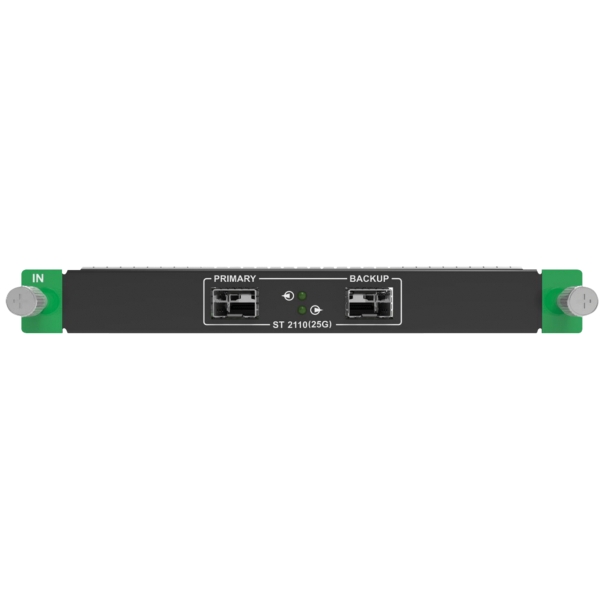
| MX_1×ST 2110 (25G) | 1× ST 2110 25G | 4096×2160@60Hz | IP video, SMPTE 2110 workflows |
| MX_2×ST 2110 (25G) | 2× ST 2110 25G | 4096×2160@60Hz | Multi-channel IP video |
| MX_1×ST 2110 (100G) | 1× ST 2110 100G | 8192×4320@60Hz (1 source) or4× 4096×2160@60Hz | High-bandwidth IP, broadcast hubs |
3.3 NovaStar MX6000 Pro Output Cards
The MX6000 Pro offers three output card types:
| Output Card | Ports | Load Capacity per Card (8/10bit@60Hz) | Best For |
|---|---|---|---|
| MX_4×10G Fiber | 4× 10G SFP+ | 17,694,720 pixels | Standard 1G rental, fixed install |
| MX_1×40G Fiber | 1× 40G QSFP+ | 17,694,720 pixels (8/10bit) / 11,804,800 pixels (12bit) | Large XR, high-bandwidth walls |
| MX_8×5G Base-T | 8× 5G Base-T | 17,694,720 pixels (8/10bit)/ 11,804,800 pixels (12bit) | New COEX 5G system, copper-based |
Each MX6000 Pro output card supports a maximum output height/width of 16,384 pixels. The MVR output card provides HDMI 2.0 and 12G-SDI monitoring outputs for real-time confidence monitoring during live events.
4.NovaStar MX6000 Pro Specifications
4.1 Processing Performance
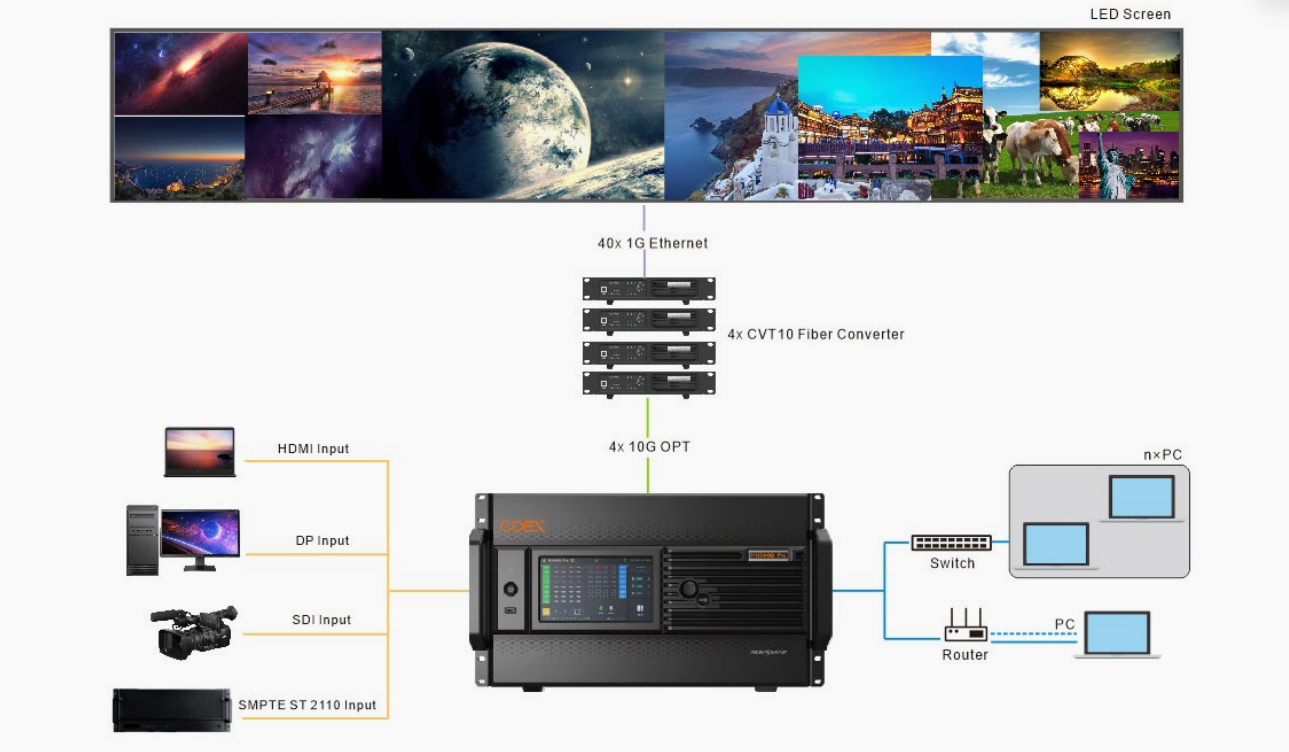
The MX6000 Pro delivers a maximum load capacity of 141 million pixels. So what does this mean in practice? Its input architecture supports up to 32× 4K@60Hz, 16× 8K@30Hz, or 8× 8K@60Hz, depending on the input cards installed.
On the output side, the MX6000 Pro has 1G output cards.Each card has up to 40 Ethernet port equivalents. With 5G solutions, the 40G fiber output card supports up to 8× 5G Ethernet port equivalents.
The MX6000 Pro supports multi-layer processing. It allows up to 4 layers per output card, or 32× 4K layers across the whole controller. It also supports cross-card layer roaming within a single screen.
4.2 Physical Design
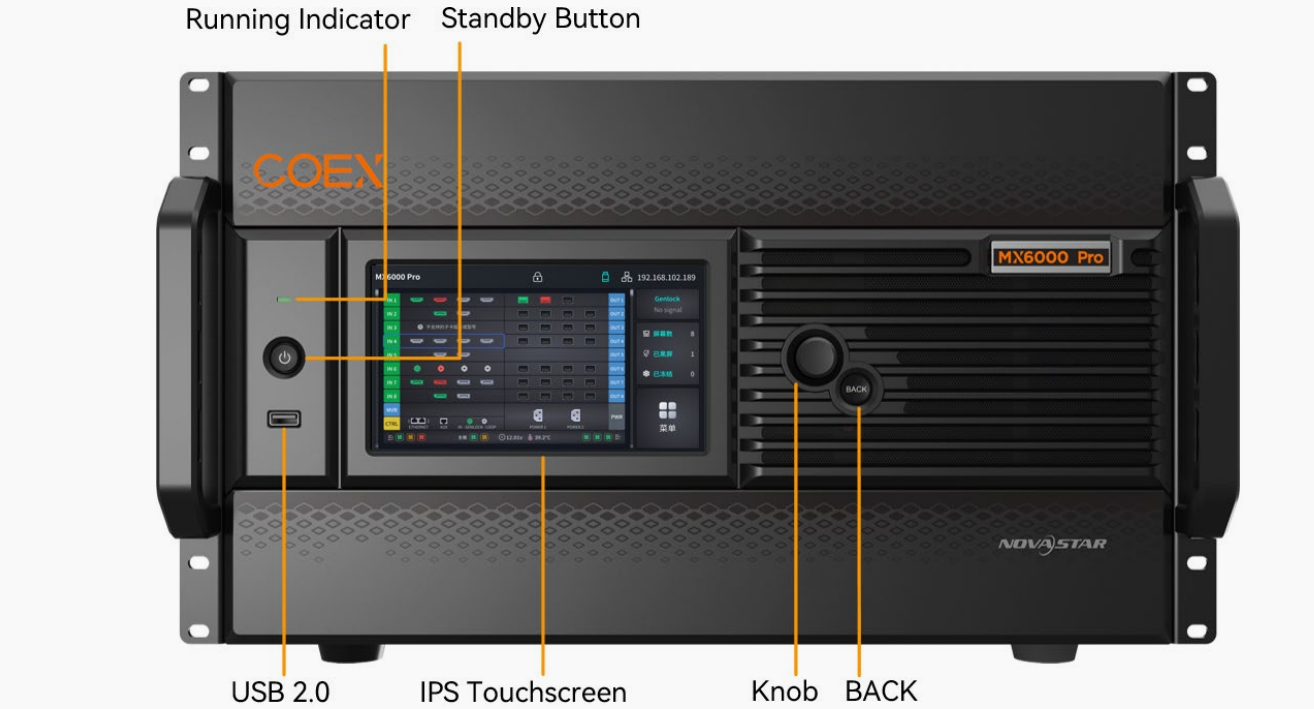
The MX6000 Pro occupies a 6U rack-mount chassis measuring 482.6 mm × 282.9 mm × 538.8 mm, with a net weight of 21.5 kg (chassis only, excluding input/output cards). The front panel features a 7-inch IPS touchscreen, a rotary knob for menu navigation, and a USB 2.0 port for diagnostic exports.
Dual redundant power supplies (100-127V~/200-240V~, 15A/10A, 50/60Hz) provide system stability, with a maximum power consumption of 820 W for a fully configured MX6000 Pro. Operating temperature ranges from –5°C to +45°C, and the typical noise level at 25°C is 43.0 dB(A) — quiet enough for most equipment rooms.
4.3 Connectivity and Control
The MX6000 Pro control card provides 2× Gigabit Ethernet ports supporting TCP/IP and star topology, 1× Genlock (Bi-Level, Tri-Level, Blackburst) with loop-through, 1× AUX (RS232) for central control devices, and 1× SPDIF digital audio output.
Protocol support includes SNMP, Art-Net, and NovaStar’s central control protocol. Up to 20 MX6000 Pro units can be cascaded via the built-in network switching function without requiring an external switch or router.
5.NovaStar MX6000 Pro Applications
5.1 Virtual Production and xR Stages
The MX6000 Pro is built for virtual production. Genlock support keeps the LED wall in sync with camera shutters. 0-frame latency gets rid of the delay between the tracked camera and the displayed background.
Frame multiplication and shutter fit adjust driver IC parameters to eliminate black lines and scanning artifacts during multi-angle shooting. For Unreal Engine workflows, the MX6000 Pro handles the high-resolution, high-frame-rate output that modern VP stages demand.
5.2 Broadcast and TV Studios
In broadcast environments, the MX6000 Pro’s 12G-SDI and ST 2110 input cards provide direct compatibility with existing broadcast infrastructure.
SMPTE ST 2110 (-10, -20, -30) support with SMPTE 2022-7 seamless redundancy, NMOS discovery (IS-04, IS-05, IS-09), and PTP synchronization (IEEE 1588-2008) turn the MX6000 Pro into a drop-in component for IP-based broadcast facilities. The ST 2110 (100G) card supports a single 8K source at 8192×4320@60Hz or four simultaneous 4K sources at 4096×2160@60Hz.
5.3 Large Event Rental LED Displays
For rental companies, the MX6000 Pro’s modular design is the main selling point. One controller, multiple configurations.
A rental house can stock a fleet of MX6000 Pro units and configure each one differently depending on the gig: 12G-SDI for a sports broadcast, HDMI 2.0 for a corporate keynote, ST 2110 for an international tournament. The MX6000 Pro supports device-level, card-level, and Ethernet port-level hot backup with automatic failover, so a hardware fault mid-show won’t interrupt the output.
5.4 Fixed Installations and E-Sports Venues
For permanent installations, the MX6000 Pro offers long-term stability with its dual power supply, automated system monitoring (fan speed, temperature, voltage, operational status), and redundant backup architecture.
E-sports venues benefit from the MX6000 Pro’s multi-layer processing (up to 32× 4K layers) for complex layouts: game feeds, player cams, sponsor graphics, and live stats, all from a single controller.
6.NovaStar MX6000 Pro vs Other NovaStar Controllers
6.1 NovaStar MX6000 Pro vs H-Series vs VX Series
| Feature | MX6000 Pro | H9/H15 | VX1000 |
|---|---|---|---|
| Architecture | Modular card-cage | All-in-one | All-in-one |
| Max Load Capacity | 141 million pixels | Lower (varies by model) | Lower |
| 8K Input | Yes (DP 1.4, HDMI 2.1, ST 2110) | Limited | No |
| ST 2110 Support | Yes (25G and 100G) | No | No |
| 12-Bit Processing | Yes | Varies | No |
| 480 Hz Support | Yes | No | No |
| Best For | Large-scale, broadcast, VP/xR | Mid-size events, fixed install | Entry-level |
6.2 Which NovaStar MX6000 Pro Configuration Should You Choose?
If your events regularly exceed 10 million pixels, require broadcast-grade inputs (12G-SDI or ST 2110), or demand 8K@60Hz processing, the MX6000 Pro is the right choice. For smaller events under 5 million pixels with standard HDMI/DP inputs, an H-series controller might save you money. The MX6000 Pro’s value scales with event size and input complexity: the more formats you need to support, the more the modular architecture pays for itself.
7.Is NovaStar MX6000 Pro Worth Buying?
7.1 For Rental Companies
Rental companies that run events across multiple formats (corporate one day, broadcast the next, concert the day after) get the strongest return from the MX6000 Pro. Instead of keeping separate controllers for each signal type, one MX6000 Pro fleet handles everything with a card swap. The hot-backup architecture cuts show-stopping risk, and the card-based design means expanding capability doesn’t require replacing the entire controller.
7.2 For Virtual Production Studios
Virtual production demands low latency, high frame rates, and Genlock synchronization. Those are all core MX6000 Pro features. The 0-frame latency, 480 Hz support, and shutter fit features are built for the camera-tracking workflows that define modern VP stages. If your studio runs Unreal Engine with tracked cameras, the MX6000 Pro should be on your shortlist.
7.3 For Broadcast Studios
Broadcast facilities transitioning to IP-based workflows (SMPTE ST 2110) will find the MX6000 Pro’s native 25G and 100G ST 2110 input cards a direct fit. Combined with 12G-SDI for legacy sources and SMPTE 2022-7 redundancy, the MX6000 Pro bridges the gap between traditional SDI infrastructure and next-generation IP video.
7.4 For Fixed Installations
Large fixed LED video walls in stadiums, arenas, and corporate lobbies benefit from the MX6000 Pro’s reliability features: dual power supplies, automated hardware monitoring, and redundant backup at device, card, and port levels. The 6U chassis fits standard 19-inch racks, and the 43.0 dB(A) noise level is manageable in most equipment rooms.
8.FAQ
8.1 How many pixels can the MX6000 Pro load?
The MX6000 Pro supports a maximum load capacity of 141 million pixels. Actual capacity depends on the output cards and receiving cards used.
8.2 Does the MX6000 Pro support 8K?
Yes. The MX6000 Pro supports 8K@60Hz input via the MX_1×DP 1.4 (8K@60Hz) card and 8K@30Hz via DP 1.4 and HDMI 2.1 cards. The ST 2110 (100G) card supports a single 8K source at 8192×4320@60Hz.
8.3 Does the MX6000 Pro support ST 2110?
Yes. The MX6000 Pro offers three ST 2110 input cards: 1× 25G, 2× 25G, and 1× 100G, all with SMPTE 2022-7 seamless redundancy and NMOS discovery.
8.4 What receiving cards work with the MX6000 Pro?
For 1G solutions, the MX6000 Pro works with A10s Pro, A8s Pro, A8s, A7s Plus, A5s Plus, and B6s receiving cards. For 5G solutions, it works with XA50 Pro and CA50E receiving cards.
8.5 What software controls the MX6000 Pro?
The MX6000 Pro is controlled via NovaStar’s Vision Management Platform (VMP) software. Basic operations can also be performed directly on the 7-inch front-panel touchscreen.
8.6 How much does the MX6000 Pro cost?
MX6000 Pro pricing varies based on the configuration, including the type and number of input and output cards installed. Since every project has different requirements, pricing is typically provided on a quote basis.
For the latest price and configuration options, contact EagerLED or visit the MX6000 Pro product page for a customized quote.
9.Conclusion
The MX6000 Pro isn’t the right controller for every project, and that’s by design. It’s a top-tier tool for the biggest productions. If your pixel counts stay below 5 million and your signal formats never go beyond HDMI, a simpler controller serves you better and costs less.
But if you’re building large-format LED walls, running virtual production stages, moving to IP-based broadcast workflows, or operating a rental fleet that has to adapt to any client requirement, the MX6000 Pro is the controller platform built for that reality.
The MX6000 Pro’s modular architecture means it evolves with your business. Need ST 2110 when your broadcast clients ask for it? Swap the card. Land a live sports contract that needs 12G-SDI? Swap the card. Walls growing past 10 million pixels?
Drop in the 40G fiber output card. Each upgrade is a card, not a controller replacement. So the long-term adaptability — 141 million pixels of headroom, 12-bit color, 0-frame latency — is what sets the MX6000 Pro apart from other LED display controllers.
 How to Choose the Best Stadium Perimeter LED Display
 Top 10 LED Screen Suppliers in USA (2026 Guide)