Colorlight X8m vs X12m comes down to output capacity: choose X8m for a screen that fits its 8 Ethernet outputs and 5.24-million-pixel rating; choose Colorlight X12m when you need 12 outputs and up to 7.86 million pixels at 8-bit, 60Hz. Both accept 4K video, but neither rating covers a full 3840 × 2160 LED wall at native resolution on one unit.
The practical difference is how much screen you can connect, not simply whether your laptop outputs 4K. This guide compares specifications, calculates real screen loads, and explains setup with LEDVISION and VideoStation Web.
Source basis: Colorlight’s X8m Specification V1.0 and X8m/X12m Quick Start Guide V1.0. Examples below are planning calculations, not measured performance tests. Confirm the supplied hardware, firmware and receiving-card configuration before ordering.
Contents
1. What Are Colorlight X8m and X12m LED Video Processors?
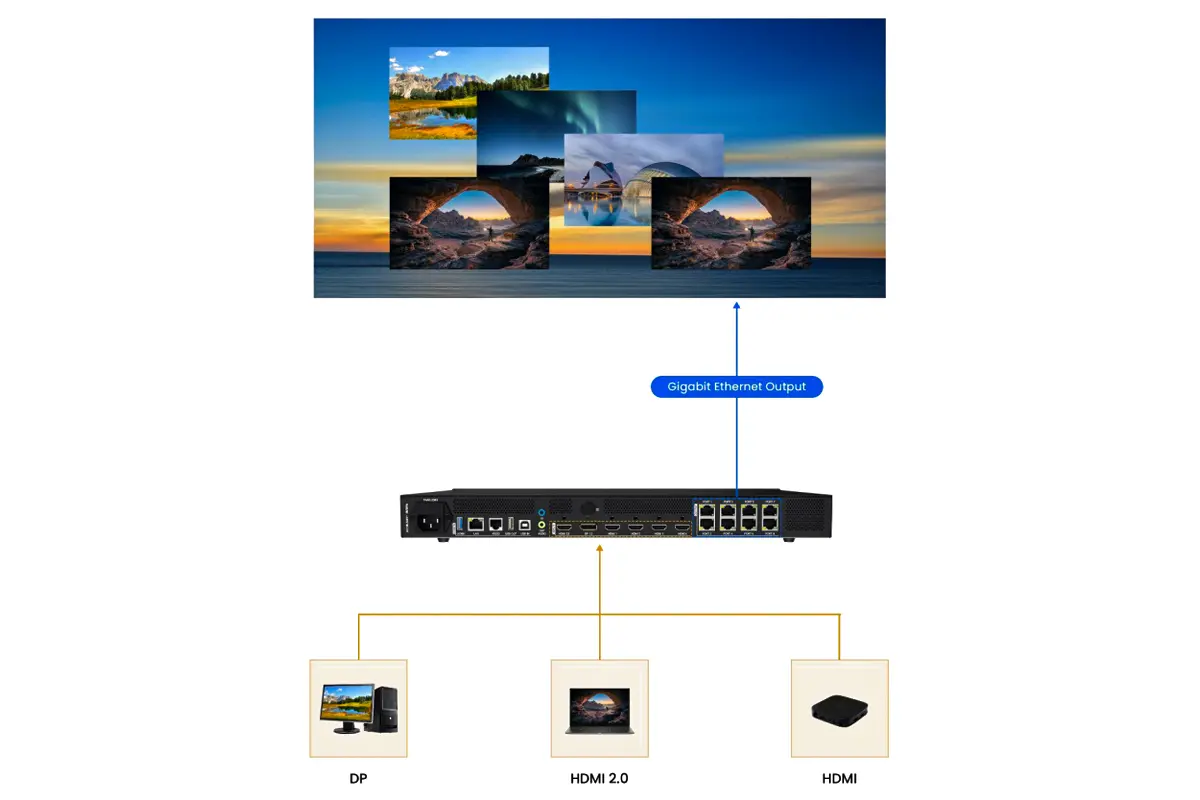
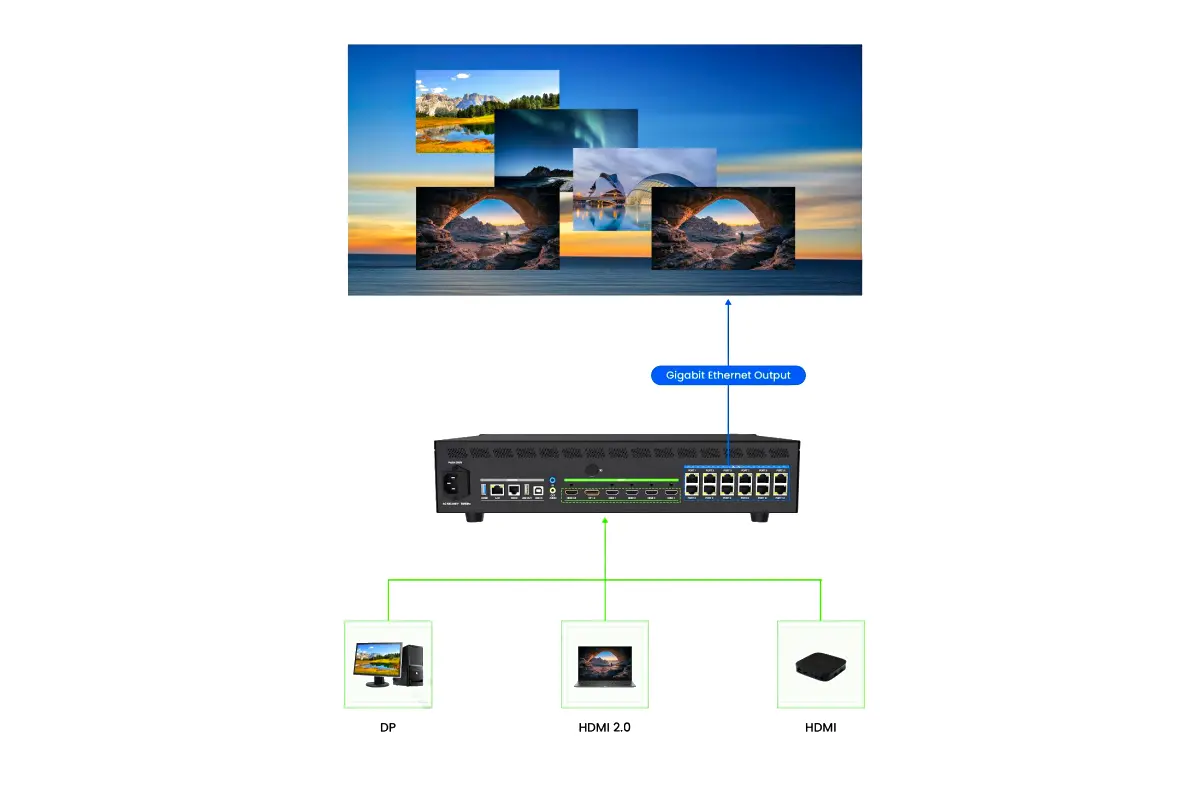
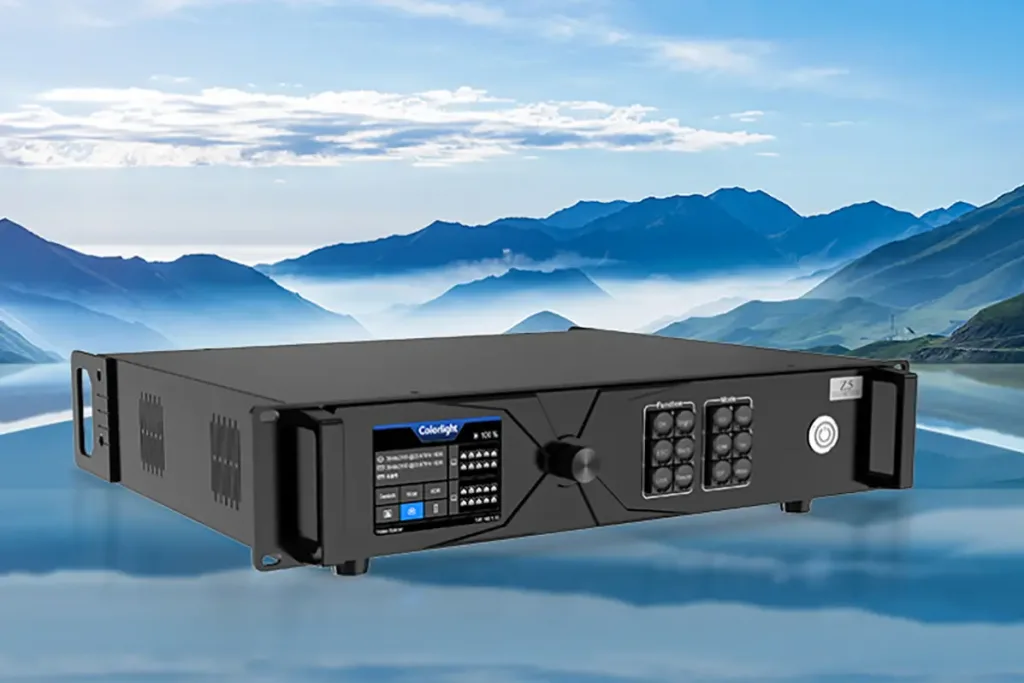
Colorlight X8m and Colorlight X12m combine video processing with LED sending functions. They accept sources such as presentation computers or media players, arrange those sources on a canvas, and send the resulting picture to receiving cards inside LED cabinets. The processor handles the source layout; receiver mapping defines where each cabinet appears on the physical screen.
A pixel load is the number of output pixels the controller must drive. Calculate it from cabinet resolution and cabinet quantity, not screen diagonal or the resolution of a video file. Two walls of equal physical size can require different controllers if their pixel pitches differ.
For X8m, the starting question is whether the entire mapped wall and every individual cable run fit the operating limits. For Colorlight X12m, the same checks apply even though four additional outputs provide more routing options.
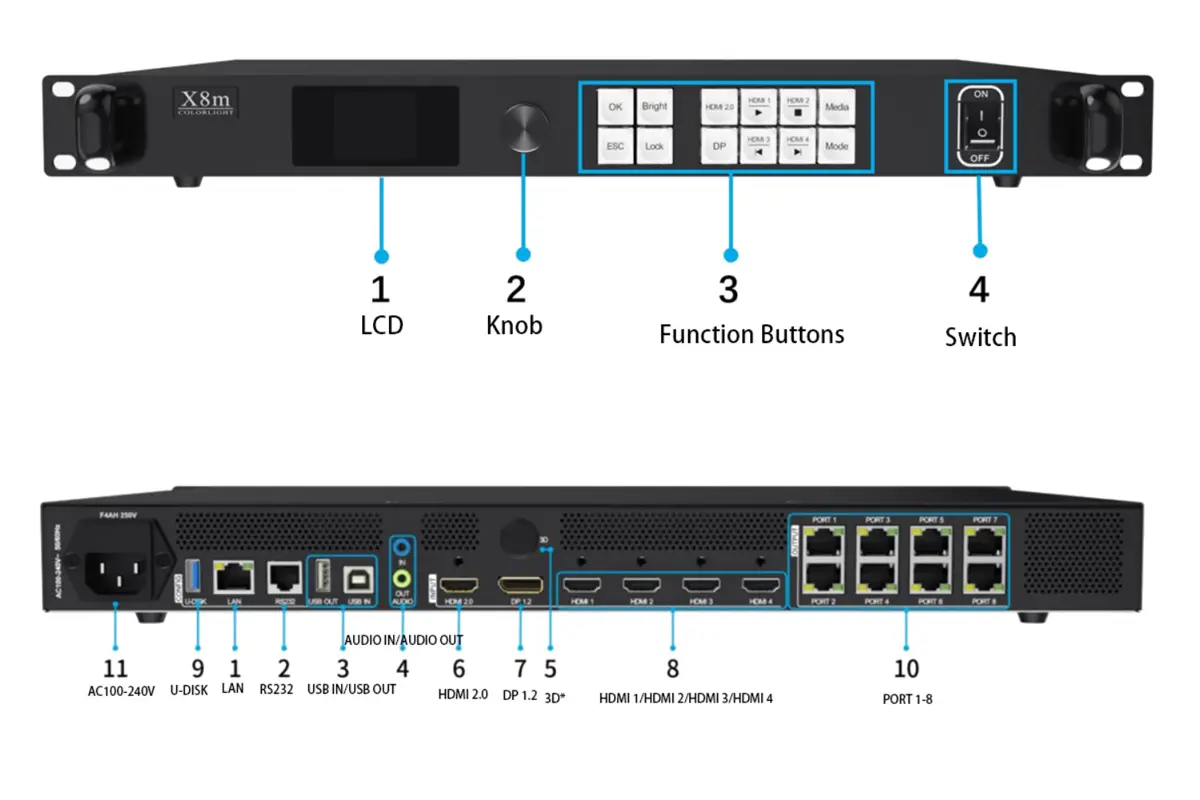
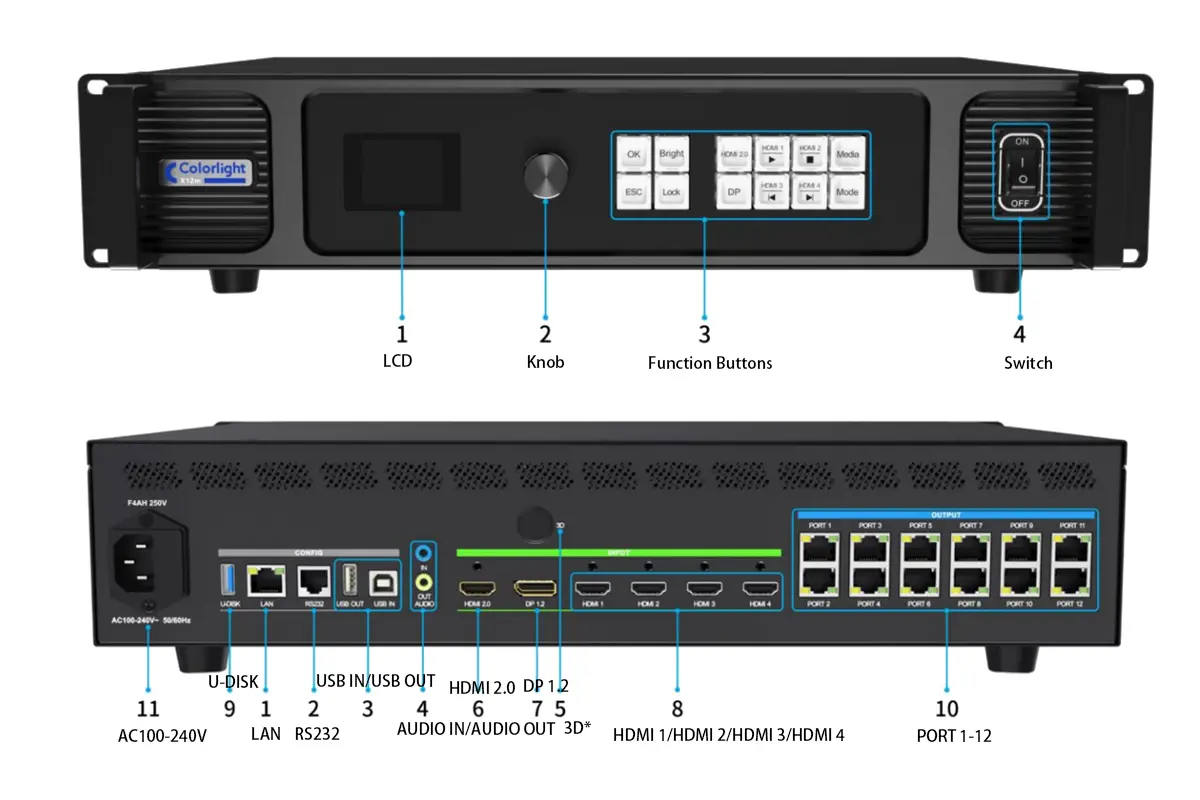
01. Similarities Between Colorlight X8m and X12m
Both models provide HDMI 2.0 and DisplayPort 1.2 inputs, four HDMI 1.4 inputs, USB media playback and independent audio connections. Both support LEDVISION screen configuration and VideoStation Web operation, as described in the official quick start guide.
Do not read “up to six windows” as six unrestricted 4K layers. The Colorlight X8m specification lists six HD layers, five layers when one is 4K, or two layers when both are 4K. Check the required source combination before committing to a show layout, and confirm the equivalent limits on the supplied X12m firmware.
Neither a higher output-port count nor a larger pixel budget automatically improves the source image. Content resolution, scaling, cabinet calibration and receiving-card support remain part of the result.
2. Colorlight X8m Specs and Features
Colorlight X8m is the smaller output configuration in this comparison. Its eight Gigabit Ethernet outputs suit projects whose cabinet map fits the available capacity without overloading any port. It is a useful candidate for conference backdrops, presentation walls and rental screens where the operator also needs source scaling and window control.
The X8m specification gives different output capacities at 60Hz, 120Hz and 240Hz. Specify the required frame rate first: a screen that fits at 60Hz can exceed the rating at 120Hz.
01. Key Specifications
| Specification | Colorlight X8m | What to check |
|---|---|---|
| Screen outputs | 8 × Gigabit Ethernet | Allocate every cabinet string to a numbered output. |
| Output capacity, 8-bit | 5.24M pixels at 60Hz; 2.62M at 120Hz; 1.31M at 240Hz | Select the frame rate before sizing the screen. |
| 4K inputs | 1 × HDMI 2.0; 1 × DP 1.2 | Up to 4096 × 2160 at 60Hz; compatible signal required. |
| HD inputs | 4 × HDMI 1.4 | Up to 1920 × 1200 at 60Hz. |
| Layer combinations | 6 HD; 1 × 4K + 4 HD; or 2 × 4K | Six layers does not mean six 4K sources. |
| Presets and audio | 128 scenes; independent 3.5mm audio input/output | Test preset recall and source audio. |
| Physical unit | 482.6 × 44.0 × 360.0mm; 4.24kg; rated 52W | Dimensions exclude foot pads; allow access and ventilation. |
Source: Colorlight X8m Specification V1.0. These are manufacturer ratings, not independent test results.
02. Standout Features
Colorlight X8m supports cropping, positioning and resizing source windows, plus storage for 128 preset scenes. These functions help an operator move between a presentation, a speaker layout and an intermission graphic without rebuilding the canvas each time.
X8m also supports synchronization options and optional 3D. Optional means that the required accessories and configuration must be confirmed; it should not be quoted as a standard, ready-to-use feature. Precise color management likewise depends on the receiving-card combination.
The procurement advantage of X8m is avoiding unused output capacity when the wall already fits comfortably. Request a current quotation instead of assuming a fixed saving. Include compatible receiving cards, cabling, setup support, freight and any spare equipment in the comparison.
3. Colorlight X12m Specs and Features
Colorlight X12m increases the available output count to twelve and the published 8-bit, 60Hz total to 7.86 million pixels. That is 50% more nominal capacity than Colorlight X8m, calculated from 7.86 ÷ 5.24. It is particularly relevant when a wall exceeds the smaller unit’s load rating or needs more independently wired cabinet strings.
Colorlight X12m is not an unlimited upgrade. Its total pixel count, individual-port load and maximum canvas dimensions must all be respected. Reserve capacity for the actual expansion plan rather than an undefined promise of future compatibility.
01. Key Specifications
| Operating condition | Colorlight X8m | Colorlight X12m |
|---|---|---|
| Numbered Gigabit outputs | 8 ports | 12 ports |
| 8-bit output at 60Hz | 5.24 million pixels | 7.86 million pixels |
| 8-bit output at 120Hz | 2.62 million pixels | 3.93 million pixels |
| 8-bit output at 240Hz | 1.31 million pixels | 1.96 million pixels |
| Maximum canvas width | 16,384 pixels | 16,384 pixels |
| Maximum canvas height | 8,192 pixels | 8,192 pixels |
| Documented control workflow | LEDVISION + VideoStation Web | LEDVISION + VideoStation Web |
Source: Colorlight X8m/X12m Quick Start Guide V1.0, output specifications. Dimension maxima and total-load limits apply together; operating mode and port mapping require separate checks.
02. Standout Features
The extra four outputs on Colorlight X12m can make a difficult cabinet layout easier to distribute. For example, physical separation between screen sections may justify twelve shorter cabinet strings even when the combined pixel count could fit Colorlight X8m.
That routing benefit is different from redundancy. Both models list redundancy support; the exact backup topology must be designed and tested. You cannot assume that all twelve ports remain available for unique screen pixels while the same ports simultaneously provide complete backup coverage.
For a quotation, send the supplier the cabinet grid, pixels per cabinet, frame rate and intended backup arrangement. Ask for a port-by-port drawing, not only a statement that the wall is below 7.86 million pixels. This turns the Colorlight X12m recommendation into a checkable system design.
4. Colorlight X8m vs X12m: Comparison and Buying Guide
For a Colorlight X8m vs X12m decision, start with the native screen raster: horizontal pixels × vertical pixels = total output pixels. Then check each port against its load at the selected frame rate. A passing total does not guarantee a passing cabinet map.
The examples below use the manufacturers’ published 8-bit, 60Hz totals. They are preliminary capacity checks; cabinet grouping, receiving-card limits and redundancy can change the final selection. Use the actual cabinet specification with this LED wall resolution guide if the total raster is not yet known.
| Native screen raster | Calculated pixels | Preliminary selection |
|---|---|---|
| 1920 × 1080 | 2,073,600 | Either; Colorlight X8m is a candidate if the map fits. |
| 3840 × 1080 | 4,147,200 | Within Colorlight X8m total; check each output string. |
| 3840 × 1600 | 6,144,000 | Above Colorlight X8m total; consider Colorlight X12m. |
| 3840 × 2160 | 8,294,400 | Above both totals; redesign the controller system. |
| 7680 × 960 | 7,372,800 | Within Colorlight X12m total; custom input and mapping still need verification. |
Method: width multiplied by height, compared with the totals in the official guide. These examples exclude any capacity reserved for backup and do not certify a complete cabinet layout.
Buying checklist: confirm native resolution, operating frame rate, output-port allocation, layer mix, backup design and delivered cost before comparing model names.
01. Choose the Colorlight X8m If Your Map Fits
Choose Colorlight X8m when the complete cabinet map fits eight outputs and leaves practical room for the project requirements. A 3840 × 1080 wall contains 4,147,200 pixels, below its 5.24-million-pixel total. The port map still needs checking, especially if cabinet strings cannot be divided evenly.
X8m is also a reasonable choice when the installation is fixed and no larger screen is planned. It retains 4K source input and multi-window operation, so buying the larger controller solely because the presentation computer is 4K is unnecessary.
Do not select X8m based on an existing office switch. The numbered screen outputs and the management LAN serve different purposes; a general network switch is not a substitute for additional LED sending outputs.
02. Choose the Colorlight X12m for More Output Capacity
Choose Colorlight X12m when the load exceeds Colorlight X8m or when more output routes make the cabinet arrangement workable. A 3840 × 1600 wall needs 6,144,000 pixels: that exceeds the smaller model’s total but falls below the larger model’s nominal 60Hz rating.
Choose neither as a single-controller solution for a native 3840 × 2160 wall at the stated setting. That wall contains 8,294,400 pixels, exceeding 7,860,000 by 434,400 pixels. Accepting a 4K signal and driving every pixel of a 4K LED wall are separate capabilities.
If your requirement is above both limits, ask for a higher-capacity controller or a properly synchronized multi-controller design. Scaling content down to a smaller physical raster is another option only when the project accepts the lower native screen resolution.
5. Input and Output Capabilities for LED Screen Systems
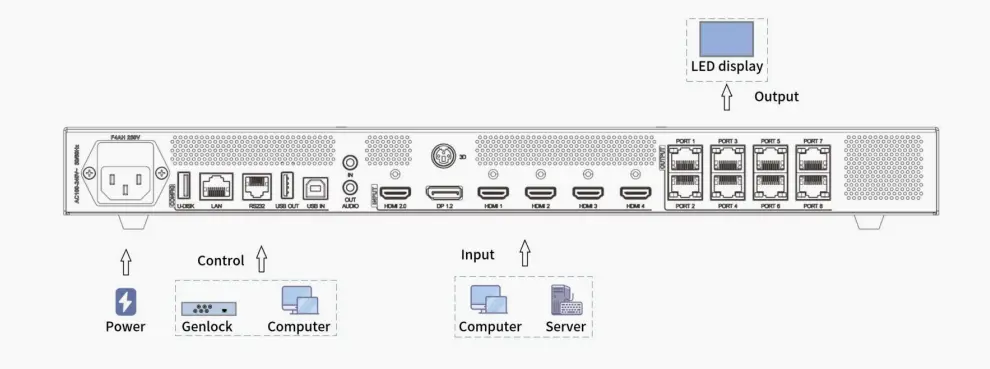
Colorlight X8m and Colorlight X12m separate input connectors, screen outputs and control connections. Label these three groups during installation. A cable that physically fits an RJ45 socket is not evidence that the socket performs the same function as another RJ45 connection.
01. Input Options
Use HDMI 2.0 or DP 1.2 for a 4K source up to 4096 × 2160 at 60Hz. The four HDMI 1.4 inputs are specified up to 1920 × 1200 at 60Hz. On Colorlight X8m, the 4K connectors also have documented custom-resolution limits; a wide canvas still has to meet pixel-clock and source-output requirements.
The official guide states that HDR and interlaced input are not supported on the 4K inputs. Configure a compatible progressive SDR signal and check resolution, refresh rate and color format when troubleshooting a blank or unstable image.
USB playback supports selected file containers and codecs, not every file with a familiar extension. Test the actual delivery file on X8m or Colorlight X12m before an event, including its audio track and playback behavior.
02. Output Options
The numbered Ethernet outputs connect to the LED receiving-card chains. Colorlight X8m provides eight; Colorlight X12m provides twelve. The quick start guide describes direct connection to the screen and recommends CAT5e cable runs no longer than 100 metres.
The documents list both 655,360 pixels as a general per-port figure and 650,000 pixels at 8-bit, 60Hz. Use the explicit operating-mode value for preliminary port planning, then obtain approval for the final map. At higher frame rates, available pixel capacity falls; multiplying the largest headline per-port number by the port count can hide these restrictions.
Both models list a maximum output width of 16,384 pixels and height of 8,192 pixels. These are separate dimension limits, not permission to drive a 16,384 × 8,192 rectangle. Total load still applies. Audio extraction through the dedicated 3.5mm output also does not establish audio transport through every LED receiving card.
6. How to Set Up Your Colorlight X8m/X12m Video Processor
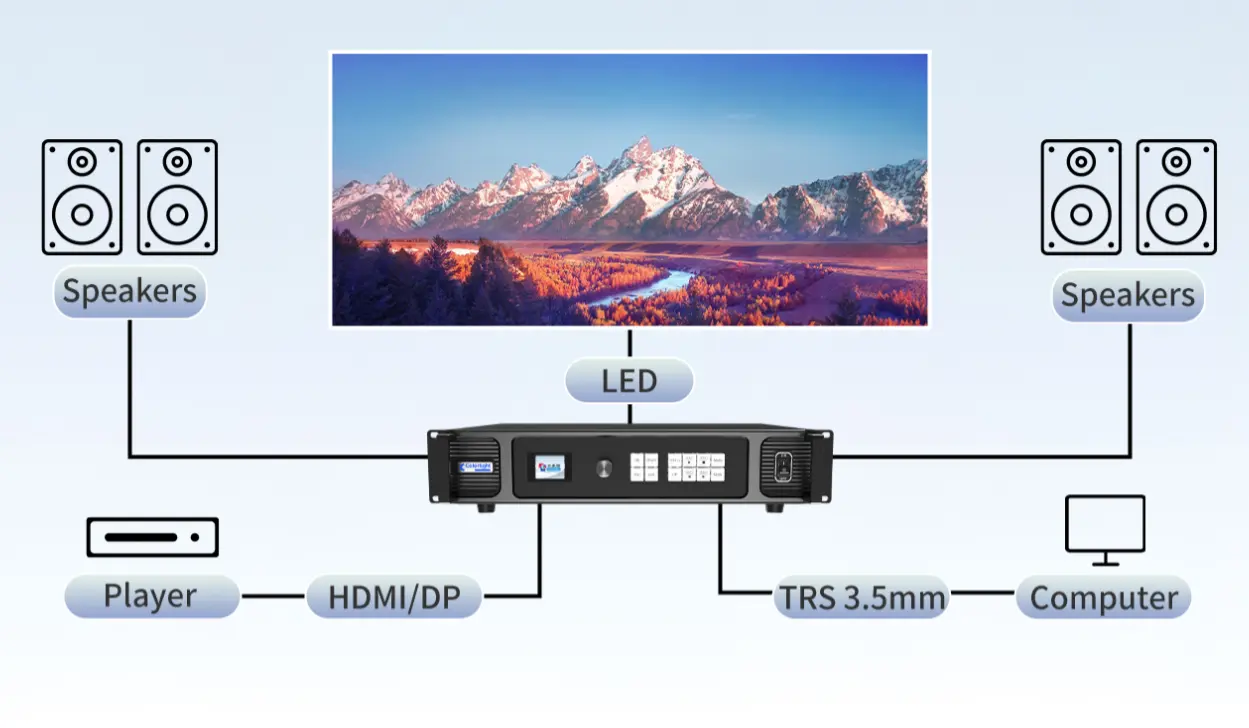
Set up Colorlight X8m or Colorlight X12m in three stages: connect the hardware, map the receiving cards, then validate the whole signal path. Keep a copy of the approved cabinet parameters before making changes. The following sequence follows the manufacturer’s quick start guide without assuming every software version has identical menus.
01. Hardware Connections
Connect the source to its intended HDMI or DP input, connect each numbered output to the first receiving card in the assigned cabinet string, and connect the control computer through the supported control interface. Label every cable with its controller port and destination.
For Colorlight X8m, number the eight routes on the wiring drawing before starting. For Colorlight X12m, do the same for all twelve routes, including any designated backup connections. Keep the management network separate in the drawing so that nobody mistakes LAN control for LED output.
Use the specified power cord and a properly grounded supply. The official guide requires grounding and states that the equipment is not waterproof. Place the controller in a suitable dry operating location even when the LED cabinets themselves are designed for outdoor use.
02. Software Configuration with LEDVISION
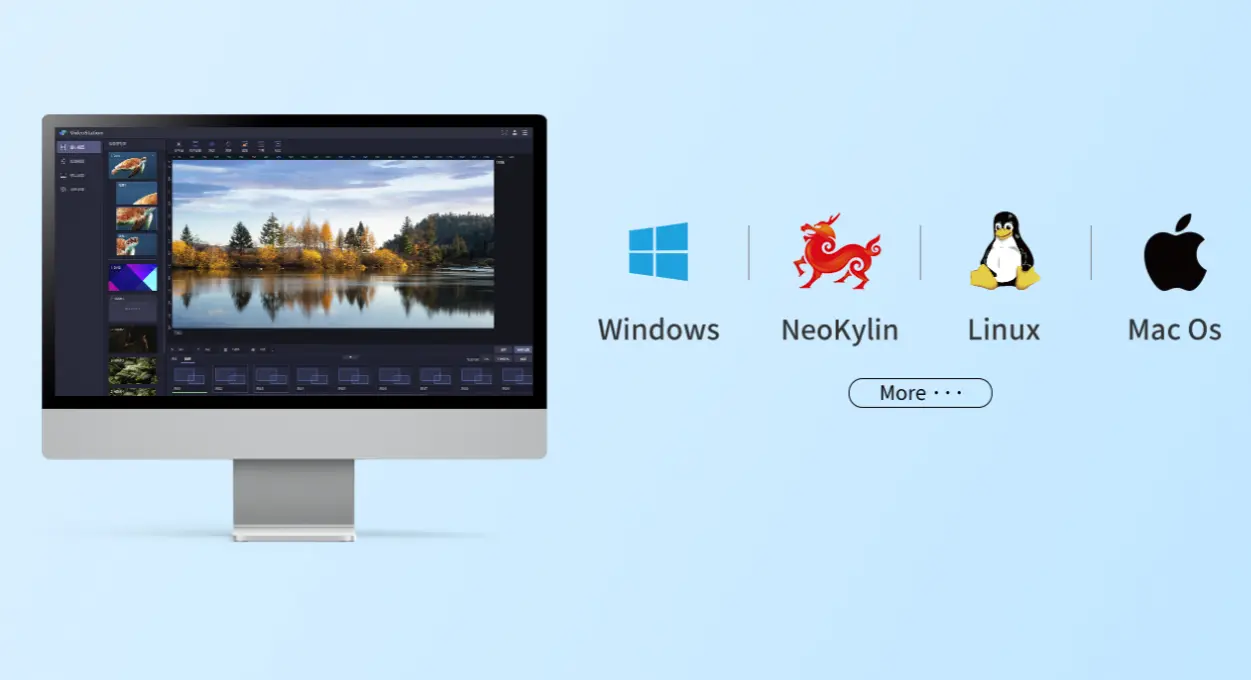
Install a compatible LEDVISION version from Colorlight’s official downloads. Open LED Screen Settings, select the sending device and detect the receivers. Verify the receiver count against the wiring drawing before proceeding; missing receivers should be investigated before loading a large mapping file.
Build the cabinet map from the front-view orientation specified in the guide. Enter the correct pixel width and height for each cabinet, then draw each port’s string in the actual connection order. A reversed string can produce a scrambled picture even though all cabinets have power.
Send the map for testing and save the working configuration as directed to the sending and receiving devices. With Colorlight X8m, check that every mapped string remains within its operating-mode limit. Apply the same method to Colorlight X12m instead of treating the extra ports as automatic headroom.
03. Testing and Final Adjustment
Begin with test patterns that expose different errors: solid red, green and blue for channels; a grid for cabinet positions; grayscale for low-brightness behavior; and moving content for timing or cable faults. Verify the full wall, not only the first cabinet attached to each output.
On Colorlight X8m, test every intended source and preset after mapping. On Colorlight X12m, include the most demanding window arrangement and the longest output route. Switch sources, recall a preset and restart the system to check that the approved configuration returns correctly.
Record the result, firmware version, receiver model and configuration filename. If a fault appears, change one variable at a time. A stable test pattern with a missing live picture points you toward source selection or input format rather than immediately blaming the cabinet map.
7. Using LEDVISION and Web Control for Colorlight X8m/X12m
Use LEDVISION for screen configuration and VideoStation Web for the operating controls described in the official guide. Keeping those roles clear makes Colorlight X8m commissioning easier and helps the next operator locate the right setting.
01. LEDVISION for Screen Configuration
LEDVISION establishes the connection between the logical image and the physical receiving-card arrangement. For Colorlight X8m, the important handover items are receiver detection, cabinet dimensions, port order and a saved working map. For Colorlight X12m, document the extra routes just as carefully.
A preset for video windows is not a replacement for a receiver configuration backup. Store both the cabinet configuration and the operating layouts with clear filenames. An operator restoring a show should be able to identify which file belongs to which screen and firmware version.
Use the site’s Colorlight software download guide for orientation, then obtain the compatible package through the manufacturer. Do not change receiving-card parameters merely to correct a source crop or presentation aspect ratio.
02. VideoStation Web for Daily Operation
The V1.0 quick start guide documents 192.168.1.10 for initial VideoStation Web access. Check the address configured on the actual device, because an installed Colorlight X8m may have been assigned a different IP. The control computer must have a compatible network configuration.
In VideoStation Web, inspect the input list, add the required source windows to the canvas and adjust position, size and stacking. Input-port settings cover EDID, input format and cropping. EDID tells the source which display modes are available; changing it can require the source to renegotiate its output.
The guide places preset tours, device parameters and version management in the web workflow. Save and name the approved layouts on X8m or Colorlight X12m, then test recall from the operator’s normal workstation rather than relying on an unsaved on-screen arrangement.
8. Advanced Applications: Genlock, Multi-Window, and Live Events
Advanced features should be selected against a concrete operating requirement. Colorlight X8m can handle presentation layouts and synchronized installations within its limits; Colorlight X12m adds output capacity. Neither model name alone proves camera performance, complete backup coverage or a particular end-to-end latency.
01. Genlock Synchronization for Multi-Screen Setups
Genlock relates video timing to a synchronization reference. The Colorlight X8m specification lists internal vsync locking, source-input synchronization and automatic selection according to layers. Confirm the supported synchronization method for the supplied system instead of assuming a dedicated external Genlock connector.
When several controllers share one visual canvas, test motion across their boundaries using the intended source and output rates. Matching cabinet positions alone does not prove that frame timing is aligned. Record the selected sync source in the handover document.
For camera-facing applications, test X8m or Colorlight X12m with the actual camera settings and receiving-card configuration. Synchronization is one part of the chain; avoid promising that it eliminates every flicker, scan-line artifact or visible seam under all shooting conditions.
02. Live Event Operation and Scene Management
The Colorlight X8m specification lists 128 stored scenes. Build a small, clearly named set for the show: opening graphic, presentation, speaker combination, intermission and a fallback layout. Rehearse every transition with the real sources connected.
Before choosing a six-window design, count the 4K layers. On X8m, the documented one-4K-plus-four-HD combination allows five layers, while two 4K layers reduce the total to two. Confirm the intended X12m combination with its supplied documentation and firmware before duplicating a layout.
Redundancy is useful only when the backup path is configured and tested. Disconnect a planned primary path during rehearsal under the integrator’s procedure, observe recovery, then restore it. Keep source backup, signal-path backup and spare-controller provision distinct in the event plan.
| Symptom | First check | Next action |
|---|---|---|
| No picture anywhere | Power, selected source and input indicator | Try a known compatible source and a verified cable. |
| Test pattern works; live input fails | Source format, cable and selected input | Confirm progressive SDR timing and EDID. |
| Cabinets appear out of order | Receiver map and physical connection order | Compare the front-view drawing with the actual string. |
| A later cabinet string fails | Per-port load, receiving cards and cabling | Inspect that route before changing the whole canvas. |
| Works at 60Hz, fails after a rate change | Reduced capacity at the new frame rate | Recalculate total pixels and every port load. |
| Web control is unavailable | Device IP and computer network settings | Verify the installed address and management connection. |
9. FAQs
10. Conclusion
Choose Colorlight X8m when the measured screen raster and approved cable map fit eight outputs at the required frame rate. Choose Colorlight X12m when the project needs twelve outputs or the larger published pixel budget. A native UHD wall still exceeds either unit’s single-controller 60Hz total.
For a final X8m vs X12m recommendation, prepare cabinet quantity, pixels per cabinet, required sources, layer layout, frame rate and backup expectations. Send these project details to EagerLED and request a controller recommendation with a port map and itemized quotation. Review the official specifications against the delivered revision before purchase.
 Colorlight Z5 Controller: Setup Guide for LED Wall Teams
 NovaStar TU4K Pro LED Processor Guide: Features, Setup & Configuration