For repeat indoor events, a foldable LED display is worth considering only when the complete transport package, approved operating footprint and service procedure fit your venues. Start with the folded drawing and case dimensions, then verify the hinge, locks, wiring and playback on the configuration you will actually buy.
1. Choose the right kind of foldable LED display
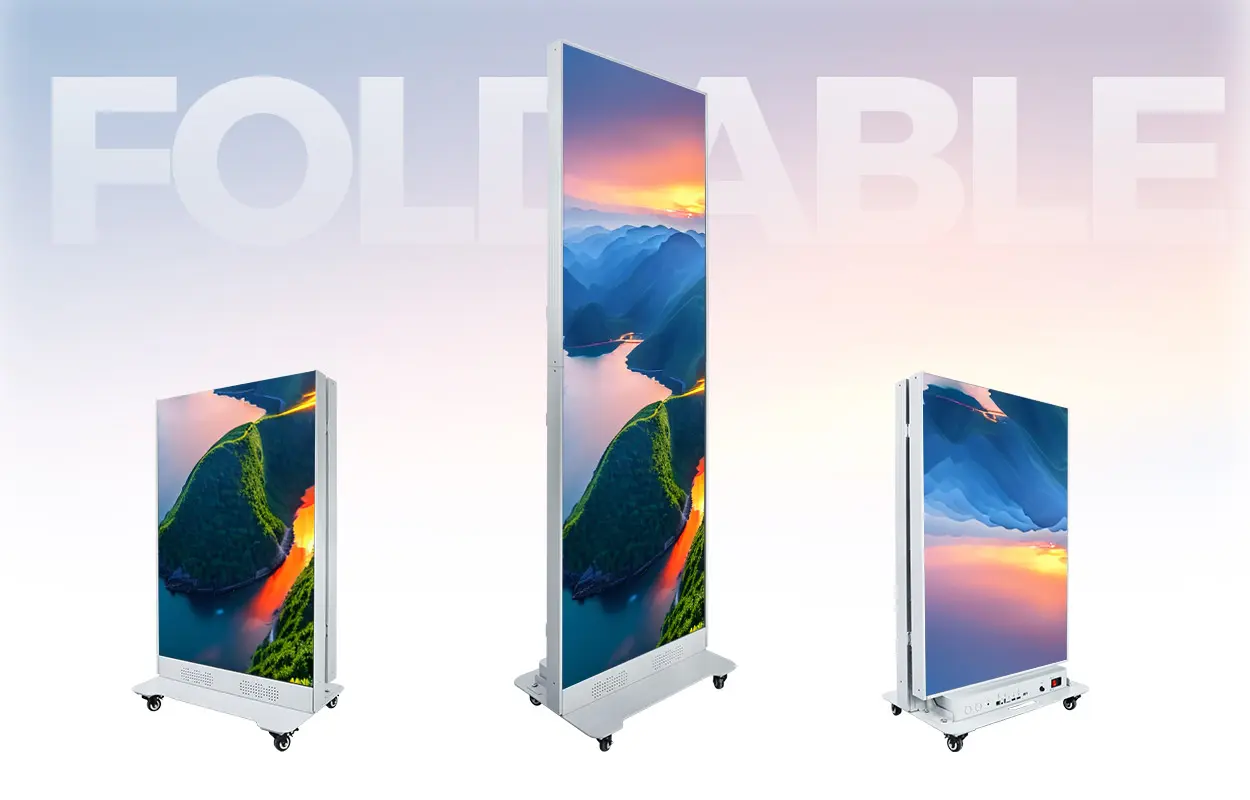
A foldable LED display can make repeated indoor deployments easier when its folded package fits your transport route and its operating position fits the venue. Before choosing one, ask for three drawings: the display ready for use, the cabinet folded for handling, and the closed transport case. A small-looking cabinet is not enough to establish that the complete package will pass through a lift or doorway.
For procurement, separate a hinged LED poster from a flexible module wall and a large folding presentation system. They solve different problems. A hinged poster changes the arrangement of rigid display sections; flexible modules follow an approved supporting curve. Neither description alone tells you the folded dimensions, approved movement procedure or number of people needed.
The EA1920iP5 indoor foldable LED poster is the product example used here. Its published specification lists a 640 × 1,920 mm display area, 65 mm cabinet depth and a 55 kg complete display. It is an indoor, IP31 product. Those figures describe the display; they are not the dimensions or gross weight of the packed flight case.
2. Check the entire transport route
Measure the narrowest usable opening, rather than the nominal doorway size. Include door furniture, turns, ramps, lift entrances, lift cabins and the final storage space. Ask for the case dimensions including wheels, handles and catches. A package can pass a door in a straight line and still fail at the next tight turn.
For example, if a measured clear opening is 800 mm and a supplier confirms a 760 mm case width, the nominal difference is only 40 mm overall. That arithmetic is a planning example, not a handling clearance recommendation. It does not establish that the package can turn, cross a threshold or be moved safely. Have the supplier and site team confirm the route, gross weight and handling method before ordering.
Request a dimensioned packing drawing and the loading arrangement. Record which side faces up, which points can be used for handling, and how accessories are restrained. Ask whether the display moves folded, upright or in its case; follow the product-specific procedure. Do not assume that castors make a heavy display suitable for stairs or rough ground.
3. Verify the hinge, locks and cable path
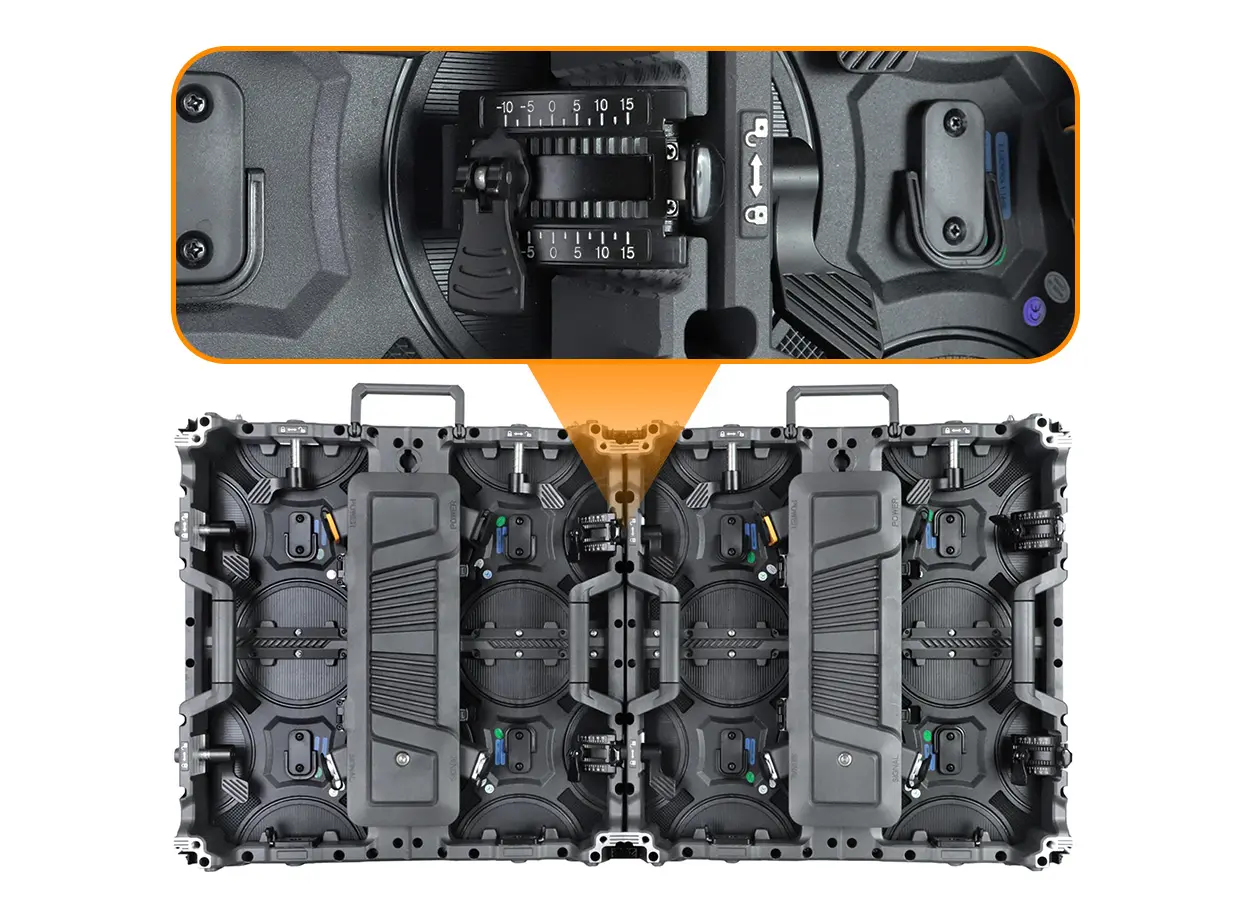
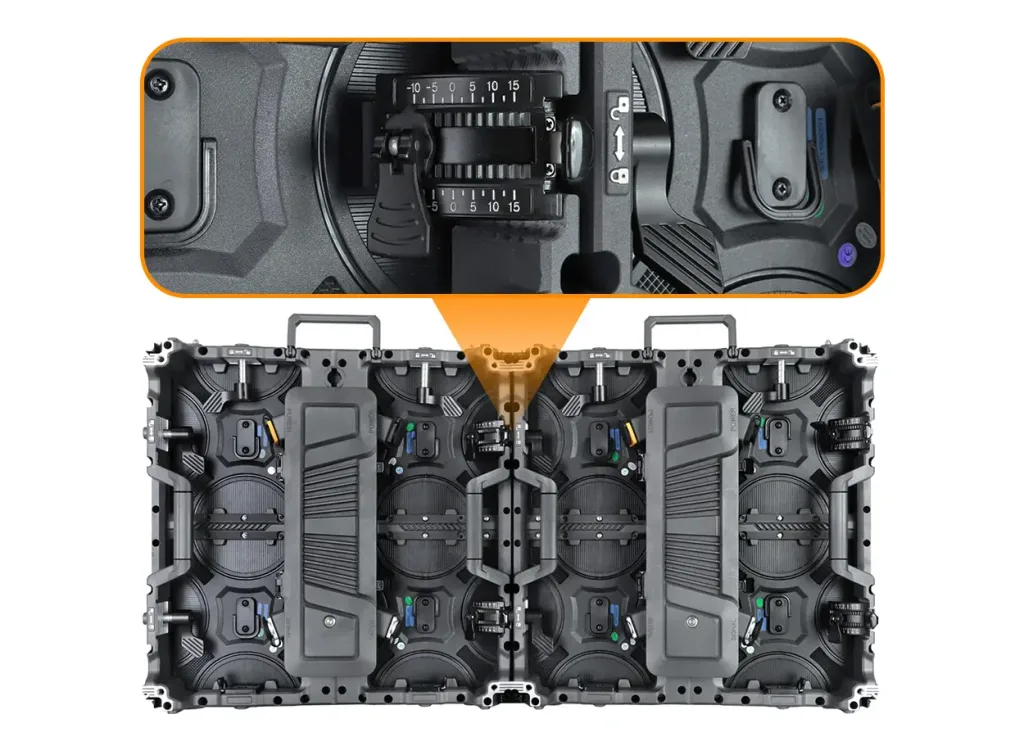
Ask for a demonstration of the supplied unit moving from its transport position to its approved operating position. The demonstration should show the locking points and cable path clearly. The EA1920iP5 product page describes a reinforced central hinge with rear locking fasteners; the photograph below helps identify that area, but it is not a substitute for operating instructions.
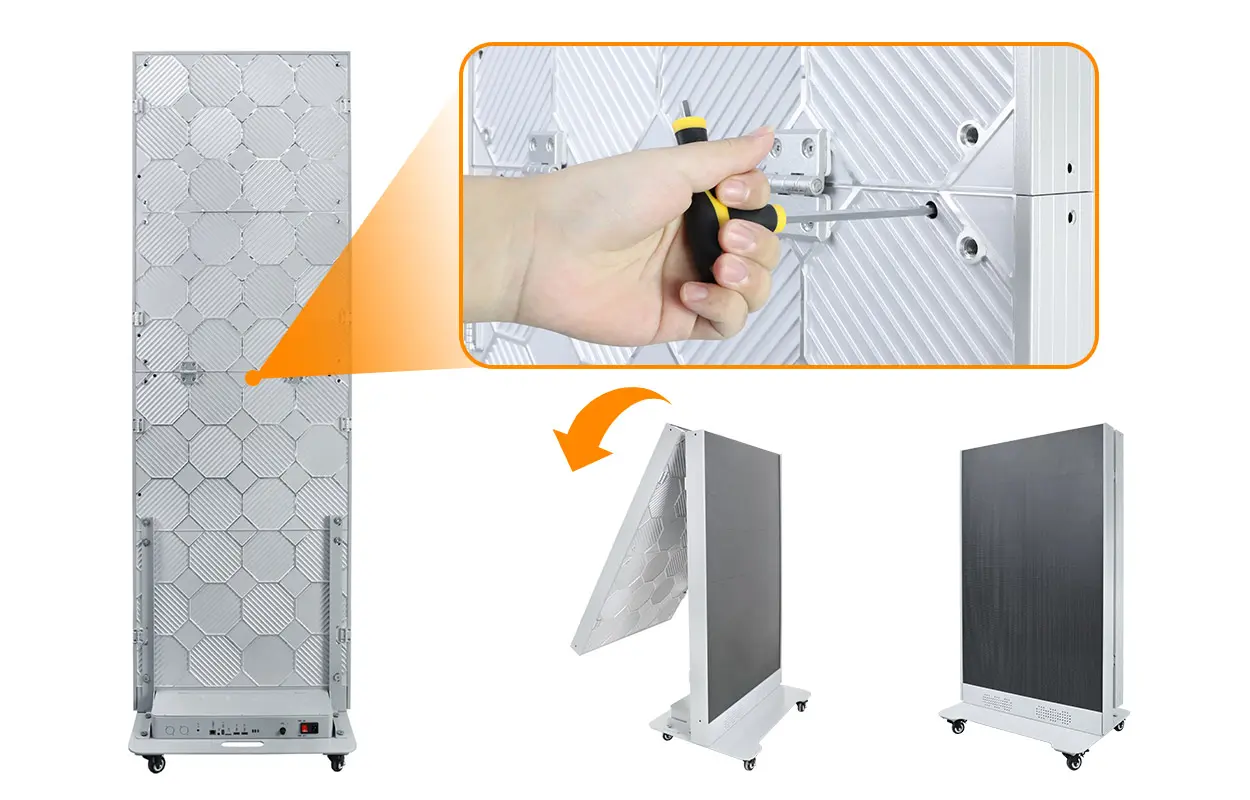
- Locking: identify every lock required before normal use and before transport.
- Cables: confirm how wiring is protected through the full approved movement.
- Alignment: inspect the meeting edges after setup using a plain test image.
- Handling: obtain the specified tools and sequence, including power isolation instructions.
- Replacement: list the hinge, lock and cable parts that can be supplied for the purchased version.
If repeated folding is central to your business, ask for the manufacturer’s documented endurance test method and result for that version. A sales demonstration does not establish a tested cycle life. Do not put an assumed folding-cycle number into your purchase specification.
4. Approve the operating footprint and environment
Check the footprint with the display in the intended position, including its base, cable connections and access needed by staff. The active display area is not the installation footprint. Request the supplier’s approved support arrangement and placement guidance; do not derive stability from cabinet depth or display weight alone.
Keep visitor routes and exits clear and agree the final location with the venue. Use a suitable indoor position, with the environmental conditions and ventilation required by the product documentation. GOB surface protection does not convert an indoor IP31 display into an outdoor product. For an exposed entrance or rain-facing location, start with the outdoor poster site checklist instead.
Preview the actual content at the expected viewing distance. Fine text, QR codes and detailed product images may need a different pixel pitch from simple promotional video. Approve content readability separately from the mechanical setup.
5. Confirm service access after placement
A front-service design can reduce the need for space behind the display, but the technician still needs room to work at the front. Confirm the removal tool, the component access sequence and the clearance required for the actual purchased configuration. Ask which tasks the venue team may perform and which require qualified service personnel.
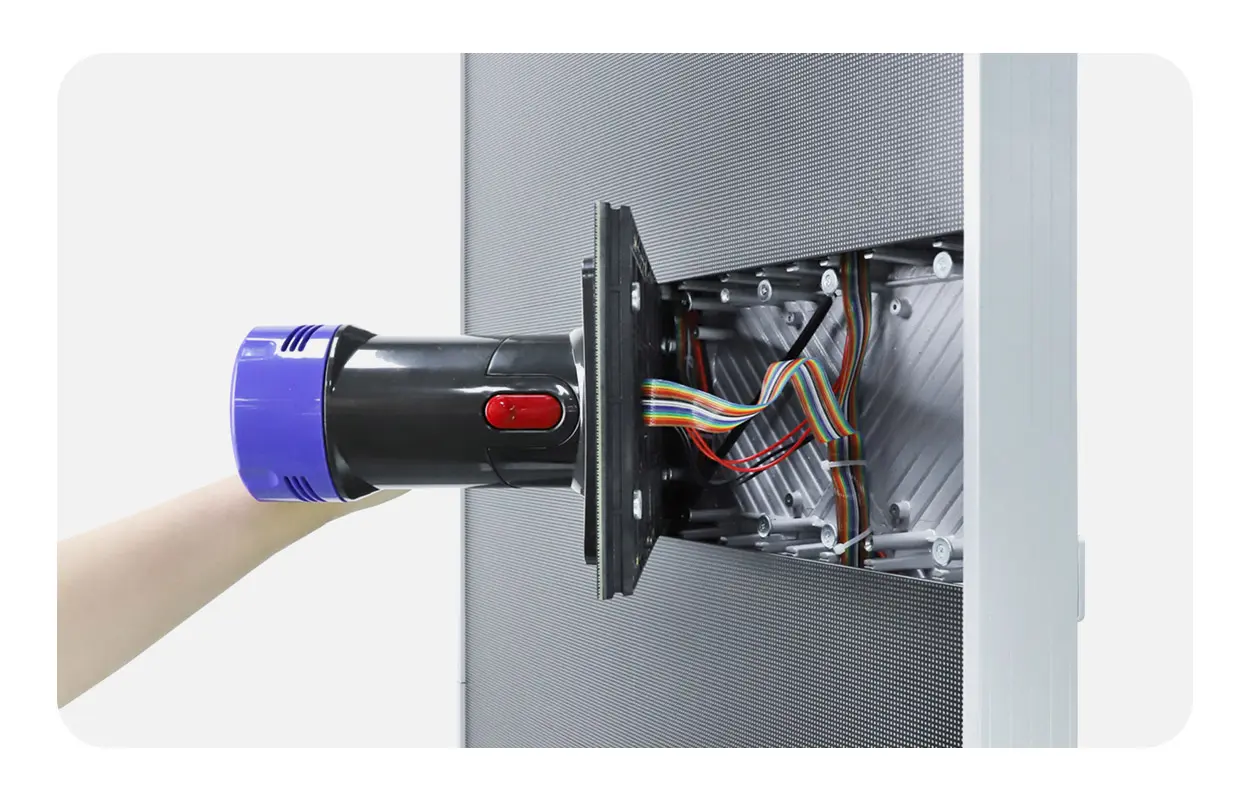
Ask for matching replacement modules and configuration records at handover. Record the model, pitch, module version, controller and software version against each serial number. For a repeat-deployment business, the rental fleet spare-parts checklist helps organize those records; it does not establish compatibility between different poster generations.
6. Put deployment evidence into the purchase order
Use the same acceptance sheet for every shortlisted supplier. Ask for evidence from the proposed configuration, not a different demonstration model. Agree how any mismatch will be resolved before dispatch.
On a small screen, swipe within the table to see all columns.
| Check | Supplier evidence | Buyer decision |
|---|---|---|
| Transport envelope | Folded drawing, closed-case dimensions and gross weight | Approve the measured delivery and storage route |
| Hinge and locks | Configuration-specific operating instructions and demonstration | Approve the setup procedure and staff training |
| Operating position | Support, footprint and placement requirements | Approve the venue location and service clearance |
| Display and playback | Your sample content on the ordered pitch and controller | Approve readability and the required playback mode |
| Maintenance | Component list, access procedure and matching spares | Approve service ownership and replacement availability |
| Packing | Photos of the actual supplied case and restrained accessories | Approve the packing arrangement and shipment scope |
For dual-face content, require a demonstration of the exact playback arrangement. Synchronized images, independent schedules and live input are different requirements. Available functions depend on the installed controller and software; a list of Wi-Fi, USB or HDMI connections does not prove every workflow is supported.
Compare quotes on an equal scope: display configuration, control equipment, case, accessories, matching spares, training and delivery terms. Request an itemized quotation rather than an unsupported universal price per unit.
7. Frequently asked questions
Is a foldable LED display the same as a flexible LED screen?
No. A hinged poster folds at specified joints. Flexible LED modules bend along an approved support structure. Choose according to the transport, shape and installation requirement.
Can the EA1920iP5 be used outdoors?
The published EA1920iP5 specification identifies it as an indoor IP31 display. Specify a suitable outdoor model for direct weather exposure.
Does 55 kg include the flight case?
The product page lists 55 kg for the complete display. Obtain a separate confirmed gross packed weight, including the case and accessories, for logistics planning.
Can both faces play different content?
Ask for a demonstration using the controller and software in your quotation. Independent scheduling should be an explicit acceptance requirement, not an assumption.
8. Request a configuration for your deployment route
Send your country, quantity, deployment frequency, indoor environment, nearest viewing distance and purchase timeline. Include doorway and lift measurements, the required operating layout and whether you need one or two content feeds. We can use those details to discuss a suitable configuration and an itemized quotation.
For a wider comparison of formats, see our LED poster display buying guide.
Product figures refer to the linked EA1920iP5 specification reviewed on October 14, 2026. Confirm the final drawing and configuration in your quotation. Photos and illustrations are manufacturer product materials, not evidence of a customer project or an independent endurance test.
 LED Receiving Card Explained: Inside the LED Cabinet
 Curved LED Wall: Radius & Quotation Planning Guide