The NovaStar VX600 is an all-in-one LED display controller that combines video processing and sending in a compact 1U chassis. It supports up to 3.9 million pixels, offers six Gigabit Ethernet outputs, and includes 10G fiber transmission for long-distance and high-reliability installations.
Positioned in the mid-range of the VX series, this model is widely used in rental staging, corporate events, and fine-pitch LED display systems where performance and flexibility must stay balanced.
Table Of Contents
1. NovaStar VX600 Overview
The NovaStar VX600 integrates video processing and LED sending into a single unit, replacing traditional multi-device setups such as video processors and sending cards.
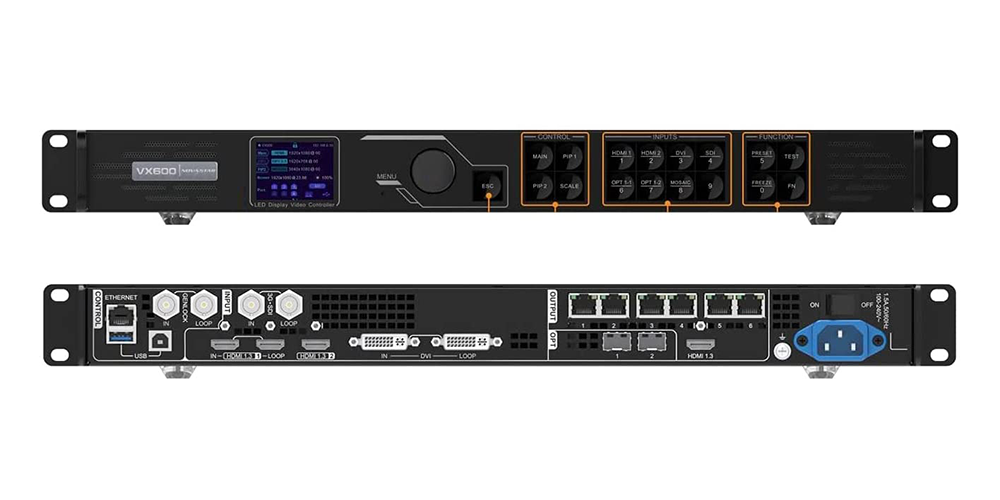
Compared with earlier generation models, it introduces:
- Higher pixel loading capacity (3.9M pixels)
- 10G fiber optic output support
- Genlock synchronization for multi-device alignment
- Expanded output width up to 10,240 pixels
It is commonly deployed in mid-size LED projects including stage backdrops, conference displays, and broadcast monitoring walls.
2.Pixel Loading & Output Capacity of the Novastar VX600
| Specification | Value |
|---|---|
| Maximum Loading Capacity | 3.9 million pixels |
| Maximum Width | 10,240 pixels |
| Maximum Height | 8,192 pixels |
| Ethernet Ports | 6 × Gigabit Ethernet (RJ45) |
| Maximum Load per Ethernet Port | 650,000 pixels (8-bit) |
| Optical Ports | 2 × 10G Fiber Outputs |
Each Ethernet port distributes pixel load evenly, making cabinet mapping straightforward for rental system setups.
The extended output width allows ultra-wide LED configurations such as panoramic stage screens or multi-screen creative layouts.
Fiber outputs support long-distance transmission and can be configured for redundancy or signal duplication depending on system design.
3.Video Inputs of the Novastar VX600
The unit supports multiple professional input formats:
| Connector | Quantity | Maximum Resolution | Notes |
|---|---|---|---|
| HDMI 1.3 | 2 | 1920 × 1200 @ 60Hz (Custom: 3840 × 648) | One HDMI port supports LOOP output for signal pass-through. |
| DVI | 1 | 1920 × 1200 @ 60Hz (Custom: 3840 × 648) | Supports IN & LOOP and extended resolutions in Direct Mode. |
| 3G-SDI | 1 | 1920 × 1080 @ 60Hz | Supports IN & LOOP, ideal for broadcast applications. |
| OPT 1 (10G Fiber) | 1 | Self-adaptive | Supports 1 × 4K × 1K @ 60Hz or 2 × 2K × 1K @ 60Hz mosaic input. |
These inputs cover most AV and broadcast workflows, from live production to fixed installations.
4.Output & Control Connectors
The NovaStar VX600 provides comprehensive output and control interfaces for LED display deployment, long-distance transmission, and professional synchronization.
4.1 Output Interfaces
| Connector | Qty | Purpose |
|---|---|---|
| Gigabit Ethernet (RJ45) | 6 | Connects to LED receiving cards, supporting up to 3.9 million pixels. |
| 10G Optical Fiber | 2 | Long-distance transmission. OPT1 supports copy output, while OPT2 can be configured for copy or backup. |
| HDMI 1.3 | 1 | Monitor output for real-time preview and confidence monitoring. |
4.2 Control & Synchronization
| Connector | Purpose |
|---|---|
| Ethernet (RJ45) | Connects to a PC or LAN for NovaLCT and V-Can management. |
| USB 2.0 Type-B | PC control interface and device cascading input. |
| USB 2.0 Type-A | Cascading output to another VX600 controller. |
| GENLOCK IN | Receives an external synchronization signal for frame-accurate playback. |
| GENLOCK LOOP | Passes the Genlock signal to additional controllers. |
| Light Sensor | Connects to an ambient light sensor for automatic brightness adjustment. |
Why it matters
Genlock support ensures multiple controllers remain perfectly synchronized, which is critical for XR stages, broadcast environments, and large LED video walls.
5.Appearance of the NovaStar VX600
5.1 Front Panel
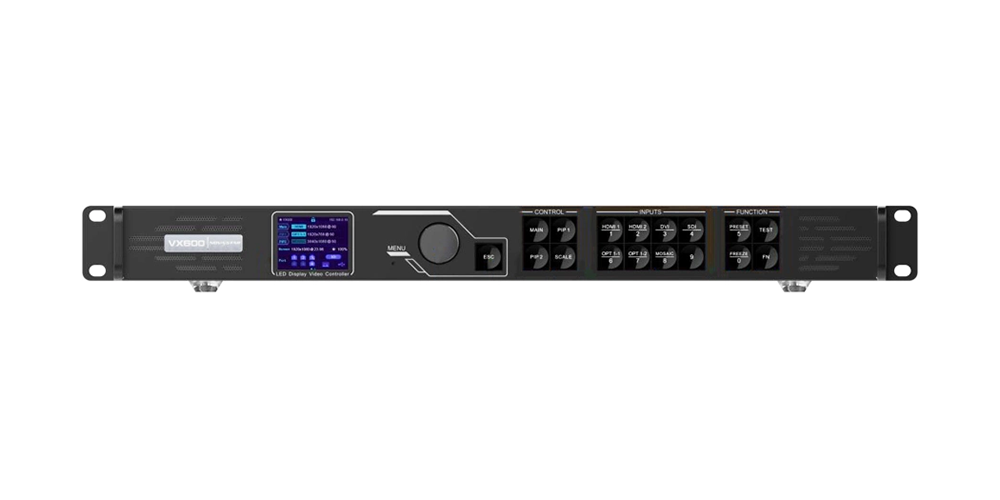
The NovaStar VX600 features a clean, professional front panel designed for fast and intuitive operation. Its 1U rack-mounted chassis houses a high-contrast LCD display, a rotary navigation knob, and dedicated shortcut buttons for layer control, input switching, scaling, presets, and test patterns.
With most essential functions accessible directly from the front panel, operators can quickly configure and manage the controller without relying on a computer—an advantage for live events and on-site installations.
5.2 Rear Panel
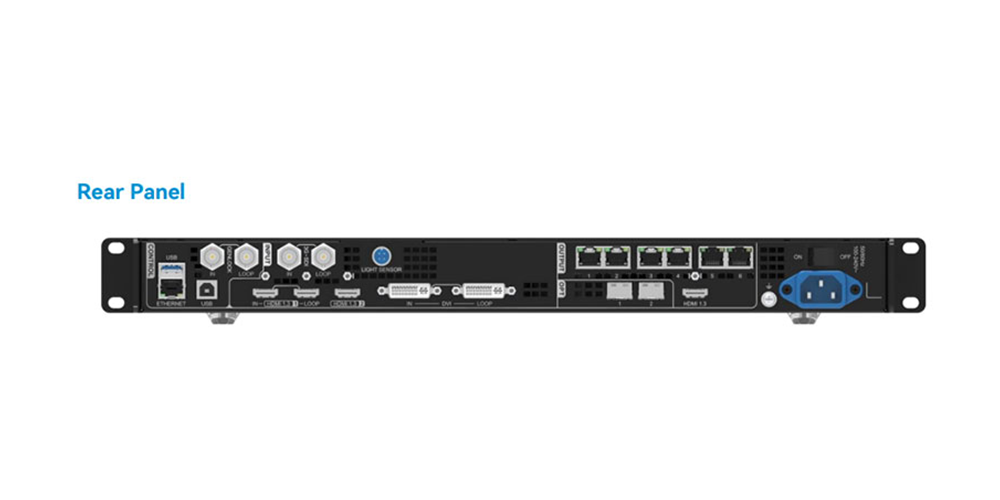
The rear panel is thoughtfully organized to simplify system integration and cable management. Video inputs, Ethernet outputs, optical fiber ports, synchronization interfaces, and control ports are clearly grouped by function, making installation faster and reducing wiring errors.
Designed for professional AV environments, the VX600’s rear-panel layout supports reliable deployment in rental productions, broadcast studios, conference rooms, and fixed LED display installations while allowing easy maintenance and future expansion.
6.Three Working Modes of the NovaStar VX600
The NovaStar VX600 supports three operating modes to meet different application requirements, from everyday LED display control to ultra-low-latency transmission and long-distance fiber connectivity.
6.1 Video Controller Mode
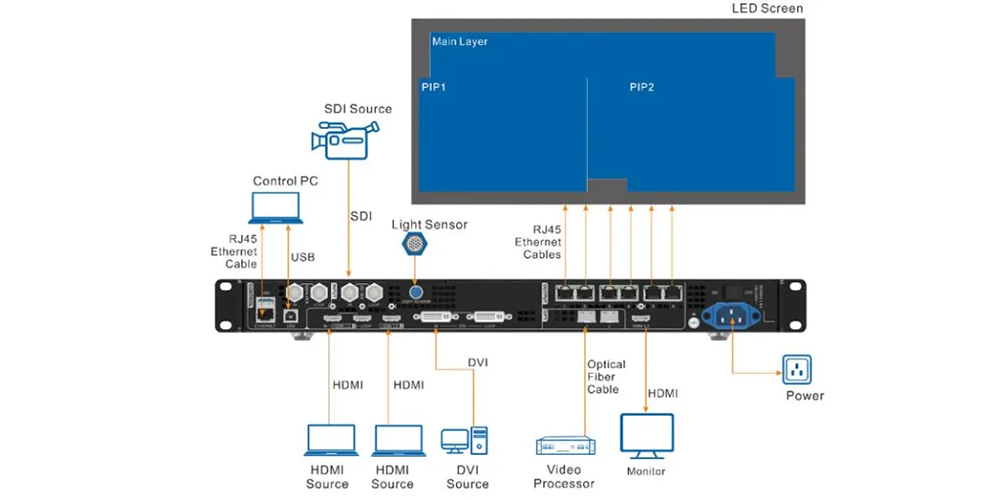
This is the default operating mode for most LED display projects. It enables full image processing, including scaling, multi-layer management, color adjustment, and preset recall.
Best for:
- Rental LED displays
- Conferences and exhibitions
- Live events
- Fixed LED installations
6.2 Bypass Mode
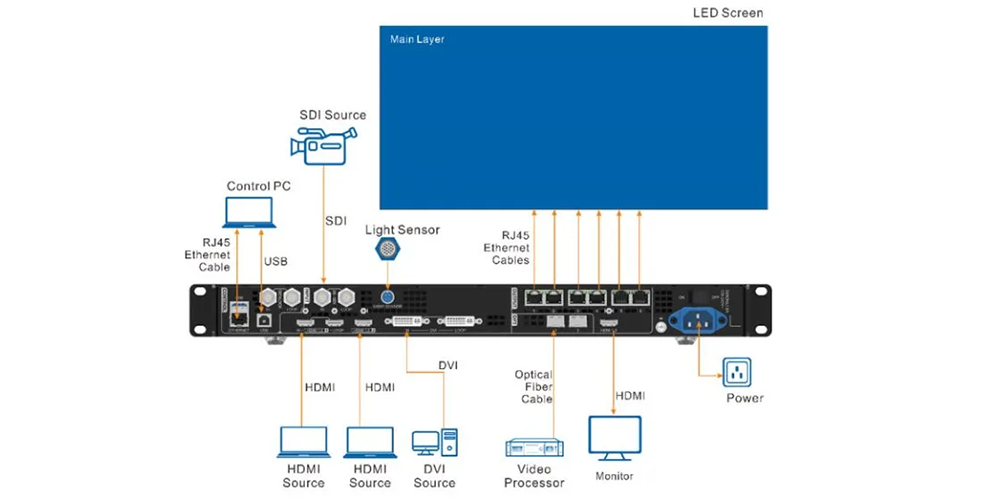
Bypass Mode minimizes image processing to achieve the lowest possible latency. Only the main layer is available, while PIP and advanced processing functions are disabled. When combined with Low Latency Mode, the VX600 delivers extremely fast signal transmission for real-time applications.
Best for:
- Live camera feeds (IMAG)
- XR and virtual production
- Esports
- Low-latency broadcast systems
6.3 Fiber Converter Mode
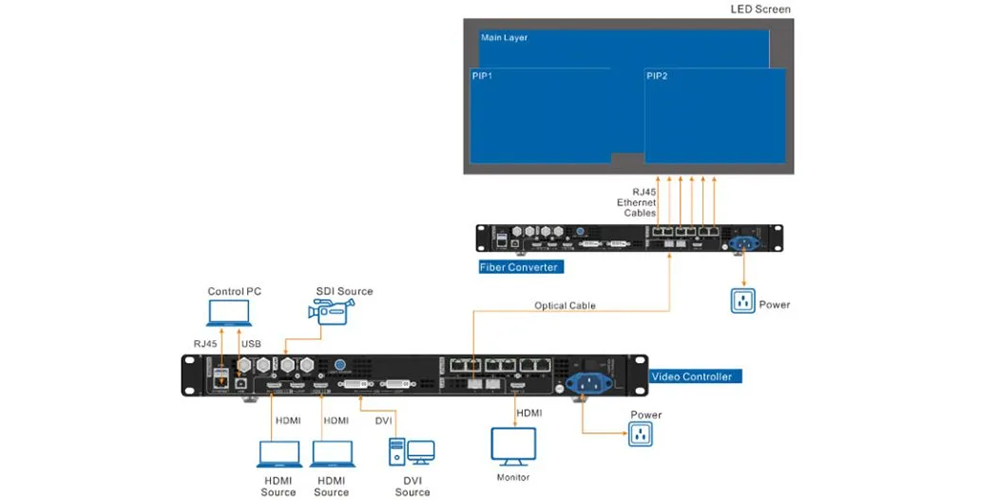
In Fiber Converter Mode, the VX600 functions as an electrical-to-optical converter, transmitting HDMI, DVI, or SDI signals over fiber without image processing or scaling. This allows stable long-distance signal transmission while another processor handles the LED display.
Best for:
- Large venues
- Stadiums
- Outdoor LED displays
- Long-distance fiber transmission
Why These Modes Matter
The three working modes make the VX600 highly flexible. Video Controller Mode is ideal for everyday LED display operation, Bypass Mode delivers ultra-low latency for real-time productions, and Fiber Converter Mode simplifies long-distance signal transmission. Users can switch between modes based on project requirements without changing hardware.
7.Key Features Explained of the NovaStar VX600
The NovaStar VX600 combines powerful image processing, flexible layer control, low-latency transmission, and reliable backup features in a single controller. These capabilities make it suitable for everything from corporate presentations to large-scale live productions.
7.1 Flexible Layer Management
The VX600 supports three independent layers—one main layer and two Picture-in-Picture (PIP) windows. Each layer can be freely positioned, resized, cropped, and assigned to different input sources.
The built-in SCALE function instantly resizes any layer to full screen, while free cropping allows operators to display only the required portion of an image.
Best for:
- Live events
- Conferences
- Multi-source presentations
- Digital signage
7.2 SuperView III Image Processing
Powered by NovaStar SuperView III, the VX600 delivers smooth image scaling without fixed aspect-ratio limitations. It also supports mosaic input through the optical interface, allowing multiple video sources to be combined into a single display.
Benefits include:
- Smooth image scaling
- Better image quality
- Flexible screen layouts
- Support for non-standard LED resolutions
7.3 Low-Latency Performance
For applications requiring real-time video, the VX600 supports Low Latency mode. When used together with Bypass Mode, processing delay is reduced to approximately 20 video lines, making it suitable for camera-based productions.
Best for:
- IMAG systems
- Broadcast
- XR and virtual production
- Live concerts
7.4 Advanced Color Calibration
The VX600 supports pixel-level brightness and color calibration using NovaStar calibration tools. It also provides independent adjustment of brightness, contrast, saturation, hue, and gamma for each input source, helping maintain consistent image quality across large LED displays.
7.5 Hot Backup & Redundancy
Reliability is a key advantage of the VX600. It supports multiple backup mechanisms to minimize the risk of display interruptions.
Device Backup – Automatic failover to a secondary VX600.
Ethernet Backup – Backup network ports protect against cable failures.
Input Backup – Automatically switches to a backup signal if the primary source is lost.
Fiber Backup – Optional optical redundancy for long-distance transmission.
These features are especially valuable for mission-critical applications where uninterrupted operation is essential.
7.6 Preset Management
The VX600 can store up to 10 user presets, including layer layouts, input assignments, scaling settings, brightness, and output configurations.
Operators can quickly recall presets using the front panel, NovaLCT, or V-Can, significantly reducing setup time for recurring events.
7.7 Audio Support
The VX600 can extract audio from HDMI sources and output it through a compatible multifunction card. Audio volume is managed directly in NovaLCT, simplifying system integration by reducing the need for external audio extraction hardware.
7.8 Software & Control Options
The VX600 can be configured through multiple control methods, allowing users to choose the workflow that best fits their application.
Software
| Software | Primary Function |
|---|---|
| NovaLCT | Screen configuration, calibration, firmware updates, and advanced settings |
| V-Can | Remote layer management, preset recall, and network operation |
| Front Panel | Source switching, Quick Configuration, presets, brightness adjustment, and test patterns |
8.Specifications of the Novastar VX600
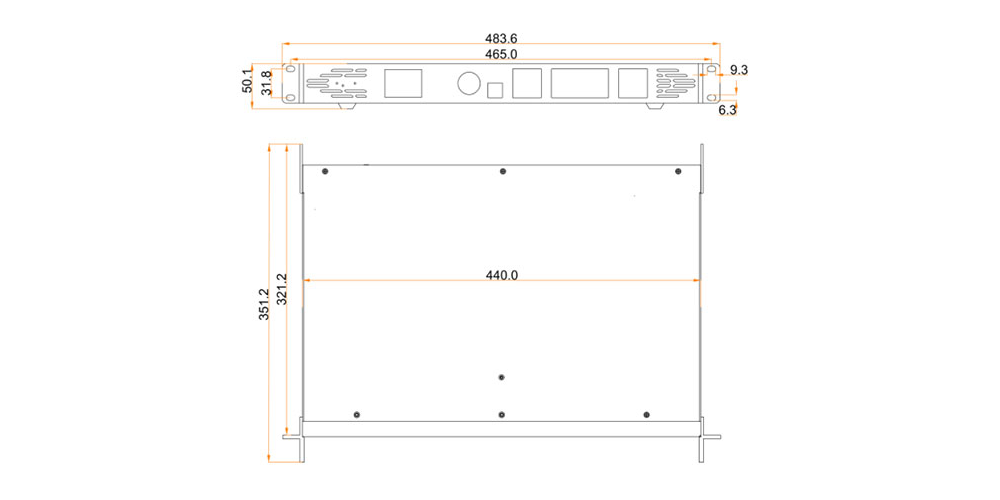
The NovaStar VX600 features a compact 1U rack-mount design, making it easy to integrate into broadcast racks, rental flight cases, and fixed AV installations. Its low power consumption and wide operating temperature range ensure reliable performance in a variety of environments.
| Specification | Value |
|---|---|
| Power Supply | 100–240V AC, 1.5A, 50/60Hz |
| Power Consumption | 28 W (Typical) |
| Dimensions (W × D × H) | 483.6 × 351.2 × 50.1 mm (19 × 13.8 × 1.97 in) |
| Net Weight | 4.0 kg (8.8 lbs) |
| Form Factor | Standard 1U Rack-Mount |
| Operating Noise | ≤45 dB(A) @ 25°C |
| Operating Temperature | −10°C to +60°C (14°F to 140°F) |
| Operating Humidity |
20%–90% RH (Non-Condensing) |
Why It Matters
With its compact 1U chassis, low 28W power consumption, and industrial-grade operating range, the VX600 is well suited for rental LED displays, broadcast systems, control rooms, and fixed commercial installations where reliability and space efficiency are essential.
9.Comparison of Novastar VX600 with Other Models
The table below compares the NovaStar VX600 with other popular controllers in the VX Series, helping you choose the right model based on your project size and performance requirements.
| Feature | VX4S-N | VX400 | VX600 ⭐ | VX1000 | NovaPro UHD Jr |
| Maximum Pixel Load | 2.3 Million | 2.6 Million | 3.9 Million | 6.5 Million | 10.4 Million |
| Maximum Layers | 2 | 2 | 3 | 3 | 3 |
| Gigabit Ethernet Outputs | 4 | 4 | 6 | 10 | 16 |
| 10G Optical Ports | — | 1 × OPT | 2 × 10G OPT | 1 × OPT | 4 × 10G Fiber |
| Maximum Output Width | 3,840 px | 10,240 px | 10,240 px | 10,240 px | 16,384 px |
| Genlock Support | No | No | Yes | Yes | Yes |
| Ambient Light Sensor | No | No | Yes | Yes | Yes |
| Bypass Mode | No | No | Yes | Yes | Yes |
| HDMI Inputs | 2 | 2 | 2 | 4 | 4 |
| SDI Inputs | — | 1 | 1 | 1 | 2 |
| User Presets | 10 | 10 | 10 | 256 | 256 |
| Best For | Small fixed LED displays | Entry-level rental & fixed installs | Mid-sized rental, stage events, fine-pitch LED displays | Large venues & broadcast | XR stages, virtual production & flagship broadcast |
Which Model Should You Choose?
- VX4S-N– Best for small LED displays and budget-conscious projects.
- VX400– Suitable for entry-level rental and standard commercial installations.
- VX600– Offers the best balance of performance, connectivity, and value for most professional LED display applications.
- VX1000– Designed for larger LED walls and higher pixel loads.
- NovaPro UHD Jr– Ideal for high-end broadcast, XR production, and ultra-large LED systems.
10.FAQ
10.1 What is the pixel loading capacity of the NovaStar VX600?
3.9 million pixels across 6 Gigabit Ethernet ports — approximately 650,000 pixels per port at 8-bit color depth. This is the total output ceiling regardless of input resolution.
10.2 Does the VX600 support 4K input?
Not natively through its electrical inputs. HDMI and DVI inputs max out at 1920×1200@60Hz (with custom resolutions up to 3840×648 in Direct mode). The OPT 1 fiber input can accept a 4K×1K@60Hz source — ultra-wide but not full-frame 4K. For native 4K60 HDMI 2.0, look at the VX1000 or NovaPro UHD series.
10.3 What’s the difference between VX600 and VX6S?
The VX600 adds: 2 × 10G OPT fiber outputs (vs none on VX6S), dedicated GENLOCK IN + LOOP BNC connectors, LIGHT SENSOR port, higher max output width (10,240 vs 4,096 pixels), and a redesigned front panel with more dedicated buttons (SCALE, FREEZE, FN). The VX6S retains dual SDI inputs, dual DVI inputs, and USB media playback — all of which the VX600 reduces or removes.
10.4 Can I use the VX600 without fiber?
Yes. The six RJ45 Ethernet ports handle all standard copper-based LED cabinet connections. The fiber ports are additive — run copper today, add fiber later when your infrastructure catches up.
10.5 What SFP+ modules are compatible with the VX600?
NovaStar maintains a published compatibility list. Not all standard 10G SFP+ transceivers work. Single-mode (1310nm, LC duplex) and multi-mode (850nm, LC duplex) options are both supported. Check the list before ordering — and buy spares.
10.6 How do I update the firmware?
Download the latest firmware from novastar.tech, copy the file to a FAT32-formatted USB drive, insert into the VX600’s USB port, and initiate the update from the front-panel system menu. After a firmware update, rebuild your presets — they don’t always carry forward.
10.7 Can multiple VX600 units be used together?
Yes — up to four units can be cascaded via USB for image mosaicing. For synchronized multi-unit arrays (blended backdrops, wide-screen stages), connect an external sync generator to the first unit’s GENLOCK IN and daisy-chain via GENLOCK LOOP across the remaining units.
11.Conclusion
The NovaStar VX600 is positioned as a balanced solution in the VX series, combining moderate pixel capacity, fiber connectivity, and synchronization features in a compact 1U design.
It is particularly suitable for rental companies and AV integrators who need stable performance for mid-size LED projects without moving into high-end broadcast systems.
Its combination of Genlock support, fiber transmission, and low-latency processing makes it a practical choice for modern stage and event production environments.
 Retail LED Display Guide: Types, Cost & Buying Tips
 Top 10 LED Screen Suppliers in Germany (2026)