Related Posts
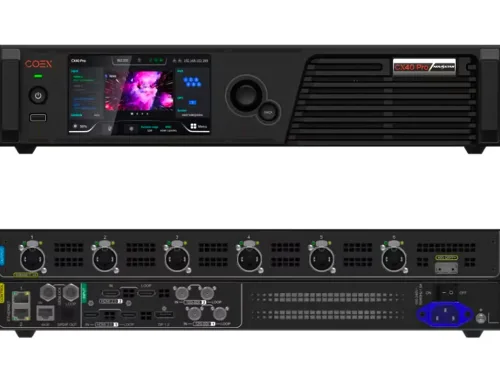
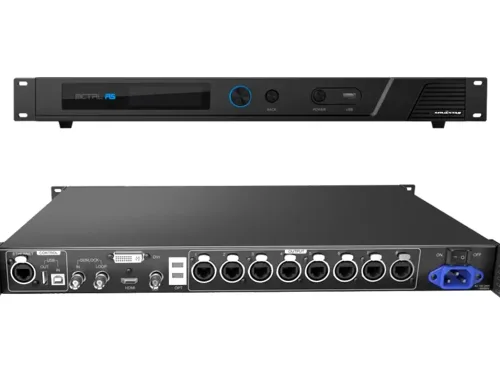
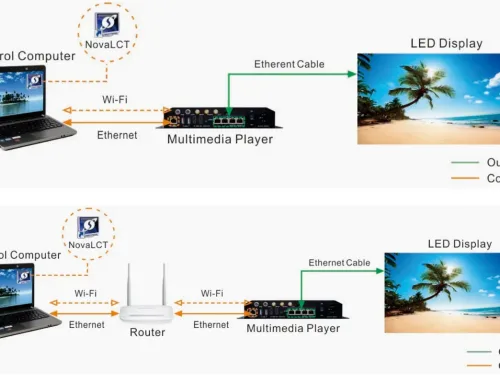




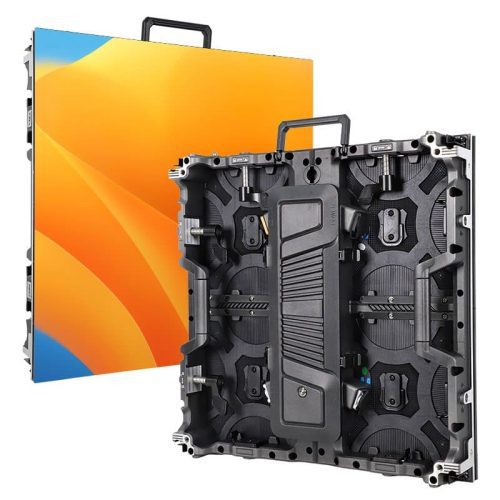
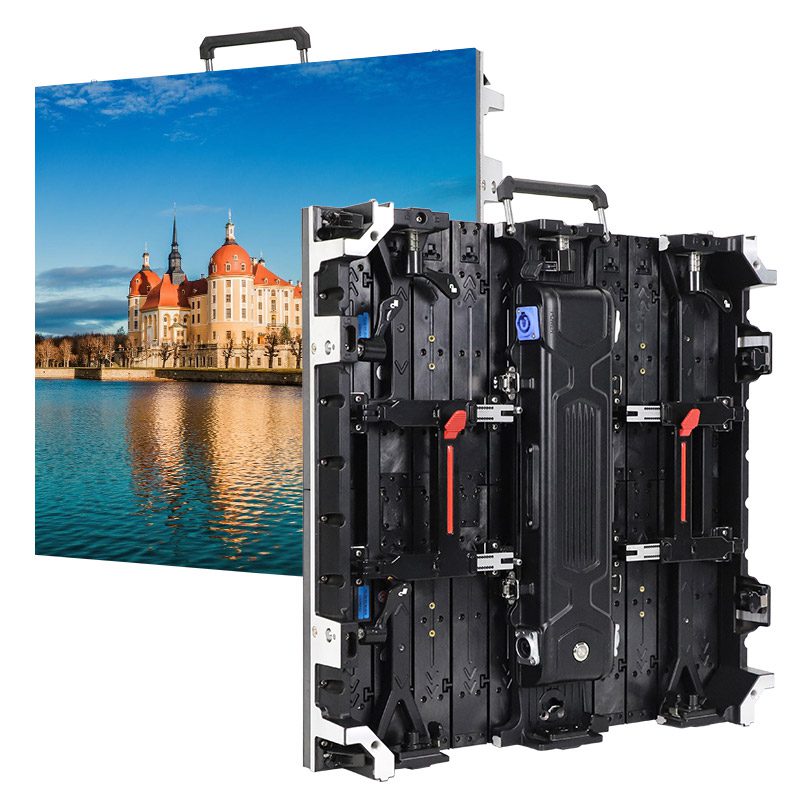
This guide provides a clear and practical overview of the NovaStar MCTRL660 series LED display controllers. It covers essential topics—including key features, hardware differences, connection methods, standalone configuration, and software management—to help you deploy and operate MCTRL660 and MCTRL660 PRO units efficiently in real-world LED display projects.
catalogue
1.Overview of the MCTRL660 and MCTRL660 PRO LED Display Controllers
NovaStar MCTRL660 and MCTRL660 PRO are high-performance LED display controllers designed for demanding applications requiring stable, low-latency video processing at resolutions up to 1920×1200@60Hz. While both models share a core feature set, the MCTRL660 PRO adds enhanced connectivity and scalability for more complex installations.
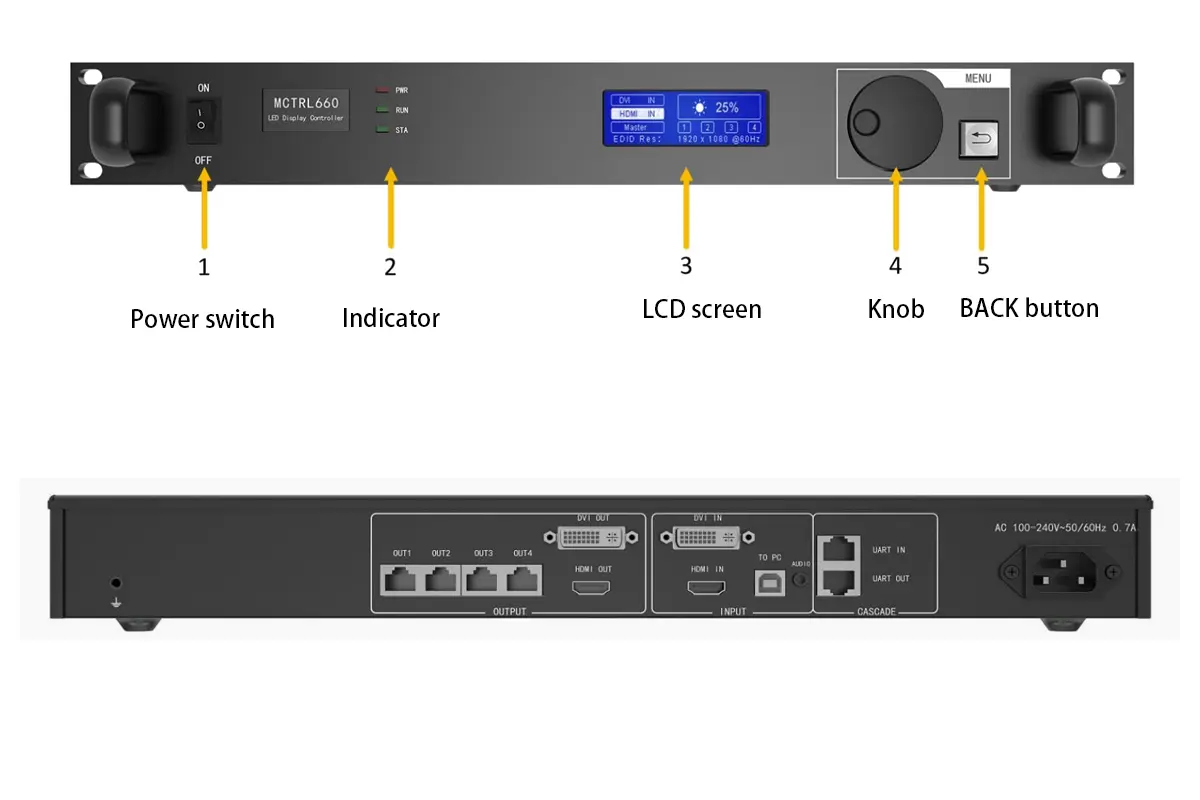
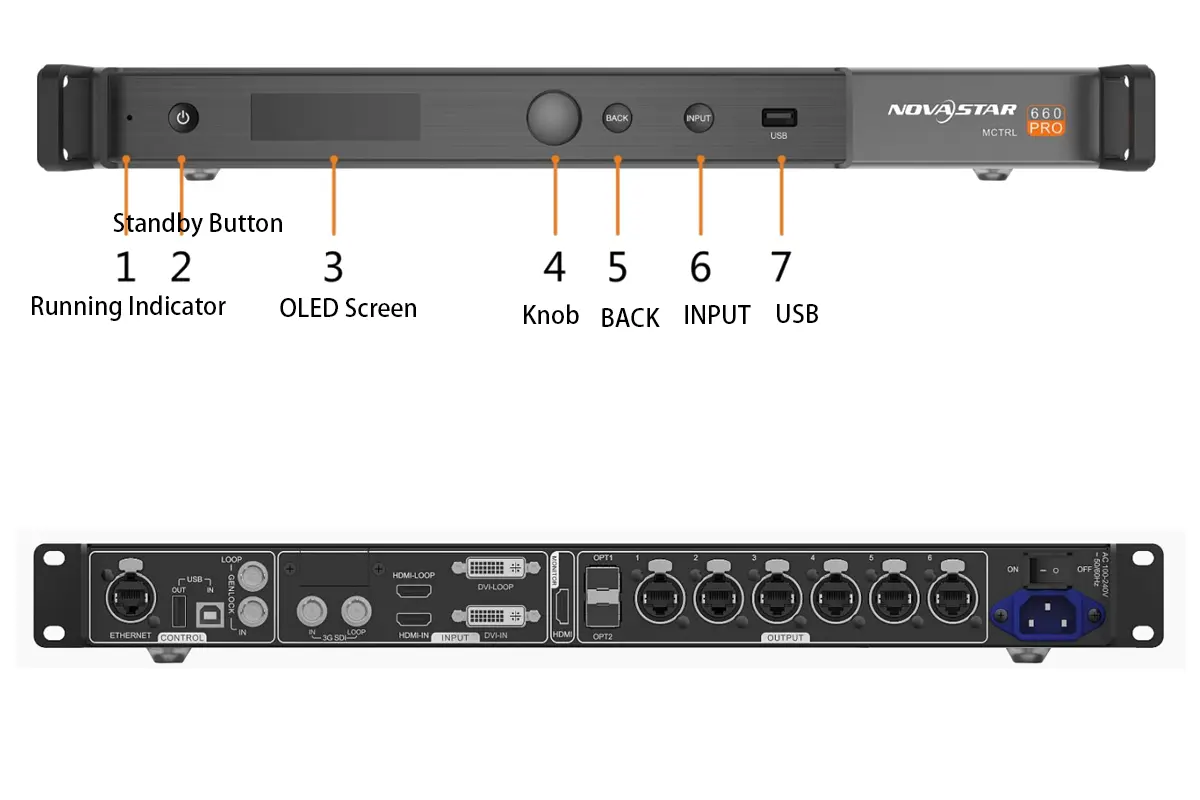
NovaStar MCTRL660 and MCTRL660 PRO common Features:
- High-Resolution Real-Time Processing: Deliver smooth, full-frame-rate video up to Full HD+ (1920×1200@60Hz) with sub-millisecond latency—ideal for live broadcasting and interactive applications.
- Flexible Input Compatibility: Seamlessly accept standard video signals via HDMI or DVI, ensuring broad compatibility with cameras, media servers, and playback devices.
- Advanced Color Fidelity: Support deep color input (up to 12-bit) for smoother gradients and richer visuals, critical in high-end staging and broadcast environments.
- Creative Screen Layouts: Built-in multi-angle image mirroring enables dynamic visual effects without external processing—perfect for curved screens or multi-surface stages.
- Consistent Display Quality: Integrated pixel-level calibration ensures uniform brightness and color across large or multi-panel installations, reducing manual tuning time.
- Scalable System Architecture: Support device cascading for synchronized control of extended displays, adapting to both compact setups and expansive video walls.
NovaStar MCTRL660 Series LED Display Controllers Specification
| Feature | MCTRL660 | MCTRL660 PRO |
|---|---|---|
| Input Connectors | SL-DVI, HDMI 1.3, Audio | SL-DVI, HDMI 1.4a, 3G-SDI |
| Output Ports | 4x Gigabit Ethernet | 6x Gigabit Ethernet, 2x Optical |
| Max Resolution | 1920×1200@60Hz | 1920×1200@60Hz |
| Bit Depth Support | 8-bit, 10-bit, 12-bit | 8-bit, 10-bit, 12-bit |
| Image Mirroring | Supported | Supported |
| Low Latency | Not Available | <1 ms |
| Cascading Devices | Up to 20 | Up to 8 |
2.Where Is MCTRL660 Series Used in LED Display Systems?
In an LED display system, the Novastar MCTRL660 series serves as the central video processing and distribution unit, positioned between the signal source (e.g., media server, camera, or playback device) and the receiving cards that drive the LED panels. It converts incoming video signals into data streams optimized for NovaStar receiving cards and distributes them reliably over Ethernet or fiber.
This role makes the MCTRL660 series essential in two primary deployment scenarios:
- Front-of-House Video Walls: In live events, broadcast studios, or corporate lobbies, where high image quality, low latency, and real-time reliability are critical.
- Backbone of Large-Scale Fixed Installations: Such as control rooms, sports venues, or digital signage networks, where stable long-term operation and easy maintenance matter most.
Thanks to its support for cascading, pixel calibration, and flexible inputs, the MCTRL660 series seamlessly bridges creative vision and technical execution—whether on a touring truck or in a permanent facility.
3.What Are the Key Differences Between MCTRL660 and MCTRL660 PRO Controllers?
While both models share many similarities, the MCTRL660 PRO LED display controller offers several enhancements:
Signal Integration
- MCTRL660: Accepts HDMI and DVI signals only. Requires external converters to interface with SDI-based broadcast equipment or professional cameras.
- MCTRL660 PRO: Adds native 3G-SDI input, enabling direct connection to broadcast switchers, PTZ cameras, and OB vans—ideal for live TV, sports, and studio environments without signal conversion.
Long-Distance Transmission
- MCTRL660: Relies solely on copper-based Gigabit Ethernet outputs (up to 4 ports). Limited to ~100-meter cable runs per link; susceptible to ground loops or EMI in electrically noisy venues.
- MCTRL660 PRO: Equipped with 2 optical fiber outputs in addition to 6 Ethernet ports, supporting transmission over hundreds of meters with immunity to interference—critical for large outdoor stages, stadiums, or complex rental rigs.
System Scalability & Topology
- MCTRL660: Supports cascading up to 20 units, making it well-suited for massive fixed installations (e.g., command centers or digital billboards) where minimizing controller count simplifies management.
- MCTRL660 PRO: Limits cascading to 8 units, but each unit drives higher-bandwidth loads—better aligned with high-refresh, high-density LED panels common in premium rental or broadcast applications.
Field Deployment & Maintenance
- MCTRL660: Optimized for stable, long-term operation in controlled indoor environments. Fewer I/O options reduce complexity but limit adaptability in dynamic setups.
- MCTRL660 PRO: Designed for rapid deployment and troubleshooting in demanding field conditions. Fiber links simplify grounding, while SDI support streamlines integration with existing broadcast workflows—saving time during load-in and tech rehearsals.
Use Case Alignment
- MCTRL660: Best for fixed, large-scale displays where cost efficiency and node density matter most (e.g., security centers, retail video walls).
- MCTRL660 PRO: Built for professional live production, where signal integrity, low latency, and compatibility with broadcast standards are non-negotiable (e.g., concerts, TV studios, esports arenas).
| Feature / Capability | MCTRL660 | MCTRL660 PRO |
|---|---|---|
| Signal Integration | HDMI, DVI only | HDMI, DVI + native 3G-SDI |
| Long-Distance Output | Ethernet only (≤100 m) | Ethernet + fiber optic (100+ m) |
| Ideal For | Large fixed installations | Broadcast & high-end rental |
| Cascading Scale | Up to 20 units (wide coverage) | Up to 8 units (high performance) |
| Field Flexibility | Limited in broadcast workflows | Plug-and-play with SDI/fiber rigs |
4.What Input Sources and Output Interfaces Does the MCTRL660 Series Support?
The Novastar MCTRL660 series includes two distinct models—MCTRL660 and MCTRL660 PRO—that share some interfaces but differ significantly in professional connectivity. Below is a complete breakdown by model.
Input Sources
| Interface | MCTRL660 | MCTRL660 PRO | Notes |
|---|---|---|---|
| HDMI | Yes | Yes | Supports up to 1920×1200@60Hz, HDCP compliant |
| DVI(Single-Link) | Yes | Yes | Same resolution limit as HDMI |
| 3G-SDI | No | Yes | SMPTE-compliant; max 1920×1080@60Hz; enables direct broadcast camera/switcher connection |
| Audio Input | Yes | Yes | 3.5mm stereo jack; audio can be embedded in output stream |
Output Interfaces
| Interface | MCTRL660 | MCTRL660 PRO | Notes |
|---|---|---|---|
| Gigabit Ethernet | 4 ports | 6 ports | Used to connect NovaStar receiving cards (e.g., VX4S, A8s); max cable length ~100 m per link |
| Optical Fiber (SFP+) | None | 2 ports | 10G fiber outputs for long-distance (>100 m), noise-immune transmission |
| HDMI Loop-Through | Yes | Yes | Passes input signal to another device or monitor |
| DVI Loop-Through | Yes | Yes | Same as above; useful for daisy-chaining or local preview |
5.How Do You Connect MCTRL660 Series Controllers in Large LED Screens?
In large LED displays that exceed the output capacity of a single controller, multiple Novastar MCTRL660 or MCTRL660 PRO units can be logically cascaded to drive different sections of the screen. This is achieved through network coordination and synchronization, not physical daisy-chaining via USB.
Cascading Connection
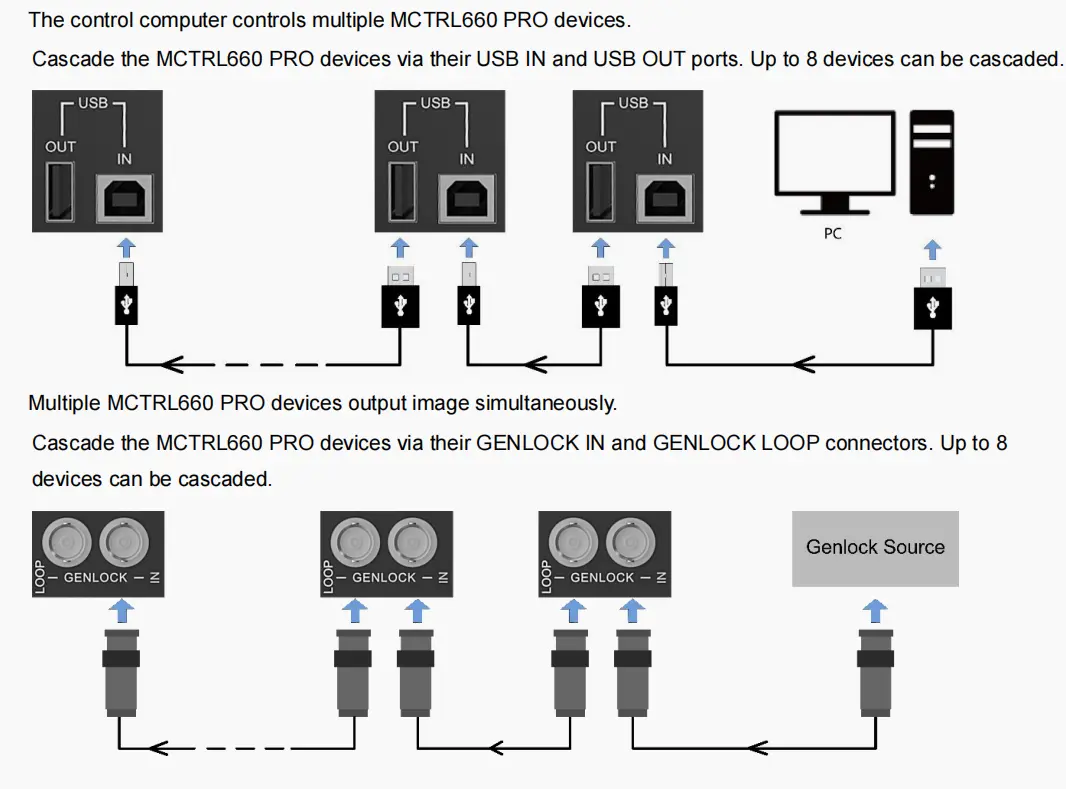
- MCTRL660 PRO: Supports cascading of up to 8 units via USB IN/OUT or GENLOCK IN/LOOP.
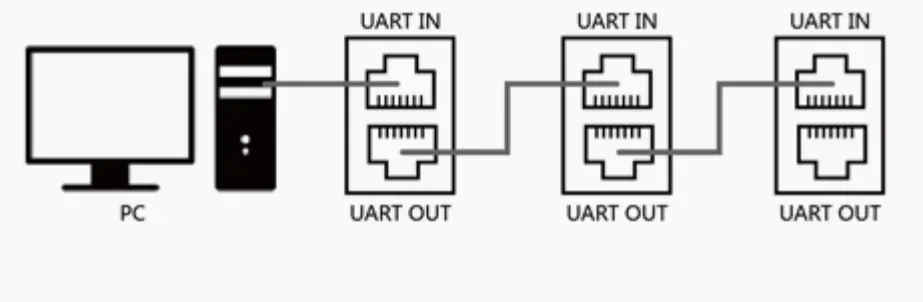
- MCTRL660: Supports cascading of up to 20 units via UART IN/OUT or HDMI/DVI OUT.
- Application: Synchronized output from multiple controllers for ultra-wide or ultra-tall displays.
NovaStar Mctrl660 Pro Cascade Devices
NovaStar mctrl660 Cascade Devices
Redundancy Backup Connection
- Configure primary and backup controllers using Ethernet ports or optical ports.
- Automatic takeover by the backup unit if the primary fails, ensuring uninterrupted display.
- Application: High-reliability scenarios such as live events and sports broadcasts.
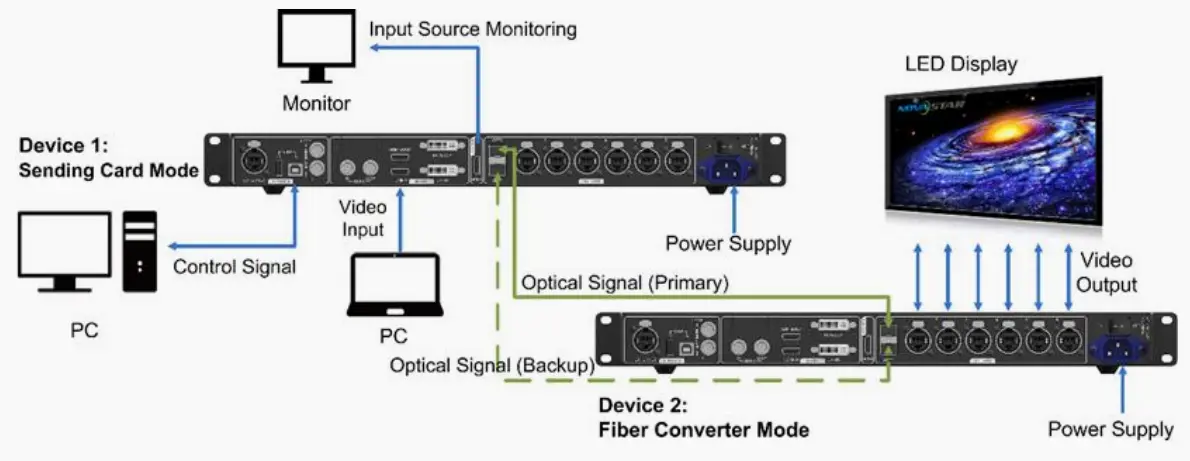
Fiber Converter Mode
- Use OPT1/OPT2 optical ports with 6 Gigabit Ethernet ports for optical-electrical signal conversion.
- Supports long-distance transmission (up to 10 km with single-mode fiber).
- Application: Long-distance signal transmission between control room and display screen.
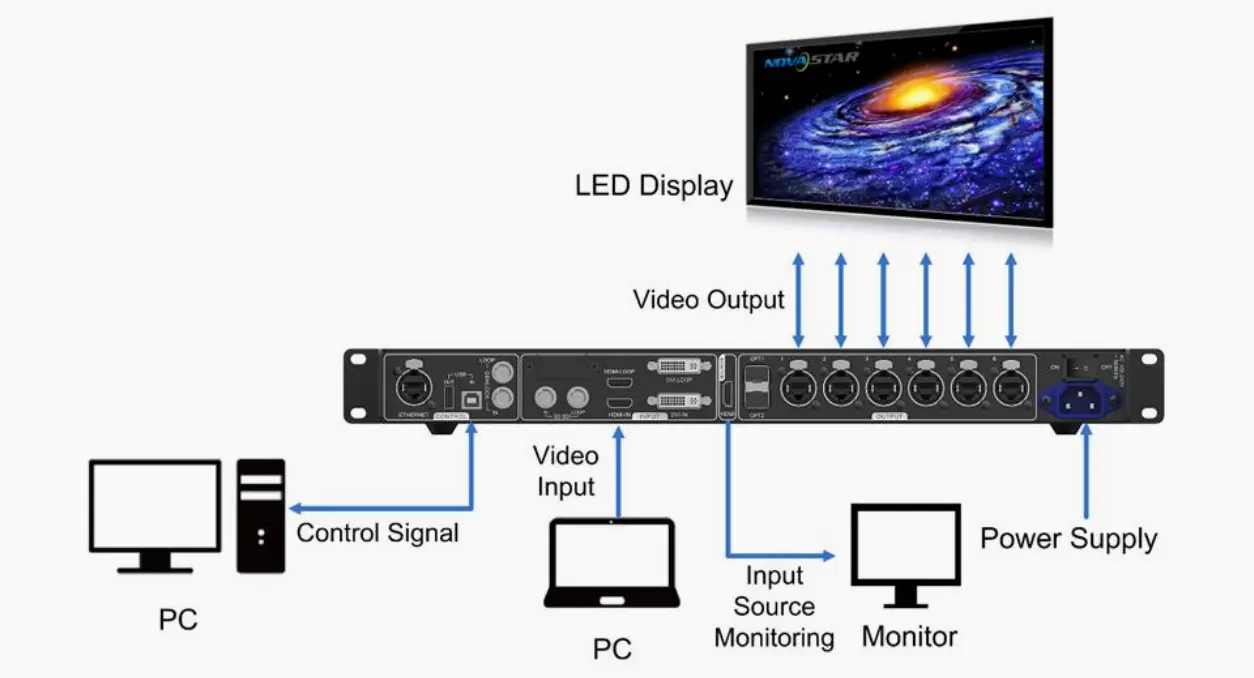
Sending Card Mode
- Output video signals directly to receiving cards via optical ports or Ethernet ports.
- Supports image mirroring, low latency (<1ms), and quick configuration.
- Application: Standard LED display control systems for real-time adjustment.
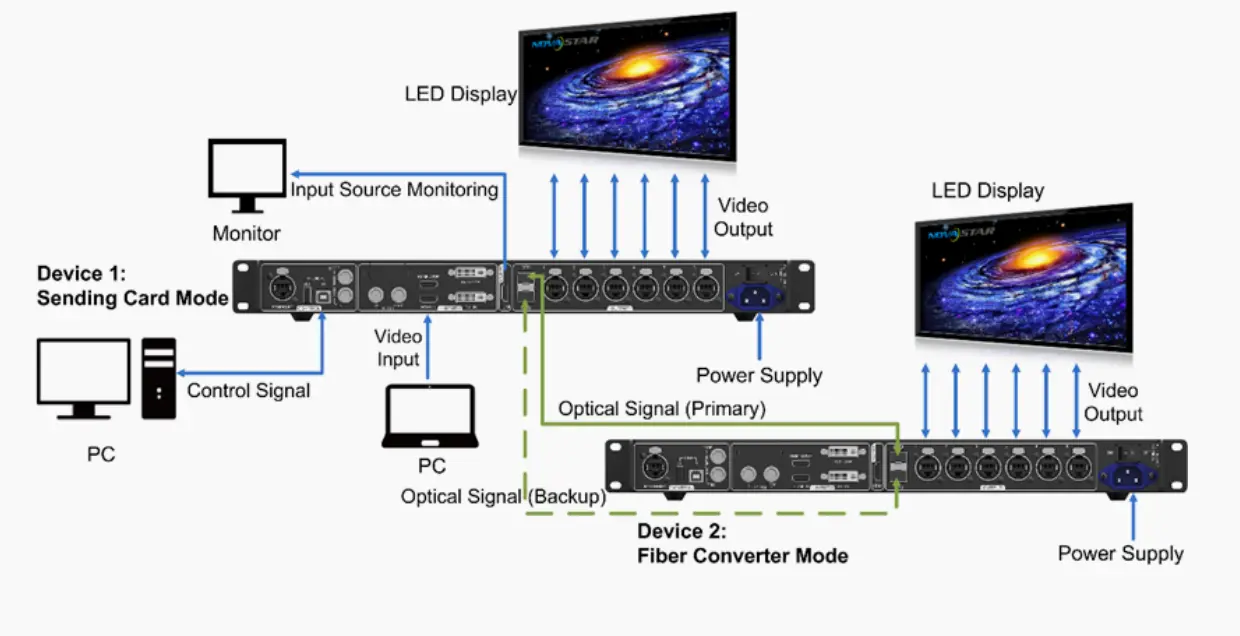
Dual Output Mode
- One controller outputs the same image simultaneously through both optical ports and Ethernet ports.
- Suitable for driving two separate display systems from a single source.
6.How Do You Quickly Configure an LED Screen on the MCTRL660 Without a PC?
A core advantage of the MCTRL660 series is its ability to be configured without a computer in just minutes, using only the front-panel knob and buttons to perform a basic setup and light up the screen.The process is streamlined but differs slightly between the standard and PRO models.
For the MCTRL660 PRO: Follow the “Four-Step” Process
Set Input Source
- Press the knob to enter the main menu → Select Input Settings → Input Source
- Choose the corresponding signal source (HDMI / DVI / 3G-SDI)
Set Input Resolution
- Go to Input Settings → Preset Resolution to select a preset resolution
- Or go to Custom Resolution to set custom width, height, and refresh rate

Set Input Bit Depth
- Go to Input Settings → Color Depth
- Select 8bit / 10bit / 12bit based on the signal source
Quick Screen Configuration
Go to Screen Settings → Quick Config
Set the following parameters:
- Cabinet Row Qty / Column Qty (number of cabinet rows and columns)
- Port 1 Cabinet Qty (number of cabinets loaded by Ethernet port 1)
- Data Flow (data direction, previewable in real-time by rotating the knob)
Press the knob to save, and the screen will light up
For the Standard MCTRL660: Follow the “Two-Step” Process
Set Input Resolution
- Go to Advanced Setting → EDID Resolution
- Select a preset resolution or customize one
Quick Screen Configuration
- Enter the Screen Setting submenu
- Set cabinet rows, columns, cabinets loaded by port 1, and data flow
- Save to light up the screen
7.How Is the MCTRL660 Series Managed Using NovaLCT or SmartLCT?
While both controllers deliver high-performance LED control, their design priorities make them better suited for different environments:
Concerts & Live Events (Rental) → MCTRL660 PRO
- Requires low latency (<1 ms), 3G-SDI input for live camera feeds, and fiber outputs to span large stages.
- Image mirroring enables creative effects on curved or multi-surface screens.
- Hot backup ensures uninterrupted playback during critical shows.
Sports Arenas & Stadiums (Fixed Installation) → MCTRL660
- Drives massive scoreboards or ribbon displays with up to 20 cascaded units, reducing controller count and cabling complexity.
- Stable Ethernet-only architecture suits controlled indoor/outdoor enclosures.
- Pixel-level calibration maintains uniformity across thousands of square meters.
Broadcast Studios & OB Vans → MCTRL660 PRO
- Native 3G-SDI support integrates seamlessly with production switchers and cameras.
- Frame-accurate GENLOCK sync eliminates tearing in multi-camera setups.
- Fiber outputs allow clean signal runs from control room to studio backdrop.
Security Command Centers & Control Rooms → MCTRL660
- Displays dozens of high-resolution camera feeds via HDMI/DVI inputs.
- Long-term reliability and simple maintenance favor the MCTRL660’s scalable, copper-based design.
- Cascading supports LED video walls spanning entire walls without performance loss.