Place two LED displays side by side and one looks crisp while the other looks washed out. The difference usually comes down to a single specification: screen contrast ratio. It decides whether dark scenes keep their detail, whether colors look saturated or muddy, and whether an outdoor LED screen stays readable at noon.
Most guides stop at “higher is better,” which is incomplete. A screen contrast ratio measured in a dark laboratory can collapse once sunlight hits the panel, and a huge dynamic figure on a datasheet may describe nothing more than a firmware trick. For anyone specifying indoor LED video walls, retail displays, stadium perimeters or roadside billboards, a realistic reading of screen contrast ratio prevents both overspending and disappointing installations. Contrast also interacts directly with LED display brightness.
Table of Contents
1. What Is Screen Contrast Ratio?
Screen contrast ratio is the relationship between the brightest white a display can produce and the darkest black it can produce, expressed as a ratio such as 3,000:1. If peak white measures 300 cd/m² and black measures 0.1 cd/m², the screen contrast ratio is 300 ÷ 0.1 = 3,000:1.
The word that matters most is simultaneously: the honest definition compares the brightest and darkest areas present within a single frame. A figure produced by measuring a full white frame and then a separate full black frame is a different, more flattering measurement.
A strong screen contrast ratio changes four things viewers notice: shadow detail in dark scenes, perceived depth between lit and unlit areas, colour saturation, and legibility in bright spaces. For commercial LED displays that last point is critical, because text and logos have to survive ambient light.
01 Static vs Dynamic vs ANSI Contrast Ratio
Display makers publish screen contrast ratio in four different ways, and mixing them up is the most common reason buyers feel cheated after installation. Static (native) contrast measures white and black in one stable frame with no processing. Dynamic contrast dims the whole backlight during dark scenes, then divides the brightest reading by the darkest, which can exceed 10,000,000:1 without changing any single frame. ANSI contrast averages a 16-block black-and-white checkerboard in one frame. Ambient contrast adds the room and describes what a viewer perceives.
| Contrast ratio type | How it is measured | Typical published figure | What it really tells you |
|---|---|---|---|
| Static (native) | Peak white and darkest black in one stable frame, no processing | 1,000:1 – 5,000:1 (LCD), 100,000:1+ (OLED), 3,000:1 – 10,000:1 (LED video wall) | The honest, repeatable figure. Use this to compare products. |
| Dynamic | Full white frame and full black frame measured separately, with backlight dimming | 50,000:1 up to 10,000,000:1 | Marketing figure. Says nothing about simultaneous on-screen detail. |
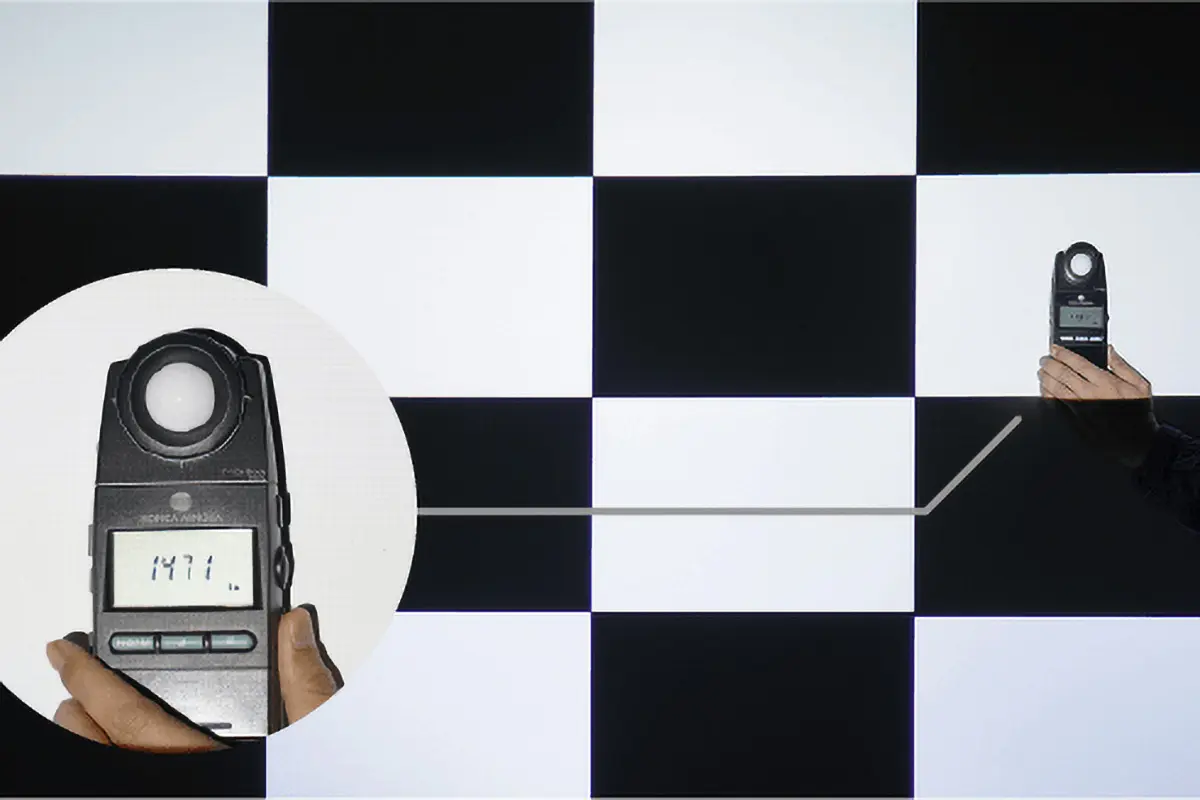
| ANSI (checkerboard) | 16-block black/white checkerboard averaged within one frame | 20–40% lower than the static figure | Closest single number to perceived image quality. |
| Ambient / effective | White and black re-measured under a defined light level, with screen reflectance included | Often 20:1 – 600:1 in real rooms and outdoor sites | The only number that predicts what your audience actually sees. |
02 Why ANSI Contrast Ratio Is the Most Honest Number
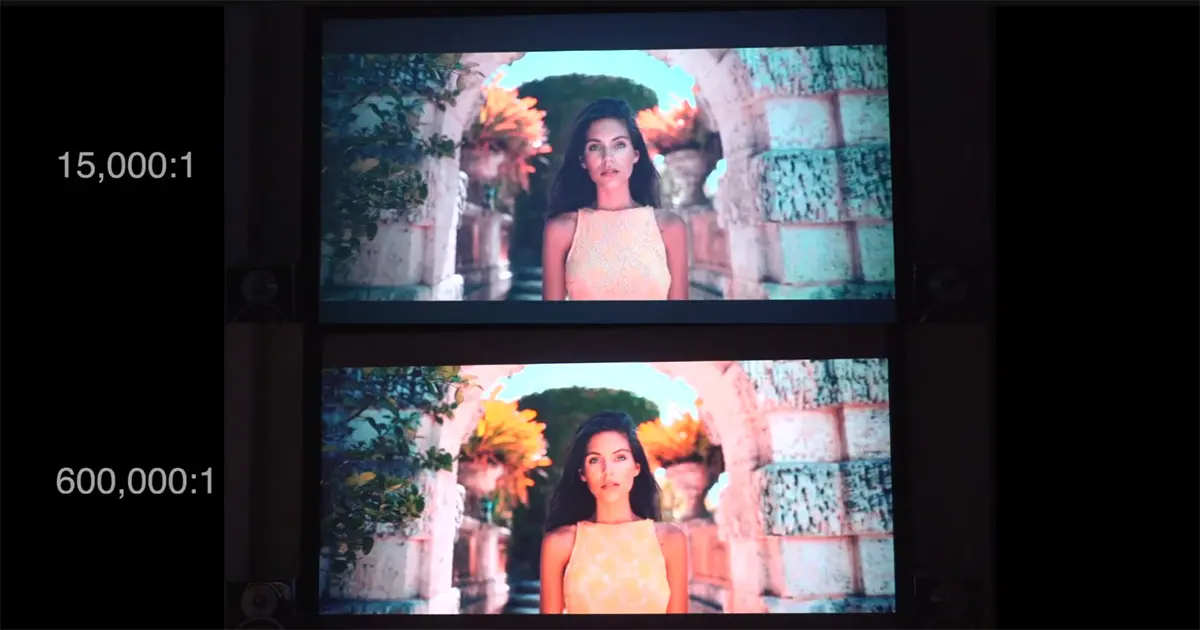
A full-black measurement flatters almost every display, because with the whole panel driven black an LED screen shows only the residual light from its own emitters. Switch on a bright object next to a dark one and light scatters sideways inside the panel, bleeds through the mask and reflects off the substrate. That is why an ANSI or mixed-content measurement typically returns a screen contrast ratio 20–40% below the published static figure. Ask suppliers for contrast measured at a defined brightness with mixed content.
03 Contrast Ratio vs Brightness: Two Numbers People Confuse
Brightness and screen contrast ratio are frequently treated as the same specification. They are not. Brightness is an absolute quantity measured in nits; screen contrast ratio is a relationship between two brightness values.
The practical consequence is that raising brightness also raises the black floor. Doubling white output on a display with a fixed ratio doubles the light leaking from its blacks, so the picture gets brighter rather than deeper. That is why the same screen contrast ratio feels completely different in a bright lobby and a dim studio.
2. Screen Contrast Ratio by Technology: OLED vs LED vs LCD
Three display families dominate the market, and each reaches a high screen contrast ratio through a different mechanism. Knowing the mechanism tells you where each one fails.
01 OLED Screen Contrast Ratio
OLED is self-emissive: every pixel makes its own light and can switch off completely, so black is genuinely black and the theoretical screen contrast ratio is infinite. Measured panels deliver roughly 100,000:1 to well over 1,000,000:1 at realistic brightness.
The trade-offs matter commercially. Organic emitters age unevenly, so static logos can burn in, and sustained high brightness accelerates that ageing — which rules OLED out for a 24/7 roadside billboard. It remains excellent for design suites, premium meeting rooms and broadcast monitoring.
02 LED Screen Contrast Ratio
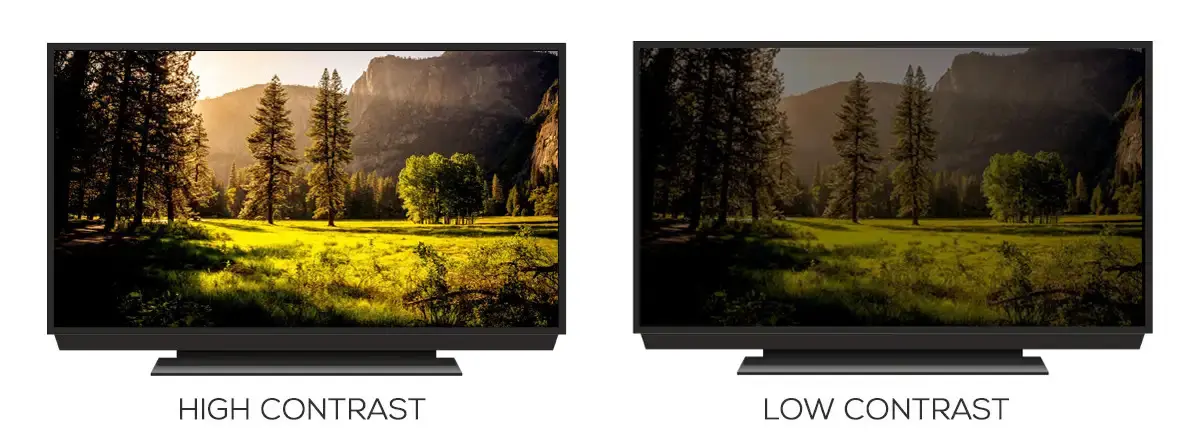
“LED” describes two very different products whose screen contrast ratio is limited by different physics.
LED-backlit LCD panels still use a liquid-crystal layer to block light: edge-lit designs manage about 1,000:1, direct-lit with local dimming does better, and Mini-LED with thousands of dimming zones can exceed 10,000:1 but blooms around small bright objects.
True LED video walls have no liquid crystal. Every pixel is a discrete red, green and blue LED that can be driven to zero, so the achievable screen contrast ratio is set by the hardware around the emitter: the LED package (black bodies absorb stray light instead of reflecting it), the substrate (a matte black PCB reflects far less than a white one), the mask and shroud, and how cleanly the driver IC handles the first few grayscale steps.
Typical published figures for indoor LED video walls run from about 3,000:1 for standard SMD product to roughly 5,000:1–10,000:1 for black-package and COB LED screens. Outdoor cabinets are usually quoted at 4,000:1–8,000:1, but as section 4 shows, ambient contrast matters far more than the laboratory figure.
One nuance is often misused in marketing: raising grayscale depth from 12-bit to 14-bit or 16-bit does not raise the screen contrast ratio. It improves how finely the display divides the dark end of the scale, which the eye reads as smoother shadows.

03 LCD Monitor Contrast Ratio
Liquid-crystal displays work differently. A backlight shines through a liquid-crystal layer that twists to block or pass light, and blocking is never perfect, so the black floor sits above zero.
Panel type drives the outcome. TN panels sit near 700:1–1,000:1. IPS panels, prized for colour accuracy and viewing angles, reach 1,000:1–1,500:1. VA panels block light more completely and commonly deliver 3,000:1–6,000:1, the best value in screen contrast ratio among mainstream monitors. For office work a 1,000:1 panel is entirely adequate; for colour grading or medical imaging that same screen contrast ratio becomes a visible limitation.
| Technology | Typical native screen contrast ratio | Black level | Best suited to | Main limitation |
|---|---|---|---|---|
| OLED (self-emissive) | 100,000:1 – 1,000,000:1+ | Approaches 0 nits | Premium indoor, HDR, colour grading, broadcast monitoring | Peak brightness, burn-in risk, cost at large sizes |
| Mini-LED / FALD LCD | 5,000:1 – 20,000:1 with local dimming | 0.01 – 0.05 nits | Home theatre, high-brightness monitors, indoor signage | Blooming halos around bright objects |
| VA LCD | 3,000:1 – 6,000:1 | 0.02 – 0.05 nits | General monitors, TVs, control-room displays | Narrower viewing angles |
| IPS LCD | 1,000:1 – 1,500:1 | 0.08 – 0.12 nits | Colour-critical office and design work | Shallow blacks |
| LED video wall, standard SMD | 3,000:1 – 5,000:1 | Set by LED package | Large indoor and outdoor video walls | Black level determined by package and mask |
| LED video wall, black package / COB | 5,000:1 – 10,000:1+ | Set by package, substrate and masking | High-contrast indoor retail, broadcast, xR stages | Higher cost per square metre |
3. What Is a Good Screen Contrast Ratio? Application Benchmarks
There is no universal best number. A good screen contrast ratio is whatever matches the lighting and the content of the place the display will live.
01 Screen Contrast Ratio for Indoor LED Displays
Indoor LED screens usually work in 200–800 lux, which is forgiving compared with daylight. A screen contrast ratio of 1,000:1 is the practical minimum for content containing dark scenes, 3,000:1 is comfortably good, and 6,000:1–10,000:1 delivers the premium look retail, automotive and broadcast clients expect.
Judge the ratio together with peak brightness and low-gray performance, and check the finish. A glossy front surface reflects every ceiling light in a brightly lit lobby, destroying the perceived screen contrast ratio even though the measured figure is unchanged.
02 Screen Contrast Ratio for Outdoor LED Advertising Screens
Outdoors, sunlight rather than the panel sets the ceiling. Direct sun produces roughly 100,000 lux, and even a little reflection off the front surface lifts the black level by hundreds of nits, so the laboratory screen contrast ratio is almost irrelevant on its own.
What matters is the ratio of peak brightness to reflected light. Practical outdoor screens use 5,000–10,000 nits, a native screen contrast ratio of 4,000:1 or better, automatic brightness control and a matte anti-reflective front surface. A 10,000:1 screen at 3,000 nits will look worse at noon than a 5,000:1 screen at 8,000 nits.
03 Screen Contrast Ratio for Monitors, TVs and Gaming
For desktop monitors, 1,000:1 is standard, 3,000:1 is a meaningful upgrade for media, and 5,000:1 or higher — typically VA, Mini-LED or OLED — is what colour-critical work requires. Gamers should prioritise at least 3,000:1 alongside response time, because night scenes are where weak blacks hide detail.
| Application | Target native ratio | Typical brightness | Why |
|---|---|---|---|
| Office and control-room monitors | 1,000:1 – 1,500:1 | 250 – 350 nits | Readable text, low eye strain, low cost |
| Home theatre and HDR TV | 3,000:1 – 10,000:1+ | 400 – 1,000 nits | Shadow detail in dark scenes |
| Competitive gaming monitor | 3,000:1 or higher (VA, Mini-LED) | 300 – 600 nits | Separates targets from dark backgrounds |
| Colour grading and design | 5,000:1 or higher (OLED, FALD) | 300 – 1,000 nits | Reliable black and colour accuracy |
| Indoor retail and brand LED wall | 6,000:1 – 10,000:1 | 800 – 1,500 nits | Saturated colour under store lighting |
| Broadcast and xR stage LED wall | 8,000:1+, 14-bit+ grayscale | 1,000 – 2,500 nits | Camera-safe blacks without banding |
| Outdoor advertising LED screen | 4,000:1 or higher | 5,000 – 10,000 nits | Legible in direct sunlight |
| Stadium perimeter and arena LED | 4,000:1 or higher | 5,000 – 7,000 nits | Fast motion plus sun and floodlight glare |
4. How Ambient Light Changes the Screen Contrast Ratio You See
01 Ambient Contrast Ratio Explained
Every display competes with light reflected from its own front surface, and that reflected light adds to both the white and the black, compressing the ratio dramatically.
Ambient Contrast Ratio = (white luminance + reflected luminance) ÷ (black luminance + reflected luminance), where reflected luminance = reflectance × illuminance ÷ π. A textured matte LED screen measures about 5% reflectance; a glossy glass front can exceed 10%.
The results are startling. In a dim living room a 300-nit monitor with a 1,000:1 screen contrast ratio delivers roughly 386:1. In a 500-lux office the same screen drops to about 37:1, and in direct sunlight it collapses to roughly 1.2:1, becoming a slightly brighter mirror. Your site decides the outcome, not the datasheet.
| Environment | Ambient light | Reflected luminance (5% screen) | Experience: 300-nit monitor, 1,000:1 | Experience: 800-nit indoor LED, 5,000:1 | Experience: 8,000-nit outdoor LED, 5,000:1 |
|---|---|---|---|---|---|
| Dim living room / home theatre | 30 lux | 0.5 cd/m² | 386:1 | 1,256:1 | 3,851:1 |
| Office or retail interior | 500 lux | 8.0 cd/m² | 37:1 | 100:1 | 838:1 |
| Bright showroom or atrium | 1,000 lux | 15.9 cd/m² | 19:1 | 51:1 | 458:1 |
| Overcast daylight, shaded façade | 10,000 lux | 159.2 cd/m² | 2.9:1 | 6.0:1 | 51:1 |
| Direct sunlight on screen face | 100,000 lux | 1591.5 cd/m² | 1.2:1 | 1.5:1 | 6.0:1 |
02 Sizing Brightness for an Outdoor LED Screen
The formula lets buyers check a quotation instead of trusting a headline number. Decide the ambient light the screen must survive, pick a surface reflectance, and calculate the reflected luminance.
For a roadside billboard at roughly 100,000 lux with a matte 5% front surface, reflected luminance is about 1,592 cd/m². Holding an ambient contrast ratio near 6:1 therefore needs roughly 8,000 nits of peak brightness with a 5,000:1 native ratio — which is exactly why outdoor LED advertising screens are specified at 5,000–10,000 nits. A matte front surface is worth more than an extra few hundred nits, and automatic brightness control preserves both legibility and emitter life after dark.
5. How to Test Screen Contrast Ratio: Three Methods
You do not need a calibration laboratory to judge a screen contrast ratio. You need controlled conditions, a repeatable pattern, and honesty about what each method proves.
01 Method 1: Full-Field Measurement With a Photometer
This is the laboratory standard behind most published figures. You need a photometer or colorimeter such as an X-Rite i1Display Pro or Datacolor SpyderX, a room below 5 lux, and at least 30 minutes of warm-up so the panel reaches thermal equilibrium. Measure the centre on a full white field, then on a full black field, and divide. Because the two states are measured separately, this method reports the most flattering screen contrast ratio a panel can produce.
02 Method 2: ANSI Checkerboard Measurement
Display a 16-block checkerboard of alternating black and white squares. Measure all eight white blocks and all eight black blocks in the same state, average each set, and divide. Because dark and bright content coexist, this captures the leakage, halation and mask reflections a full-black measurement misses, and returns a screen contrast ratio 20–40% lower that correlates far better with what viewers see.
03 Method 3: Real-Content and Video Evaluation
The third method needs no instrument. Play content that mixes deep blacks with small bright highlights — a night cityscape or a starfield — and look for three failures: shadow crush, where dark detail disappears; halation, where a bright object spreads a grey halo; and colour shift, where blacks turn blue or green. It produces no number, but it reliably exposes a screen that only performs well in the dark.
04 Reading a Contrast Report Without Being Fooled
With those three methods in mind, most published screen contrast ratio claims become easy to interpret.
| Datasheet claim | What it usually means | Ask instead |
|---|---|---|
| “10,000,000:1 dynamic contrast” | Backlight dims between two separate measurements | “What is the native ratio?” |
| “5,000:1” on an outdoor LED screen | Measured in a dark room, not at 5,000 nits | “What is it at full peak brightness?” |
| “∞:1 contrast” | Self-emissive panel, or an instrument noise floor | “What is the black level in nits?” |
| “High contrast”, no number | Marketing wording, no defined test condition | “Please state the ANSI ratio.” |
| Contrast with no brightness figure | The two values are only meaningful as a pair | “At what brightness and ambient light?” |
| “16-bit grayscale, so 16× contrast” | Bit depth smooths dark detail; it is not contrast | “Ratio and low-gray performance?” |
6. How Manufacturers Improve LED Screen Contrast Ratio
Raising the screen contrast ratio of an LED display is a hardware problem with well-understood levers. Each trades cost, brightness or serviceability against black-level performance.
01 Black LED Chips and Dark Substrates
The largest single gain comes from the emitter package. A white-bodied LED reflects light from its own internal surfaces back toward the viewer, lifting the black floor; a black-bodied package absorbs that stray light. Combined with a matte black PCB, a well-executed black package lifts the native screen contrast ratio substantially for only a small loss of peak brightness.
02 Masking, Visors and Light Shielding
The mask between pixels, the cabinet shroud and clip-on visors block light arriving from the wrong direction. Outdoors, where the sun dominates, shielding does more for the perceived screen contrast ratio than any change to the LED itself, because it removes the veiling reflection before it reaches the panel. The trade-off is viewing angle: aggressive masking narrows the cone within which the display looks best, which matters on wide plazas and curved installations.
03 COB and Flip-Chip Packaging
Chip-on-board (COB) packaging places the LED dies directly on the board under a dark encapsulation layer. Removing the individual package walls eliminates the gaps between pixels, cutting reflective surface area dramatically and improving low-gray linearity at the same time. Flip-chip mounting removes the bond wires and solder pads that would otherwise reflect light, and dark silicone encapsulation lowers the black field further.
04 Optical Bonding and Anti-Reflective Coatings
Optical bonding fills the air gap between the LED layer and the front surface with an index-matched adhesive, removing two reflective interfaces at once. A matte anti-reflective front surface then reduces veiling reflection. As section 4 showed, cutting reflectance from 10% to 5% halves the reflected luminance and can double the ambient contrast ratio without touching peak brightness, which makes this the highest-value upgrade for outdoor and storefront displays.
| Method | How it raises the ratio | Typical gain | Trade-off |
|---|---|---|---|
| Black LED packages (black SMD) | Absorbs stray light inside the package | Large gain in native contrast | Slightly lower peak brightness |
| Matte black PCB substrate | Reduces reflection between pixels | Moderate gain | Negligible |
| Masking, shrouds and visors | Blocks off-axis light and veiling glare | Large gain outdoors | Narrows the optimum viewing cone |
| COB encapsulation | Removes pixel gaps and reflective package walls | Higher contrast, smoother low gray | Higher cost, harder field repair |
| Flip-chip with dark silicone | Eliminates reflective bond wires and solder pads | Lower black-field luminance | Manufacturing complexity |
| Optical bonding and AR coating | Removes internal reflections and surface glare | Large gain in bright rooms | Cost and weight |
| Higher grayscale depth (14–16 bit) | Does not change the ratio; smooths dark detail | Better shadow detail only | Costlier driver ICs |
7. How to Adjust and Optimize Screen Contrast Ratio
01 For Home and Office Users
Consumer displays rarely let you change the true screen contrast ratio, because it is a property of the panel. What you can change is how much of it survives your room.
Start with reflected light: a matte surface, blinds and directional lighting beat any picture adjustment. Then calibrate rather than maximise. Raise brightness until white is comfortable, set contrast so the brightest two steps of a test pattern still separate, and leave dynamic contrast off for critical work because it changes the ratio while you are judging the image. Running at 60–70% output in a dim room preserves the effective screen contrast ratio and extends emitter life.
02 For AV Integrators and LED Screen Technicians
On a real installation the goal is to preserve the screen contrast ratio the specification promised. Four settings do most of the work.
Low-gray calibration. Tune gamma at the dark end so near-black content transitions smoothly instead of banding or dropping to full black.
Brightness scheduling. Drive peak output from an ambient light sensor so the display runs at 8,000 nits at noon and 1,500 nits at night, protecting both the ambient contrast ratio and the LED lifetime.
Refresh rate and scan mode. A high refresh rate with a low-scan configuration reduces flicker and banding when cameras are present, which directly affects perceived contrast on broadcast and xR stages.
Mask and shroud maintenance. Dust and cleaning residue scatter light and quietly reduce the effective screen contrast ratio over months, so include the front surface in the maintenance schedule.
8. Screen Contrast Ratio Buyer’s Checklist
Before signing a quotation for any LED display or monitor, confirm these nine points. Each one has changed the outcome of a real project.
1. Is the quoted screen contrast ratio static or dynamic? Ask for the native figure.
2. At what brightness was the screen contrast ratio measured? A contrast figure without a brightness figure is meaningless.
3. Was it full-field or ANSI? ANSI is closer to real content and normally 20–40% lower.
4. What is the screen reflectance, and is the front surface matte?
5. What ambient light will the screen face? Test the proposal with the ambient contrast ratio formula.
6. What are the grayscale depth and low-gray performance?
7. Does the display support automatic brightness control?
8. What is the black level in nits, not just the ratio?
9. Who maintains the front surface, and how?
If you want these numbers checked against a specific site, our engineers can recommend a screen contrast ratio and brightness combination that fits the environment rather than the brochure. Our advertising LED board and LED video wall ranges show how the specifications are presented.
9. Frequently Asked Questions About Screen Contrast Ratio
These are the questions buyers ask us most often about screen contrast ratio.
10. Conclusion
Screen contrast ratio is one of the few display specifications that genuinely changes how content looks, and one of the easiest to misread. Compare native figures rather than dynamic marketing numbers, insist on knowing the brightness at which the ratio was measured, use an ANSI measurement when you want a number that predicts real content, and calculate the ambient contrast ratio before approving any specification that meets daylight.
For indoor LED displays, 3,000:1 is a good working target and 6,000:1–10,000:1 is the premium tier. Outdoors, pair 5,000–10,000 nits with a native screen contrast ratio of at least 4,000:1 and a matte, low-reflectance front surface. For monitors and TVs, match the ratio to the room. Get those decisions right and the screen contrast ratio stops being a marketing claim and becomes a reliable description of how the display will look where it is installed.
 Mini LED vs Micro LED: Differences, Cost & Which to Choose
 Rent a LED Screen in 2026: Rental Costs, Types & Planning Guide