

Download Sysolution (Xixun) LED screen software, device firmware and update packages, controller specifications, user manuals, drivers and development resources. Use the software selector below before downloading: the controller model and installed player version determine which package fits your display.
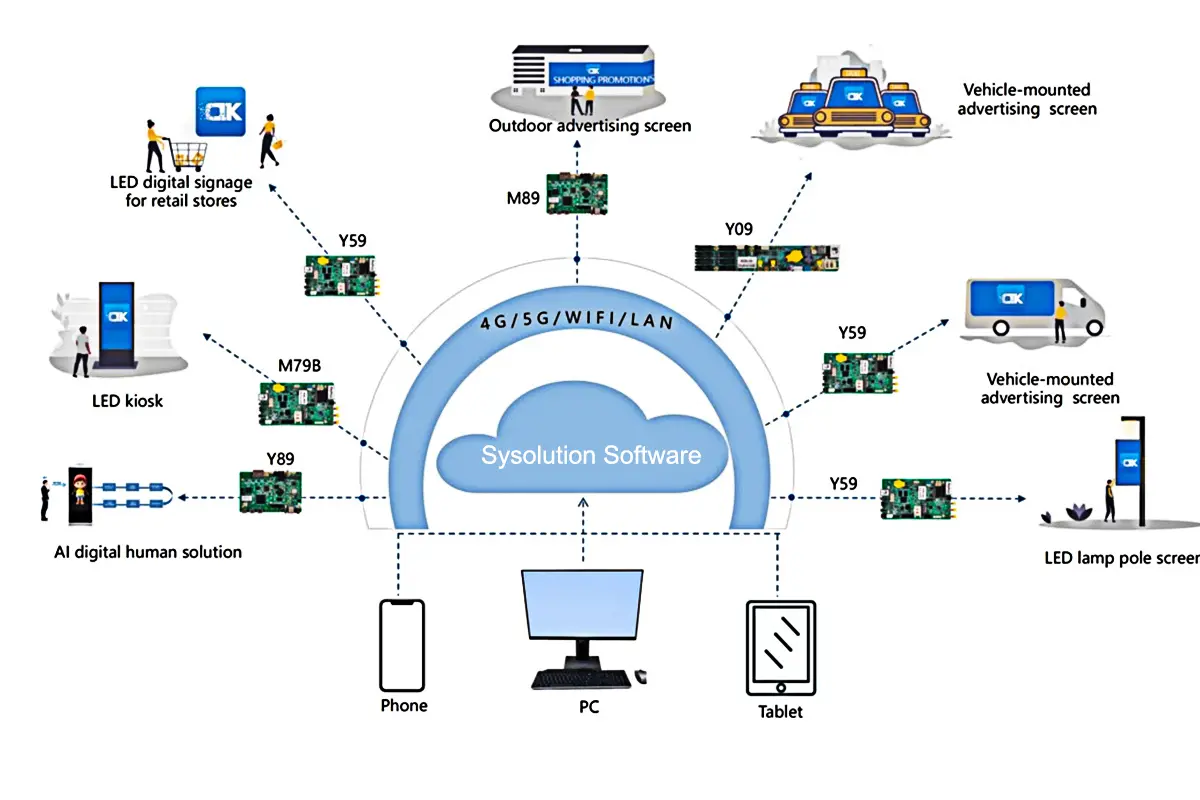
Current Windows release: LEDOK Express 2.0.10 requires xixunplayer 2.0.6 or later. LEDSET 4.0 and LEDSET 2.3 support different controller generations. Sysolution’s firmware catalogue also lists XixunPlayer 2.2.60 and Conn updates dated 9 October 2026.
Library checked: 10 October 2026. Sources checked: Sysolution’s software, documentation, SDK and firmware catalogues. Downloads are hosted by LED Screen Board. Package dates below are the dates shown in the brand’s catalogue, not a guarantee of compatibility.
Sysolution / Xixun software download
LEDOK Express is used to prepare and publish display content on compatible player-based controllers. LEDSET is used with the controller generations listed below. Desktop software, mobile apps and controller firmware are separate downloads.
| Application | Platform / requirement | Controller guidance |
|---|---|---|
| LEDOK Express 2.0.10 | Windows; xixunplayer 2.0.6+ | Confirm the installed player version before upgrading. |
| LEDOK Express for Mac | macOS; source lists no build number | Check the included instructions for your controller. |
| LEDSET 4.0 | Windows | Y19, Y12, Y50, Y59, M69, M79, M89 |
| LEDSET 2.3 | Windows | Y03, Y08, Y09 |
| LEDOK Lite | Android / iOS; app version not stated in catalogue | Listed for Y08, Y12, Y50, M50, M60, M70, M80, L30, L16 and L15; consult the app manual. |
| ILED | Mobile app | KD15 and KD16; verify the app publisher and model manual. |
| Resource / model | File | Download |
|---|---|---|
| LEDSET 4.0 | EXE · 109.7 MB | ZIP part 1 of 2 · ZIP part 2 of 2 |
| LEDSET2.3[Windows version] | EXE · 27.9 MB | Download ZIP |
| LEDOK Express[Mac version] | DMG · 302.0 MB | ZIP part 1 of 5 · ZIP part 2 of 5 · ZIP part 3 of 5 · ZIP part 4 of 5 · ZIP part 5 of 5 |
| LedOK Express V2.0.10 [Windows version] | EXE · 342.2 MB | ZIP part 1 of 5 · ZIP part 2 of 5 · ZIP part 3 of 5 · ZIP part 4 of 5 · ZIP part 5 of 5 |
How to use the numbered ZIP parts
For a multi-part download, get all numbered ZIP files for that application and extract them into the same empty folder. Windows: run rebuild.cmd. macOS: run sh rebuild-mac.sh from that folder. The helpers only reconstruct the original file. Verify its SHA-256 below before opening the installer. Each standalone ZIP must be extracted; joining the ZIP files directly will not rebuild the installer.
Legacy software — use only with the matching older controller
Express 1.4.1 is listed for the xixunplayer 1099 series; Express 1.2.9 for Y30/Y60 with Display 5.1.7.6. LedEditor V10 is listed for older M20/M31/K10/K16 cards; Easyboard V192 for older Y10/Y30 cards. These are legacy resources, not the current default.
| Resource / model | File | Download |
|---|---|---|
| LededitorV10 | ZIP · 74.7 MB | Download ZIP |
| EasyboardV192 | ZIP · 46.9 MB | Download ZIP |
Sysolution firmware and device update downloads
Firmware and device apps run on the controller; they are different from LEDOK Express or LEDSET installed on your computer. Sysolution groups these packages in its firmware-download catalogue. The library includes player, connectivity, system and display updates.
Before upgrading: record the exact controller model, board revision, current player/system version and processor family; back up the display configuration; confirm the package and upgrade method with your supplier. Do not treat a higher version number or newer date as proof that a package works with your hardware. Keep power stable during the approved upgrade procedure.
| Official package name | Catalogue date | Download |
|---|---|---|
| Conn_v11.1.4.7[296]-release-Phone-D_3568 | 2026-10-09 | Download ZIP |
| Conn_v11.1.4.7[296]-release-Phone-D_3576 | 2026-10-09 | Download ZIP |
| Conn_v11.1.4.9[299]-release-wss-config | 2026-10-09 | Download ZIP |
| XixunPlayer_v2.2.60[260]-release | 2026-10-09 | Download ZIP |
| SystemCore_v5.2.7.1-9-PX30[515]-release-all | 2023-12-05 | Download ZIP |
| display2.0_v_2.5-ralease-Y50 | 2023-02-22 | Download ZIP |
Conn variants such as D_3568, D_3576 and wss-config are separate packages. The catalogue does not state an exact controller-model compatibility list for these entries. The older SystemCore and Display entries remain available for the matching hardware; they are not universal upgrades. Some firmware ZIP files are password-protected: obtain the package password and approved upgrade procedure from your supplier. Firmware files mirrored here were checked against the catalogue’s MD5 values; SHA-256 values are provided below.
Software user manuals and cloud setup guides
Download the guide for your chosen application before configuring screen parameters, publishing content or binding a cloud account.
| Resource / model | File | Download |
|---|---|---|
| AIPS2.0 Instructions | PDF · 7.9 MB | Download PDF |
| Quick Guide Of Set 4G and Bind to Vehicle HUB Platform | PDF · 0.8 MB | Download PDF |
| LEDOK Express Instructions | PDF · 4.5 MB | Download PDF |
| LEDSET4.0 software Instructions | PDF · 6.5 MB | Download PDF |
| LEDOK Lite APP Instructions | PDF · 2.0 MB | Download PDF |
| LEDSET2.3 Software User Instructions | PDF · 5.6 MB | Download PDF |
| AIPS2.0 Publishing Platform Account Registration Steps.pdf | PDF · 0.2 MB | Download PDF |
| AIPS2.0 publishing platform account binding and network access configuration.pdf | PDF · 0.4 MB | Download PDF |
| Vehicle Hub platform Simple operation instruction-V1.0.pdf | PDF · 2.2 MB | Download PDF |
Controller specifications and hardware user manuals
Match the full model name on the hardware label. Models with similar names can have different interfaces and capacities; use the individual datasheet rather than applying another model’s specifications.
Y-series controllers
| Resource / model | File | Download |
|---|---|---|
| Y08 Datasheet | PDF · 2.4 MB | Download PDF |
| Y12 Datasheet | PDF · 2.9 MB | Download PDF |
| Y12 User Manual | PDF · 4.3 MB | Download PDF |
| Y50 Datasheet | PDF · 1.1 MB | Download PDF |
| Y50 User Manual | PDF · 3.7 MB | Download PDF |
| Y80 Datasheet | PDF · 3.5 MB | Download PDF |
| Y35 Datasheet | PDF · 1.6 MB | Download PDF |
| Y40 Datasheet | PDF · 2.9 MB | Download PDF |
| Y70 Datasheet | PDF · 2.2 MB | Download PDF |
| Y60C Datasheet | PDF · 2.5 MB | Download PDF |
| Y70 User Manual | PDF · 4.4 MB | Download PDF |
M-series media players
| Resource / model | File | Download |
|---|---|---|
| M50 Datasheet | PDF · 2.7 MB | Download PDF |
| M70 Datasheet | PDF · 2.2 MB | Download PDF |
| Sysolution Media Player User Manual | PDF · 4.5 MB | Download PDF |
| M80 Datasheet | PDF · 1.5 MB | Download PDF |
KD-series controllers
| Resource / model | File | Download |
|---|---|---|
| KD15 Datasheet | PDF · 1.8 MB | Download PDF |
| KD16 Datasheet | PDF · 1.9 MB | Download PDF |
G-series controllers
| Resource / model | File | Download |
|---|---|---|
| G series Datasheet | PDF · 1.6 MB | Download PDF |
| G-series User Manual | PDF · 3.0 MB | Download PDF |
D-series receiving cards
| Resource / model | File | Download |
|---|---|---|
| D60-12A Datasheet | PDF · 0.7 MB | Download PDF |
| D60-320 Datasheet | PDF · 1.4 MB | Download PDF |
| D60-16 Datasheet | PDF · 1.9 MB | Download PDF |
| D60-A8S Datasheet | PDF · 0.8 MB | Download PDF |
| D60-8 Datasheet | PDF · 1.7 MB | Download PDF |
| D60-B6S Datasheet | PDF · 1.0 MB | Download PDF |
| D70-8 Datasheet | PDF · 0.6 MB | Download PDF |
| D70-320 Datasheet | PDF · 0.7 MB | Download PDF |
| D70-B8S Datasheet | PDF · 0.7 MB | Download PDF |
| D90-A4S Datasheet | PDF · 0.9 MB | Download PDF |
| D90-8 Datasheet | PDF · 0.4 MB | Download PDF |
| D60-75 Datasheet | PDF · 0.7 MB | Download PDF |
S-series synchronous controllers and processors
| Resource / model | File | Download |
|---|---|---|
| ST40 Datasheet | PDF · 1.5 MB | Download PDF |
| S20PRO Datasheet | PDF · 1.1 MB | Download PDF |
| Synchronous card User Manual | PDF · 1.9 MB | Download PDF |
| S30 Datasheet | PDF · 0.5 MB | Download PDF |
| S40 Datasheet | PDF · 0.6 MB | Download PDF |
| S45S Datasheet | PDF · 1.2 MB | Download PDF |
| S30,S40 User Manual | PDF · 4.8 MB | Download PDF |
| S50s Datasheet | PDF · 0.6 MB | Download PDF |
| S52 Datasheet | PDF · 0.6 MB | Download PDF |
| S60E Datasheet | PDF · 0.5 MB | Download PDF |
| S70s Datasheet | PDF · 0.6 MB | Download PDF |
| S45S S50S S52 S60E User Manual | PDF · 7.5 MB | Download PDF |
| S120 Datasheet | PDF · 0.6 MB | Download PDF |
| S200 Datasheet | PDF · 0.6 MB | Download PDF |
| S70S user manual | PDF · 7.3 MB | Download PDF |
L-series LCD players
| Resource / model | File | Download |
|---|---|---|
| L50/L50B Datasheet | PDF · 1.5 MB | Download PDF |
| L16B Datasheet | PDF · 1.3 MB | Download PDF |
| L16B User Manual | PDF · 2.3 MB | Download PDF |
| L30B Datasheet | PDF · 4.0 MB | Download PDF |
| L13Y Datasheet | PDF · 0.8 MB | Download PDF |
| L13Y User Manual | PDF · 3.9 MB | Download PDF |
Accessories and sensors
| Resource / model | File | Download |
|---|---|---|
| RL2 Datasheet | PDF · 0.8 MB | Download PDF |
| RL3 Datasheet | PDF · 0.6 MB | Download PDF |
| RL3B Datasheet | PDF · 0.6 MB | Download PDF |
| RLB1 Datasheet | PDF · 1.0 MB | Download PDF |
| RS5A Datasheet | PDF · 0.5 MB | Download PDF |
| RT1 Datasheet | PDF · 0.3 MB | Download PDF |
| RH1 Datasheet | PDF · 0.2 MB | Download PDF |
| RTH2 Datasheet | PDF · 0.9 MB | Download PDF |
| R66 Datasheet | PDF · 1.1 MB | Download PDF |
| R68 Datasheet | PDF · 1.2 MB | Download PDF |
| R69 Datasheet | PDF · 0.6 MB | Download PDF |
| R56S Datasheet | PDF · 0.4 MB | Download PDF |
| RM1275 Datasheet | PDF · 1.1 MB | Download PDF |
| RC200 Datasheet | PDF · 0.8 MB | Download PDF |
| RC300 Datasheet | PDF · 1.0 MB | Download PDF |
| RP0 Datasheet | PDF · 0.2 MB | Download PDF |
| RP1 Datasheet | PDF · 0.8 MB | Download PDF |
| RP2 Datasheet | PDF · 0.3 MB | Download PDF |
| RP3 Datasheet | PDF · 0.2 MB | Download PDF |
| R70 Datasheet | PDF · 0.6 MB | Download PDF |
| Resource / model | File | Download |
|---|---|---|
| N20 Datasheet | PDF · 0.8 MB | Download PDF |
| DJ10 Datasheet | PDF · 3.1 MB | Download PDF |
Drivers, SDK and application resources
Choose x86 or x64 drivers to match your Windows installation. Development resources are intended for integrators; check the SDK documentation and hardware support before deploying custom software.
| Resource / model | File | Download |
|---|---|---|
| Sysolution Android SDK source | ZIP · 38.6 MB | Download ZIP |
| Visual C runtime x86 | EXE · 13.1 MB | Download ZIP |
| USB driver x64 | EXE · 0.1 MB | Download ZIP |
| USB driver x86 | EXE · 0.1 MB | Download ZIP |
2026 product catalogue and application solutions
| Resource / model | File | Download |
|---|---|---|
| Sysolution 2026 product catalogue | PDF · 8.4 MB | Download PDF |
| Smart LED taxi top sign Solution | PDF · 3.2 MB | Download PDF |
| Smart LED Lamp Post Sign Solution | PDF · 9.9 MB | Download PDF |
| Indoor Commercial Mirror Display Solution | PDF · 0.9 MB | Download PDF |
| LEDOK IoT Cloud Solution | PDF · 5.3 MB | Download PDF |
LEDOK setup tutorials
Use these videos alongside the matching software manual; interfaces may differ between releases.
- Watch the LEDOK Lite access-point setup tutorial on YouTube
- Watch the LEDOK Lite installation tutorial on YouTube
Sysolution download FAQ
What is the latest LEDOK Express version listed here?
Sysolution’s software download page lists LEDOK Express 2.0.10 for Windows. It requires xixunplayer 2.0.6 or later on the controller. The Mac package is listed separately without a version number on the source page. This library was checked on 10 October 2026.
Which Sysolution software should I use?
Choose by controller model and its installed player version. LEDSET 4.0 is listed for Y19, Y12, Y50, Y59, M69, M79 and M89. LEDSET 2.3 is listed for Y03, Y08 and Y09. LEDOK Express is the publishing application for supported player-based controllers. Check the relevant manual before using a different software generation.
Is Xixun software the same download family as Sysolution?
Sysolution’s download resources use Xixun names, including xixunplayer and legacy Xixun controllers. This page brings those software and device-update resources together; the file names and controller requirements still determine which package to use.
Can I install every firmware package on every controller?
No. XixunPlayer, Conn, CardSystem, SystemCore, Display and vehicle-player packages update different components. The newest release date does not establish compatibility with your board. Confirm the hardware revision, processor family, installed component and upgrade procedure before applying a package.
How do I download and rebuild a large installer?
Download every numbered ZIP part for the chosen installer. Extract all parts into one empty folder. On Windows, run the included rebuild.cmd; on macOS, open Terminal in that folder and run sh rebuild-mac.sh. These helpers combine the parts without installing the application. Compare the reconstructed file’s SHA-256 with the checksum list, then follow its installation guide.
Where is LEDOK Lite for Android or iPhone?
Use the LEDOK Lite manual below to identify the correct app and supported controller. Search for LEDOK Lite in your device’s app store and verify the publisher. The official download catalogue does not state a current app version, so this page does not present an old APK version as the latest release.
What should I do if a screen is not detected?
Confirm the correct application for the controller, power and network connection, then follow the relevant software manual. Where a USB connection is used, select the driver for your computer’s architecture. Record the controller model and installed software versions before asking for support.
File verification: SHA-256 checksums
These values refer to the original downloaded files, including reconstructed installers. On Windows use PowerShell Get-FileHash -Algorithm SHA256 "filename"; on macOS use shasum -a 256 "filename". A matching checksum confirms the file’s bytes; it does not establish hardware compatibility.
- Latest LEDset4.0:
6e47b4f2b53c6b72182a1f140aa016097194aaa1140439acb46080a6b9a7e9af - LEDSET2.3[Windows version]:
d4a8f0905d1c292c1a1aa968a1d30f2e7c6cc8a3056cee8b2a56d91b37c45bab - LededitorV10:
7bb5b49412d65bf6de6de47127fe74a5aeafdf2d0a28037e4acea07acc7b69e6 - EasyboardV192:
528ee391b422b23a0770f1c88f0f437564e4b60c34cd35e5bcddcbb62391d4b1 - AIPS2.0 Instructions:
556a43181b895a686b83686a40045867a169eb961da6b5eacd963cb51e9452f9 - Quick Guide Of Set 4G and Bind to Vehicle HUB Platform:
3479f65f5ef63302e9002f0194b5591cf9a6729b5d5c1f910b1a13621704a600 - LEDOK Express Instructions:
5c161a0659ee8d37ad5be62ad135f8559d30da75438c451d949574f46412aacf - LEDSET4.0 software Instructions:
aee0b348be7e730cda7b4905eb52400769eba1593e6fda95973b0b82d83e6a32 - LEDOK Lite APP Instrictions:
622a4662d64557638e7cdf10b228327efd0ed8a5fabf13257b8f613eef23c750 - LEDSET2.3 Software User Instructions:
163bbdf34a17f17622392c6a3619b415d00d6df6a699ae69916c3c0eaecd1388 - LEDOK Express[Mac version]:
b29bb0b72bf06315c9035383acfb4474da7b3cf99cd246d063ea6b8a544aeed8 - product catalog download:
07128c6197b1c71345624866457224e672a5ffafcb4f829737f9cda8785820d2 - Y08 Datasheet:
042bc43b4aa620954802ec8a6ac7a5b5fa97add5fcc981703c498f4f16929182 - Y12 Datasheet:
e55736812fe78607312cfdda4e41dca662d0c465b9a95f44472d6cc8fad5c5c8 - Y12 User Manual:
1ac304063c8c2732e54aaf9333f3bbad015cb263fb04adcc09e6ae16d54d1732 - Y50 Datasheet:
d1297dd4f9ee034a5cc4b2e48115ddcb4b410ef9cbf1219f0f9a5981d9df7800 - Y50 User Manual:
d22505ba45693fe5e6f461ca7a0d261d9882117f1e63347562ad14a862b7aa9b - Y80 Datasheet:
ea8d01f9ec25a8e6a04f0ac972d6a3bbefec3130b8e5a603ad3330d62c1e623b - Y35 Datasheet:
a0f7b620ad17fa06d915927a0de74a4cc0b688c72bf213f36563ada96319beaf - Y40 Datasheet:
c00145170bbcee330f0de3f8572f1a47c1510ad69c50685a7eaf0e8953c7d549 - Y70 Datasheet:
3f525d3f61fd049309e046b894bc798e76879069ad6f72cf639246492e8394e2 - Y60C Datasheet:
a066759fcb18b137fb6888b0546baf4ea42b3f81318c478272e41c3457464a53 - M50 Datasheet:
f2da89f2be93b56aad7114ce281750f527bbe56497d24d23b677e4177724cda8 - Y70 User Manual:
98c79a3afc00b212f34865ac391aa5147bc41843df27ef37f496bdcc1650f588 - LedOK Express V2.0.10 [Windows version]:
ef17c01e1523534028f6ee423f1621e3261d1d0f085b1a2eca35ffdf8d93da61 - M70 Datasheet:
18245d46de906bd2789147ac2907ce01ef4d5c0e141c30a1bb2e038bc117ef26 - Sysolution Media Player User Manual:
f7c71c622ccdce7ace5039eb95a8b0ac056a4e5d7372df5d15c66c91eb2ce443 - M80 Datasheet:
005eadc54e7cfd770ae52504b9ec5794a716d282303e95a87dda77f541d2a980 - KD15 Datasheet:
1af567a9f7be984aa2e200ab7b8ee1b0591752747e76cc67bf9a5e3c15c7653e - KD16 Datasheet:
e4c8c52207bf97f43c9b193cb4c1e4d91ec0943dd22395d4c27cd86e82a3efd0 - G series Datasheet:
e5647b7c5363ba5485efbaec74429affc12d89e689997fefbbd95538472ac0b6 - D60-12A Datasheet:
a5437da0b00c61ae17ed3330eab912a81c32dfa2abdf3a0e11c3e50d82842c75 - G-series User Manual:
0a53472fc8e9e9be96a3aca8a6d0c20183970d093102dc38091ebcf52efb6de0 - D60-320 Datasheet:
0f0ad90035a9f084a2d28b1b18c22ed2292ad4d28429a11126b8c8bce0c0b4d9 - D60-16 Datasheet:
b2ee6c81bd99bfd1b9a6d504c6b041cd91915d6050f2085623fba9ed040418be - D60-A8S Datasheet:
47fee44832ff317b7e414bcb3b16246405cf5ffa85bdc76e3de32ab54a275947 - D60-8 Datasheet:
caf7f13a894c19da94c0f1fb4e580e954eeae7fc766ea49d0bf184278e1c1ad8 - D60-B6S Datasheet:
bceeb0340ee3ad364afb388df38bc54fe3e0a54412e3137636bdef28c7b490fb - D70-8 Datasheet:
feadceae4baabfdef62ad3da119dc5e26301a66bcd1a09bbf8aa99937d8a325b - D70-320 Datasheet:
4974d0f5ff0f33b7a7816b94813b747436dbe1ae6c5a889a30bcb1accb0a01f3 - D70-B8S Datasheet:
fccfd3059b2bfbe1186613053408f1bfe62fb8a26437d42f34c22d733012fd90 - D90-A4S Datasheet:
91c538e52c8aa9c20efadc4470d6fafbfadf22b0583251c7d7564ab2b210f708 - D90-8 Datasheet:
3fad6280e0d498caf1acec1b49c0eb1ff4a81c4a774eeb248c7ffb6472bd5acc - D60-75 Datasheet:
f7eec9bb5d4411147906f5052ea2302ea15c68dbd9dcb5d2f56d8cbf081dea4f - ST40 Datasheet:
00557ed232a91152843e55d4ad3321cdcef3ef729d0014142a93f52d8d8d5d7c - S20PRO Datasheet:
8e3ea7dfe509a65e3e99715086974ff6fa80ae384f018be661a9802a2dcd1792 - Synchronous card User Manual:
fbcd9d58724cf44449f6da16caee5ee2cda49bc663151be9389ee90b43e676a4 - S30 Datasheet:
5d9861e844f4885bf6797d55cb56ddc1e069a276458100322172389a56a69640 - S40 Datasheet:
92b8b1a880a3bba7f6753dea015284d37970a5afb774ba75e9e582fb1b7cf6b6 - S45S Datasheet:
203c85cc98eb7841a158609ea3372cde22f15afd783319b02cb095f59930bab9 - S30,S40 User Manua:
8e2a7e7fa9b4bcbfcb77e608258eab5a8af377702370d314236b473946df2c1d - S50s Datasheet:
dabfed4bba66c7d97fb1ff84780e49df3c831b3d5cdce59dc95f224b4299fab7 - S52 Datasheet:
fe9082ca588eaf455cb90aa0fa1eeba5cf0760143e3df617e0e63b5be33d188a - S60E Datasheet:
bb720fc1c1920e0061f3e2172d8bf47cc4b6c400f981a3d33e493f977e3dd0d5 - S70s Datasheet:
1691aadb147425460cdc876741f8a1e127184b112e8abd2547c122ea8bd6854c - S45S S50S S52 S60E User Manual:
f83ebcfc0f9542fd58a5d774900e49f4917c9da6d6aea93c514e57a9908ca56c - S120 Datasheet:
36eb3bd6b674a6aa1506f44dcd8fb8b2f925b111216dd5409467e6330a66f866 - S200 Datasheet:
c97f7fe5ea4d3ffd63a10eadd6099006115d5e5b113ed0e36adc513447bb7141 - L50/L50B Datasheet:
00af94ccaebc9f487bf56e8c9701cf612983f857d89ab71cb265573bbe6dfa16 - S70S user manual:
bd8c7782ab8ca36f97ff136b37688a3ee0bcd2699f99e3ead1816104614d0e2c - L16B Datasheet:
c9376c6e240ff9761369ff322858e3f3edffc8d476bc7fd2358a0a75e348f07c - L16B User Manual:
61c5acc0124bba1a245b30f371b5f0cc6393bcef862a15d12b8bc02a0798f45d - L30B Datasheet:
99438e29a976b279aa993ca6b46255ff5968d1c6e6d01502f277b1503ed89a32 - L13Y Datasheet:
9115c5c02ee2f447aed2770e7b2aa82334accb9bab8ec836c4b4d322e20aa5e8 - RL2 Datasheet:
00e07e6c1e9a74830cd2109dbd6db0cee1fc426f366c29ab9d97aa3b2ee1acf8 - RL3 Datasheet:
e4c362fb59daf757ca53c11e5905d1d68f901c4de79f383b9837719421f294c1 - L13Y User Manual:
3382788393d11bcc6ad7c8bcc7e286a979655d5c15b502d6cc6ee3a2f9d74ca0 - RL3B Datasheet:
0be7ff766228502a9597a87f476ddcd845f6c854b0caa384d1b55354e57c807a - RLB1 Datasheet:
4211235f1ed59a96782e2285c0c2c2f525f17a6276a1cebb496956fb92cc8b23 - RS5A Datasheet:
ef33632ae7773d4f258d5d7e053ced3b0aa726326128ff3a3ae8398f3275ec32 - RT1 Datasheet:
2ed3c6557ba14bb32a996d0bbf191d7cd5c675708b0c2367b55726766182ebc2 - RH1 Datasheet:
499bfc63b1aeb80e2a6d9abe4bb4fea7d140509481a8a585bcb755ea3ea7f219 - RTH2 Datasheet:
d48d145d6fd502b180a2e8652b0f42db202587c3cb7f3e5af30beab9379c0b56 - R66 Datasheet:
d5e6e69840986f81c3dba07cd18d7430d8a7257ae2b73deb61300158d8be9b93 - R68 Datasheet:
aca48869989362a7fa8b0f4e5ffc6a5a86b999d8df67a1bc914dc39b761cfb50 - R69 Datasheet:
cb8c1d6b96e2643e49119ad6a8dd7129865cb88ddf2c5dd3209c718a57a1e960 - R56S Datasheet:
a9849e27edaff0f2e0baff4d9b28d05fe4ed14d3a458e3c5d163c3fe689c16c4 - RM1275 Datasheet:
99c097ed6c9e5bcfbf55a2f8935602756e96fd581af5b189cf24a81ebee61691 - RC200 Datasheet:
c7509e994856723a90b9689928babe5c248a85806bb27032de34d55c1e249638 - RC300 Datasheet:
0aebce7d1e8ba0d26f12cd4e81870d48a8e3901fb4cf04addc2af3afa2b5108c - RP0 Datasheet:
8b8832e0e6e082eaa725f1a2f0444a77799666c189c2343cd3ee0e5574add01d - RP1 Datasheet:
303ff52840da273ac6abe71ab04ba1c75533d4e5058bc6b15fc1e4cee47efb61 - RP2 Datasheet:
acb85197e4ded0e19c283b1ec314373baebc184b16c1ebe16b21d9b24c9d0d96 - RP3 Datahseet:
a4c4ee82013934cf2641f61010aef480212773f333eef3e97d5b2e1408abad09 - R70 Datasheet:
647a9a1936b1c88ddfe0199c91eaa0940ac05ad1fdb755e8732c1a6b5218db20 - N20 Datahseet:
59df58d31675d9a5b39b7a795eca9c49eca588d6b62a4929209f6fed23b01cf2 - DJ10 Datasheet:
d1d9dcc686866e64bdffde2157fcc35d4794681ad2c5e0ca1279832070b24789 - Smart LED taxi top sign Solution:
305629c8e7cee21d505cce5f61428995e0bf0952cca5bac9a57ad081b5017b6e - Smart LED Lamp Post Sign Solution:
aa5240a7b19c72ebe022f4dd0843b9c75ed8c93c0e27ff5b3f33f1e99cabbda7 - Indoor Commercial Mirror Display Solution:
72a06b7d065030f4518c51d6b7477357136f738f0a5299ab022180b990987e4e - LEDOK IoT Cloud Solution.pptx:
67cdc21d5baa538ed574f8da1b1154b6a296929592681fcd04a2e1cfa4e8c3bb - AIPS2.0 Publishing Platform Account Registration Steps.pdf:
da9ce69f64ef89e8531fbf34fb10099ef4c9f57a59f6ca81febeb2fc6f1e70e3 - AIPS2.0 publishing platform account binding and network access configuration.pdf:
55e7f5c62f0287587a7e97e52a4e2779ae3c69fb244551953df71f53a9d4b932 - Vehicle Hub platform Simple operation instruction-V1.0.pdf:
53c251542fa320127703f053e45be94bdf415dcbc70f3915a9364c2f4d35a469 - Sysolution Android SDK source:
8254c8ea9c20aead1afca218ce3729539dadaa1e435a45483e27ef0b966e1c03 - Visual C runtime x86:
2acbfe92157c1cf1a7b524a9325824046d83dbfa3feb1cbd4dd02a42e020f77c - USB driver x64:
3501fc1ba3f090c0c08d4ac084293f089385770d83ca23af545ca4e783eb9ed6 - USB driver x86:
a1baa2da7e080ec4c14bb9e9dd612885d7da1e371f5ce7342318c049631e20be - Conn_v11.1.4.7[296]-release-Phone-D_3576:
7c4393c9cb7d2688c7995228d03978fd9ff6aa58c12808c45f9b69969d60dfcd - Conn_v11.1.4.9[299]-release-wss-config:
c4ceb2f4aa0cd5302adcfbfd4aa2f6ae80f0fc9799de4b5df80f70b13cb142b2 - Conn_v11.1.4.7[296]-release-Phone-D_3568:
63ae9b7b382cbb19520d8e67c11528724d2bda680e71e6fde16f56a5ae886fe8 - XixunPlayer_v2.2.60[260]-release:
ac7379a1130fe5c4225f3d2bb74b9d377f146190a7007d1396a278e5b7eb29bb - SystemCore_v5.2.7.1-9-PX30[515]-release-all:
06bfb137cd060a550aeaa33ccd37e096a71b7cbf725bd8ab3633290a013e5203 - display2.0_v_2.5-ralease-Y50:
1243ab40e8209670b0651612a89de94fc0d4a6909d72255f1ca1c770276a5c58
Related LED screen software resources
Need another control-system brand? Browse our LED screen software download library. For package selection, share your controller model, hardware revision and installed versions with the EagerLED support team using the contact options on this site.
