Related Posts




As you know, managing these displays efficiently requires a reliable and versatile industrial controller. Enter the Novastar MBOX600 Pro, a groundbreaking solution that combines an industrial PC with advanced sending capabilities. With it, you no longer need an external computer or complex setups. This all-in-one controller simplifies your entire workflow, from daily operations to system maintenance, all accessible through a centralized web interface.
In this blog, we’ll explore what makes the MBOX600 Pro stand out, why it’s the ideal choice for your LED display needs, and how to set it up for optimal performance. Let’s dive in!
catalogue
- 1. Wat is die MBOX600 Pro Industriële Beheerder?
- 2. Waarom die MBOX600 Pro vir u LED-skerm kies?
- 3. Hoe werk die MBOX600 Pro Industriële Beheerder?
- 4.MBOX600 Pro Vereenvoudigde Installasie- en Gebruiksproses
- 5. Die toepassings novastar MBOX600 industriële beheerder
- Hoë betroubaarheid en redundansie rugsteuntoepassings
- 6. Gereelde vrae
- 7.gevolgtrekking
1. What is the MBOX600 Pro Industrial Controller?
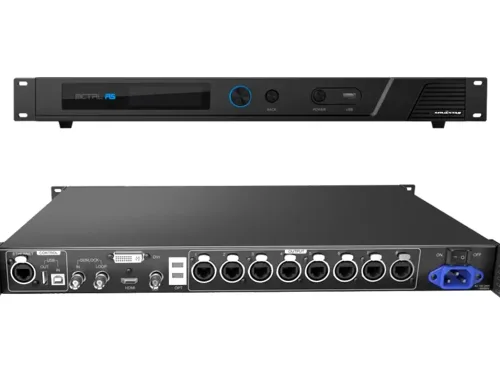
Novastar MBOX600 Pro is a fully integrated hardware solution that combines a full-featured industrial PC with a high-performance video sending card. This integration eliminates the need for an external computer in your LED display system.
The MBOX600 Pro is a “two-in-one” device:
- Industrial PC: It comes with an Intel processor, memory, and SSD, allowing it to run an operating system (Windows/Linux), offering the computing and processing power of a complete computer.
- LED Video Sender: It has professional video processing capabilities, converting input video signals into data and protocols that can be recognized by LED displays, and outputs them through a Gigabit Ethernet port.
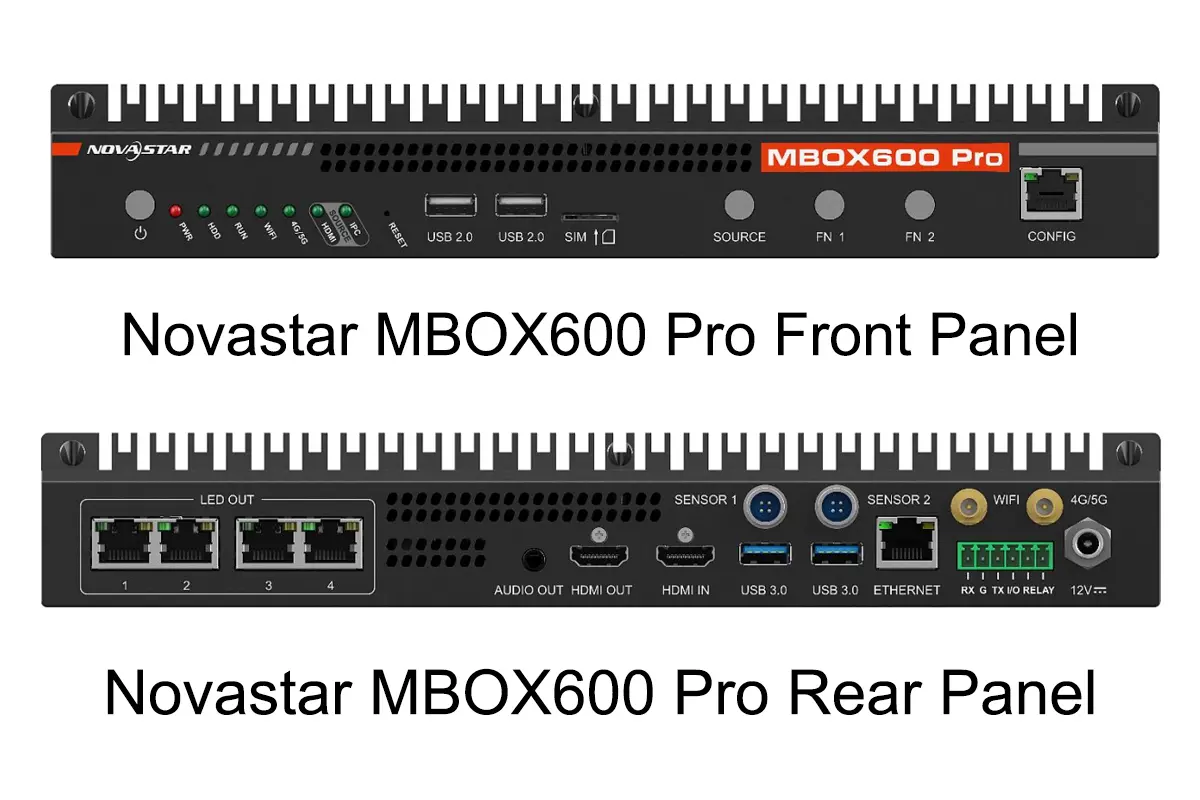
Key Features of the MBOX600 Pro industrial controller:
| Feature | Description |
|---|---|
| Pixel Capacity | Up to 2,600,000 pixels |
| Output Scaling | Width: 64 to 4096, Height: 64 to 1920 |
| Supported Resolutions | Common resolutions: 1366×768, 1920×1080, 2048×1152 |
| Audio Output | 1x Stereo audio output |
| Processor | Intel® Processor N97, 4 cores, 3.6 GHz max turbo frequency |
| RAM | 4 GB / 8 GB |
| Storage | SSD: 128 GB / 256 GB |
| Control Ports | 2x USB 2.0, 2x USB 3.0, 2x Gigabit Ethernet |
| Wi-Fi & 4G/5G Support | Supports Wi-Fi and optional 4G/5G modules |
2.Why Choose the MBOX600 Pro for Your LED Display?
When it comes to managing LED displays, the Novastar MBOX600 Pro offers several advantages that make it a standout choice among industrial controllers:
Superior Performance
Equipped with an Intel® Processor N97 and integrated graphics, the MBOX600 Pro delivers exceptional performance for demanding applications. Whether you’re running complex animations or displaying real-time data, this controller ensures smooth and lag-free operation.
Versatile Connectivity
The MBOX600 Pro industrial controller supports multiple connectivity options, including:
- Ethernet Ports: 4x Gigabit Ethernet outputs for pixel transmission and 2x Gigabit Ethernet ports for communication and remote management.
- USB Ports: 2x USB 2.0 and 2x USB 3.0 ports for peripherals like keyboards, mice, and external drives.
- Wireless Options: Built-in Wi-Fi and optional 4G/5G module support for flexible networking.
Advanced Monitoring and Control
With SNMP system integration, the MBOX600 Pro industrial controller provides professional-grade monitoring and management services. Users can configure alarm rules, brightness adjustments, and screen connections through its intuitive web interface.
Scalability and Innovation
Designed for diverse secondary development needs, the MBOX600 Pro supports both Linux and Windows operating systems. This flexibility allows users to customize the system according to their specific requirements.
| Feature | Benefit |
|---|---|
| High Pixel Capacity (2.6M) | Ensures sharp and detailed visuals on large LED displays. |
| SNMP Integration | Enables proactive system monitoring and issue resolution. |
| Customizable Settings | Supports tailored configurations for unique use cases. |
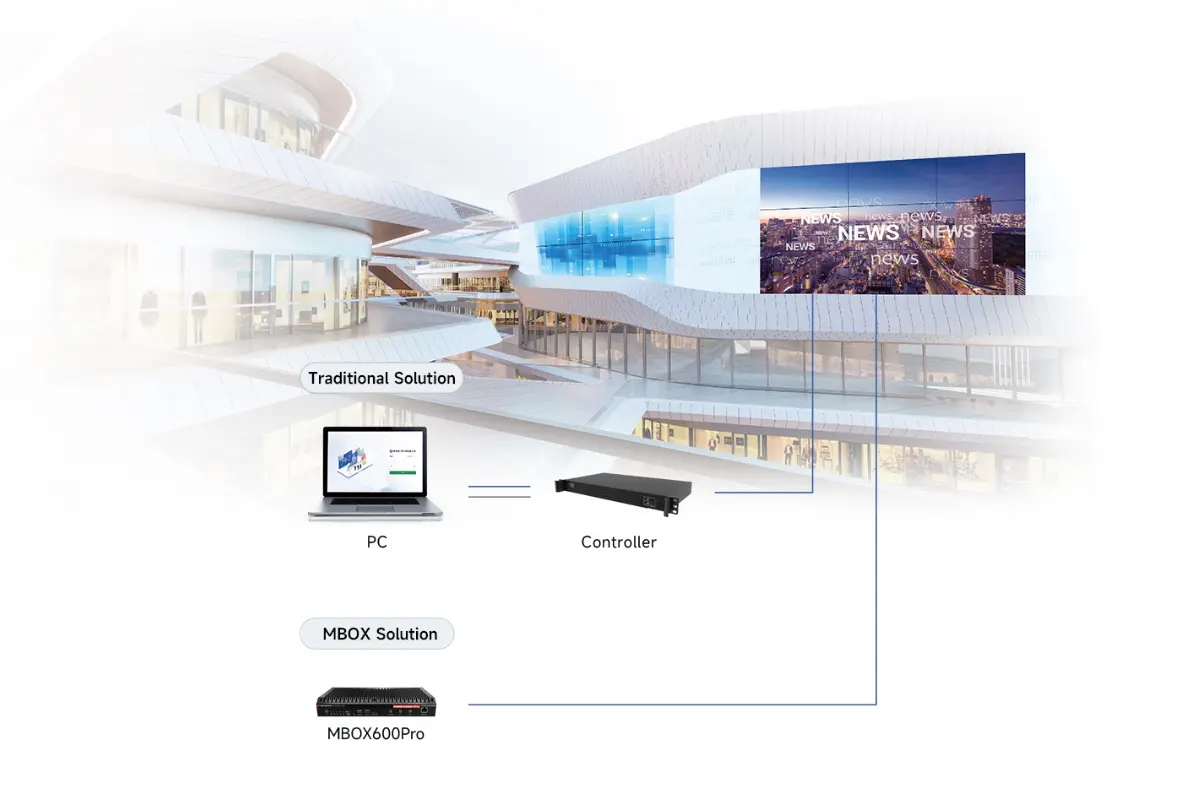
3.How Does the MBOX600 Pro Industrial Controller Work?
Signal Input
The controller obtains content from the following sources:
- Internal Source: Content such as images and videos stored on the device’s SSD, which can be played through the built-in playback software or services.
- HDMI Input: Connects to external devices like computers, players, set-top boxes, etc., to display their content in real time.
- Network Source: Receives content pushed over the network (wired, Wi-Fi, or 4G/5G).
Users can switch between signal sources via the SOURCE button on the front panel or through the Web interface.
Signal Processing and Mapping
This is the core processing stage of the industrial controller :
- Scaling: Regardless of the input signal resolution, the controller can scale it to match the physical pixel layout of the LED screen. Scaling can be automatic or manually customized.
- Image Processing: Includes color calibration, image enhancement, and other processing.
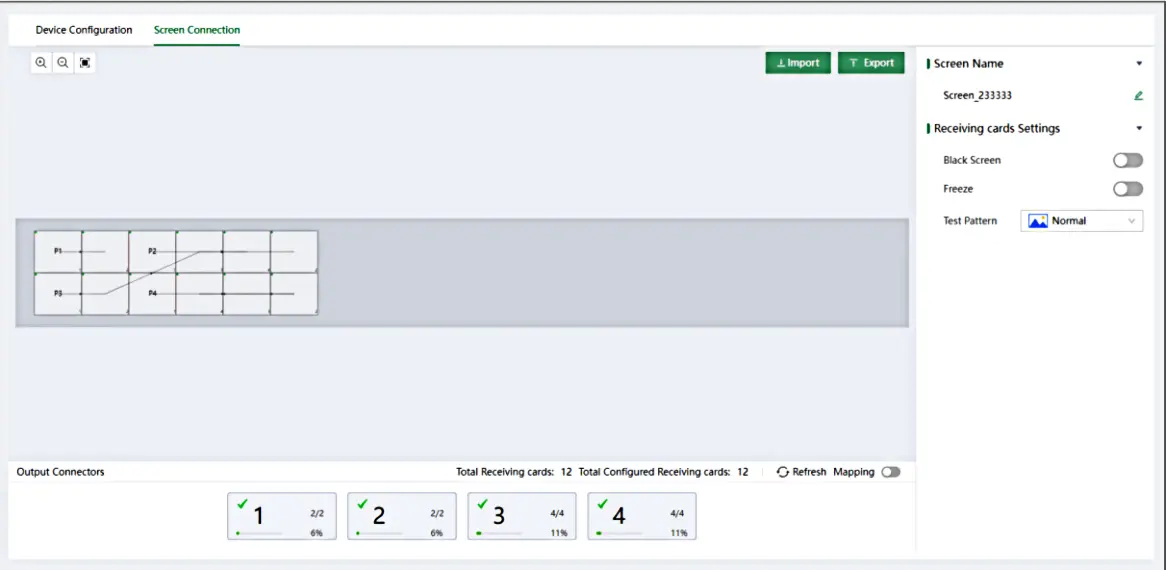
- Screen Configuration: In the Web interface (using the “Screen Connection” feature), users need to set up the virtual topology of the LED cabinets. This step informs the controller about the physical screen configuration — how many modules and cabinets make up the screen and how they are connected. The controller uses this “map” to accurately map the processed video signal to the corresponding physical pixels.
Signal Output
The processed data is output through the following methods:
- LED OUT: Via 4 Gigabit Ethernet ports, the signal is output to the receiving cards connected to the LED display, ultimately driving the LED modules to show the content. This is the primary display output method.
- HDMI OUT: Outputs a video signal to connect to a monitor, allowing real-time preview or debugging of the content.
- AUDIO OUT: Outputs synchronized audio.
4.MBOX600 Pro Simplified Installation and Usage Process
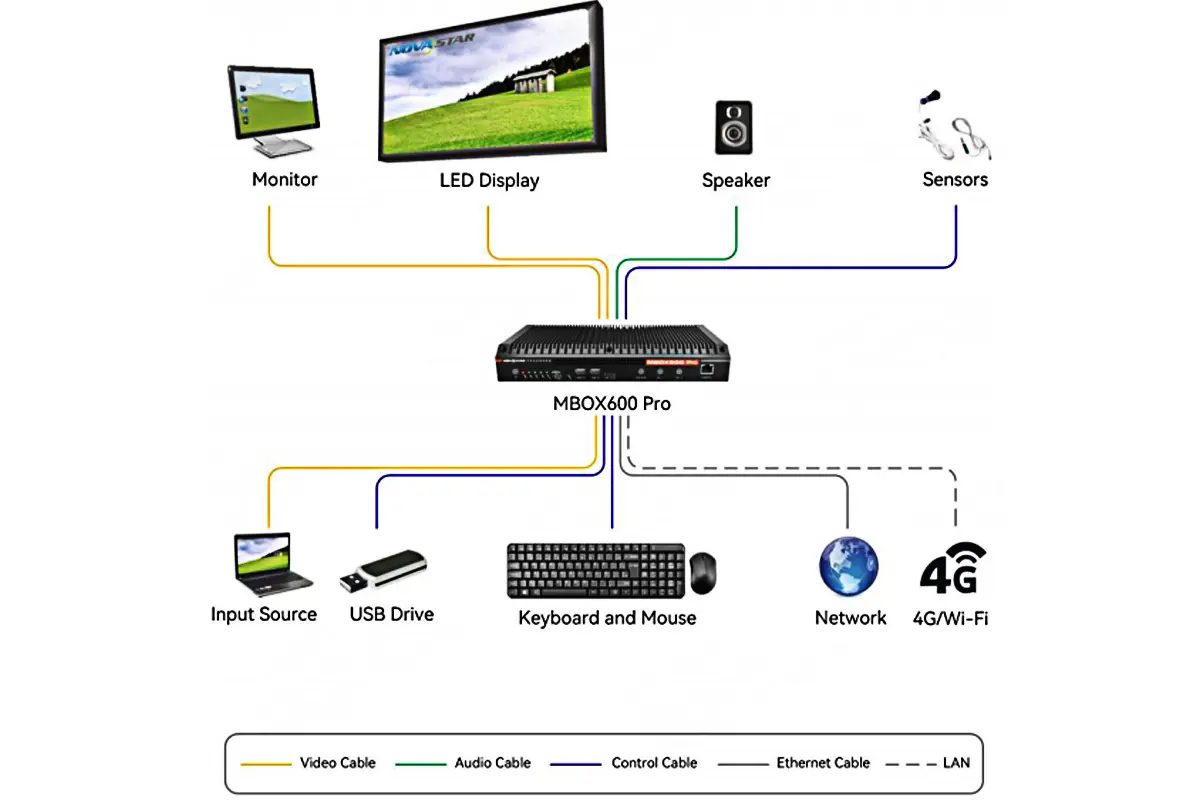
Hardware Connection
Power: Connect using the included 12V DC power adapter.
Display: Connect a monitor to the HDMI OUT port for initial setup and monitoring.
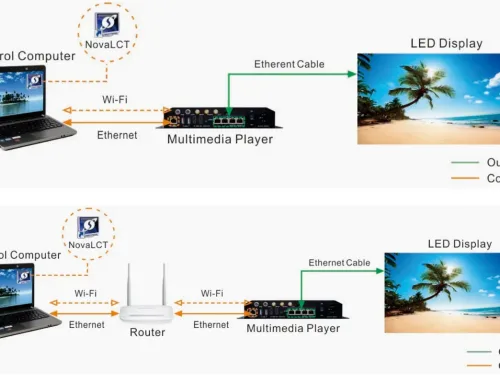
LED Screen: Use Ethernet cables to connect the LED display’s receiving cards to the LED OUT (Gigabit Ethernet) ports on the controller’s rear panel.
Network (Choose one):
- Wired: Connect the rear panel ETHERNET port to a router using an Ethernet cable.
- Wi-Fi/4G/5G: Install the antennas and configure the wireless network in the Web Interface.
- nput Devices: Connect a keyboard and mouse to the USB ports.
- Audio (Optional): Connect speakers to the AUDIO OUT port.
- Light Sensor (Optional): Connect to the SENSOR interface on the rear panel.
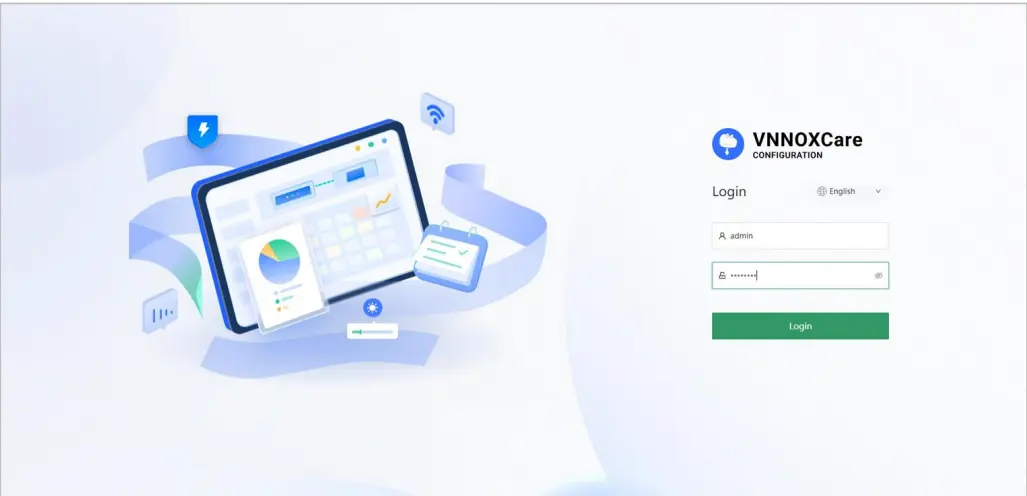
System Login
Open one of the following addresses in a computer browser:
- Local Login: 127.0.0.1 (Use when operating directly on the MBOX600 Pro connected to a monitor).
- Remote Login: 192.168.0.10 (Use from a computer connected to the same network via Ethernet cable).
- Default Username: admin
- Default Password: SN2008@+
Core Configuration Steps
Screen Configuration
Go to Screen Configuration > Screen Connection.
Drag and drop the corresponding cabinets onto the canvas and connect them according to the actual physical layout of the LED cabinets to establish the logical topology.
Signal Source Settings
Go to Screen Configuration > Device Configuration.
Select the input source: IPC Source (the controller itself) or HDMI Source (external HDMI input).
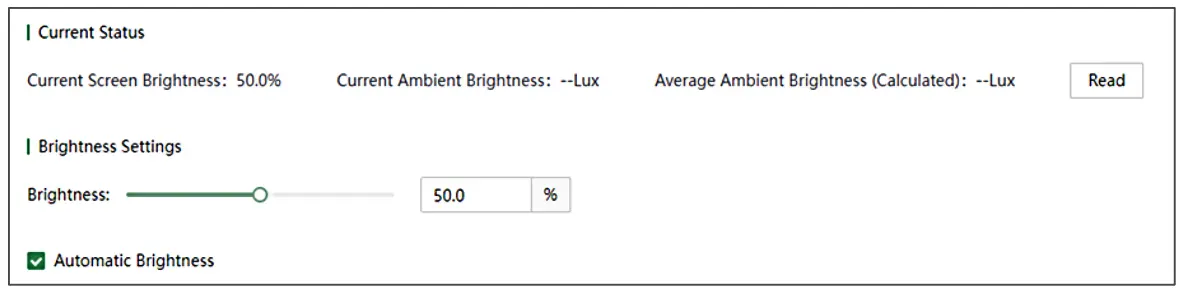
Brightness Control
Go to Brightness Control.
Manual: Adjust by directly dragging the slider.
Automatic: Enable “Automatic Brightness” and set brightness policies based on schedules or the ambient light sensor (requires connection).
Alarm and Monitoring
Go to Rule Configuration.
Set alarm thresholds for temperature and voltage.
Enable Monitoring Refresh Interval to ensure features like SNMP function correctly.
Daily Maintenance
Firmware Upgrade: Upload the update file in Maintenance > Device Maintenance.
Configuration Backup/Restore: Use the Toolbox in the top toolbar to import or export configuration files (in .mprj format).
5.The Applications novastar MBOX600 industrial controller
MBOX600 Pro is an industrial-grade LED display controller with core advantages including powerful processing capabilities, rich interfaces, remote management features, high reliability, and flexibility. As a result, it is particularly well-suited for outdoor or indoor fixed display applications that require remote control, unattended operation, high stability, and customization.
Professional Advertising Media Displays
The MBOX600 Pro industrial controller is specifically designed for “professional advertising media display users,” offering system monitoring and operational management services. It is commonly used in advertising screens and information displays in locations such as shopping malls, squares, stations, airports, and office buildings.
Unattended Outdoor Fixed Displays
This Novastar controller can be widely used in unattended scenarios, such as outdoor fixed screens. It is ideal for outdoor environments that do not allow for frequent manual intervention, such as:
- Billboards along highways
- Building facade displays
- Bus stop advertisement screens
Display Systems Requiring Remote Management and Monitoring
The MBOX600 Pro industrial controller supports SNMP protocol, remote Web management, 4G/5G, and Wi-Fi networking, enabling users to remotely manage the display screens:
- Content publishing
- Status monitoring (temperature, voltage, faults)
- Brightness adjustment (manual or automatic based on ambient light)
- Fault alarms and maintenance
High Reliability and Redundancy Backup Applications
The MBOX600 Pro industrial controller meets the diverse secondary development and innovation needs of users, supporting both Linux and Windows systems, and offering a wide range of I/O interfaces (USB, HDMI, sensors, relays, etc.). It is well-suited for system integrators to perform custom development, such as:
- Smart retail interactive display screens
- Industrial control visualization dashboards
- Multimedia exhibition hall control systems
6. FAQs
7.conclusion
Novastar MBOX600 Pro redefines what an industrial controller can achieve in LED display management. With its powerful hardware, extensive connectivity options, and user-friendly interface, it caters to a wide range of applications, from outdoor advertising to event management. By investing in the MBOX600 Pro, businesses can enjoy unparalleled performance, scalability, and reliability, ensuring their LED displays always shine brightly.
For more information, visit www.novastar.tech.