

In contrast to NovaStar LED software‘s positioning in the high-end market and professional applications, Colorlight LED software follows a cost-effective approach. Its software products are easy to use, feature-rich, and especially suitable for small to medium-sized projects and users with limited budgets.
Mainstream software offered by Colorlight, such as LEDVISION and LEDShow T9, not only support both synchronous and asynchronous playback modes but also feature real-time monitoring, brightness adjustment, and modular configuration. These functionalities meet the needs of various applications, including advertising screens, stage performances, exhibitions, and more.
1.Colorlight software free download
What is colorlight ledvision software and what can it do?
Colorlight LEDVISION is a professional software used to control and play content on LED displays.
Content Editing and Playback: It allows you to create and play various types of content, including videos, images, text, GIFs, Flash, PPTs, web pages, clocks, timers, weather forecasts, real-time data (from databases), external video signals (e.g., cameras, TV signals), and more.
Flexible Layout: The software supports multi-page, multi-window, and multi-layer editing, enabling different content to be displayed simultaneously on a single screen (for example, playing a video on one side, scrolling text on the other, and showing a clock in the corner).
Multiple Control Methods:
- Synchronous Control: When the computer is powered on and the software is running, it controls the content of the screen in real time.
- Asynchronous Control (Offline Playback): The prepared content can be sent to the receiving card or C-series playback box, allowing the LED screen to continue playing even if the computer is turned off.
Timing and Automation: You can set scheduled tasks to automatically turn the screen on/off, play/pause programs, adjust brightness, etc., at designated times.
Wide Hardware Compatibility: It is compatible with various sending cards, receiving cards, and playback boxes from Colorlight.
Operations of LEDvision
What is colorlight iSet software
iSet is a professional software designed for hardware setup and real-time control of LED displays.
Its core functions are:
- Screen Topology Setup: Engineers can use iSet to “draw” a screen’s topology, accurately informing the control system of the physical screen’s splicing arrangement.
- Screen Calibration and Color Adjustment: iSet helps in calibrating brightness and color consistency, solving issues such as color differences and uneven brightness across different areas of the screen. It also supports advanced color adjustments.
- Real-time Control and Monitoring: iSet allows adjustments to screen brightness, color temperature, power on/off, and freezing. It also provides real-time monitoring of processor and receiving card health data such as temperature, voltage, and signal status.
- Signal Management: It supports video signal processing, including cropping, scaling, and multi-screen stitching.
- Fault Diagnosis: The software offers various test patterns to quickly identify hardware issues such as dead pixels or cable faults.
In simple terms, iSet serves as the “hardware manager and calibrator” for LED screens. It doesn’t handle content creation or playback; instead, it ensures the screen itself correctly, stably, and high-quality displays images from other signal sources (such as computers or cameras) or players (like LEDVISION). iSet and LEDVISION have clear divisions of responsibility—one manages the “hardware,” the other manages the “content.”
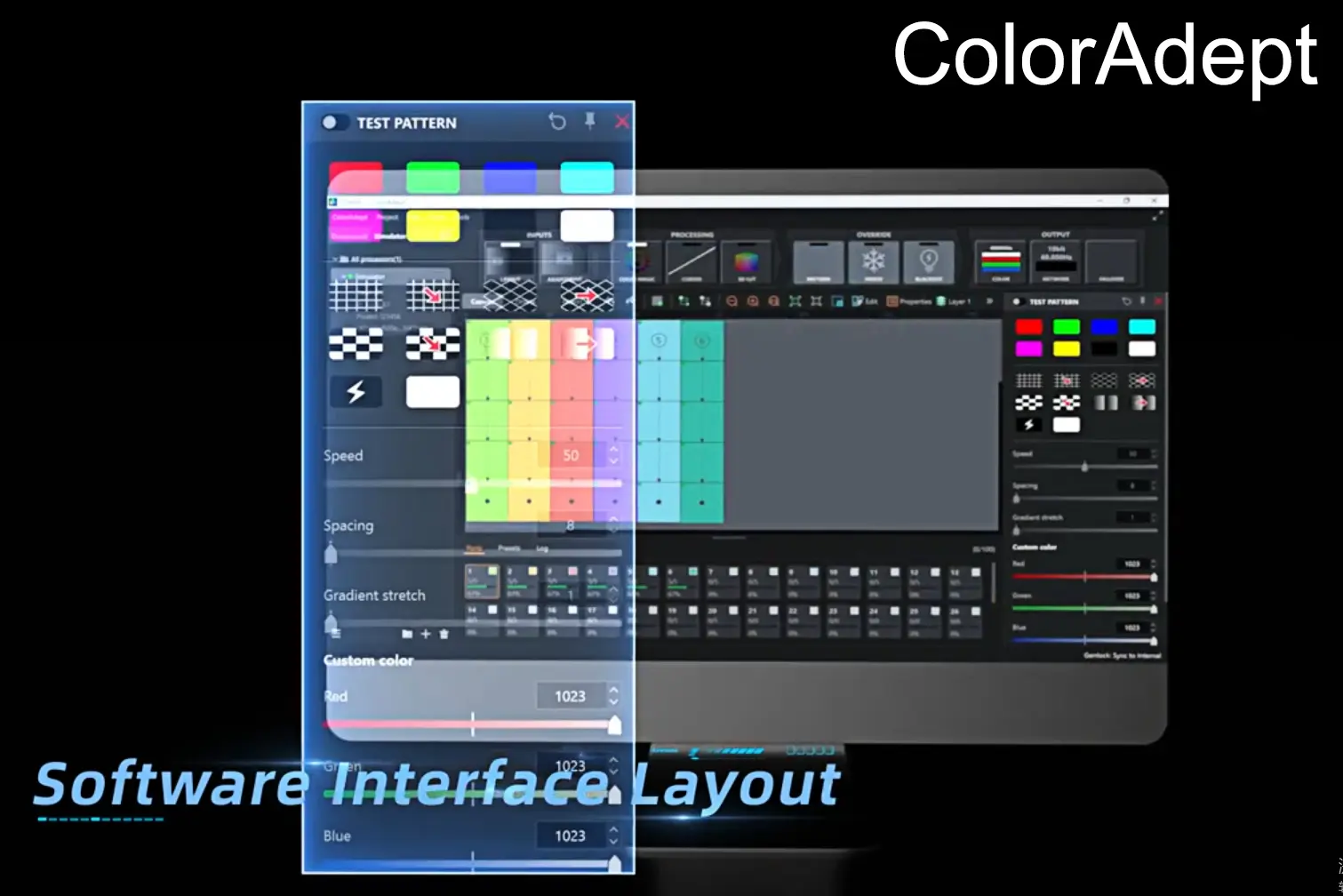
ColorAdept: Professional LED Display Color Calibration and Optimization
ColorAdept is a professional LED display color calibration software that allows you to configure, manage, and fine-tune connected LED screens to deliver vibrant and dynamic visuals.
The core features of ColorAdept include:
Professional and Precise Color Adjustment: The software offers various advanced color adjustment methods. For instance, similar to the curve tool in Photoshop, you can fine-tune the brightness, contrast, and color performance of red, green, and blue by manipulating the curve. It also supports importing professional 3D LUT (Look-Up Table) files, which are essential in post-production and virtual shooting, ensuring color consistency between the screen, camera, and post-production.
Dynamic Color Adaptation: A common issue with LED screens is that temperature changes during operation can cause color shifts, such as a general bluish tint. ColorAdept’s dynamic color gamut adjustment feature automatically compensates for these color discrepancies caused by temperature variations, ensuring consistent color output across different operating conditions.
Image Detail Optimization: With technologies like grayscale refinement and Infi-Bit, ColorAdept enhances grayscale transitions, preserving more detail in both dark and highlight areas for a more refined and realistic display.
In addition to its impressive color adjustment features, ColorAdept also offers real-time monitoring of key parameters such as temperature, humidity, voltage, and fan status, and supports dead pixel detection on LED modules, even providing a count of defective pixels for each color (red, green, blue).
| PlayerMaster Download | iSet Download | ColorAdept Download |
|---|---|---|
| PlayerMaster V1.9 | Calibration Pro V7.0 | LEDUpgrade V4.0 |
| PlayerMaster V1.8 | Calibration Pro V6.5 | LEDUpgrade V3.6 |
| PlayerMaster V1.4 | Calibration Pro V5.5 | LEDUpgrade V3.2 |
| PlayerMaster V1.2 | Calibration Pro V4.0 | LEDUpgrade V3.0 |
PlayerMaster: LED Display Content Management and Distribution
PlayerMaster is a professional software for managing and distributing content on LED displays. It allows for easy program creation, content publishing, and remote control of connected LED devices, enabling unified management across multiple screens.
Core Features of PlayerMaster:
Program Creation and Content Management: Create and manage content like videos, images, text, clocks, and weather on a flexible canvas. Supports importing documents (Word, Excel, PPT) and displaying GIFs, streaming videos, and web content.
Remote Control and Status Monitoring: Manage multiple LED terminals in real-time, monitor status (IP, resolution, storage), and control functions like brightness, color temperature, and volume. Remotely switch content or perform actions like restart and sleep.
Automated Scheduling: Set precise playback schedules for programs or commands, including automatic tasks like adjusting brightness or powering the screen on/off for unattended operation.
Flexible Networking: Manage devices in LAN mode for local control or use cloud platform mode for remote management across locations.
LEDUpgrade: Professional Firmware Upgrade Tool for LED Displays
LEDUpgrade is a specialized tool for upgrading the firmware of various hardware devices within an LED system.
Core Features:
Comprehensive Hardware Firmware Upgrades: The software supports firmware upgrades for multiple core hardware components, including receiving cards, sending cards, playback boxes, and multifunction cards, making it easy to update internal programs, fix potential issues, or enhance performance.
Firmware Reading and Font Library Writing: In addition to upgrades, the software can read the current firmware from receiving cards for backup or analysis. It also supports writing font libraries to receiving cards and customizing boot logos for sending cards with LCD screens, allowing for personalized device settings.
| Kylin VICP Download | Videostation Download | Calibration Pro Download |
|---|---|---|
| Kylin VICP App for iOS | Videostation V1.5 | Calibration Pro V6.5.0 Setup |
| Kylin VICP App for Harmony OS/ Android | Calibration Pro V5.5 Setup | |
| Calibration Pro V4.0 Setup | ||
| Calibration Pro V3.5 Setup | ||
| Calibration Pro V7.2 | ||
| Calibration Pro V7.0 |
| LEDUpgrade download | Ledmanager download | LEDShowT9 download |
|---|---|---|
| LEDUpgrade V4.0 | ledmanager.apk | LEDShowT9 11.32 Setup |
| LEDUpgrade V3.6 | LedManager 0.2.5 apk for Colorlight C1 LED Player | |
| LEDUpgrade V3.2 | ||
| LEDUpgrade V3.0 | ||
| LEDUpgrade V2.6 | ||
| LEDUpgrade V5.0 |
| Kylin VICP download | DSManager download | DSConfig download |
|---|---|---|
| Kylin VICP Harmony OS or Android_1.0.2 | DSManager V1.0 | DSConfig V1.0 |
| Harmony OS/ Android | ||
| iPad OS |
4.Colorlight Manual Download
Video Processors
LED Control System
ColorlightCloud
| Cloud Player | Cloud Server | Software |
|---|---|---|
| A4K User Manual V1.2 | ColorlightCloud User Manual V1.1 | PlayerMaster User Manual V1.4 |
| A2K User Manual V1.4 | ||
| C3Pro User Manual V2.0 | ||
| A100&A200 User Manual V1.1 |
Media Server
| Software |
|---|
| Grandshow User manual V2.0 |
5. Colorlight Specifications Download
Video Processors
| Professional Video Processor | Super Video Processor | Video Splicer | AV over IP | Software |
|---|---|---|---|---|
| VX10 Specification V1.1 | Z8t Specification V2.1 | U9 Max Specification V1.0 | DS40 Specification V1.0 | None |
| X40m Specification V1.1 | Z8 Specification V1.6 | X100 Pro-7U Specification V1.3.1 | ||
| X20m Specification V1.0 | Z6 PRO-G2 Specification V1.4 | X100 Pro-11U Specification V1.2 | ||
| X20 Specification V2.0 | Z6 Specification V2.2 | X100 Pro-2U Specification V1.0 | ||
| X16E Specification V1.1 | Z4F Specification V2.1 | X100 Pro-4U Specification V1.3.1 | ||
| X12 Specification V1.2 | Z5 Specification V1.0 | |||
| X6 Specification V1.6 | Z4 Pro Specification V1.0 | |||
| X7 Specification V1.6 | Z3 Specification V1.0 | |||
| X4m Specification V1.5 | ||||
| X2m Specification V1.5 |
LED Control System
ColorlightCloud
| Cloud Player | Cloud Server | Software |
|---|---|---|
| A100 Specification V3.2 | None | None |
| A4K Specification V1.4 | ||
| A2K Specification V1.3 | ||
| C3Pro Specification V2.1.1 | ||
| A200 Specification V2.2 |
Media Server
| Media Server | Software |
|---|---|
| CS4K G2 Specification V1.0 | None |
| CS20-8K Pro Specification V2.1 | |
| CS16K Specification V1.0 | |
| CS4K Pro Specification V1.1 |
6.Colorlight Firmware Download
Video Processors
| Video Splicer | Super Processor | Professional Processor |
|---|---|---|
| D16 V1.0 | Z8 V2.80(10G) | X20(LAN)-PCB1.1-V2.60 |
| D9 V1.0 | Z6PRO-G2 V1.60 | X20-PCB1.1-V2.40 |
| Z6 PCB5.1 V3.20 | X16E-PCB1.1-V1.40 | |
| Z4 V2.10 | X12-PCB2.0-GD-V1.20 | |
| Z4F V1.0 | X12-PCB2.0-ST-V1.20 | |
| Z5 V1.20 | X6-PCB3.0-GD-V1.40 | |
| Z4 Pro V1.20 | X6-PCB3.0-ST-V1.40 | |
| Z8 V2.60(5G) | X6-PCB2.0-GD-V1.20 | |
| X6-PCB2.0-V1.60 | ||
| X7-PCB3.0-GD-V1.40 | ||
| X7-PCB3.0-ST-V1.40 | ||
| X7-PCB2.0-GD-V1.60 | ||
| X4s-GD-V2.60 | ||
| X4s-ST-V2.60 | ||
| X2s-GD-V2.60 | ||
| X2s-ST- V2.60 |
LED Control System
| Cloud Player | Media Server – Accessories |
|---|---|
| A200 V1.69 | CP404-H4/CP204-S4/CP404-S4/CP208-S8 |
| A100 V1.69 | CP208-H8/CP208-S8B/CP201-SD |
| C3Pro V1.69 | CP202-H2/CP204-H4 |
| A4K V1.69 | CP4K1-H1L/CP402-H2/CP401-HSP |
| A2K V1.69 |
